Todo lo que necesitas saber sobre Fello AI. ¿No encuentras tu respuesta? Escríbenos a [email protected].
General
Fello AI es una app nativa para Mac, iPhone y iPad que reúne más de 30 modelos de IA de vanguardia en una sola interfaz. A diferencia de ChatGPT, puedes cambiar entre GPT-5.6, Claude, Gemini, DeepSeek, Grok, Kimi, Perplexity y más sin suscripciones separadas. Además, tienes extras como conversaciones fijadas, respuestas guardadas y soporte completo de archivos, todo en un mismo lugar.
No. Fello AI es una app de desarrollo independiente y no está afiliada, respaldada ni patrocinada por OpenAI, Anthropic, Google, Meta, Mistral, Alibaba ni xAI.
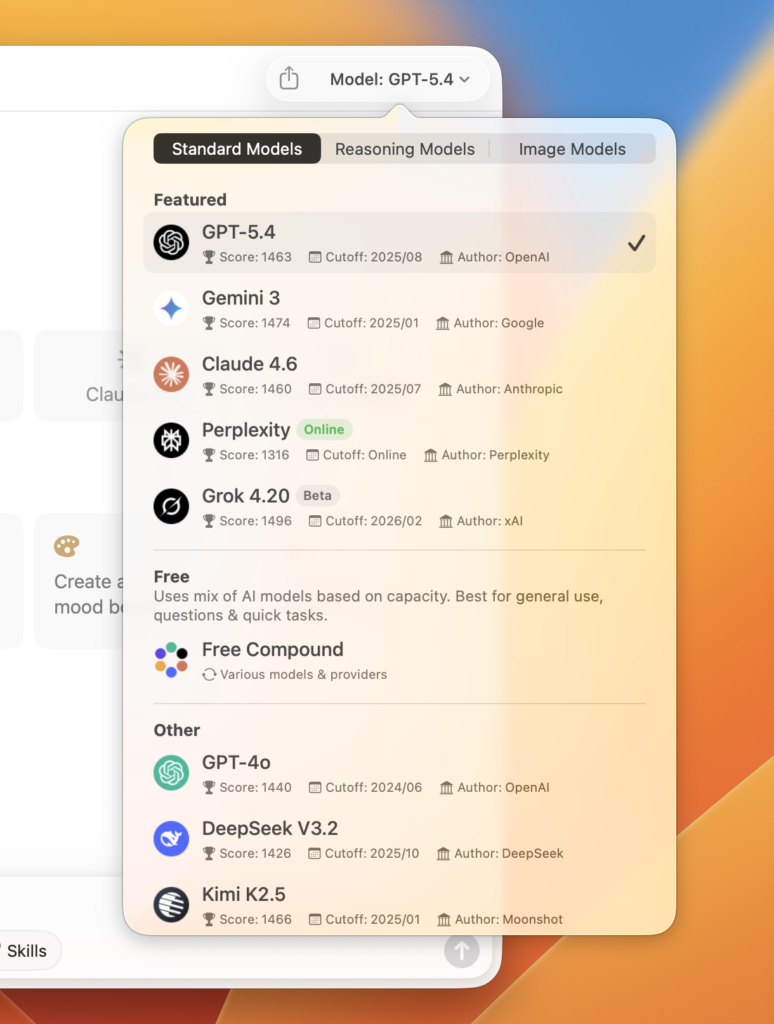
Fello AI admite un catálogo amplio y en constante crecimiento. Entre los modelos de texto se incluyen:
Entre los modelos de generación de imágenes se incluyen GPT Image 2, Nano Banana 2, Seedream 5, FLUX.2 y Grok Imagine. Se añaden modelos nuevos con regularidad.
Sí. Escribe tu prompt en cualquier idioma y la IA lo reconocerá automáticamente y responderá en ese mismo idioma. También puedes cambiar el idioma de la interfaz de la app en Ajustes, con opciones como inglés, francés, alemán, español, portugués, italiano, chino (simplificado y tradicional), japonés, coreano, tailandés, vietnamita, turco, ruso, polaco y checo.
Todas las conversaciones se almacenan exclusivamente en tu dispositivo. En los servidores de Fello AI no se guarda ningún prompt ni interacción. Solo el contenido que envías de forma explícita (tu prompt y los archivos adjuntos) se transmite al proveedor de IA para generar una respuesta. Los identificadores personales, como tu nombre o tu correo, nunca se comparten con los proveedores de IA. Consulta nuestra Política de privacidad para conocer todos los detalles.
Los usuarios gratuitos pueden hacer hasta 5 preguntas por hora con los modelos premium; a partir de ahí, la app cambia al modelo Free Compound hasta que se reinicia la hora. Los suscriptores premium tienen preguntas ilimitadas con todos los modelos premium.
Algunas funciones exclusivas de las apps oficiales no están disponibles en Fello AI:
el modo de voz en tiempo real de ChatGPT
las herramientas de memoria persistente de Claude
la integración de Gemini con Google Workspace
Sin embargo, Fello AI ofrece cosas que ninguna app oficial por separado tiene: cambio de modelo, subida de varios archivos, exportación de documentos (PDF, Word, PowerPoint) y conversaciones fijadas, todo en un mismo lugar.
Los modelos de lenguaje no tienen conciencia de sí mismos ni saben el momento exacto en que se implementaron ni qué versión son. Pueden recurrir por defecto a versiones anteriores que existían en sus datos de entrenamiento. Es una limitación conocida de todos los grandes modelos de lenguaje, no algo específico de Fello AI.
Requisitos
Mac: macOS 12 (Monterey) o posterior — chip de Apple e Intel
iPhone / iPad: iOS o iPadOS 16 o posterior
La app ocupa alrededor de 30–50 MB y usa una cantidad insignificante de RAM.
Sí. Fello AI está disponible en iPhone y iPad con iOS 16 o posterior. Tu suscripción cubre todos tus dispositivos Apple con el mismo Apple ID, de modo que las conversaciones y los ajustes se mantienen sincronizados entre Mac, iPhone y iPad.
Por ahora no. Fello AI solo está disponible en macOS, iPhone y iPad. Es posible que valoremos su expansión a otras plataformas en el futuro.
No. Fello AI es una app independiente. No necesitas ninguna suscripción adicional para usar GPT-5.6, Claude, Gemini ni ningún otro modelo dentro de Fello AI.
Detalles técnicos
Los grandes modelos de lenguaje se entrenan con enormes conjuntos de datos de texto, incluidos libros, sitios web y artículos. Aprenden a predecir la siguiente palabra de una secuencia según el contexto de todo lo anterior. Este proceso, repetido miles de millones de veces, da lugar a un modelo capaz de generar texto similar al humano, responder preguntas, escribir código y razonar sobre problemas complejos.
La precisión depende de la complejidad de tu pregunta y del modelo que uses. Los modelos populares funcionan bien en tareas cotidianas, pero pueden tener dificultades con temas muy especializados o muy recientes. Verifica siempre la información importante en fuentes fiables.
Las respuestas de la IA deben tomarse como un punto de partida y no como una fuente definitiva, sobre todo en temas legales, financieros o médicos. Todos los modelos pueden generar información que suena verosímil pero es incorrecta. Contrasta las afirmaciones importantes con fuentes fiables y de confianza antes de actuar en función de ellas.
Una alucinación es cuando una IA da una respuesta que suena segura pero en realidad es errónea o inventada. Ocurre porque el modelo predice lo que suena más probable según los patrones de sus datos de entrenamiento, no consultando datos verificados. Si la precisión importa, contrasta siempre las respuestas de la IA.
La mayoría de los modelos de IA se entrenan con datos hasta una fecha de corte concreta, por lo que por sí solos no saben nada de lo que ocurre después. Fello AI cierra esa brecha con la Búsqueda adaptativa: detecta automáticamente cuándo tu pregunta necesita información actual y fundamenta la respuesta en datos web en tiempo real, con fuentes incluidas. No tienes que activar nada. Si prefieres forzarlo, también puedes usar las habilidades de Búsqueda en línea o Investigación profunda, o elegir un modelo con conexión a la web como Perplexity Online.
Cada modelo de IA se entrena con datos hasta una fecha concreta, llamada su corte de conocimiento. A partir de esa fecha, el modelo no tiene conocimiento integrado de nuevos eventos, precios ni lanzamientos de productos, por eso puede sonar seguro y estar desactualizado. En Fello AI, la Búsqueda adaptativa cierra esa brecha automáticamente consultando datos web en tiempo real siempre que tu pregunta lo necesite.
Empieza con una orden clara (Resume / Escribe / Explica / Compara)
Sé específico: los prompts vagos dan respuestas vagas
Incluye contexto relevante que la IA no conocería de otro modo
Indica el formato que quieres (lista con viñetas, tabla, párrafo breve)
Escribe en frases completas, no en fragmentos
Cuanto más contexto des, mejor será la respuesta.
Has alcanzado el máximo de solicitudes de API para ese periodo de tiempo. Causas habituales:
uso elevado en un plan gratuito o de nivel inferior: espera a que se reinicie el límite o mejora tu plan
regiones con fuertes restricciones de internet o uso de VPN
varias personas compartiendo la misma cuenta
Suele ser un problema de sincronización entre tu dispositivo y los servidores de Apple. Prueba estos pasos:
Actualiza a la versión más reciente de Fello AI
Comprueba que has iniciado sesión con el Apple ID correcto
Verifica que tu suscripción está activa en los ajustes de tu cuenta de Apple
Toca «Restore In-App Purchases» dentro de la app
Funciones de Fello AI
Toca o haz clic en el menú Modelo en la esquina superior derecha de la app y elige el modelo que prefieras en la lista desplegable. En macOS también puedes configurar accesos rápidos para tus modelos más usados en Ajustes → Modelos.
Sí. Fello AI lleva el razonamiento, a veces llamado modo de pensamiento, a todos los grandes modelos de IA que admite. Cuando una pregunta es compleja, el modelo la trabaja paso a paso antes de responder, lo que mejora la precisión en matemáticas, lógica, programación y problemas de varios pasos. Funciona con GPT, Claude, Gemini y los demás modelos de la app, así que no estás limitado al modelo de razonamiento de un único proveedor.
Sí. Puedes subir hasta 16 archivos a la vez en una sola conversación:
PDF: hasta 500 páginas cada uno
Imágenes: JPG, PNG y otros formatos habituales
Documentos de Office: Word, Excel, PowerPoint
El tamaño máximo es de 16 MB por archivo.
Sí. Pega un enlace de YouTube y Fello AI puede resumir el vídeo, extraer los puntos clave y responder preguntas sobre él, para que obtengas lo que necesitas sin verlo entero. Es muy útil para charlas largas, tutoriales y clases cuando solo quieres la sustancia o una respuesta concreta.
Sí. Fello AI incluye generación de imágenes con GPT Image 2, FLUX.2 y Grok Imagine. Selecciona un modelo de generación de imágenes, elige la relación de aspecto, escribe una descripción y tu imagen se genera en segundos.
Sí. Puedes editar imágenes existentes describiendo en texto los cambios que quieres, o subir varias imágenes para combinarlas de forma creativa. Cambios como ajustar colores, añadir objetos o cambiar fondos funcionan a través de un prompt de texto.
Sí. Con las habilidades de Fello AI, describes lo que necesitas y la app genera el archivo directamente en la conversación. Crea una presentación de PowerPoint, un documento de Word, una hoja de cálculo de Excel o un PDF sin salir del chat, y expórtalo cuando tenga el aspecto correcto. Convierte una conversación normal en un espacio de trabajo donde vas de la idea al documento terminado en un solo lugar.
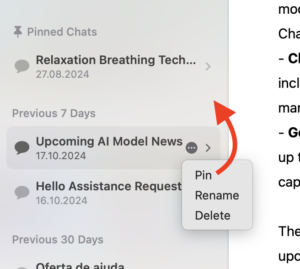
Sí. Pasa el cursor sobre una conversación en la barra lateral, haz clic en el icono de tres puntos y selecciona «Fijar conversación». Las conversaciones fijadas permanecen en la parte superior de la lista para acceder a ellas fácilmente.
Sí. Haz clic en el icono de tres puntos de cualquier mensaje y selecciona «Guardar». Las respuestas guardadas se almacenan por separado para que puedas consultar respuestas importantes sin recorrer una conversación larga.
Sí. Los Proyectos agrupan conversaciones relacionadas en un mismo lugar y guardan el contexto compartido que necesitan, como información de fondo, instrucciones, archivos y una guía de estilo. Cada nuevo chat que inicias dentro de un proyecto ya tiene ese contexto, así te ahorras explicar la configuración cada vez. Es ideal para mantener organizado un cliente, un curso, una base de código o una tarea continua. Encontrarás los Proyectos en la parte superior de la barra lateral izquierda.
Sí. Fello AI incluye una búsqueda de texto completo en la esquina superior izquierda de la app. Resalta cada aparición de tu término de búsqueda en todas tus conversaciones.
Sí. Fello AI cuenta con la Búsqueda adaptativa, que decide automáticamente cuándo una pregunta necesita información actualizada y consulta fuentes en línea por ti, respondiendo con citas. Las preguntas cotidianas que no necesitan la web siguen respondiéndose al instante, sin demora. Cuando quieres tomar el control, abre el menú de habilidades y elige Búsqueda en línea para una consulta web en tiempo real, o Investigación profunda para una investigación en profundidad. Cada respuesta basada en la web incluye un botón «Resources» para que puedas ver exactamente de dónde proviene la información.
Sí. La Investigación profunda es una habilidad diseñada para las tareas de investigación más exigentes. En pocas interacciones busca en decenas de fuentes en línea, verifica y compara lo que encuentra, y sintetiza todo en una respuesta completa y bien documentada con la máxima precisión posible. Va mucho más allá de una simple búsqueda web, lo que la hace ideal para análisis profundos, comparativas e informes detallados. La encontrarás en el menú de habilidades, junto a Búsqueda en línea. Para preguntas cotidianas, la Búsqueda adaptativa ya gestiona automáticamente la actualidad de la información.
Sí. Cuando una respuesta de la IA incluye información de una búsqueda web, verás un botón «Resources» en la parte inferior de ese mensaje. Al tocarlo, se muestran todas las URL de las fuentes que la IA consultó.
Sí. Ve a Ajustes → Estilo de IA para elegir entre estilos predefinidos o escribir el tuyo:
Asistente, Eficiente, Profesional, Amigable
Explicativo, Creativo, Desafiante, Pirata
También puedes escribir instrucciones de sistema totalmente personalizadas. Se aplican automáticamente a cada nueva conversación.
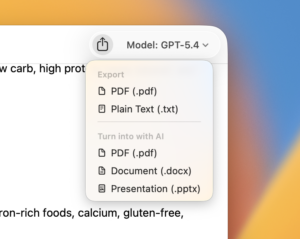
Haz clic en el icono de exportar en la parte superior derecha de cualquier conversación. Formatos disponibles:
PDF: un documento con estilo de la conversación
Texto sin formato: copia de texto en bruto
Exportación con IA: elige PDF, Word (.docx) o PowerPoint (.pptx)
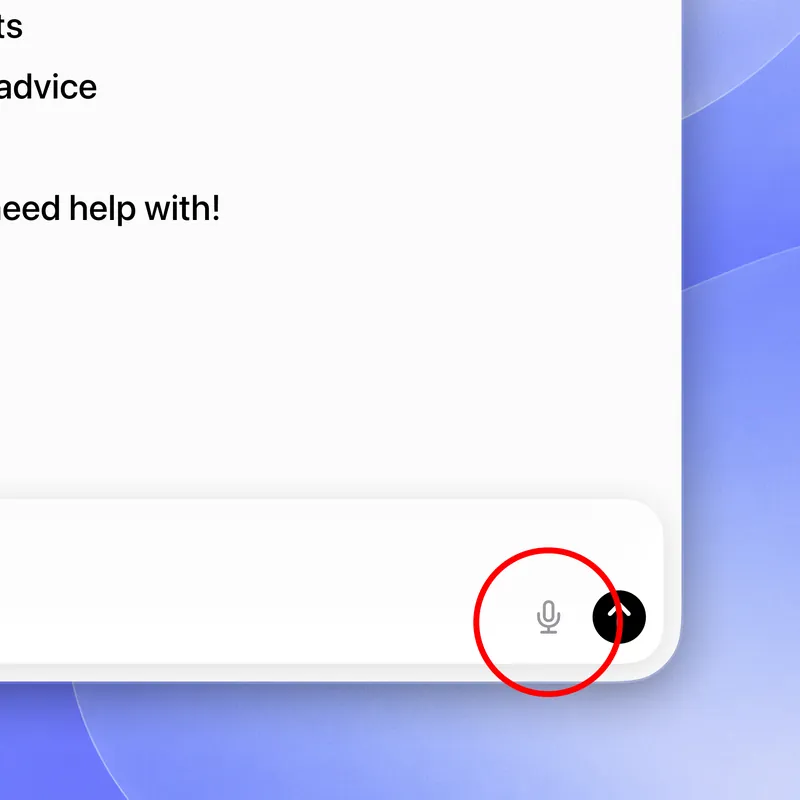
Sí. Fello AI incluye dictado de voz. Toca el micrófono en la barra de chat y habla, hasta cinco minutos por grabación, y Fello AI convierte tu voz en texto editable. Revísalo o ajústalo, elige el modelo que quieras y envía. Funciona con todos los modelos de chat y admite más de 100 idiomas, detectando automáticamente lo que hablas, incluso si cambias de idioma a mitad de la frase.
Toca el micrófono en la barra de chat, y Fello AI escucha y transcribe mientras hablas. Más información sobre el dictado de voz.
Sí. La habilidad Podcast de Fello AI convierte un PDF, un enlace web, tus notas o incluso un prompt sencillo en un episodio de audio con dos presentadores naturales que puedes escuchar en lugar de leer. Transforma un informe denso en un resumen perfecto para el trayecto al trabajo, ponte al día con un artículo sin tener las manos libres o estudia un tema de oído. Puedes elegir la duración y el estilo, y admite varios idiomas.
Disponibles en macOS:
⌘ N Nuevo chat
⌘ F Buscar conversaciones
⌘ ⌫ Eliminar conversación
⌘ R Renombrar conversación
Sí. En Ajustes, usa el control deslizante Tamaño del texto para ajustarlo desde el 50 % hasta el 200 %.
Ve a Fello AI → Ajustes y selecciona el idioma de la interfaz que prefieras. Los idiomas admitidos incluyen inglés, francés, alemán, español, portugués, italiano, chino (simplificado y tradicional), japonés, coreano, tailandés, vietnamita, turco, ruso, polaco y checo.
Sí. La ruta depende de tu dispositivo:
iPhone / iPad: toca el icono del engranaje → Modelo predeterminado
macOS: Fello AI → Ajustes → Modelos → Modelo inicial
Sí, en macOS. Ve a Fello AI → Ajustes → Modelos para personalizar hasta cinco botones de acceso rápido en la pantalla de nuevo chat. También puedes hacer clic derecho directamente en cualquier botón de acceso rápido y elegir «Personalizar accesos rápidos».
Ve a Ajustes y desplázate hasta la sección Notificaciones para desactivar por completo las notificaciones push.
En Ajustes, desactiva el interruptor de vista previa del contenido de las notificaciones. Seguirás recibiendo avisos de notificaciones, pero sin que se muestre el texto de la conversación en la vista previa.
En macOS, ve a Ajustes → Modelos para personalizar hasta 5 accesos rápidos, o haz clic derecho en cualquier botón de acceso rápido para ver la opción «Personalizar accesos rápidos».
Precios y cuenta
Fello AI es gratis de descargar, con un plan gratuito limitado. Planes de pago:
Semanal: $3.99
Mensual: $9.99
Anual: $79.99 (mejor valor)
Todos los planes incluyen acceso a cada modelo premium en Mac, iPhone y iPad.
Sí. Fello AI incluye un plan gratuito en el que puedes hacer un número limitado de preguntas por hora con los modelos premium. El límite se reinicia cada hora. Las funciones avanzadas y el acceso ilimitado a los modelos premium requieren un plan de pago.
Fello AI paga a los proveedores de IA según el uso real, no con tarifas mensuales fijas por asiento. Esto significa que los costes escalan con los patrones de uso reales. La mayoría de los usuarios hace muchas menos consultas de las que necesitaría para justificar el coste completo de suscripciones individuales, así que un único plan de tarifa plana que cubre todos los modelos acaba resultando bastante más barato.
No. Fello AI es una app totalmente independiente y no se vincula a ninguna cuenta externa. No puedes conectar tu cuenta de ChatGPT, Claude ni Gemini con Fello AI.
No. Fello AI es completamente independiente y no se conecta con tus suscripciones actuales de OpenAI, Anthropic o Google. Proporciona acceso a los modelos a través de su propia infraestructura.
Sí. Tu suscripción a Fello AI funciona en Mac, iPhone y iPad siempre que hayas iniciado sesión con el mismo Apple ID.
La gestión de la suscripción la realiza Apple, no Fello AI. Puedes cancelar desde los ajustes de suscripciones de tu Apple ID en cualquier dispositivo Apple. La suscripción permanece activa hasta el final del periodo de facturación actual.
Ve a Ajustes y crea una cuenta para activar la sincronización; luego inicia sesión en tus otros dispositivos con las mismas credenciales. Las conversaciones se sincronizarán automáticamente entre Mac, iPhone y iPad.
Si has iniciado sesión: Ajustes → Cuenta → «Eliminar cuenta»: borrado permanente e inmediato
Si no has iniciado sesión: Ajustes → «Borrar todos los datos»: borra solo el almacenamiento local del dispositivo
Sin resultados. ¿No encuentras lo que buscas? Escríbenos a [email protected] y te ayudamos.
Usamos cookies para analizar el tráfico y mejorar tu experiencia.
Política de privacidad


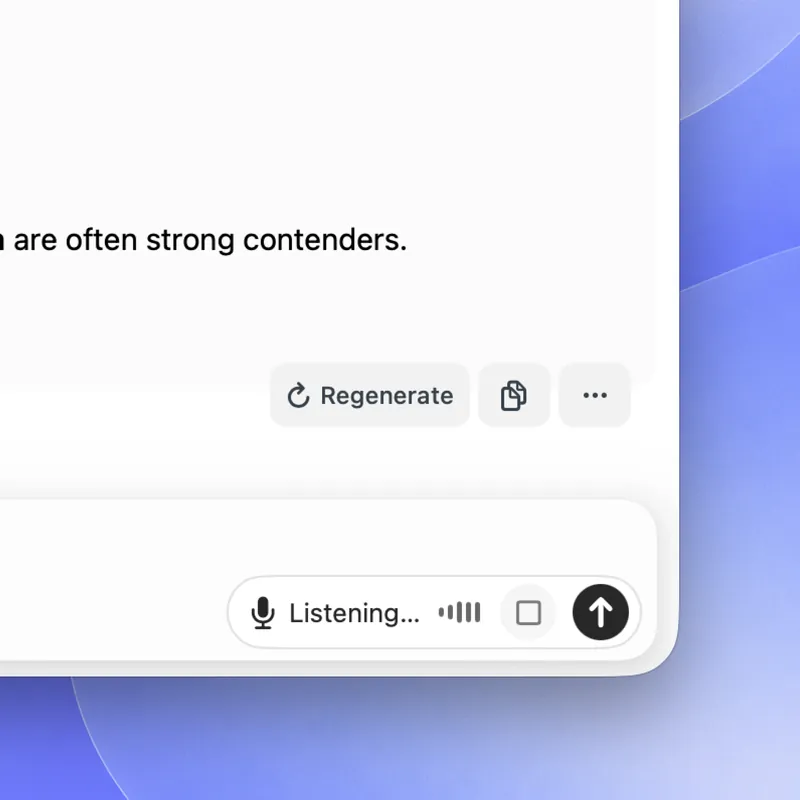 Toca el micrófono en la barra de chat, y Fello AI escucha y transcribe mientras hablas. Más información sobre el dictado de voz.
