
Email management consumes more working time than almost any other single task, and for the hundreds of millions of professionals who rely on Microsoft Outlook, that time adds up fast. Overflowing inboxes, calendar clashes, and routine replies eat into hours that could go toward meaningful work. ChatGPT changes the equation, handling the repetitive parts of Outlook so you can focus on what actually matters.
This guide covers the most useful ChatGPT prompts for Outlook, from drafting responses and scheduling meetings to managing contacts and detecting phishing attempts. AI-powered tools like ChatGPT, combined with a Mac AI assistant like Fello AI, give Outlook a genuine productivity upgrade. Whether you use Outlook for work or personal email, these prompts will cut real hours off your week.
The Key Takeaways
- ChatGPT automates email responses, calendar management, and task prioritization inside Outlook
- Simple prompts generate out-of-office templates, project update emails, and customized replies in seconds
- ChatGPT can analyze email threads to suggest optimal meeting times and draft prep notes before calls
- Advanced use cases include regulatory compliance checks and phishing detection from email content
- Pairing ChatGPT with Fello AI on Mac lets you save and reuse your best prompts instantly
How ChatGPT Can Make Outlook Work for You, Rather Than the Other Way Round
ChatGPT makes the usual time sink of working through Outlook disappear by leveraging its natural language processing to do much of the heavy lifting for you. It can read entire email threads in seconds and create well-thought-out responses in one click. It can help you prioritize tasks or save mental bandwidth by suggesting resolutions to problems such as clashing calendar invites or competing colleague email requests.
It can automate a great deal, too. Imagine having one-click responses ready to go for your most common email types. ChatGPT, when combined with Fello AI, gives you the power to do exactly that. With your specific email prompts saved within your ChatGPT-powered Mac client, you can save hours of lost productivity every single week.
Streamlining Outlook with AI for Maximum Productivity
Managing a flooded inbox can quickly drain your time and mental energy. A few simple prompts can automate many of your routine Outlook tasks. Here are the key categories with examples for each.
Effortless Email Responses
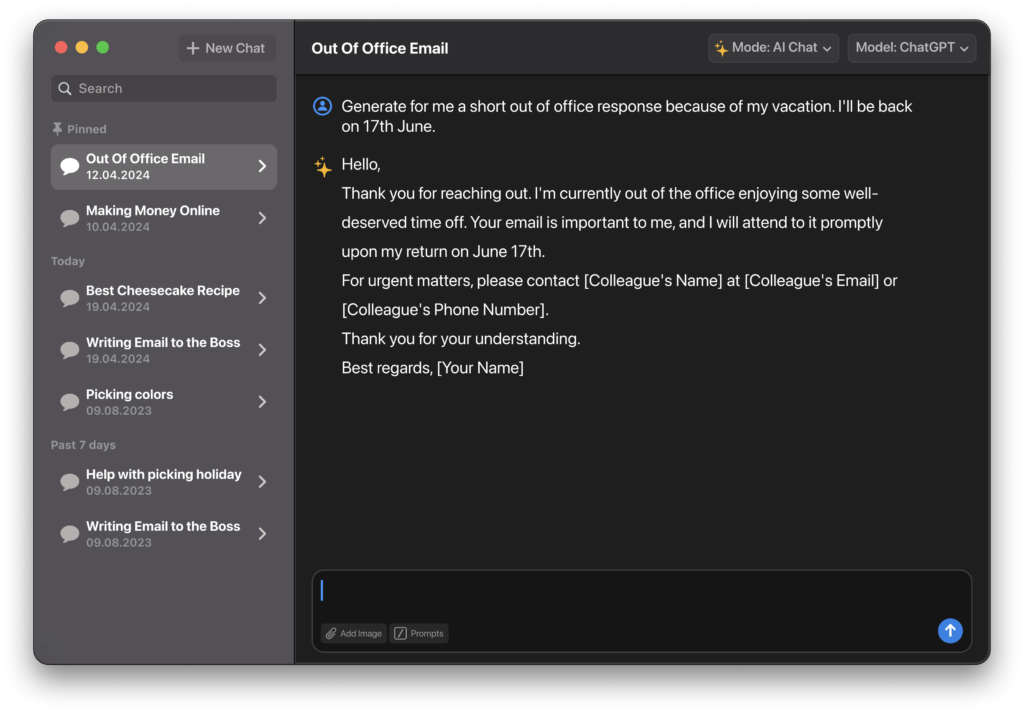
There’s no longer any need to agonize over crafting careful replies to common inquiries or requests. Create automated email replies and customized templates with ChatGPT and have them ready for one-click sending.
- Automated Responses: “Generate five out-of-office email templates covering typical scenarios like vacation, sick leave, and conference travel.”
- Template Creation: “Create an email template providing a project update to stakeholders, including the current phase, milestones achieved, and next steps.”
Enhance Meeting and Calendar Management
Leverage ChatGPT to eliminate the pain of coordinating schedules by having it analyze calendar invites and email threads to suggest optimal times. Better yet, have ChatGPT brief you on key talking points before meetings rather than pouring over long email threads to remind yourself.
- Meeting Scheduling: “Analyze Susan’s, Michael’s, and my availability and recommend three 30-minute meeting slots over the next two weeks.”
- Prep Notes: “Read my email exchanges with leadership about the new project rollout and draft concise talking points to review before the meeting.”
Streamline Contact Management
Maintaining an organized contact list is crucial for both your career and personal relationships. But keeping contacts up-to-date and well-organized takes time that could be better spent on high-value tasks.
- Contact Updates: “Generate an updated contact file for Jamie Smith from the sales team using details in this email thread and their latest signature.”
- Contact Group Suggestions: “Analyze the email exchanges from the past month to recommend helpful new mail lists like company departments, regions, or roles like Sales Team East Coast.”
Better Manage and Prioritize Tasks
Emails demanding action can quickly pile up and make it impossible to see the wood from the trees. ChatGPT can parse through mountains of text and surface the most pressing tasks, neatly organizing everything for you.
- Email Prioritization: “Analyze these emails from my inbox and highlight the five that should be my top priority to respond to or take action on today.”
- Task Organization: “Extract the key action items from this email chain with my team and create tasks with due dates in Asana to cover what I’ve committed to completing this week.”

More Complex Use Cases for ChatGPT in Outlook
While the above prompts can dramatically boost your productivity, you can go beyond language-based analysis to leverage ChatGPT’s capabilities for more advanced Outlook tasks. ChatGPT’s vast training data makes it capable of handling complex tasks that require specialized knowledge.
Here are two powerful examples worth trying.
Regulatory Compliance Checks
ChatGPT can scan message content for sensitive details and immediately surface relevant handling protocols from standards like HIPAA, GDPR, and CCPA. This takes seconds instead of manual review.
- “Review this email chain with a client and highlight any discussed information that would require regulatory compliance considerations.”
Phishing Detection
By knowing the latest best practices and methods of cyber attacks, ChatGPT can help you identify malicious attempts to access personal or company information in emails received through Outlook.
- “Analyze the attached email and determine the likelihood it represents a phishing threat.”
These two examples represent just a fraction of what’s possible. The more you experiment with prompts, the more use cases you’ll discover for your own workflow.
Conclusion
ChatGPT, when used alongside Outlook, transforms tiresome productivity-sapping tasks into ones that only require a few clicks. From automating standard email replies to freeing up mental bandwidth by outsourcing mundane tasks like meeting prep, you’re one step away from a fundamentally better Outlook experience.
To get started, download Fello AI to begin prompting immediately, then experiment with the examples from this article and save your favorites for quick reuse.
FAQ
Can ChatGPT read my actual Outlook emails?
Not directly. You copy and paste email text into ChatGPT, which then analyzes it and drafts responses. Integrations like Fello AI make this process faster on Mac.
Is it safe to paste work emails into ChatGPT?
Avoid pasting sensitive or confidential information. For routine emails and non-sensitive correspondence it is generally fine, but check your company’s AI usage policy first.
Does ChatGPT work with both Outlook desktop and Outlook web?
Yes. ChatGPT is a separate tool; you copy content from Outlook into it regardless of which version you use.
What is the most time-saving ChatGPT prompt for Outlook?
The out-of-office template generator and email prioritization prompts save the most time for most users, especially if you receive high volumes of recurring requests.
Can ChatGPT help with Outlook calendar scheduling?
Yes. Paste the relevant availability information and email context into ChatGPT and it can suggest meeting slots, draft invite messages, and summarize agenda points before your next call.