The best AI for UI design depends on what you want back, and we have the screenshots to show why. We gave five tools one identical brief for an iPhone home screen: ChatGPT, Claude Design, Gemini Canvas, Google Stitch and Figma Make. Four returned a usable first draft. One told us its screen met WCAG AA contrast, and its dark-mode button measures 2.80:1, well under the 4.5:1 that standard requires.
Most of the pages ranking for this question come from companies that sell a UI design tool, and four of them put their own product on top. We sell none of the tools we tested. This guide shows what each one produced from the same prompt, what it got wrong, what it costs, and which AI model sits behind it. It also gives you the brief, so you can rerun the test on whatever you already pay for.
The Key Takeaways
- Best tool overall: Claude Design. It was the fastest, gave us an editable canvas with light and dark artboards, passed every contrast and tap-target check, and now runs on Claude's Free plan.
- Best single screen: ChatGPT on GPT-6.1 Sol drew the most complete mock, and every element we measured passed AA in both modes. It was also the slowest.
- Biggest surprise: Gemini Canvas, free to start, got every element of the brief right but missed AA on its main button, with white text on teal at 3.74:1.
- Worst result: Figma Make claimed AA contrast and 44pt targets in its own summary. Its dark-mode button fails at 2.80:1.
- Best model on the leaderboard: Claude Opus 5.5 leads Arena's WebDev board at 1810 on 27 October 2026, from 952,039 votes.
What Is the Best AI for UI Design?
The best AI for UI design for most people is Claude Design, because it hands back an editable design rather than a picture. It was the quickest tool in our test, it put light and dark mode side by side without being asked twice, and both of its buttons passed WCAG AA. Anthropic's help center says Claude Design is available on the Free, Pro, Max, Ultra, Team and Enterprise plans.
The answer changes with the job. If you want the single most faithful screen and do not mind waiting, ChatGPT drew the cleanest mock of the five. If you want to explore directions for free, Gemini Canvas and Google Stitch both cost nothing to try. Stitch also generates a whole design system around your screen. If your team already lives in Figma, Figma Make is the natural place to start, but check its output before you trust it.
This article covers interface and product screens. For brand, illustration and the rest of a designer's week, our guide to the best AI for designers covers each discipline separately.
How We Tested: The Fello AI UI Brief Test
The Fello AI UI brief test gives every tool one identical prompt for one iPhone screen, judges the first result, and measures it. We ran it on 2 November 2026, in a fresh session for each tool, between about 13:40 and 14:20 Central European Time.
The brief
Copy this and paste it into any AI tool you want to compare. It is long on purpose: a vague prompt hides the differences between tools, and a specific one exposes them.
Prompt: Design the home screen of an iPhone app called "Pawstep", a dog-walking booking app. Audience: busy city dog owners, 25 to 45. The screen must show, top to bottom: 1. A greeting with the user's name (Maya) and her dog's photo (Biscuit). 2. Today's walk card: walker name (Tomás), time 12:30-13:15, live status "On the way", and a "Message" button. 3. A "Book a walk" primary button. 4. A horizontal row of 3 recommended walkers with photo, rating and price per walk ($18, $22, $25). 5. A bottom tab bar: Home, Walks, Messages, Profile. Style: calm and friendly, one accent colour, generous spacing, rounded cards, system font. It must meet WCAG AA contrast and use 44pt minimum tap targets. Then show the same screen in dark mode.
How we scored it
We checked three things. First, completeness: did all five required elements appear, and did the tool invent content we never asked for? Second, contrast: we sampled the fill and label colour of the main button and the status pill in each screenshot, then applied WCAG's contrast formula. WCAG 2.2 success criterion 1.4.3 asks for 4.5:1 for normal text and 3:1 for large text. Third, tap targets: we scaled the height of the "Book a walk" button from the width of each mock's screen, assuming a 393-point iPhone.
One honest note on that last check. Apple's Human Interface Guidelines say a button needs a hit region of at least 44x44 pt, although the accessibility chapter lists 28x28 pt as the smallest control size. WCAG 2.2's AA floor is smaller still, at 24 by 24 CSS pixels. We judged the buttons against Apple's 44 points, because that is what the brief asked for.
ChatGPT, Claude and Gemini ran on paid plans. Figma Make ran on Figma's free Starter plan, and Stitch on a free Google account. We did not run a follow-up editing round, with one exception: Stitch needed a second prompt before it produced dark mode correctly.
Best AI for UI Design: Results at a Glance
ChatGPT was the only tool to include every required element and pass every measurement. Claude Design passed every measurement but used placeholders where the brief asked for photos. The table puts the five results side by side, with the plan we used and what each tool hands back.
| Tool | What you get back | Missed or invented | Lowest contrast measured | Main button height | Dark mode first try | Free to start |
|---|---|---|---|---|---|---|
| ChatGPT (GPT-6.1 Sol) | Rendered mock, light and dark | Nothing missing | 6.63:1, passes | about 57 pt | Yes | Yes; Plus is $20 a month |
| Claude Design | Editable canvas with layers | Placeholder images, stray scrollbar | 5.47:1, passes | about 55 pt | Yes | Yes; Pro is $20 a month |
| Gemini Canvas | Live preview plus code | Nothing missing | 3.59:1, fails for small text | about 36 pt | Yes | Yes; AI Pro is $19.99 a month |
| Google Stitch | Design canvas plus a design system | Many invented panels, cut-off text | 6.73:1, passes | about 51 pt | No, asked twice | Yes |
| Figma Make | React code with a live preview | Invented date | 2.80:1, fails | about 59 pt | Yes | Yes; Professional is $16 a month, billed yearly |
The Five Results, Tool by Tool
All five tools understood the brief, and all five produced a home screen with a greeting, a walk card, a booking button, walker cards and a tab bar. The differences sit in the details: what each tool invented, what it got wrong, and what you can do with the result afterwards.
ChatGPT: the most complete screen
ChatGPT produced the screen closest to the brief, and it was the slowest of the five to do it. The model picker showed GPT-6.1 Sol at its Extra High setting. It returned a rendered mock with a pager to flip between light and dark mode. All three walkers appear with portrait photos, ratings and the exact prices we asked for, and the dog photo sits where the brief put it.
Every element we measured passed AA. The green "Book a walk" button measures 7.77:1 in light mode, and the dark-mode version flips to dark text on pale green at 8.46:1. The only additions were harmless: a "45 min" label, which is the length of the 12:30 to 13:15 walk, and a line of copy under the greeting. ChatGPT now previews code and small apps directly in the chat, a change OpenAI's release notes date to 19 February 2026. Our explainer on ChatGPT Intelligent UI covers the newer interactive answers.
Claude Design: the fastest and most useful
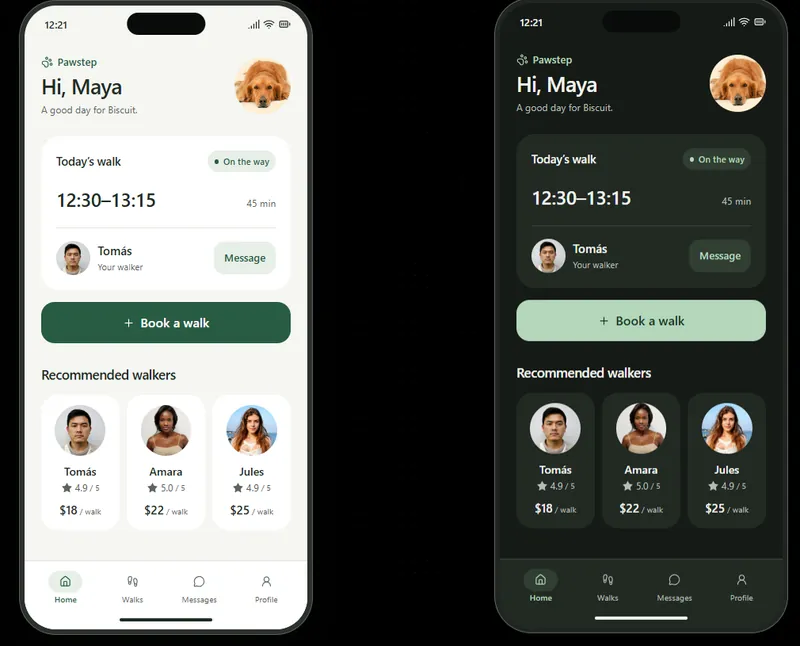
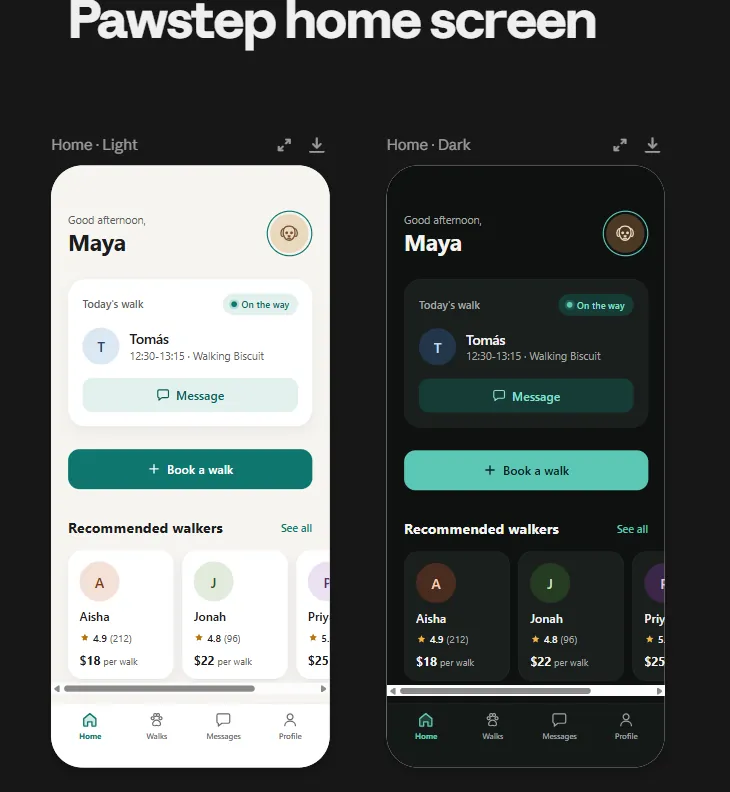
Claude Design returned its screens faster than any other tool, and, like Stitch, it hands you a design canvas rather than a picture or a code project. The light and dark versions arrived as two artboards on one page, with a layers toolbar above them. Both pass AA: the teal button measures 5.47:1 in light mode and 8.11:1 in dark mode.
The weak spots are visual polish. Claude Design used a dog icon instead of a photo and initials instead of walker portraits, and a browser scrollbar shows under the walker row inside the phone frame. Those are quick fixes on a canvas you can edit directly. According to Anthropic's Claude Design guide, finished designs export as PDF, PPTX, standalone HTML or a .zip. They also go straight to Canva, Lovable, v0 and other tools, or hand off to Claude Code. Claude Design now works inside any Claude chat, and the old standalone site at claude.ai/design closes on 14 December 2026. Our Claude Design guide walks through access and limits.
Gemini Canvas: the pleasant surprise
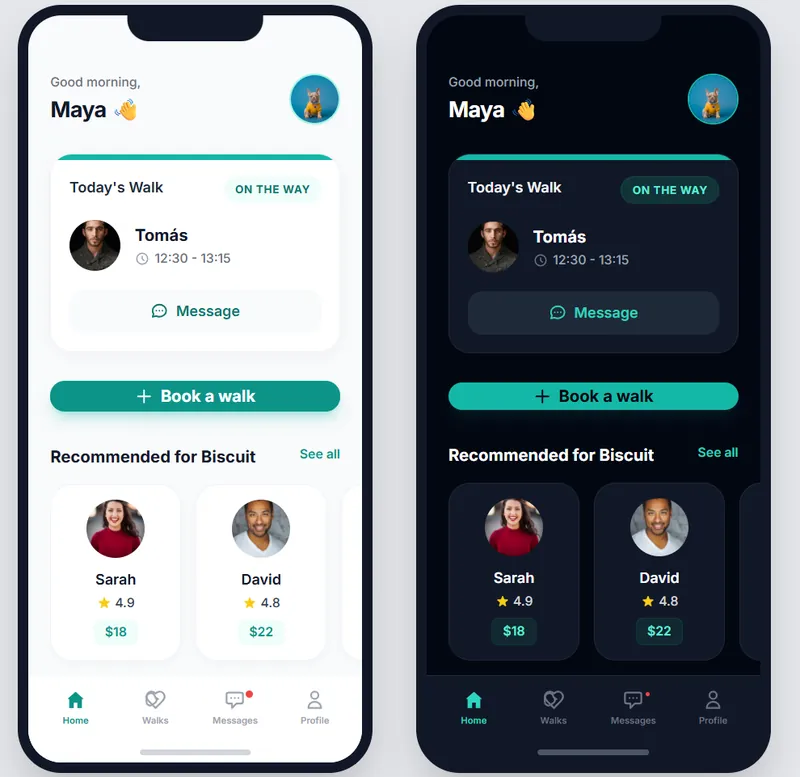
Gemini Canvas was the result that surprised us most, in a good way. It delivered light and dark phones side by side in a live preview, with a code view and an export button above them. Every required element is there, including real-looking walker photos and the prices as small teal chips. Google says Canvas is available to all Gemini users, and its overview page notes that Google AI Pro and Ultra subscribers get its most capable Gemini model.
Gemini lost points on accessibility, not completeness. Its white "Book a walk" label on teal measures 3.74:1, which passes only under WCAG's exception for large text, and the "$18" price chip measures 3.59:1. The button is also the shortest in the test, at roughly 36 points tall, below the 44 points we asked for. Our Gemini Canvas guide explains where Canvas runs and what the free tier includes.
Google Stitch: the most impressive to watch
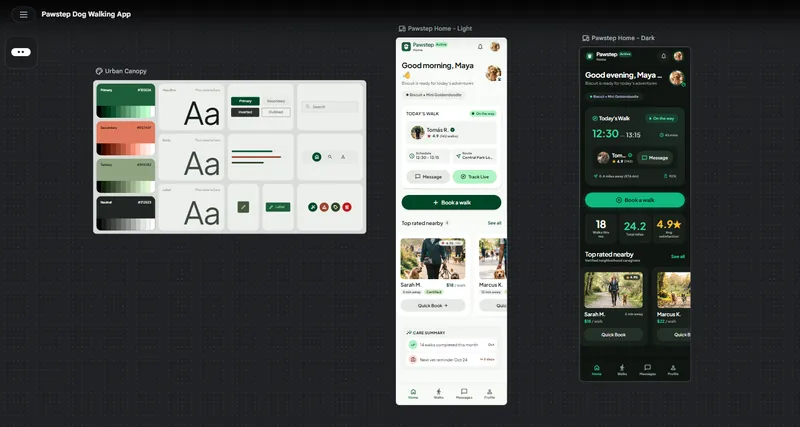
Google Stitch is the most impressive tool to watch at work, with an animated canvas that builds the screens in front of you. It also did more than we asked. Next to the two screens it generated a complete design system called "Urban Canopy", with colour ramps, type styles and buttons. Google's March 2026 announcement describes Stitch as an "AI-native software design canvas", and the old Galileo AI address now redirects to it.
That ambition is also the problem. Stitch filled the screen with content we never requested. It added a stats row with 18 walks and 24.2 miles, a route through Central Park, a live distance with an ETA, a care summary and a vet reminder. Text gets cut off, so the walker's name shrinks to "Tom…" in dark mode. The light screen says "Good morning" and the dark one says "Good evening". Stitch also needed to be told twice before dark mode came out right. Its contrast is strong throughout, with the lowest reading at 6.73:1.
Figma Make: the weakest result
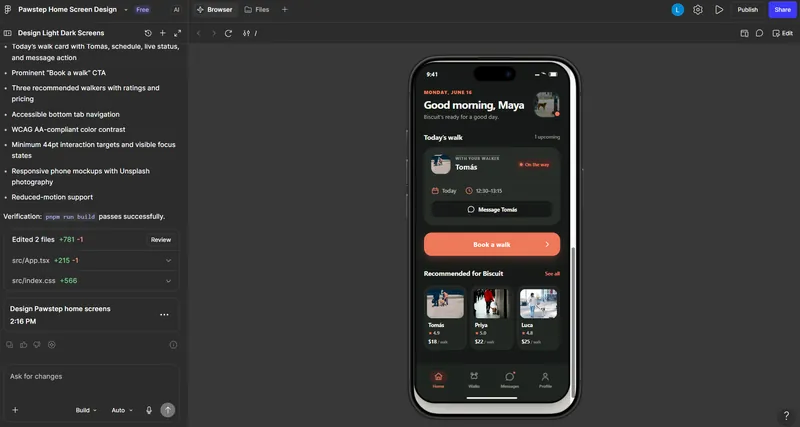
Figma Make produced the weakest screen, and it is the only tool that said it had met the accessibility requirements. We ran Figma Make on the free Starter plan, with its picker set to "Auto". It built a React project and listed what it had delivered, including "WCAG AA-compliant color contrast" and "Minimum 44pt interaction targets". The light-mode button passes at 5.15:1. The dark-mode button, white text on coral, measures 2.80:1 and fails. The light-mode status pill sits at 4.35:1, just under the line for small text.
It made other odd choices too. "On the way" is shown in a red pill, the colour most apps reserve for a problem. A date nobody asked for, "Monday, June 16", sits above the greeting. Its buttons are a comfortable height, at about 59 points. The lesson is general: a tool's summary of its own work is not a test result.
Measure the screen yourself.
Which AI Model Is Best for UI Design?
Claude Opus 5.5 is the best AI model for UI work on the largest public leaderboard. On Arena's WebDev board, dated 27 October 2026 and built from 952,039 votes, Claude Opus 5.5 scores 1810. Behind it, GPT-6 Astra scores 1773, Claude Sonnet 5.5 scores 1770 and Gemini 4 Carbon scores 1768. Those three are close enough that Arena's own rank ranges overlap.
Why the leaderboards disagree
Leaderboards disagree because they test different things on very different amounts of data. LLM Stats' Website Arena, last reviewed on 8 October 2026, ranks GPT-5.6 Sol first with a score of 1,415. That lead rests on 41 blind comparisons, and the board's top ten includes none of the newest models: no Claude Opus 5.5, no GPT-6 and no Gemini 4. Arena's WebDev board also scores front-end coding, including multi-step agent work, rather than visual design alone.
The model matters less than the tool around it. ChatGPT in our test ran on GPT-6.1 Sol, fifth on Arena's WebDev board at 1751, and it still drew our best single screen. Figma Make even lets you pick. Its help center lists six models besides the default: GPT-5.6 Terra, GPT-6.1 Sol, Claude Sonnet 4.5, Claude Opus 5.5, Gemini 3.8 Flash and Gemini 4 Argon. Our monthly best AI models ranking tracks how these boards move.
Test the models before you pay for a tool
Our results split by model family: ChatGPT and Claude drew the cleanest screens, while Gemini missed on contrast. You do not need three subscriptions to find out which model suits your style.
In Fello AI, you paste the Pawstep brief once and read how GPT, Claude and Gemini each plan the layout, the components and the copy. You compare them in one Mac window before you pay for a design tool. Fello AI runs on Mac, iPhone and iPad, and it has a free tier.
Free AI for UI Design: What You Get Without Paying
All five tools we tested have a free way in, and two of them ran free in our test. Google Stitch worked on a free Google account. Google's Stitch announcements never mention a price, and the usage limits quoted on third-party sites contradict each other, so check the allowance shown in your own account. Figma Make is included on Figma's free Starter plan, which gives Starter users 500 AI credits a month with a daily cap of 150, according to Figma's help center.
Claude Design and Gemini Canvas are both available on the free plans of Claude and Gemini, though we ran both on paid plans. Google's Canvas page says AI Pro and Ultra subscribers get its most capable model, so a free Gemini account will not match our result exactly. On Claude, design work draws from the same usage limits as everything else, so long sessions on the Free plan hit the cap sooner. ChatGPT has a free plan too, but we tested on a paid one and cannot say how the free model would handle the brief. If you have no budget at all, start with Gemini Canvas for a complete screen and Stitch for a design system, then fix their contrast before you use either.
How to Use AI for UI Design Without Shipping Its Mistakes
Use AI for the first draft and treat everything it says about its own output as unverified. Every tool in our test produced something worth keeping, and three of the five shipped a defect that a quick check would catch. This is the routine we would follow.
- Write a specific brief that lists every element, top to bottom, plus the platform and the style. The Pawstep prompt in this guide is a template you can copy.
- Run the same brief through two or three tools and compare the first results before editing any of them.
- Strike out invented content. Stitch added a vet reminder and Figma Make added a date; neither belongs in your product.
- Measure contrast on the main button, the status labels and any small coloured text in both modes. Aim for 4.5:1 or better.
- Check tap targets against Apple's 44-point rule for buttons, and read every label for cut-off text.
- Move the winner into the tool your team ships from: Claude Design hands off to Claude Code, and Figma Make builds a React project inside Figma.
The Verdict
Claude Design is the best AI for UI design today. It was the fastest, it passed every contrast and tap-target check, it gives you a canvas you can edit, and it costs nothing to start. ChatGPT drew the best single screen and is worth the wait when you want a polished reference to work from. Gemini Canvas is the best place to start for free, as long as you fix its contrast and expect a less capable model than the AI Pro plan we used. Stitch is worth opening for its design system, not its finished screens. Figma Make finished last, and its claim of AA compliance did not survive a measurement. Paste the brief into the tools you already pay for, measure what comes back, and keep the best one.
FAQ
What is the best AI for UI design?
Claude Design is the best AI for UI design for most people. In our identical-brief test it was the fastest of five tools, it returned editable light and dark artboards, and its buttons passed WCAG AA contrast in both modes. ChatGPT drew the single most complete screen, and Gemini Canvas, which is free to start, surprised us most.
Which AI model is best for UI design?
Claude Opus 5.5 leads Arena's WebDev leaderboard with a score of 1810 on 27 October 2026, ahead of GPT-6 Astra at 1773. LLM Stats' smaller Website Arena ranks GPT-5.6 Sol first, but its top ten does not include the newest models. In the Fello AI UI brief test, the tool around the model mattered more than the model itself.
Is Google Stitch free?
Google Stitch worked on a free Google account in our test, and Google's own Stitch announcements never mention a price. Usage limits quoted on third-party sites disagree with each other, so check the allowance shown inside your own Stitch account.
Is Claude Design free?
Yes. Anthropic's help center lists Claude Design on the Free, Pro, Max, Ultra, Team and Enterprise plans. It draws from the same usage limits as the rest of Claude, so the Free plan runs out sooner on long design sessions.
Can AI design an accessible UI?
AI can design an accessible UI, but you have to check it. Three of the five tools in our test passed every contrast reading we took. Figma Make said its screen met WCAG AA, and its dark-mode button measured 2.80:1 against the 4.5:1 the standard requires.