Google made Genie 4 available in Project Genie on 18 November 2026, three weeks after Google DeepMind first showed it to a small group of testers. Project Genie is Google's experimental web app for creating and walking through interactive worlds. Genie 4 is the first model in it that generates sound and accepts live text edits while you explore. The catch is access: it is rolling out to eligible Google AI Ultra subscribers only, and Google AI Pro members can join a waitlist.
Most pages about Genie 4 still say it is not available yet. Most pages about the app still describe the US-only Genie 3 version from January. This guide covers what changed on 18 November and which Google plan you actually need. It also compares Genie 4 with the upgraded Genie 3 in the model picker, shows what a visitor without Ultra sees, and lists what Google says Genie 4 still gets wrong.
The Key Takeaways
- Live since 18 November: Genie 4 is in Project Genie for eligible Google AI Ultra subscribers aged 18+. AI Pro gets a waitlist, and there is no free tier.
- The $199.99 plan: Google described the app's audience as its "$200" Ultra subscribers. Ultra costs $99.99 or $199.99 a month, and Google ties Project Genie to the top tier.
- What Genie 4 adds: native audio (ambient sound, music, dialogue) and text edits mid-session, such as changing the weather or adding a character.
- Genie 3 still matters: Genie 4 runs for around a minute of continuous interaction. Genie 3 now runs for up to 3 minutes per generation and can chain worlds together.
- Still a prototype: Google lists drifting details, weak text rendering, imperfect real places and audio accuracy as open problems. Every world carries a SynthID watermark.
What Is Project Genie?
Project Genie is a Google Labs web app that generates an interactive world from a text description or an image and lets you move through it in real time. The world is not a 3D file built in advance. Genie draws each new view as you walk, fly or turn the camera, which is why Google calls the engine underneath a world model rather than a game engine.
Google opened the app on 29 January 2026 to Google AI Ultra subscribers in the US, running the Genie 3 model. On 19 May 2026 Google extended it to eligible Ultra subscribers worldwide and added Street View starting points for places in the US. Google still labels the whole app an "EXPERIMENT", and the 18 November announcement calls Genie 3 and Genie 4 "world models in the frontier research space".
It runs in a web browser, so there is nothing to install on a Mac. Google has not announced a Mac or iPhone app for it.
What's New With Genie 4
The 18 November update adds four things to Google's world app: the Genie 4 model, a world-building agent, a community gallery and upgrades to Genie 3. Google announced it in a post on its Keyword blog, and Google DeepMind followed on X a few minutes later.
Genie 4 is now available in Project Genie.
— Google DeepMind (@GoogleDeepMind) November 18, 2026
It brings native audio, real-time editing, and a new agent to help you create interactive, virtual worlds.
Live Edits While You Explore
Genie 4 lets you type a new prompt in the middle of a session and changes the world you are standing in. Google's examples are shifting the weather, dropping in a character and redirecting the action. According to Google DeepMind, Gemini adapts each prompt to match the surrounding scene, and between your inputs it keeps monitoring and steering the world so the story holds together.
Native Audio
Genie 4 is Google DeepMind's first real-time world model that generates its own audio. Every world comes with the ambient sound of its setting, from wind in the trees to waves on a beach. Characters can also speak and react to you in real time, which Google DeepMind calls "the true frontier". Genie 3 has no native audio, so this is the first time you can hear one of Google's generated worlds as well as see it.
The World-Building Agent
The new world-building agent builds a world from a conversation instead of a single prompt. You describe what you want, and the agent uses Google's other models to produce the opening visuals and a background score that fits the mood. During a session you can also bring Gemini in as a co-pilot. Gemini watches the screen, offers suggestion chips for where to go next, and can trigger events on its own as the journey unfolds.
The Community Gallery
The new community gallery collects worlds made by Google and by users, and you can explore or remix any of them. Google's launch picks include "Villa Giallo", a room-by-room mystery in a gothic manor made with the creative technologist Will aka BLVCKL!GHT. Another is "The Life of Ants", built with the filmmaker Anand Gandhi. When you finish a world of your own, you can publish it to the gallery for others to remix.
Google's AI account summed up the whole release in one post:
The all-new Project Genie experience is now available.
— Google AI (@GoogleAI) November 18, 2026
Moving beyond the initial preview, this release launches a full creative ecosystem:
— Genie 4 is live: Experience our most realistic, interactive world model yet, now with real-time editing and native audio. Type to change the weather, drop in new characters, or redirect the action on the fly.
— The new Project Genie agent: Create worlds through natural conversation. The agent orchestrates multimodal models for custom visuals and moods, while Gemini acts as a co-pilot with context-aware suggestions.
— Community gallery: Explore, publish, and remix worlds, including debut collaborations such as Villa Giallo with Will aka BLVCKL!GHT and The Life of Ants with Anand Gandhi.
— Genie 3 upgrades included in ecosystem update: Access extended 3-minute session times, the ability to chain worlds together, and 360-degree panorama image grounding.
Available now to eligible Google AI Ultra subscribers (waitlist open for Google AI Pro).
Genie 4 vs Genie 3: Which Model to Pick
Pick Genie 4 for short, detailed scenes with sound and live changes, and Genie 3 for longer journeys or worlds that start from a panorama photo. Both models stay in the app's model picker, and Google's own announcement says Genie 3 is there "when you want longer runs or panorama-seeded spaces".
| Feature | Genie 4 | Genie 3 (18 November update) |
|---|---|---|
| Continuous interaction | Around a minute | Up to 3 minutes per generation (was 60 seconds) |
| Sound | Native audio: ambient, music, dialogue | No native audio |
| Change the world mid-session | Yes, by typing | Yes, with real-time in-world events |
| Chain worlds together | Not announced | Yes |
| Start from a 360-degree panorama | Not announced | Yes |
| Google's pitch | Highest-fidelity visuals, physics and people | Longer runs, panorama-seeded spaces |
The one-minute figure comes from Google DeepMind's own list of Genie 4 limitations, which says the model "currently supports around a minute of continuous interaction, rather than extended sessions". Google has not published a resolution, a frame rate or a model size for Genie 4. Pages quoting 720p at 24 frames per second are repeating the specification Google gave for Genie 3 in 2025.
Genie 4 also leans on the Gemini family. Google DeepMind says Gemini Omni anchors how Genie 4's worlds look and behave. In its research on complex multi-step events, Google DeepMind also runs Gemini 3.8 Flash in the loop as a guiding agent that breaks goals into steps and checks each one against the incoming frames. Google has not said that this setup is part of the Project Genie app.
How Much Does Project Genie Cost?
Project Genie comes with the $199.99-a-month tier of Google AI Ultra. Google AI Ultra has two prices on Google's plans page, $99.99 a month for 5x the AI Pro usage limits and $199.99 a month for 20x. When Google opened the app worldwide in May, it named the audience as "eligible Google AI Ultra $200 subscribers globally (18+)", and the 18 November post keeps the word "eligible".
There is no free way in. Google AI Pro ($19.99 a month) does not include it, but Pro members can join the Genie 4 waitlist. Google AI Plus and the free Gemini plan get nothing. For everything else each Google plan includes, see our breakdown of what is free in Gemini and what each paid plan adds.
One detail shows how new this is. On the evening of 18 November, Google's own plans page still described the Ultra perk as a world app "with our breakthrough Genie 3 world model". Treat Google's launch post, not the plans page, as the current description until the plans page catches up.
If you were eyeing Ultra mainly for Gemini's chat models rather than world-building, you don't need a top tier at all. Fello AI puts Gemini, ChatGPT and Claude in one Mac and iPhone app, so you can ask all three from one window on one subscription.
What You See Without Ultra: Our Test
Without an Ultra plan, Project Genie opens in browse-only mode: you can look at the gallery but not play or create, even with a paid Google AI Pro account. We opened the site in a desktop browser on 18 November 2026, a few hours after launch, first signed out and then signed in with AI Pro.
Signed Out
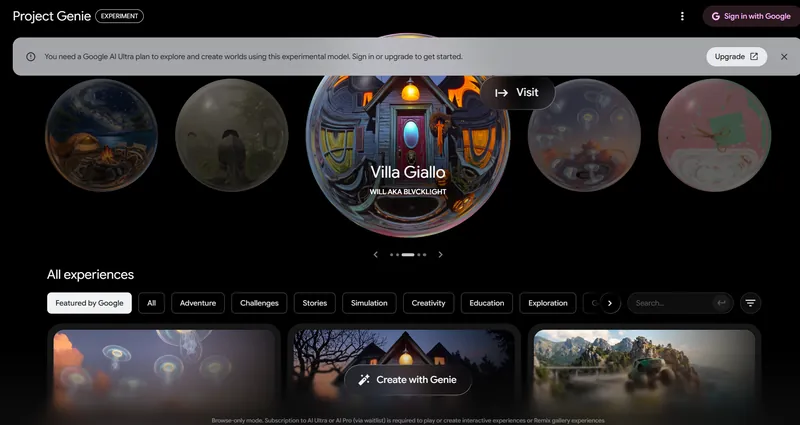
A banner at the top read: "You need a Google AI Ultra plan to explore and create worlds using this experimental model. Sign in or upgrade to get started." Next to it sat an Upgrade button. The gallery loaded anyway, led by a carousel with Villa Giallo by Will aka BLVCKL!GHT. Below it sat category filters (Featured by Google, Adventure, Challenges, Stories, Simulation, Creativity, Education, Exploration), a search box and a "Create with Genie" button.
The footer spelled out the rule: "Browse-only mode. Subscription to AI Ultra or AI Pro (via waitlist) is required to play or create interactive experiences or Remix gallery experiences". So a visitor can see what other people built, but cannot step inside a single world without Ultra or a waitlist place.
Signed In With Google AI Pro
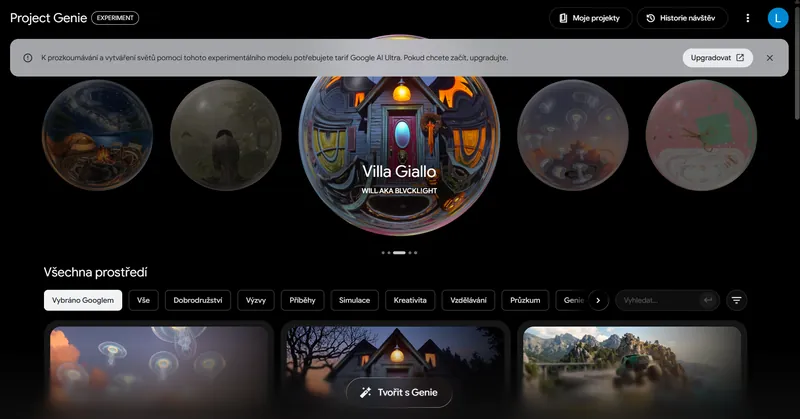
Signing in with a Google AI Pro account did not open the door. We repeated the check on a Pro account the same evening, with the interface in Czech. Two new buttons appeared, My projects and Visit history, and the gallery looked the same. The banner, translated from the Czech interface, still said a Google AI Ultra plan is needed to explore and create worlds with this experimental model. It offered only an Upgrade button. On launch night, a Pro subscriber could browse but not play, and the banner pointed to an upgrade, not to the waitlist.
How to Use Project Genie
Using Project Genie takes an eligible Ultra account, a web browser and one prompt. These are the steps Google describes:
- Sign in to the app with the Google account that holds your Google AI Ultra plan.
- Choose a model in the model picker: Genie 4 for sound and live edits, Genie 3 for longer runs or a panorama start.
- Set the scene with a text description or an image, or describe your idea to the world-building agent and let it build the opening world. You can also open a gallery world and remix it.
- Explore with standard keyboard controls for moving and turning the camera.
- Type live prompts to change the weather, add a character or set an event in motion. Gemini can suggest the next move if you invite it in.
- Publish the finished world to the community gallery if you want others to explore or remix it.
Google DeepMind's published examples show how much detail helps. Its demo prompts run to several paragraphs. They name the camera position, the lighting, the film look and even the sounds, such as "Natural lake ambience, distant wind, soft water movement, and realistic saxophone sound." Short prompts work, but the showcase worlds were written like a shot list.
Where Can You Use Genie 4?
Genie 4 is available in more than 140 countries, to Google AI Ultra subscribers aged 18 or over. That figure comes from a footnote on Google's plans page, which also says Google AI Ultra itself is sold in more than 150 countries, so not every Ultra subscriber can use Project Genie. Google described the May rollout as gradual and global. One limit remains: Street View starting points cover only places in the US, and Google says it plans to add more places over time.
Developers have no general access yet. When Google announced Genie 4 on 27 October, it named "early access partners in the Gemini API and AI Studio" as the first developers in line, with a wider developer release later. The 18 November announcement did not mention developers at all, so Genie 4 is not open to ordinary Google AI Studio users.
What Genie 4 Still Can't Do
Genie 4 is an early research model, and Google DeepMind publishes six limitations on its own Genie model page. Paraphrased, they are:
| Limitation | What Google DeepMind says |
|---|---|
| Coherence | Visual details and object permanence drift over time, more so in long runs, after several complex edits or while moving around. |
| Other agents | Modelling several independent characters interacting with you and with each other is still a research problem. |
| Real places | Genie 4 cannot simulate real-world locations with perfect accuracy. |
| Text | Legible text usually appears only when it is in the world description. |
| Duration | Around a minute of continuous interaction. |
| Audio | Real-time audio accuracy is still being improved. |
The 18 November post adds camera latency and intricate physical interactions to the list. On the safety side, Google says every Genie video and audio output carries a SynthID watermark, and every input and output passes a safety screen.
Those limits shape what Google's world app is for today. It is a place to explore and share short interactive scenes, not a tool for making a finished game. Google DeepMind frames the bigger goal as training ground for robots and AI agents, and as a step toward the general intelligence it describes in its AGI predictions. Game makers noticed: PocketGamer.biz reported that Take-Two's shares closed 7.9% lower the day after the January launch, as we covered in our look at whether GTA 6 uses AI.
Is Project Genie Worth $199.99 a Month?
Project Genie alone is not worth $199.99 a month for most people, but it is the only way to try Genie 4, a world model that talks back. If you already pay for the top Ultra tier for its Flow credits, YouTube Premium or 20 TB of storage, Genie 4 comes at no extra cost and is worth an evening. If you would be upgrading for this app alone, wait. Genie 4 sessions last about a minute, and Google calls the whole app an experiment. The AI Pro waitlist also suggests cheaper access is coming. For Google's video tools at a lower price, Google Flow is the place to start.
FAQ
Is Project Genie free?
No. Project Genie is limited to eligible Google AI Ultra subscribers, which Google described in May as its $200 Ultra tier ($199.99 a month). Without a plan you can only browse the gallery.
Can Google AI Pro subscribers use Genie 4?
Not yet. Google AI Pro members can join a waitlist on the site. Google has not given a date for Pro access.
When was Genie 4 released?
Google DeepMind announced Genie 4 on 27 October 2026 as a research preview for trusted testers. It reached eligible Google AI Ultra subscribers on 18 November 2026.
How long can you explore a world in Project Genie?
About a minute with Genie 4, by Google DeepMind's own count. Genie 3 allows up to 3 minutes per generation and can chain several worlds into a longer journey.
Is there a Genie 4 API?
Only for early access partners. Google said in October that Genie 4 would come to early access partners in the Gemini API and Google AI Studio, and has not opened it to all developers.
Das Titelbild dieses Artikels wurde mithilfe von KI erstellt.