Assistance
Questions fréquentes
Tout ce que vous devez savoir sur Fello AI. Vous ne trouvez pas votre réponse ? Écrivez-nous à [email protected].
Général
Fello AI est une application native pour Mac, iPhone et iPad qui réunit plus de 30 modèles d’IA de pointe dans une seule interface. Contrairement à ChatGPT, vous pouvez passer de GPT-5.6 à Claude, Gemini, DeepSeek, Grok, Kimi, Perplexity et d’autres, sans abonnements distincts. Vous bénéficiez aussi d’extras comme les conversations épinglées, les réponses mises en favori et une prise en charge complète des fichiers, le tout au même endroit.
Non. Fello AI est une application développée de façon indépendante et n’est ni affiliée à OpenAI, Anthropic, Google, Meta, Mistral, Alibaba ou xAI, ni approuvée ou sponsorisée par eux.
Fello AI prend en charge un catalogue large et en constante croissance. Les modèles de texte comprennent :
- GPT-5.6, GPT-4o, OpenAI o4 (OpenAI)
- Claude 5 (Anthropic)
- Gemini 3.6 (Google)
- Grok 4.5 (xAI)
- Perplexity (Online, avec recherche web)
- DeepSeek V4, Qwen 3.8 Max, Kimi K3, GLM 5.2, MiniMax M3, Mistral
Les modèles de génération d’images comprennent GPT Image 2, Nano Banana 2, Seedream 5, FLUX.2 et Grok Imagine. De nouveaux modèles sont ajoutés régulièrement.
Oui. Rédigez votre prompt dans n’importe quelle langue et l’IA la reconnaîtra automatiquement et répondra dans la même langue. Vous pouvez aussi changer la langue de l’interface de l’application dans les Réglages, parmi lesquelles l’anglais, le français, l’allemand, l’espagnol, le portugais, l’italien, le chinois (simplifié et traditionnel), le japonais, le coréen, le thaï, le vietnamien, le turc, le russe, le polonais et le tchèque.
Toutes les conversations sont stockées exclusivement sur votre appareil. Aucun prompt ni aucune interaction n’est enregistré sur les serveurs de Fello AI. Seul le contenu que vous envoyez explicitement (votre prompt et les fichiers joints) est transmis au fournisseur d’IA pour générer une réponse. Les identifiants personnels comme votre nom ou votre e-mail ne sont jamais partagés avec les fournisseurs d’IA. Consultez notre Politique de confidentialité pour tous les détails.
Les utilisateurs gratuits peuvent poser jusqu’à 5 questions par heure avec les modèles premium ; ensuite, l’application bascule vers le modèle Free Compound jusqu’à la réinitialisation de l’heure. Les abonnés premium bénéficient de questions illimitées avec tous les modèles premium.
Certaines fonctionnalités propres aux applications officielles ne sont pas disponibles dans Fello AI :
- le mode vocal en temps réel de ChatGPT
- les outils de mémoire persistante de Claude
- l’intégration de Gemini avec Google Workspace
En revanche, Fello AI propose des choses qu’aucune application officielle prise séparément n’offre : le changement de modèle, l’envoi de plusieurs fichiers, l’exportation de documents (PDF, Word, PowerPoint) et les conversations épinglées, le tout au même endroit.
Les modèles de langage n’ont pas de conscience d’eux-mêmes et ne savent pas à quel moment précis ils ont été déployés ni quelle version ils sont. Ils peuvent se rabattre sur des versions antérieures présentes dans leurs données d’entraînement. C’est une limitation connue de tous les grands modèles de langage, et non un problème propre à Fello AI.
Configuration requise
- Mac : macOS 12 (Monterey) ou version ultérieure — puce Apple et Intel
- iPhone / iPad : iOS ou iPadOS 16 ou version ultérieure
Oui. Fello AI est disponible sur iPhone et iPad sous iOS 16 ou version ultérieure. Votre abonnement couvre tous vos appareils Apple sous le même identifiant Apple, de sorte que les conversations et les réglages restent synchronisés entre le Mac, l’iPhone et l’iPad.
Pas pour le moment. Fello AI est disponible uniquement sur macOS, iPhone et iPad. Une extension à d’autres plateformes pourra être envisagée à l’avenir.
Non. Fello AI est une application autonome. Vous n’avez besoin d’aucun abonnement supplémentaire pour utiliser GPT-5.6, Claude, Gemini ou tout autre modèle dans Fello AI.
Détails techniques
Les grands modèles de langage sont entraînés sur d’immenses ensembles de textes, notamment des livres, des sites web et des articles. Ils apprennent à prédire le mot suivant dans une séquence à partir du contexte de tout ce qui précède. Répété des milliards de fois, ce processus aboutit à un modèle capable de générer du texte proche du langage humain, de répondre à des questions, d’écrire du code et de raisonner sur des problèmes complexes.
La précision dépend de la complexité de votre question et du modèle utilisé. Les modèles populaires se comportent bien sur les tâches du quotidien, mais peuvent avoir du mal avec des sujets très spécialisés ou très récents. Vérifiez toujours les informations importantes auprès de sources fiables.
Les réponses de l’IA doivent être considérées comme un point de départ plutôt que comme une source définitive, en particulier pour les sujets juridiques, financiers ou médicaux. Tous les modèles peuvent générer des informations qui semblent plausibles mais sont incorrectes. Recoupez les affirmations importantes avec des sources fiables et reconnues avant d’agir en conséquence.
Une hallucination, c’est lorsqu’une IA donne une réponse qui semble sûre d’elle mais qui est en réalité fausse ou inventée. Cela se produit parce que le modèle prédit ce qui paraît le plus probable d’après les schémas de ses données d’entraînement, et non en recherchant des faits vérifiés. Si la précision compte, recoupez toujours les réponses de l’IA.
La plupart des modèles d’IA sont entraînés sur des données allant jusqu’à une date de connaissances précise et ne reçoivent pas de mises à jour en temps réel. Pour des informations à jour, utilisez Perplexity Online ou un autre modèle connecté au web disponible dans Fello AI.
- Commencez par une commande claire (Résume / Rédige / Explique / Compare)
- Soyez précis : des prompts vagues donnent des réponses vagues
- Indiquez le contexte pertinent que l’IA ne pourrait pas connaître autrement
- Précisez le format souhaité (liste à puces, tableau, court paragraphe)
- Rédigez en phrases complètes, pas en fragments
Vous avez atteint le nombre maximal de requêtes d’API pour cette période. Causes fréquentes :
- usage élevé sur une formule gratuite ou de niveau inférieur — attendez la réinitialisation de la limite ou passez à une formule supérieure
- régions soumises à de fortes restrictions d’internet ou usage d’un VPN
- plusieurs personnes partageant le même compte
Il s’agit généralement d’un problème de synchronisation entre votre appareil et les serveurs d’Apple. Essayez ces étapes :
- Mettez Fello AI à jour vers la dernière version
- Vérifiez que vous êtes connecté avec le bon identifiant Apple
- Contrôlez que votre abonnement est actif dans les réglages de votre compte Apple
- Touchez « Restore In-App Purchases » dans l’application
Fonctionnalités de Fello AI
Touchez ou cliquez sur le menu Modèle en haut à droite de l’application et choisissez le modèle de votre choix dans la liste déroulante. Sous macOS, vous pouvez aussi configurer des raccourcis d’accès rapide pour vos modèles les plus utilisés via Réglages → Modèles.
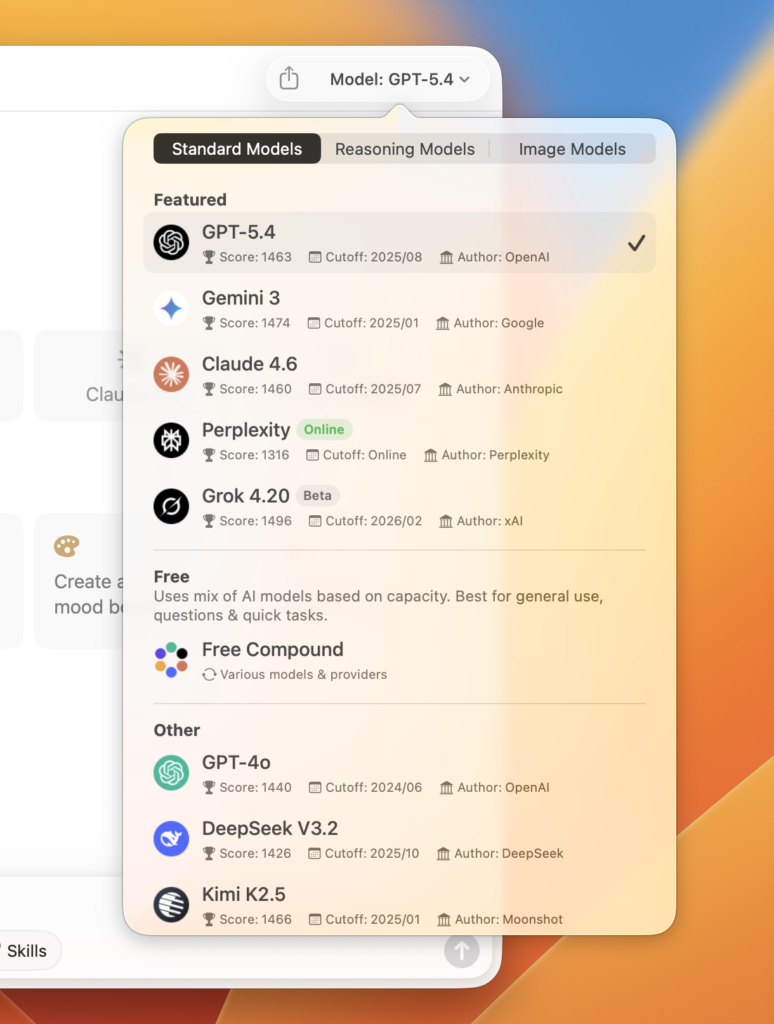
Oui. Vous pouvez importer jusqu’à 16 fichiers à la fois dans une même conversation :
- PDF — jusqu’à 500 pages chacun
- Images — JPG, PNG et autres formats courants
- Documents Office — Word, Excel, PowerPoint
Oui. Fello AI intègre la génération d’images avec GPT Image 2, FLUX.2 et Grok Imagine. Sélectionnez un modèle de génération d’images, choisissez le format, saisissez une description, et votre image est générée en quelques secondes.


Oui. Vous pouvez modifier des images existantes en décrivant en texte simple les changements souhaités, ou importer plusieurs images pour les combiner de façon créative. Des modifications comme ajuster les couleurs, ajouter des objets ou changer l’arrière-plan fonctionnent toutes via un prompt textuel.
Oui. Survolez une conversation dans la barre latérale, cliquez sur l’icône à trois points, puis sélectionnez « Épingler la conversation ». Les conversations épinglées restent en haut de votre liste pour un accès facile.
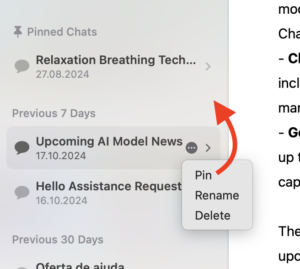
Oui. Cliquez sur l’icône à trois points d’un message et sélectionnez « Mettre en favori ». Les favoris sont enregistrés séparément afin que vous puissiez retrouver les réponses importantes sans faire défiler une longue conversation.
Oui. Fello AI intègre une recherche en texte intégral en haut à gauche de l’application. Elle met en évidence chaque occurrence de votre terme de recherche dans toutes vos conversations.
Oui. Lorsqu’une réponse de l’IA contient des informations issues d’une recherche web, un bouton « Resources » apparaît au bas de ce message. En le touchant, vous voyez toutes les URL des sources auxquelles l’IA s’est référée.
Oui. Allez dans Réglages → Style d’IA pour choisir parmi des styles prédéfinis ou rédiger le vôtre :
- Assistant, Efficace, Professionnel, Amical
- Explicatif, Créatif, Stimulant, Pirate
Cliquez sur l’icône d’exportation en haut à droite de n’importe quelle conversation. Formats disponibles :
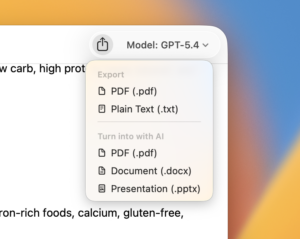
- PDF — un document mis en forme de la conversation
- Texte brut — copie en texte simple
- Exportation par IA — choisissez PDF, Word (.docx) ou PowerPoint (.pptx)
Pas pour le moment. L’interaction vocale est envisagée pour une future mise à jour.
Disponibles sous macOS :
⌘ N Nouveau chat
⌘ F Rechercher dans les conversations
⌘ ⌫ Supprimer la conversation
⌘ R Renommer la conversation
Oui. Dans les Réglages, utilisez le curseur Taille du texte pour l’ajuster de 50 % à 200 %.
Allez dans Fello AI → Réglages et sélectionnez la langue de l’interface de votre choix. Les langues prises en charge comprennent l’anglais, le français, l’allemand, l’espagnol, le portugais, l’italien, le chinois (simplifié et traditionnel), le japonais, le coréen, le thaï, le vietnamien, le turc, le russe, le polonais et le tchèque.
Oui. Le chemin dépend de votre appareil :
- iPhone / iPad : touchez l’icône d’engrenage → Modèle par défaut
- macOS : Fello AI → Réglages → Modèles → Modèle de départ
Oui, sous macOS. Allez dans Fello AI → Réglages → Modèles pour personnaliser jusqu’à cinq boutons de raccourci sur l’écran de nouveau chat. Vous pouvez aussi faire un clic droit directement sur n’importe quel bouton de raccourci et choisir « Personnaliser les raccourcis ».
Allez dans les Réglages et faites défiler jusqu’à la section Notifications pour désactiver entièrement les notifications push.
Dans les Réglages, désactivez l’option d’aperçu du contenu des notifications. Vous continuerez de recevoir les alertes de notification, mais sans que le texte de la conversation s’affiche dans l’aperçu.
Sous macOS, allez dans Réglages → Modèles pour personnaliser jusqu’à 5 raccourcis, ou faites un clic droit sur n’importe quel bouton de raccourci pour afficher l’option « Personnaliser les raccourcis ».
Tarifs et compte
Fello AI est gratuit au téléchargement, avec une version gratuite limitée. Formules payantes :
- Hebdomadaire — $3.99
- Mensuelle — $9.99
- Annuelle — $79.99 (meilleur rapport qualité-prix)
Oui. Fello AI comprend une version gratuite qui vous permet de poser un nombre limité de questions par heure avec les modèles premium. La limite se réinitialise toutes les heures. Les fonctionnalités avancées et l’accès illimité aux modèles premium nécessitent une formule payante.
Fello AI paie les fournisseurs d’IA en fonction de l’usage réel, et non selon des frais mensuels fixes par utilisateur. Les coûts évoluent donc avec les habitudes d’utilisation réelles. La plupart des utilisateurs font bien moins de requêtes qu’il n’en faudrait pour justifier le coût complet d’abonnements individuels, si bien qu’une seule formule à tarif fixe couvrant tous les modèles revient nettement moins cher.
Non. Fello AI est une application totalement autonome qui ne se relie à aucun compte externe. Vous ne pouvez pas connecter votre compte ChatGPT, Claude ou Gemini à Fello AI.
Non. Fello AI est totalement indépendant et ne se connecte pas à vos abonnements existants chez OpenAI, Anthropic ou Google. Il donne accès aux modèles via sa propre infrastructure.
Oui. Votre abonnement Fello AI fonctionne sur Mac, iPhone et iPad tant que vous êtes connecté avec le même identifiant Apple.
La gestion de l’abonnement est assurée par Apple, et non par Fello AI. Vous pouvez résilier depuis les réglages d’abonnement de votre identifiant Apple sur n’importe quel appareil Apple. L’abonnement reste actif jusqu’à la fin de la période de facturation en cours.
Allez dans les Réglages et créez un compte pour activer la synchronisation, puis connectez-vous sur vos autres appareils avec les mêmes identifiants. Les conversations se synchroniseront automatiquement entre Mac, iPhone et iPad.

- Si vous êtes connecté : Réglages → Compte → « Supprimer le compte » — effacement permanent et immédiat
- Si vous n’êtes pas connecté : Réglages → « Effacer toutes les données » — n’efface que le stockage local de l’appareil