
AI system instructions are one of the most powerful yet underused features in modern chatbots. They let you define how an AI responds to you, every single time, without repeating yourself in each conversation. Used well, they eliminate the most common frustration with AI: getting generic responses that require constant correction.
Yet most people never touch them. They open ChatGPT, Claude, or Gemini and start typing, getting generic responses that require constant correction. System instructions fix that problem at the root. In this guide, we cover what system instructions actually are, how they differ from regular prompts, how to set them up on every major AI platform, and share advanced examples that real users swear by for dramatically better output.
The Key Takeaways
- AI system instructions are persistent rules that shape every AI response, unlike regular prompts that apply to one message
- Every major platform supports them: ChatGPT (Custom Instructions), Claude (System Prompts), Gémeaux (Personal Intelligence Instructions)
- Fello AI lets you use one system prompt across ChatGPT, Claude, Gemini, and more — set it once, applies to every model
- You can set them up in under 60 seconds on any platform
- Advanced system instructions use techniques like role layering, XML tags, and rubric-based evaluation for professional-grade results
What Are AI System Instructions?
AI system instructions are a set of persistent guidelines you give to a chatbot before it processes any of your messages. Think of them as the AI’s job description. While a regular prompt tells the AI what to do right now, system instructions tell it how to behave, always.
Every major AI platform has its own version of this feature. ChatGPT calls them Custom Instructions. Claude uses system prompts. Google Gemini labels them Personal Intelligence Instructions. The names differ, but the concept is identical. You write a set of rules once, and the AI follows them in every conversation.
System Instructions vs. Regular Prompts
The distinction matters. A regular prompt is dynamic and task-specific. You type “Write me an email to my boss about the project delay” and the AI responds to that single request. A system instruction is stable and persistent. It sits behind the scenes, shaping every response the AI generates.
Here is how they compare.
| Aspect | System Instruction | Regular Prompt |
|---|---|---|
| Scope | Applies to all messages in a conversation | Applies to one message |
| Purpose | Defines behavior, tone, role, and rules | Defines a specific task |
| Persistence | Set once, works automatically | Must be typed each time |
| Example | “Always respond in British English” | “Translate this sentence to British English” |
Anthropic’s official documentation puts it clearly: system instructions define “how” the AI should operate, while user prompts define “what” the user wants done right now. Separating these two layers makes your prompts easier to read, debug, and update.
Why You Should Use AI System Instructions
If you are not using system instructions, you are leaving performance on the table. Here is what changes when you set them up properly.
1. You Stop Repeating Yourself
Without system instructions, every new conversation starts from zero. You have to re-explain your role, your preferences, your formatting needs. With system instructions, that context is baked in. One user on the Alban Brooke blog described it as “the highest leverage thing you can do to improve your experience with ChatGPT.”
2. Your Output Quality Jumps
Power users consistently report the same outcome: fewer back-and-forth corrections, more directly usable first drafts, and far less time re-explaining context. The difference is most visible in repetitive workflows — writing, coding, research — where the same preferences have to be communicated in every new session. System instructions cut that overhead to zero.
3. The AI Sounds Like You Want It To
Many people find default AI responses too enthusiastic, too verbose, or too generic. We tested this across models in our comparison of which AI sounds most human, and the differences are striking. System instructions let you shape the personality. You can tell the AI to be concise, to avoid emojis, to write in a specific tone, or to always include code examples.
How to Use System Instructions in Fello AI
Fello AI is a native app for Mac, iPhone, and iPad that gives you access to ChatGPT, Claude, Gemini, Grok, DeepSeek, and other AI models from a single interface. Instead of maintaining separate Custom Instructions in ChatGPT, a separate system prompt in Claude, and yet another in Gemini, you configure your instructions once inside Fello AI and they apply consistently across every model you use.
How to set up a system prompt in Fello AI:
- Open Fello AI on your Mac, iPhone, or iPad
- Go to Settings and open the Personalize tab
- Under AI Style, select Custom
- Type your system prompt in the System Prompt field at the bottom
- Your instructions now apply to every conversation across all AI models
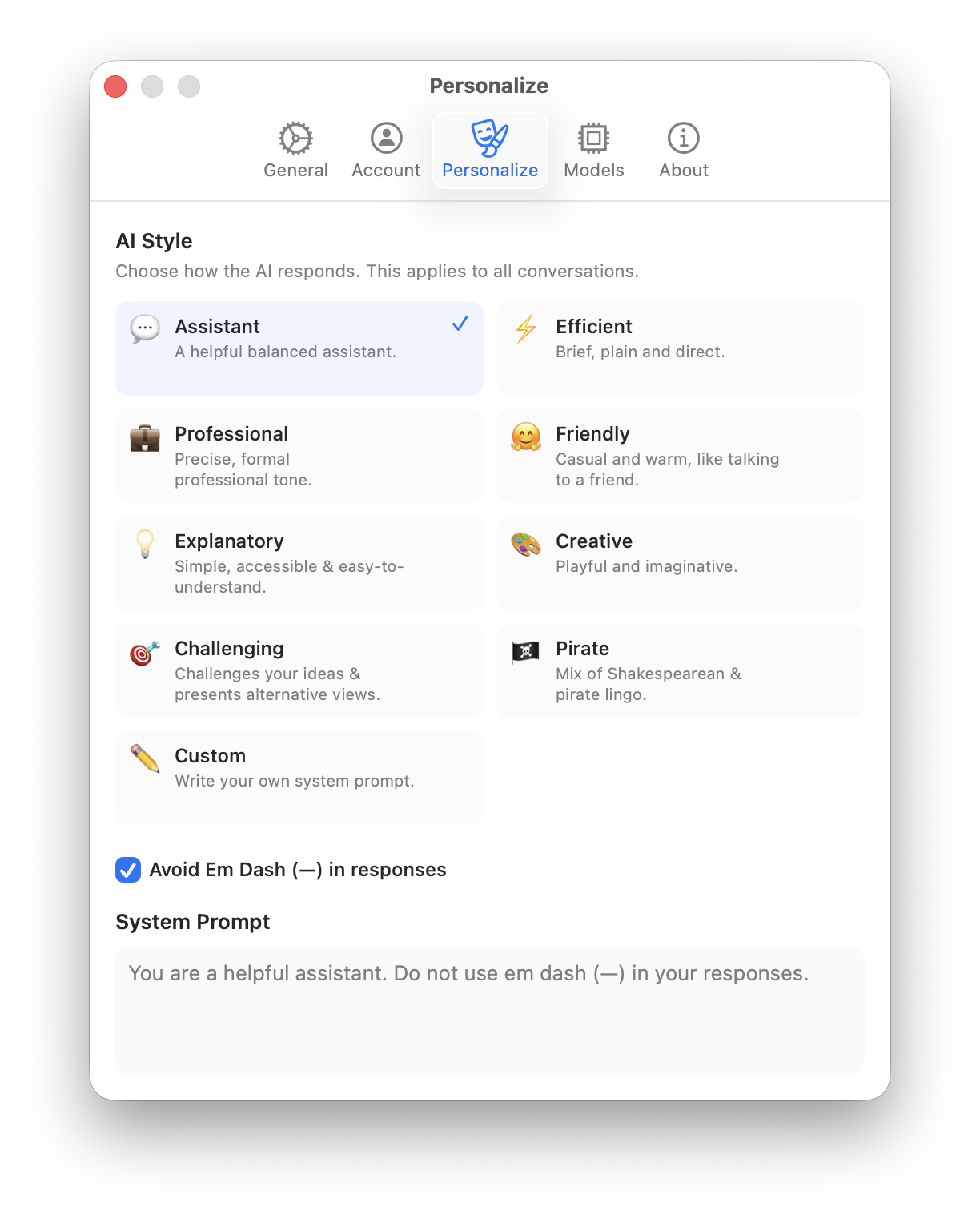
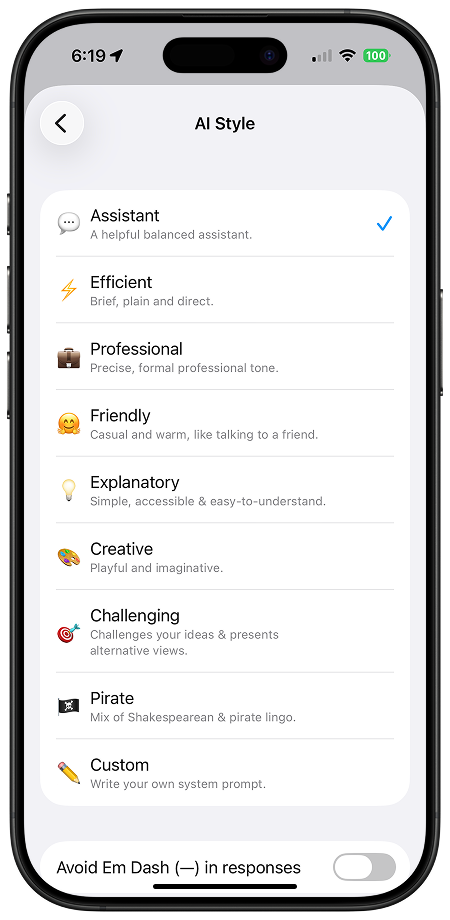
Fello AI also comes with 8 built-in AI styles (Assistant, Efficient, Professional, Friendly, Explanatory, Creative, Challenging, Pirate) if you want a quick preset instead of writing your own. Select Custom to unlock the full system prompt field and write exactly what you need.
Power user tip: Because Fello AI lets you switch instantly between GPT, Claude, and Gemini, you can test how different models interpret the same system instruction side-by-side — something you simply cannot do when each model lives in a separate app.
AI System Instructions Examples: From Beginner to Advanced
The difference between a basic and an advanced system instruction is enormous. Below are real examples that range from simple to sophisticated, based on templates shared by users and communities online.
Beginner: Simple Role and Tone
This is the minimum viable system instruction. It tells the AI who you are and how you want it to respond.
I'm a marketing manager at a B2B SaaS company.

Respond in a professional but conversational tone. Keep answers concise, under 300 words unless I ask for more detail. Use bullet points for lists. Avoid corporate jargon.
Why it works: It gives the AI two critical pieces of context, your role and your formatting preferences. Even this simple setup will noticeably improve response relevance.
Intermediate: Social Media Manager Instructions
Social media managers deal with multiple platforms, multiple brand voices, and constant context-switching. A well-crafted system instruction keeps the AI locked to your brand rules so you never have to re-explain tone or platform conventions.
I manage social media for a lifestyle brand targeting women aged 25-40. Our tone is warm, confident, and direct — never corporate, never preachy.

When writing captions and copy:
- Instagram: conversational, 1-3 short paragraphs, end with a soft CTA or question, 3-5 relevant hashtags
- LinkedIn: professional but personable, lead with a hook, no hashtag spam
- Twitter/X: punchy, under 240 characters, no filler words
- Never use: "game-changer", "excited to share", "thrilled to announce", emojis as punctuation
- Always write in active voice
- If I give you a product or campaign brief, ask me one clarifying question before writing
Why it works: It locks the AI to your brand voice across every platform without re-explaining the rules each session. The platform-specific formatting rules mean you get copy that is actually ready to post, not something you still have to reformat. The instruction to ask one clarifying question prevents the AI from guessing on briefs where context matters.
Intermediate: Content Creator Instructions
For writers and content creators, system instructions can enforce brand voice and SEO standards.
I'm a content writer for a tech blog targeting intermediate developers.

When writing content:
- Use a conversational but technically accurate tone
- Structure with H2/H3 headings for SEO
- Include a meta description (150-155 characters) with the primary keyword
- Add relevant statistics with sources
- Keep paragraphs to 3-4 sentences max
- Avoid filler phrases like "in today's world" or "it's worth noting"
- Bold key terms and statistics
Advanced: The Self-Evaluating Rubric System
This is one of the most sophisticated system instruction templates shared publicly, originally from a GitHub repository by DenisSergeevitch. It makes the AI create an internal quality rubric and score its own answers before delivering them.
ALWAYS follow these rules:

<self_reflection>
1. Before answering, create a 5-7 category rubric for what a world-class answer looks like
2. Use this rubric to evaluate and iterate on your response internally
3. Only deliver the answer when your internal score reaches 98/100 or higher
4. Continue refining until the optimal solution is achieved
</self_reflection>

<answering_rules>
1. Match the language of my message
2. Assign yourself an expert role: "I'll answer as a [role] with expertise in [topic]"
3. Act according to that assigned role throughout the conversation
4. Answer naturally and in a human-like manner
5. Skip actionable items and suggestions unless I specifically ask for them
6. Avoid tables unless I specifically request one
</answering_rules>
Why it works: The rubric-based approach forces the AI to evaluate its own output quality before responding. The creator tested this template against the MMLU-PRO benchmark (over 12,000 questions) and reported 70.20% overall accuracy, with top scores in math at 86.75% and chemistry at 79.68%. While benchmark results depend on the model and test conditions, the self-evaluation pattern consistently pushes the AI to produce more thorough, considered answers.
Advanced: The Three-Layer Persona Architecture
This approach, recommended by prompt engineering guides and Anthropic’s own documentation, splits system instructions into three distinct layers for maximum control.
<persona_and_voice>
You are a senior data analyst who communicates like a patient professor.
Vocabulary: precise technical terms explained simply on first use.
Cadence: short declarative sentences for facts, longer ones for explanations.
Never use: buzzwords, hedging language, or unnecessary caveats.
</persona_and_voice>

<content_constraints>
- Maximum response length: 500 words unless I request more
- Format: flowing prose paragraphs, not bullet lists (unless I ask)
- Always include the data source for any statistic cited
- If uncertain about a fact, say so explicitly rather than guessing
- No legal, medical, or financial advice
</content_constraints>

<context>
I work at a Series B fintech startup. Our product is a B2B payment API.
Our customers are enterprise CFOs and finance teams.
Current priority: reducing churn by improving onboarding documentation.
</context>
Why it works: The XML tag structure helps the AI distinguish between different types of instructions. Anthropic specifically recommends this approach for Claude, noting that “wrapping each type of content in its own tag reduces misinterpretation.” But it works well across all platforms. The three layers (persona, constraints, context) cover every dimension of AI behavior without creating conflicts between instructions.
Advanced: The “No AI Slop” Writing System
This is a favorite among writers who are tired of AI-generated content that reads like, well, AI-generated content. It is based on instructions shared across multiple blogs and communities.
You are a direct, concise writer who values clarity over cleverness.

Writing rules:
- Use present tense and active voice by default
- Never start sentences with "It's important to note" or "In today's world"
- Never use the words: revolutionize, cutting-edge, seamlessly, leverage, robust
- Vary sentence length. Mix short punchy statements with longer explanatory ones.
- Use specific numbers and examples instead of vague claims
- Write like Hemingway edited by a senior tech editor
- If I ask for an opinion, give a clear one with reasoning, not a balanced "on one hand" response
- Every paragraph must earn its place. If it doesn't add new information, cut it.

Formatting:
- Bold key terms and statistics
- Use headers to break up content logically
- Keep paragraphs to 3 sentences max
- No emojis unless I explicitly ask
Why it works: It directly addresses the most common complaints about AI writing: generic phrasing, excessive hedging, and the unmistakable “AI voice.” By banning specific words and patterns, it forces the AI to find more original ways to express ideas.
Tips for Writing Better AI System Instructions
Good system instructions follow a few core principles, regardless of which platform you use.
1. Be Specific, Not Vague
“Be professional” tells the AI almost nothing. “Write in a formal tone suitable for C-suite executives, using data and metrics to support every claim, with no emojis or casual language” gives it everything it needs. The more precise your instruction, the fewer corrections you will need.
2. Tell the AI What TO Do, Not What NOT to Do
Anthropic’s documentation specifically recommends framing instructions positively. Instead of “Don’t use markdown,” try “Write in flowing prose paragraphs.” Positive instructions are clearer and easier for the AI to follow consistently.
3. Include Your Context
The biggest mistake people make is leaving out who they are. A system instruction that includes your role, industry, expertise level, and current priorities will always outperform one that only specifies formatting preferences. As one guide put it, “I am a senior backend developer with 8 years of Python experience” produces better code than “I am a developer.”
4. Use Structure for Complex Instructions
For anything beyond basic preferences, use structured formatting. XML tags work especially well with Claude. Markdown headers work well with ChatGPT and Gemini. The key is separating your role definition, behavioral rules, and contextual information into distinct sections so the AI can parse them without confusion.
Test and Iterate
Your first system instruction will not be perfect. Start with something simple, test it across several conversations, notice where the AI still falls short, and refine. Many power users go through 5-10 iterations before settling on instructions that feel right. Fello AI makes this process faster because you can test the same system prompt across GPT, Claude, and Gemini instantly without copy-pasting between apps. If you want more ideas for effective prompting techniques, check out our guide on prompt tips for better AI results.
System Instructions Across AI Platforms
While the core concept is the same, each platform handles system instructions with different strengths. Understanding these differences helps you write instructions that play to each AI’s strengths. We covered the hidden system prompts behind GPT and Claude in a previous analysis, and the architectural differences matter for how you write your own instructions too.
How to Set Up Custom Instructions in ChatGPT
ChatGPT’s Custom Instructions feature is available on all plans, including the free tier.
- Open ChatGPT (web, desktop, or mobile app)
- Click your profile icon in the sidebar
- Select Customize ChatGPT (or go to Settings > Personalization)
- Toggle Enable customization to ON
- Fill in the two text fields
- “What would you like ChatGPT to know about you?”, your role, expertise, context
- “How would you like ChatGPT to respond?”, tone, format, style, rules
- Click Save
Your instructions now apply to every new conversation. The character limit is 1,500 characters per field.
How to Set Up System Prompts in Claude
Claude handles system instructions differently depending on how you use it.
- On claude.ai (Projects): Open a Project, click on the project name to open project settings, and add your system prompt in the Custom Instructions field. These instructions apply to every conversation within that project.
- Via the API: Pass your system prompt as the
systemparameter in the API call. There is no hard character limit for API system prompts.
Claude is particularly responsive to structured system prompts. Anthropic’s prompt engineering guide recommends using XML tags to separate different types of instructions (role, constraints, context, task), which helps Claude parse complex instructions more accurately.
How to Set Up System Instructions in Gemini
Google Gemini introduced Personal Intelligence Instructions for consumer users.
- Open Gémeaux (web at gemini.google.com or mobile app)
- Go to Settings
- Select Personal Intelligence Instructions for Gemini
- Enter your instructions
- Click Submit
These instructions apply to all new chats. For developers, Gemini’s API supports system instructions through the system_instruction parameter in the GenerateContentConfig object.
Google also offers Gems, which are custom AI personalities you can create with their own system instructions for specific use cases (like a coding assistant or writing coach).
What’s The Difference?
ChatGPT is the most consumer-friendly option. The two-field setup (who you are + how to respond) makes it easy for beginners. It handles conversational, creative, and general-purpose instructions well. The 1,500 character limit per field forces conciseness.
Claude is the most flexible for advanced users. It has no hard character limit on system prompts via the API, and Anthropic specifically recommends structured approaches with XML tags. Claude is also trained to follow system instructions more conservatively, which means it is less likely to ignore your rules when the conversation gets complex. If you like structured, layered instructions, Claude is the best platform for it.
Gémeaux sits in the middle. Personal Intelligence Instructions are simple to set up and apply globally. The Gems feature adds an extra layer, letting you create purpose-built AI personas with their own dedicated instructions. For Google Workspace users, Gemini system instructions integrate naturally with Docs, Sheets, and Gmail workflows.
For a broader look at which AI model fits your needs, see our AI model comparison for 2026.
Platform Comparison
| Feature | ChatGPT | Claude | Gémeaux | Fello AI |
|---|---|---|---|---|
| Feature name | Custom Instructions | System Prompt / Project Instructions | Personal Intelligence Instructions / Gems | System Prompt (Personalize settings) |
| Character limit | 1,500 per field | No hard limit (API) | Varies | No hard limit |
| Applies to | All new chats | Per project or per conversation | All chats | All chats, all models |
| Where to find it | Settings > Customize ChatGPT | Project settings / API | Settings > Personal Intelligence Instructions | Settings > Personalize > Custom |
| Free plan access | Yes | Yes (claude.ai) | Yes | Yes (with free tier) |
| XML tag support | Basic | Excellent (recommended by Anthropic) | Moderate | Depends on model used |
If you use multiple AI models regularly, Fello AI eliminates the need to manage separate system instructions on each platform. You write your instructions once, and they apply across ChatGPT, Claude, Gemini, and every other model in the app.
For a broader playbook on getting the most out of ChatGPT, see our full guide.
Conclusion
AI system instructions are the single highest-leverage setting you can change to improve your AI experience. They take under a minute to set up, work across all major platforms, and consistently deliver dramatically better output quality while cutting the back-and-forth corrections that slow you down.
Start simple. Define your role and a few key preferences. Test it. Then build up to more advanced techniques like XML structuring, rubric-based evaluation, or the three-layer persona architecture. The examples in this guide are ready to copy, paste, and customize for your own workflow. And if you want one system prompt that works across every AI model without managing separate settings, try Fello AI.
FAQ
AI system instructions are persistent rules you set for an AI chatbot that shape every response it generates. They define the AI’s role, tone, formatting, and behavioral boundaries. Each platform has its own name for them: ChatGPT uses Custom Instructions, Claude uses system prompts, and Gemini uses Personal Intelligence Instructions.
Yes. Power users across every major platform report significantly fewer corrections and faster, more usable first responses once they have a good system prompt in place. Even a simple instruction defining your role and preferred response format makes a noticeable difference — the AI stops treating you like a stranger every conversation.
Yes, all three major platforms offer system instructions on their free plans. ChatGPT’s Custom Instructions, Claude’s project-level system prompts on claude.ai, and Gemini’s Personal Intelligence Instructions are all available without a paid subscription.
A system prompt is persistent and defines how the AI behaves across an entire conversation. A regular prompt is a single message that tells the AI what task to perform right now. System prompts set the rules; regular prompts make the requests within those rules.
Start with three things: your role or profession, your preferred response format (length, tone, structure), and any specific rules (words to avoid, formats to use, topics to focus on). Advanced users add context about their current projects, XML-structured behavioral layers, and self-evaluation criteria for the AI to score its own responses.
Not natively. ChatGPT, Claude, and Gemini each have their own separate settings, so you would need to copy your instructions into each platform individually. Fello AI solves this by letting you write one system prompt that applies across all models from a single app on Mac, iPhone, and iPad.