Claude Design vs ChatGPT Images 2.0 is not the fight the headlines sold you in April. The two products landed four days apart, Claude Design on April 17, 2026 and ChatGPT Images 2.0 on April 21, 2026, and Figma’s stock fell roughly 7% on Claude Design’s launch day. They were instantly framed as rivals. They are not. One builds editable, multi-page surfaces you can keep working on. The other generates the best single images on the market. Three months in, that gap has widened rather than closed.
Almost every comparison you will find still quotes April, and April is out of date. Claude Design left research preview for beta on June 17, 2026. It scrapped the separate usage meter that used to lock people out in a single afternoon, and it now lets you choose which Claude model does the work. On the OpenAI side, DALL-E 2 and DALL-E 3 were retired on May 12, 2026, and ChatGPT quietly added a second Pro tier at $100/month. We ran both tools against the same three briefs, pulled the live pricing, and built a use-case-by-use-case verdict so you know which one to open first.
The pitch sounds the same. The execution never was.
The Key Takeaways
- Claude Design wins for slide decks, prototypes, mockups, and full design systems. It exports to PPTX, PDF, Canva, and standalone HTML, and since June it can import your existing design system from a GitHub repo or a design file.
- ChatGPT Images 2.0 wins for hero images, marketing visuals, infographics, and any standalone graphic where you need accurate text rendering. It generates static images only. It does not build decks or prototypes, and it never has.
- Claude Design is now in beta and shares usage limits with Claude chat, Claude Code, and Cowork. The separate weekly design allowance that people burned through in an afternoon is gone.
- You now pick the model inside Claude Design, choosing between Fable 5, Opus 4.8, Sonnet 5, and Haiku 4.5, plus an Effort setting. Any guide still telling you Claude Design is “powered by Opus 4.7” is quoting a launch post Anthropic never corrected.
- Running both officially costs $40/month, Claude Pro plus ChatGPT Plus. Fello AI puts Claude, ChatGPT, Gemini, Grok, and DeepSeek behind one $9.99/month subscription instead.
The 30-Second Verdict
Claude Design and ChatGPT Images 2.0 solve different problems, and the fastest way to waste a week is to treat them as substitutes. Claude Design wins for slide decks, interactive prototypes, mockups, and design systems with brand consistency and code handoff. ChatGPT Images 2.0 wins for hero images, marketing visuals, infographics, and any single graphic where text has to render cleanly. Use them in sequence, not interchangeably.
If you only have time to pick one this week, pick Claude Design for anything multi-page (decks, prototypes, mockup flows) and ChatGPT Images 2.0 for anything single-image (covers, banners, social assets, hero shots).
Claude Design vs ChatGPT Images 2.0 Comparison Table
Here is the head-to-head as it stands in July 2026, after Claude Design’s June overhaul and OpenAI’s spring pricing changes.
| Feature | Claude Design | ChatGPT Images 2.0 |
|---|---|---|
| Launched | April 17, 2026 | April 21, 2026 |
| Status today | Beta (since June 17, 2026) | Generally available |
| Model | You choose: Fable 5, Opus 4.8, Sonnet 5, or Haiku 4.5 | gpt-image-2 |
| Best for | Slide decks, prototypes, mockups, design systems | Hero images, marketing visuals, infographics |
| Slide deck output | Yes, full multi-slide decks | No, single images only |
| Prototype builder | Yes, interactive prototypes with components | No |
| Design system support | Yes, imports from a GitHub repo, design files, or raw uploads | No |
| Image generation | Limited, tuned for layout and slide visuals | World-class, raw asset generator |
| Text rendering | Standard | Best-in-class, including non-Latin scripts |
| Web search | No | Yes, in Thinking mode |
| Reasoning before output | Yes, via the Effort control | Yes, native Thinking mode |
| Max resolution | HTML, PPTX, and PDF native | Up to 2K |
| Aspect ratios | Slide and page standard | 3:1 to 1:3 (continuous) |
| Multi-image per prompt | Per slide, per page | Up to 8 coherent images |
| Export formats | Canva, PDF, PPTX, HTML, ZIP | PNG, JPG, web-ready |
| Free tier | No, requires Claude Pro or higher | Yes, Instant mode on Free |
| Entry price | Claude Pro $20/month | ChatGPT Plus $20/month for Thinking mode |
| Top tiers | Max $100 or $200/month, Team, Enterprise | Pro $100 or $200/month, Business, Enterprise |
| Usage limits | Shared with chat, Claude Code, and Cowork | Standard ChatGPT message limits |
What Claude Design Actually Is Now
Claude Design is Anthropic’s product surface for turning plain-English prompts into interactive prototypes, slide decks, landing pages, app mockups, and full design systems. It runs at claude.ai/design and it passed one million users in its first week. You describe what you want, Claude produces a first version, and you refine it through inline comments, direct text edits, or adjustment sliders that Claude generates on the fly for spacing, colour, and layout.
The version most articles describe no longer exists. Anthropic overhauled Claude Design on June 17, 2026, moving it out of research preview and into beta, and three of those changes rewrite the comparison below. If you want the full walkthrough, our complete Claude Design guide covers setup, prompts, and export in depth.
The separate usage meter is gone
This is the single biggest change, and it kills the strongest argument against the tool. At launch, Claude Design was metered on its own weekly allowance, and it was brutal. PCWorld’s Ben Patterson burned 80% of his weekly Claude Design allowance in about 25 minutes on a Pro plan, generating three variations of a single project. His headline: “I tried Claude Design for half an hour. I’m already locked out for a week.”
That pool no longer exists.
Claude Design now draws from the same usage limits as the rest of Claude, shared with chat, Claude Code, and Cowork. Anthropic’s own framing is that most people get much more headroom and that those who do hit limits will hit them less often. In practice it means design work competes with your other Claude usage rather than living in a small ring-fenced budget, which is a far better trade for anyone who was previously locked out by Wednesday.
You now pick the model yourself
Anthropic’s April launch post said Claude Design ran on Claude Opus 4.7. That page has never been corrected, so the entire web keeps repeating it, and some sites have “upgraded” the claim to Opus 4.8 without a source. Both are wrong. Open the product today and there is a model picker sitting in the prompt composer. It offers Fable 5 for the hardest work, Opus 4.8 for complex tasks, Sonnet 5 as the efficient everyday choice, and Haiku 4.5 for speed, with a More models menu behind them.
Beneath it sits an Effort control that defaults to High, with a full ladder of Low, Medium, High, Extra high, and Max documented in Anthropic’s guide to model, effort, and thinking settings. No single model powers Claude Design. You decide, per project, and because design now draws from your shared pool, dialling Effort down on rough drafts is the easiest way to stretch a subscription.
Design system imports and nine connectors
Claude Design used to infer your brand during onboarding. Now you hand it a source of truth directly, from a GitHub repository, a design file, or raw uploads, and Claude checks its own output against that system and corrects itself when it drifts. Admins on Team and Enterprise plans can approve one standard system and lock it down so nobody ships off-brand work.
You also get five templates, Prototype, Slides, Document, Wireframe, and Animation, plus nine connectors covering Adobe, Base44, Canva, Gamma, Lovable, Miro, Replit, Vercel, and Wix. Wireframe is the one most people miss, and it is the right template when the argument is about structure rather than polish.
Developers get two commands. /design-sync, run inside Claude Code, pulls your codebase’s design system into Claude Design, so every prototype starts from your real components instead of approximations. /design lets you create, edit, and sync design projects without leaving the Claude Code terminal at all. When a design is ready to become software, you hand it back to Claude Code, which picks up your existing work rather than starting over from a screenshot.
What ChatGPT Images 2.0 Actually Is
ChatGPT Images 2.0 is OpenAI’s image model with reasoning built into the product around it. It ships under the model ID gpt-image-2, and it replaced DALL-E entirely. DALL-E 2 and DALL-E 3 were removed on May 12, 2026, a date OpenAI set in its API deprecation schedule back in November 2025. That transition is done, not pending.
The model thinks before it draws. It can search the web for real-time information, plan a layout, generate multiple consistent images from one prompt, and check its own output before delivering it. Unlike Claude Design, this is a pure generator, and it has not moved an inch toward decks or prototypes since launch. For the full launch breakdown including QR codes and infographics, see our deep dive on what ChatGPT Images 2.0 can do.
The specs that matter
Output runs up to 2K resolution, with continuous aspect ratios from 3:1 ultra-wide to 1:3 ultra-tall, which covers everything from billboard banners to mobile screens. The model generates up to eight coherent images from a single prompt, holding characters and objects consistent across the whole set, which is what makes a full social campaign a one-prompt job.
Text rendering is the standout. The model treats typography as a first-class element rather than decorative texture, and it handles non-Latin scripts including Japanese, Korean, Chinese, Hindi, Bengali, and Arabic natively. This is the capability that killed the old “AI can’t spell” objection, and it is the single clearest reason to reach for ChatGPT Images 2.0 over anything Claude Design produces.
Instant mode vs Thinking mode
Instant mode is available to everyone, including the Free tier. OpenAI does not publish a fixed free-tier cap, and the number moves with demand, so the honest answer is that your limit is whatever the app tells you it is on the day. Treat the free tier as generous enough to evaluate the model and nowhere near enough to run a campaign on.
Thinking mode is the one you actually want. It adds web search during generation, multi-image batching, and output self-verification, and it is restricted to Plus, Pro, Business, and Enterprise. Every meaningful advantage ChatGPT Images 2.0 holds over Claude Design in the tests below came from Thinking mode being switched on.
Why Images 2.0 is the wrong OpenAI product to compare
Here is the thing that most head-to-heads get structurally wrong. ChatGPT Images 2.0 was never OpenAI’s answer to Claude Design, and pitting them against each other flatters neither. Images 2.0 is a static image generator. It produces no decks, no clickable prototypes, no component libraries, and no design systems. Asking it to compete with Claude Design on mockups is like asking a camera to compete with a word processor.
OpenAI’s real answer arrived on July 9, 2026 with ChatGPT Work, an agent product that creates documents, slides, sheets, and web apps. That is the product aimed squarely at Claude Design’s territory. If you are choosing between OpenAI and Anthropic for design output rather than for images, that is the fight to watch, and it is a much closer one.
We Ran 3 Real Prompts Through Both Tools
Feature lists only get you so far. We ran the same three briefs through Claude Design and ChatGPT Images 2.0 on April 26, 2026, nine days after Claude Design’s launch and five days after ChatGPT Images 2.0’s. The outputs below are those original runs, and we have left them exactly as they were.
Read them as a fair picture of how each tool behaves, because the pattern they show has not changed. Do read them as a snapshot, though. Claude Design has since gained the model picker, design-system imports, and the wireframe and animation templates, so its side of these tests would likely be sharper today than what you see here.
Test 1: A 3-Screen Mobile App Mockup
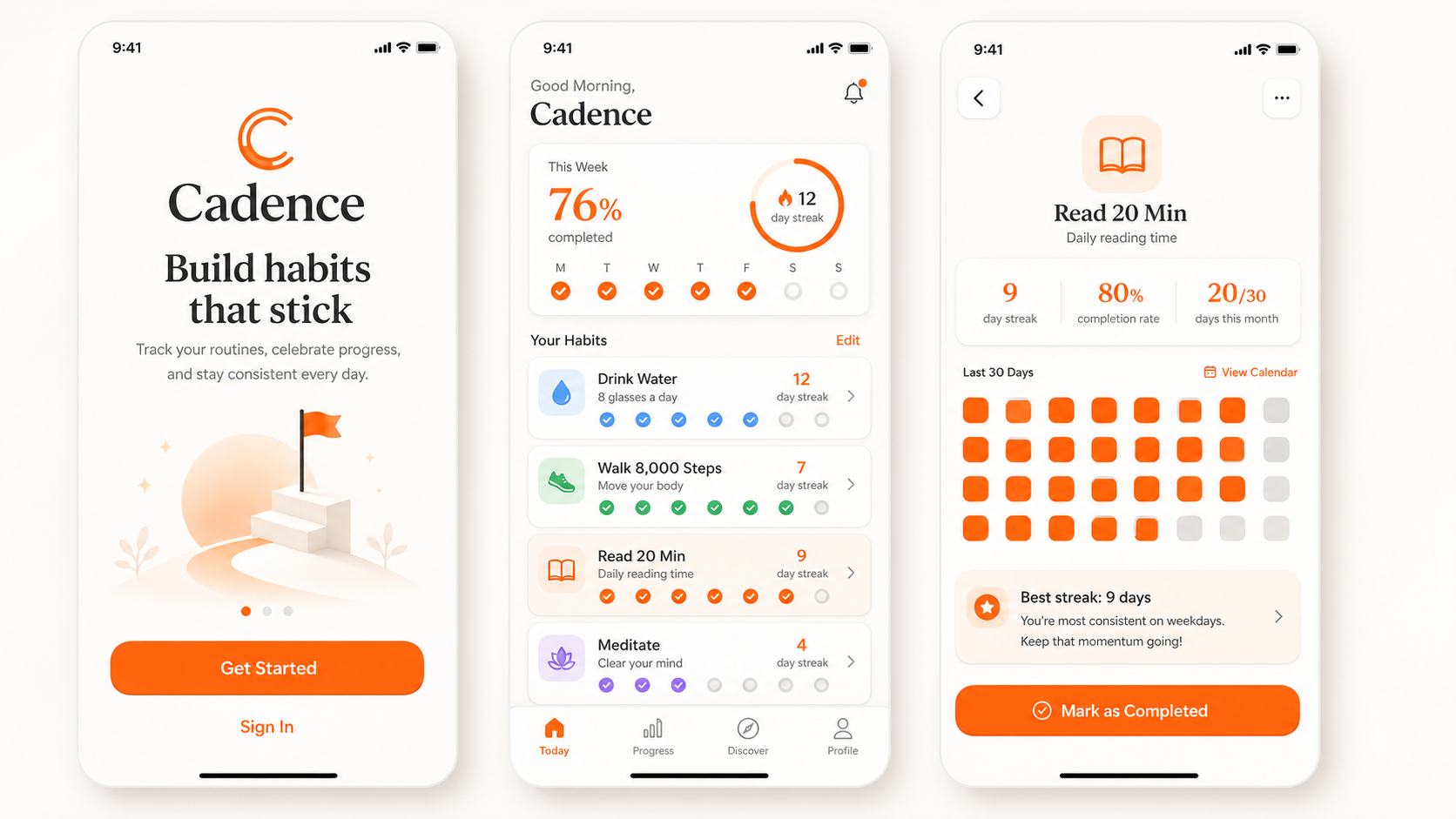
The prompt: Design 3 connected screens for a habit-tracking iOS app called Cadence: onboarding, dashboard with 4 habits and weekly streaks, and a single-habit detail page with a 30-day grid. iOS native style, accent color #FF7A1A.
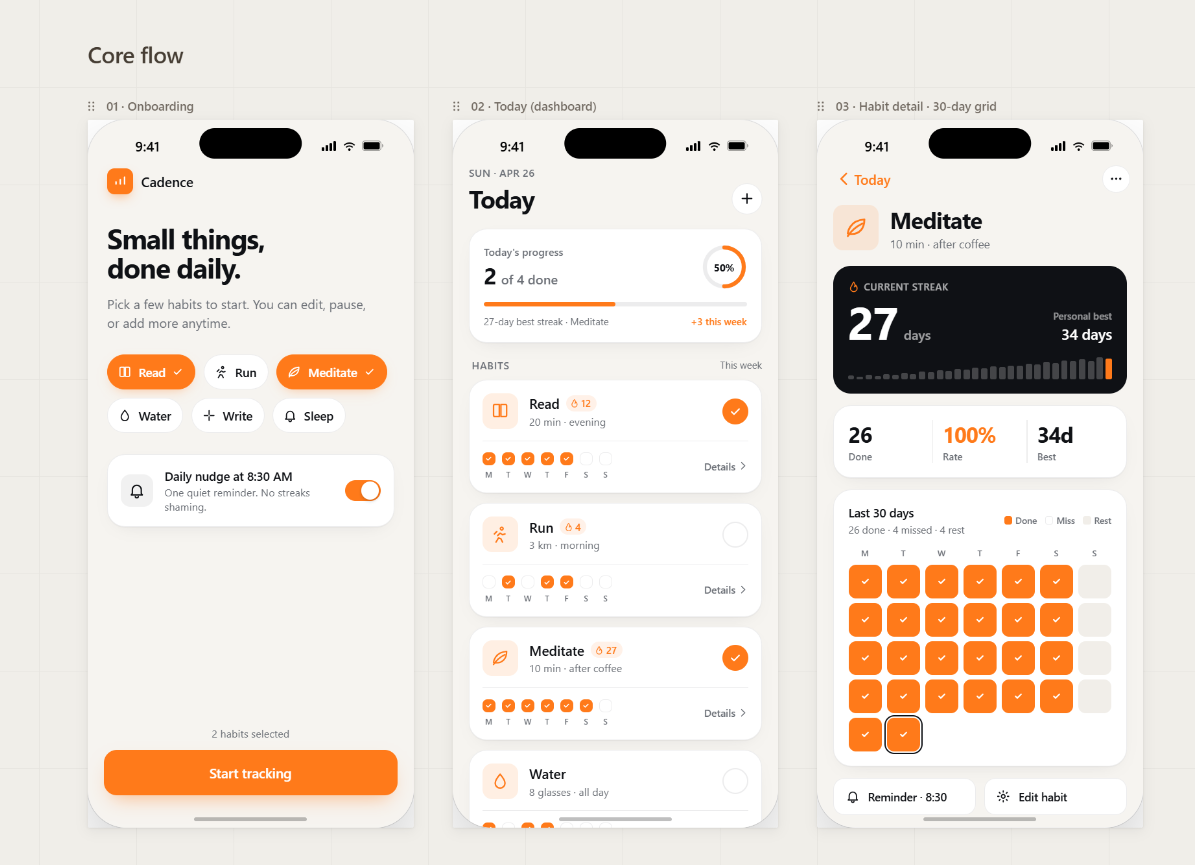
Claude Design produced three connected, functional iOS screens with real components: cards, toggles, progress rows, completion checkmarks per day, and a fully rendered 30-day grid of orange and empty squares for the streak detail. Every screen used the #FF7A1A accent consistently, and the three screens read as one app, not three concepts.
ChatGPT Images 2.0 produced a polished single image of three phones lined up against a soft beige backdrop, with the Cadence brand on screen one, a progress dashboard on screen two, and a reading streak on screen three. Beautiful as a launch-page render, useless as an editable prototype.
Winner: Claude Design, by a mile, for anything you actually need to build. The ChatGPT Images 2.0 output is gorgeous, but it is one static image, not three editable screens. Keep that render for the marketing site.
Test 2: A Landing-Page Hero with Headline Text
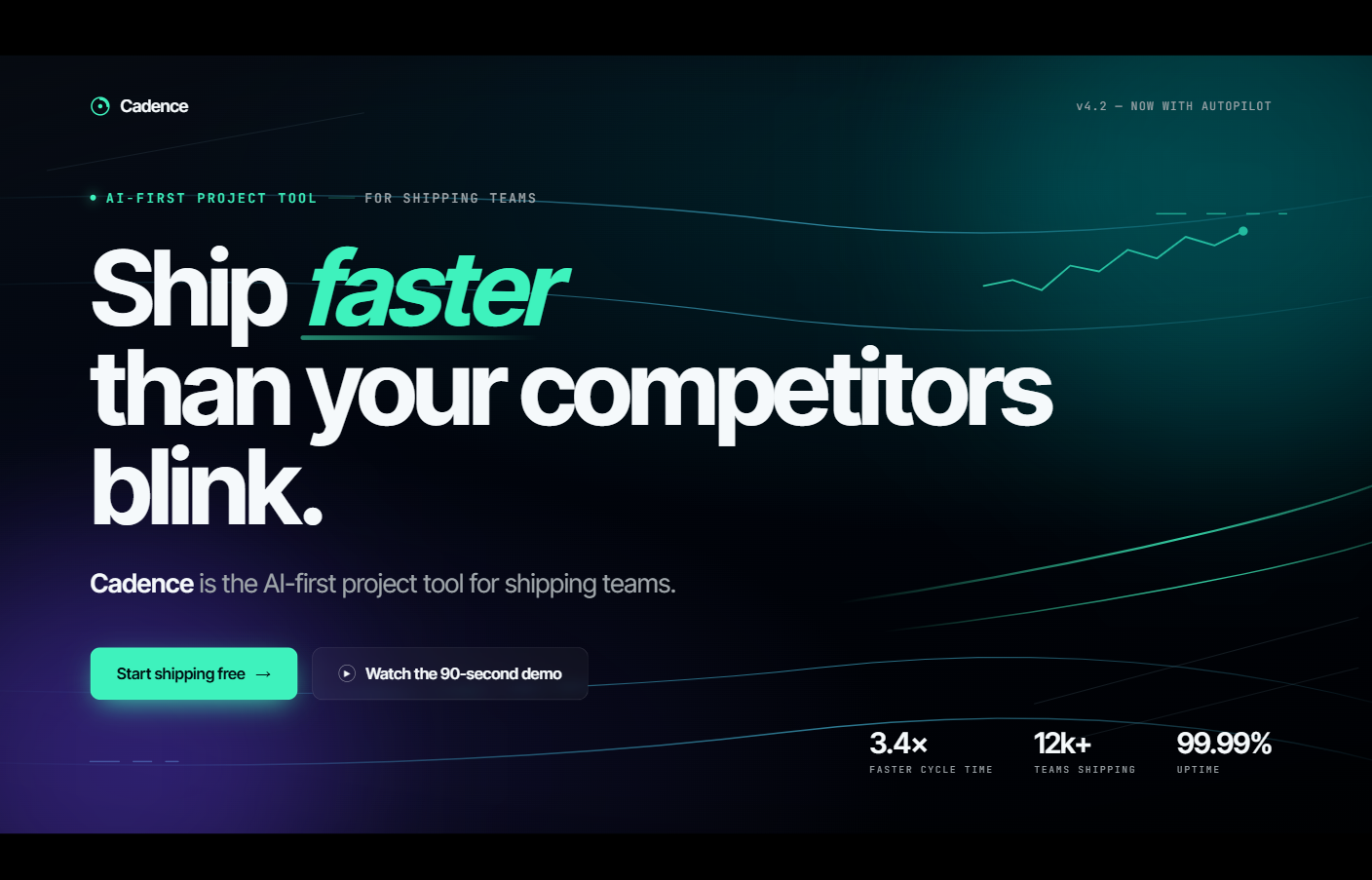
The prompt: Create a 16:9 hero image for a B2B SaaS landing page. Headline text: “Ship faster than your competitors blink.” Subhead: “Cadence is the AI-first project tool for shipping teams.” Modern, dark gradient, abstract motion lines, headline perfectly readable. Use Thinking mode if available.
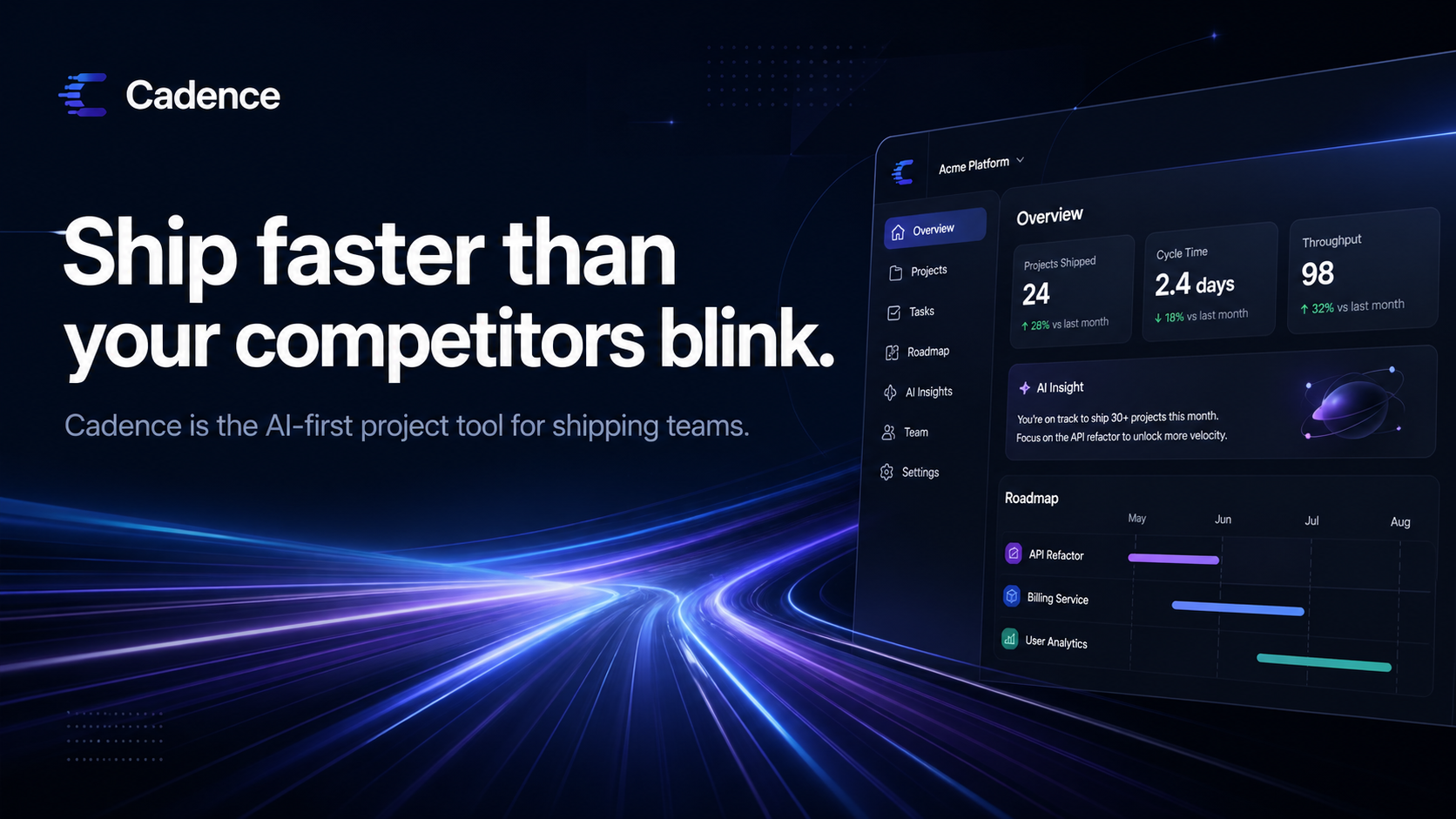
ChatGPT Images 2.0 with Thinking mode delivered exactly what was asked: 16:9 ratio, deep navy gradient, motion lines streaking across the bottom-left, a stylized dashboard tucked top-right, and the headline rendered in clean white sans-serif with zero typos. Both the headline and the subhead read perfectly.
Claude Design went further and built the entire hero section as live HTML: italicized “faster” in the headline, two real CTA buttons (“Start shipping free” and “Watch the 90-second demo”), a stats row showing 3.4x, 12k+, and 99.99%, and a teal-green gradient background. Not an image. An actual web page.
Winner: it depends on what you need. ChatGPT Images 2.0 wins if you want a finished hero image to drop into your existing site. Claude Design wins if you want the whole landing page section, code-ready and editable.
Test 3: A Data Infographic
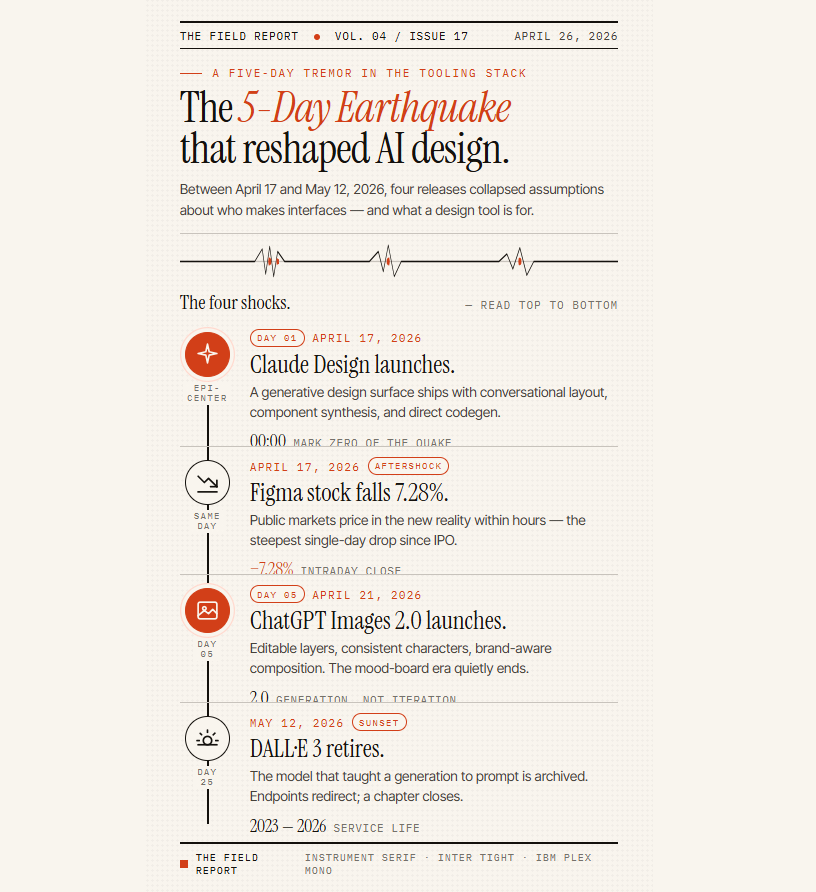
The prompt: One-page infographic titled “The 5-Day Earthquake That Reshaped AI Design.” Timeline of 4 events: April 17, 2026 Claude Design launches; same day Figma stock falls 7.28%; April 21, 2026 ChatGPT Images 2.0 launches; May 12, 2026 DALL-E 3 retires. Use icons. All text perfectly readable.
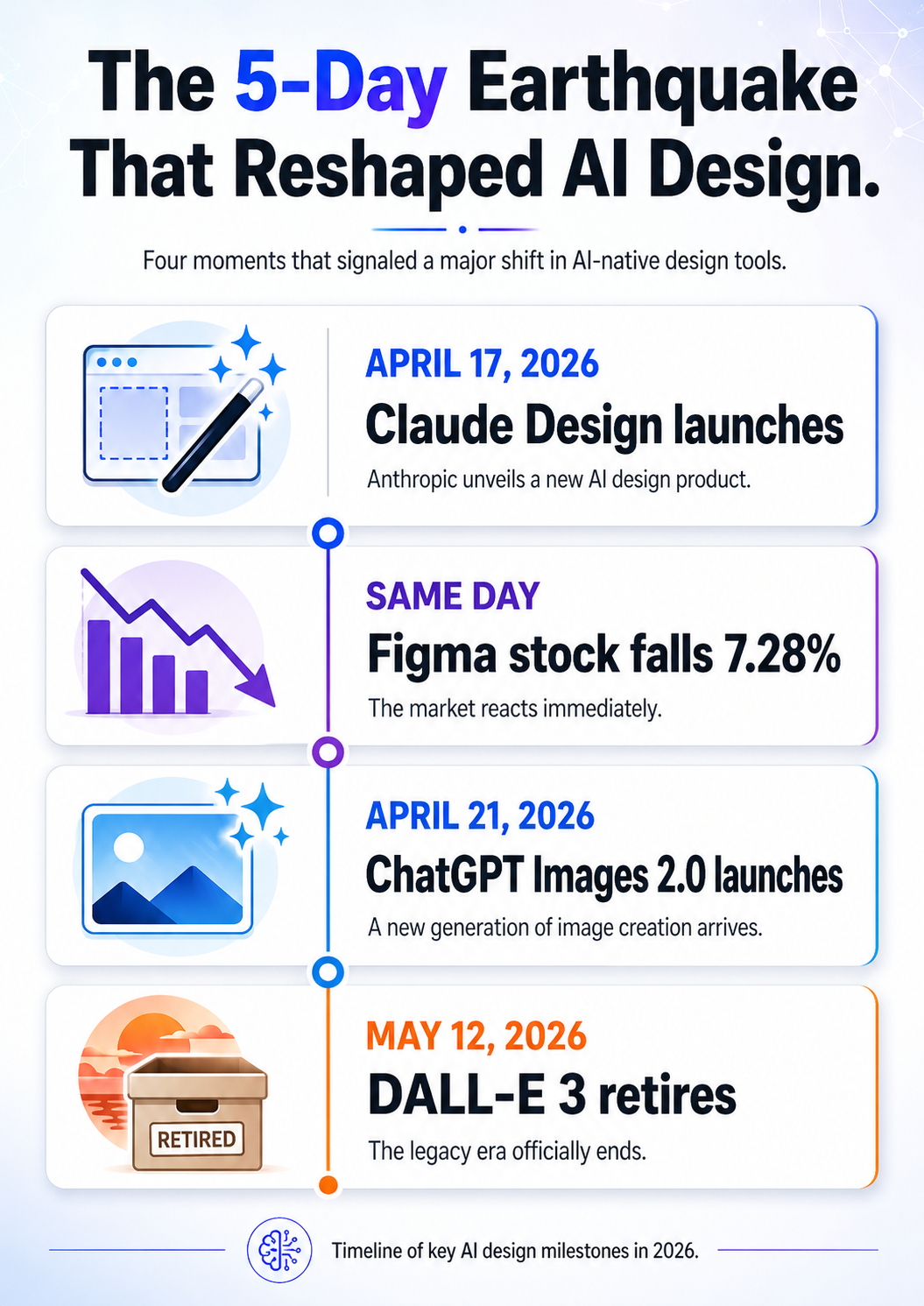
ChatGPT Images 2.0 produced a bold modern infographic: vertical timeline, four event blocks with colored icon tiles (pencil, falling chart, image frame, retired box), big readable stat lines, and accurate dates throughout. Every number rendered correctly. Built for social sharing.
Claude Design went editorial: a “The Field Report” masthead, serif typography, vertical timeline with bullet markers, and longer descriptive prose under each event. Less Instagram, more Wall Street Journal explainer.
One correction worth making. We fed both tools 7.28% as the Figma drop, and ChatGPT Images 2.0 rendered it flawlessly. The figure itself does not hold up. The best available reporting puts Figma’s launch-day fall at about 7%, which is the number we use everywhere else on this page, and no source supports the decimal. The model reproduced our input perfectly, which is exactly what we were testing, and it is a useful reminder that flawless text rendering is not the same thing as a checked fact.
Winner: tied, depends on the audience. Use ChatGPT Images 2.0 for social, embeds, and visual decks. Use Claude Design when the infographic lives inside a longer report or article and the words have to do real work.
What the Tests Actually Showed
Two patterns held across all three prompts. First, ChatGPT Images 2.0 produces finished pixels: polished, brand-readable, drop-in image assets that look great in isolation. Second, Claude Design produces editable surfaces: real components, real typography, real CTAs you can keep iterating on. Neither replaces the other. The tests confirmed what the feature lists already implied. Pick by deliverable, not by brand.
Use-Case Verdicts: Which One to Open First
Both tools are excellent. The real question is which one to open for the job in front of you, so we broke it down by deliverable.
Slide Decks and Investor Presentations
Winner: Claude Design. No contest for anything multi-slide. Claude Design builds full decks with brand consistency, embedded data visualisations, animated transitions between slides, and one-click export to PPTX or Canva. ChatGPT Images 2.0 cannot output a multi-slide deck, period. It can generate individual slide visuals, which you then drop into Claude Design or a regular slide tool. If you are starting from a research paper or a PDF, our guide on how to create a presentation with AI walks through the full workflow.
Mobile App Mockups and Prototypes
Winner: Claude Design. This is the use case that moved Figma’s stock. Claude Design generates interactive prototypes with components, screens, and flows, then hands off to Claude Code if you want to ship them. Start from the Wireframe template when you are still arguing about structure, and switch to Prototype once the layout is settled. ChatGPT Images 2.0 produces static screenshots that look like app screens, which is fine for a pitch image and useless if you need clickable flows or component reuse.
Marketing Landing Pages
Winner: Claude Design, with ChatGPT Images 2.0 as the sidekick. Claude Design produces full landing pages with sections, components, and brand styling pulled from your imported design system. Use ChatGPT Images 2.0 to generate the hero image, product shots, and feature graphics, then drop them in. This is the clearest example of the “use both in sequence” pattern, and it is how most teams have settled.
Hero Images, Banners, and Social Assets
Winner: ChatGPT Images 2.0. This is what it was built for. The 3:1 to 1:3 aspect-ratio range covers ultra-wide banners and ultra-tall mobile screens. The eight-image batch mode produces a full social campaign in one go. And the text rendering means you can ship marketing visuals with real readable copy on them. Claude Design is the wrong tool here, and it will feel like it.
Infographics and Data Visuals
Tied, depends on the input. If you are visualising structured data across multiple slides or sections, Claude Design wins because it builds full layouts with charts. If you need a single dense infographic with reasoned layout and accurate text labels, ChatGPT Images 2.0 wins on Thinking mode. Our step-by-step ChatGPT Images 2.0 guide has the prompt formulas that get infographics right on the first try.
Design Systems and Component Libraries
Winner: Claude Design, and it is not close. ChatGPT Images 2.0 has no design-system tooling, no component-library output, and no code handoff. Claude Design imports your system from a repo or a design file, self-checks its output against it, and lets an admin lock one approved standard across the whole team.
Pricing and Usage Limits Compared
The pricing story used to split into two completely different shapes. It no longer does, and that is good news for Claude Design. Since June, both products bill the same way: you pay for a plan, and your usage draws from that plan’s pool. Claude Design’s separate metered allowance is gone.
ChatGPT’s ladder has changed too, and this is the detail most comparisons still miss. There are now two Pro tiers, not one.
What ChatGPT Images 2.0 costs
Free gets you Instant mode with a dynamic cap that OpenAI does not publish. Plus at $20/month adds Thinking mode, web search, multi-image batching, and output verification. That is the tier that makes the model worth using. Above that, ChatGPT added a $100/month Pro tier in April 2026, sitting under the original $200/month Pro. Both were pitched at developers, and the headline multipliers attached to them, roughly five times Plus limits on the $100 tier and twenty times on the $200 tier, describe Codex capacity rather than image generation. For design work, Plus is the tier that matters. Business and Enterprise add admin controls on top.
If you are building on the API instead, gpt-image-2 is priced at $8 per million image input tokens and $30 per million image output tokens, per OpenAI’s published API pricing. That output price is actually lower than its predecessor’s, so the model got better and cheaper at the same time.
What Claude Design costs
There is no free tier. Claude Design starts at Claude Pro, $20/month, and is also included on Max at $100 or $200/month, Team, and Enterprise, though Enterprise administrators have it switched off by default. Team plans run from 5 to 150 seats. Whatever you are on, design work now draws from the same weekly pool as your chat and coding, and you can buy extra capacity as usage credits billed at standard API rates.
The practical takeaway is that the old advice to budget carefully for Claude Design is obsolete. The new advice is to manage your Effort setting, because a Max-effort Fable 5 session eats your shared pool far faster than a Sonnet 5 draft does. Running both tools officially means Claude Pro plus ChatGPT Plus, $40/month combined.
How to Use Both Together (the Workflow)
Experienced users landed on the same pattern within a week of both launches, and three months later it still holds. Do not pick one. Sequence them. Here is the workflow that wastes the least usage and produces the cleanest output.
- Start in ChatGPT Images 2.0 with Thinking mode on. Explore visual direction, generate hero images, batch product shots, and lock the look and feel before you commit to anything structural.
- Move to Claude Design with a fully specified brief and your generated reference images attached. Pick Sonnet 5 at medium Effort for the first pass, because you are checking structure, not polish, and there is no reason to spend Fable 5 usage on a draft you are going to throw away.
- Switch up to Opus 4.8 or Fable 5 once the structure is right and you want the detailed pass, especially if you are working against an imported design system with a lot of rules to hold in mind at once.
- Export from Claude Design to PPTX, Canva, or HTML depending on where the deliverable lives, then refine the final 5% in your usual tool, or hand off to Claude Code if it is a prototype that needs to ship as real product.
If your work starts as a document rather than a blank page, you can skip step one entirely. Our walkthrough on turning any PDF into a PowerPoint covers the document-to-deck path that pairs neatly with Claude Design’s PPTX export.
Will Claude Design Replace Figma?
Short answer: not yet, and not for everyone. Figma still wins on real-time multiplayer collaboration, fine-grained component control, plugins, and the muscle memory of an entire industry. Claude Design wins on speed from idea to first draft and on design-system-aware generation. The honest read from designers shipping with both is that Claude Design takes the first 70% of the work, meaning exploration, drafting, and the brand-aware first pass. Figma still owns the last 30%, which is refinement, handoff, and multiplayer review.
Where it gets uncomfortable for Figma is the investor deck and landing page categories. Claude Design’s PPTX and HTML export plus Canva integration mean you can finish those categories without ever opening Figma. That is what spooked the market on April 17, and the June overhaul made the case stronger, not weaker.
The Fello AI Angle: Both Models, One Subscription
You do not need a Claude Pro plan and a ChatGPT Plus plan to work with both models. Fello AI puts Claude, ChatGPT, Gemini, Grok, and DeepSeek behind a single $9.99/month subscription, with no per-model upcharge and no juggling two logins. It holds a 4.7-star rating across 27,000+ reviews, and for anyone running the “use both in sequence” workflow the maths is simple: $9.99/month against $40/month for Claude Pro plus ChatGPT Plus.
Be clear about what it is and is not. Fello AI is not a drop-in replacement for the Claude Design canvas or for Thinking-mode image generation, because those run inside Anthropic’s and OpenAI’s own web products. What it does give you is the conversational power of both models on your Mac, iPhone, and iPad, which covers the prompting, drafting, and iteration that surrounds the design work. Our guide to getting started with Fello AI walks through the setup. If you want native Claude on your laptop as well, our breakdown of Claude on Mac covers the desktop options, our guide to the ChatGPT desktop client for Mac does the same on the OpenAI side, and our rankings of the best AI models right now show where both companies sit.
Conclusion
Pick by deliverable, not by brand. Claude Design is the clear winner for slides, prototypes, mockups, landing pages, and design systems, The June overhaul removed the one thing holding it back, the separate usage meter that locked people out mid-project. ChatGPT Images 2.0 is the clear winner for hero images, banners, infographics, and any single-image output where text rendering matters, and nothing has come close to displacing it.
If you take one thing away, take this: stop asking which tool wins and start asking which model you should have selected. That question did not exist in April, and it is now the setting that most affects both your output quality and how fast you burn through your plan. Most serious workflows will use both tools, and the cheapest way to reach both models is one Fello AI subscription instead of two single-vendor plans.
FAQ
Is ChatGPT Images 2.0 better than Claude Design?
Neither is better overall, because they do different jobs. ChatGPT Images 2.0 wins for single-image work like hero shots, banners, and infographics with readable text. Claude Design wins for multi-page work like slide decks, prototypes, mockups, and design systems. Pick by deliverable. If you want an OpenAI product that competes directly with Claude Design, look at ChatGPT Work, not Images 2.0.
Which model does Claude Design use?
You choose it. Claude Design has a model picker offering Fable 5, Opus 4.8, Sonnet 5, and Haiku 4.5, plus a More models menu and an Effort control that defaults to High. Anthropic’s April 2026 launch post said the tool ran on Claude Opus 4.7 and was never updated, which is why so many guides still repeat it, but that is not what the product shows today.
Does Claude Design still have a separate weekly limit?
No. That changed on June 17, 2026. Claude Design used to be metered on its own weekly allowance, which people burned through in a single afternoon. It now draws from the same usage limits as Claude chat, Claude Code, and Cowork, so there is no separate design budget to track. Turning the Effort setting down on rough drafts is the easiest way to make that shared pool last.
Is ChatGPT Images 2.0 free?
Instant mode is available on the Free tier. OpenAI does not publish a fixed cap for it, and the limit moves with demand, so the number you get is whatever the app shows you on the day. Thinking mode, which adds web search, multi-image batching, and output verification, requires ChatGPT Plus at $20/month or higher.
Can Claude Design replace Figma?
For the first 70% of design work, meaning exploration, drafting, and brand-consistent first passes, Claude Design competes directly with Figma. For real-time multiplayer collaboration, fine-grained component control, and the last 30% of polish, Figma still leads. The categories where Claude Design can finish the job alone are investor decks and landing pages.