
You can learn to use AI confidently in 2 to 4 weeks, and you do not need to code, pay for a bootcamp, or understand the math behind neural networks to start. Knowing how to learn AI in 2026 comes down to two clear routes, becoming an AI power user who gets far more done with tools like Claude, ChatGPT and Gemini, or becoming an AI builder who writes the software behind them. Most people only need the first one, and that path is free, fast, and entirely no-code.
This roadmap covers both routes so you can pick the right one for your goal. You will get a realistic timeline, the five steps to power-user fluency, the best free courses worth your time, a short technical path for anyone who wants an AI career, and the fastest way to actually practice. The biggest mistake beginners make is collecting courses they never finish, so the focus here is on doing, not watching.
The Key Takeaways
- You can become a confident AI power user in 2 to 4 weeks with no coding, just short daily practice on real tasks.
- Becoming an AI builder takes longer, roughly 3 to 6 months for foundations and 6 to 12 months to be job-ready at around 10 hours a week.
- The best free starting point is Elements of AI from the University of Helsinki and MinnaLearn, free and built for non-coders.
- Prompt engineering did not die, it got simpler. Clear instructions with context, format and constraints beat memorised syntax and paid certificates.
- The fastest way to improve is using one AI tool every day, not stacking up tutorials you abandon halfway.
The Two Ways to Learn AI in 2026
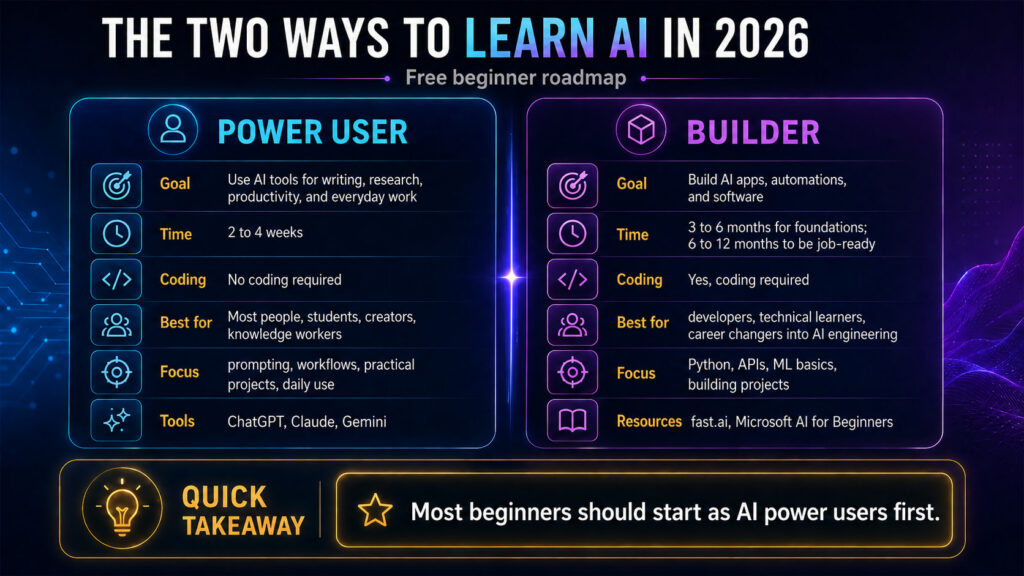
There are two honest answers to “how to learn AI,” and they suit very different people. The power user path is for anyone who wants to write faster, research better, automate busywork, or make smarter decisions with AI. The builder path is for people who want to engineer AI systems as a career, training models, wiring up APIs, and shipping AI products.
Pick based on your goal, not on what sounds impressive. The vast majority of people asking this question want the power-user path, and they can get real value this month. The builder path is a genuine career investment measured in months, and it sits on top of the same foundations, so starting as a power user is never wasted effort. If your real goal is job security rather than a job title, start with which jobs are hardest for AI to replace and pick the route that points there.
| Path | Who it’s for | What you learn | Time to value | Cost |
|---|---|---|---|---|
| AI Power User | Students, professionals, creators, anyone non-technical | Prompting, choosing the right model, automation, applying AI to real work | 2 to 4 weeks | Free to ~$10–20/mo for a paid tool |
| AI Builder | Future AI engineers and developers | Python, math, machine learning, APIs, RAG, AI agents | 6 to 12 months to job-ready | Mostly free courses, optional paid certs |
How Long Does It Take to Learn AI?
You can become a confident AI power user in 2 to 4 weeks of daily practice, with no coding required. Becoming an AI builder takes longer, roughly 3 to 6 months to grasp the foundations and 6 to 12 months to be job-ready, assuming about 10 hours of study a week. The learning curve is far gentler than it was a few years ago, because modern models understand plain English instead of demanding rigid commands.
The single biggest factor is not talent or background, it is consistency. Thirty minutes a day on real tasks will teach you more than a weekend binge of video tutorials you never apply.
Path 1: 5 Steps to Learn AI as a Power User
This is the no-code route, and it is where almost everyone should begin. You can work through these five steps in a few weeks, and you only need a free AI account to follow along.
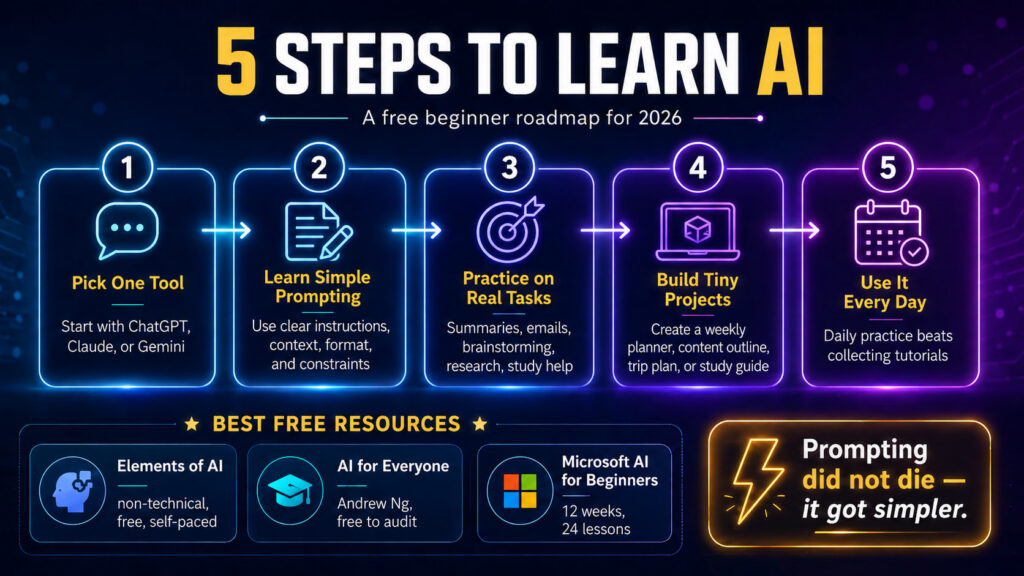
- Build a mental model of AI. Spend a few hours understanding what AI can and cannot do, where it makes things up, and why it sometimes sounds confident while being wrong. A short free course like Elements of AI is plenty.
- Learn to prompt clearly. Give the model context, tell it the format you want, and set constraints. That is 90% of good prompting in 2026, and our guide on how to learn AI prompting walks through it from scratch.
- Pick one capable tool and use it daily. Depth beats variety at the start. Choose one strong model, Claude, ChatGPT or Gemini, and bring it into your actual work. If you settle on one, our walkthroughs on how to learn Claude and Claude Code, how to learn ChatGPT, and how to learn Gemini give you a focused path.
- Apply it to real tasks. Summarise documents, draft emails, plan a trip, debug a spreadsheet, study for an exam. Real stakes teach faster than practice prompts.
- Go deeper only where you need it. Once the basics click, branch into automation, coding help, or a specific tool, depending on your goals.
Why Prompting Is Simpler Than People Claim
The version of “prompt engineering” built on elaborate syntax and paid certifications is largely outdated. Today’s models read natural language well, so clear communication matters more than secret formulas. Tell the model who it is helping, give it the relevant background, and say exactly what a good answer looks like.
The fastest way to improve is to iterate. If the first answer misses, do not start over, just tell the model what to fix. Treating it like a conversation with a sharp but literal assistant gets better results than any template.
Practical Beginner Projects
Skills stick when you ship something small and real. Use AI to plan a week of meals around a budget, turn messy notes into a study guide, build a simple weekly newsletter, or analyse your spending and suggest cuts. Putting ChatGPT to work on real tasks like managing money teaches more in an afternoon than a month of passive reading.
Keep each project tiny and finish it. A messy, completed project beats a perfect one you never start, and every finished task makes the next prompt sharper.
Best Free Resources to Learn AI
You do not need to pay to learn AI. These free, well-regarded courses cover the power-user basics and the technical foundations, and most rankers recommend the same short list. Start with one, finish it, then move on. For a wider pick with and without certificates, browse our roundup of the best free AI courses. Some vendors go further than courses; Anthropic now sells proctored exams too, and our guide to Claude certification covers who is actually allowed to sit them.
Elements of AI (Free, Self-Paced, No Coding)
Created by the University of Helsinki and MinnaLearn, the Elements of AI introductory course is the best starting point for non-experts. It runs across six short modules, needs no programming or complicated math, and builds the mental model that makes everything else easier. Most learners finish in a few weeks at their own pace, and the follow-up course, Building AI, adds light Python for anyone curious about the technical side.
Andrew Ng’s “AI for Everyone” (Free to Audit, Non-Technical)
This Coursera course gives a clear, jargon-free overview of what AI is, what it can do, and how it affects work and society. It is built for non-technical learners and pairs well with Elements of AI as a second pass.
fast.ai (Free, Project-First, for Builders)
If you want to write code, fast.ai teaches practical deep learning top-down, building real models early instead of front-loading months of theory. It is a favourite for career switchers who already know a little Python.
Microsoft AI for Beginners (Free, 12 Weeks, 24 Lessons)
Microsoft’s AI for Beginners is a structured 12-week, 24-lesson curriculum with quizzes and labs covering core AI concepts, frameworks, and ethics. It bridges the gap between casual use and real building.
For maths, Khan Academy covers linear algebra, calculus and statistics for free, and you only need it if you take the builder path. You can also test most paid AI tools at no cost first; our guide to free trials for AI tools shows how, and students can stack that with student discounts on AI tools to keep costs near zero.
Path 2: How to Learn AI as a Builder
If you want an AI career as an engineer, the technical path is real work, but every step is free to start. It sits on a stack of foundations, and skipping them usually slows you down later rather than speeding you up.
Begin with Python, the default language of AI, since almost every library and framework targets it first. Layer in the maths that matters, linear algebra, calculus, probability and statistics, at the depth your goal requires. Then learn machine learning and deep learning fundamentals, followed by the applied modern stack, working with APIs from the leading AI models available today, building retrieval-augmented generation pipelines, and finally AI agents and orchestration.
A realistic schedule at 10 hours a week runs about three months on foundations, three more on applied AI and APIs, and a final stretch on agents and deployment. Build a portfolio of small projects as you go, because shipped work, not certificates, is what gets you hired. Knowing the players helps too, so it helps to understand the rivalry between the major AI labs building these models.
Practice AI Across Every Model in One Place
The power-user path rewards one habit above all, using AI every day, and that is easier when every major model lives behind a single app. Fello AI puts Claude, ChatGPT, Gemini, Grok and DeepSeek in one place on your Mac, so you can run the same prompt across several models and learn which one wins for which job.
That comparison is a fast teacher. You see why one model writes better, another reasons better, and another codes better, which sharpens both your prompting and your judgement. It is one subscription at $9.99 a month instead of juggling several paid accounts, and you can start with free trials before committing. Check the frequently asked questions if you want the details on how it works.
Conclusion
The honest answer to how to learn AI in 2026 is to stop preparing and start using it. Pick the power-user path, spend a few hours on Elements of AI, then bring one strong model into your real work every day for a month. That alone will put you ahead of most people, and the builder path is there if your goals demand it later.
Choose one model, practise daily, and finish small projects. If you want the easiest way to practise across every major model at once, try Fello AI on your Mac and start comparing answers today.
FAQ
Can I learn AI without coding?
Yes. The fastest-growing AI skills, prompting, automation and AI strategy, are completely no-code. You only need programming if you want to build or fine-tune models yourself, which most people never do. Most learners get real value from AI without writing a single line of code.
How long does it take to learn AI?
You can become a confident power user in 2 to 4 weeks of daily practice. Becoming an AI builder takes longer, roughly 3 to 6 months for the foundations and 6 to 12 months to be job-ready at about 10 hours a week.
Do I need math to learn AI?
Not for the power-user path. You only need linear algebra, calculus and statistics if you take the builder path and want to train models yourself, and Khan Academy covers all of it for free.
Is AI hard to learn?
Less than it used to be. Modern models understand plain English, so you can get useful results on day one. The power-user basics are easy; the builder path is harder but still beginner-friendly if you go step by step.
What is the best free way to learn AI?
Start with Elements of AI from the University of Helsinki, then practise daily with a capable model on real tasks. Pair free courses with free trials of paid tools, and you can learn the essentials without spending anything.