Every app runs on iPhone Duo, but only some of them use the 7.6-inch inner display properly. The best iPhone Duo apps were rebuilt for the fold before the phone went on sale on 23 October 2026. Things 3 grows a sidebar of your lists, Fantastical shows calendars and tasks together, and Flighty turns the half-folded phone into a tray-table flight map. Older apps sit in a box in the middle of the screen with empty space around them.
This list covers 10 apps worth installing on day one, what each one does differently on the Duo, and what it costs in the US App Store. After the list comes Apple's own answer to the question most new owners ask first: will all my apps work? You will also learn how to check any app before you rely on it.
The Key Takeaways
- All apps run, not all apps fit: Apple says apps built with the iOS 26 SDK or earlier open as a centred window on the inner display, while apps built with the iOS 27.1 SDK use the full screen.
- Confirmed Duo layouts: Things 3, Fantastical, CARROT Weather, Flighty, NYT Cooking, Bear and Penbook all list iPhone Duo support in their own App Store release notes.
- Split View is new to iPhone: the Duo is the first iPhone that runs two apps side by side, and you can save app pairs to reopen later.
- Cheapest upgrade: Bear Pro costs $2.99 a month, and Things 3 is a $9.99 one-time purchase with no subscription.
The Best iPhone Duo Apps at a Glance
The 10 best iPhone Duo apps split into three jobs: getting work done, running your day, and switching off. The table shows what each app changes on the fold and where its Duo support is documented. Prices are US App Store prices checked on 27 October 2026.
| App | What changes on iPhone Duo | Price (US) | Duo support documented in |
|---|---|---|---|
| Things 3 | Sidebar of lists when unfolded, controls down the right edge | $9.99 one-time | App Store release notes, Apple newsroom |
| Fantastical | Calendars, tasks and menus on one screen | Free, Premium $6.99/mo | App Store release notes, Apple newsroom |
| Fello AI | AI chat next to the app you are working in | Free, with subscription | Fello AI team |
| Bear | Notes and organization on screen at once | Free, Pro $2.99/mo | App Store release notes, Apple newsroom |
| Penbook | Two-page handwriting stationery | Free, Premium yearly or lifetime | App Store release notes |
| CARROT Weather | Bigger weather maps, side-by-side radar | Free, Premium $4.99/mo | App Store release notes |
| Flighty | Tent-mode flight map for the tray table | Free, Pro $9.99/mo | App Store release notes, Apple newsroom |
| NYT Cooking | Recipe and video on a half-folded phone | Free, subscription for full access | App Store release notes, Apple newsroom |
| Netflix | Clips on the outer screen, keep watching inside | Netflix subscription | Apple newsroom |
| Headspace | Runs as-is, no Duo-specific layout announced | $12.99/mo or $69.99/yr | Runs (Apple: all apps run) |
Best iPhone Duo Apps for Getting Work Done
Productivity apps gain the most from the Duo, because the 7.6-inch inner display finally has room for the sidebar and second column that these apps already show on iPad. Apple's 22 October developer release singles out note-taking and task apps as "a natural fit for the larger canvas."
1. Things 3: Best to-do app for iPhone Duo
Things 3 is the most complete Duo update on this list. Cultured Code's release notes say Things "reshapes itself to make the most of every pose." That covers the phone closed, open, folded like a book, or sharing the screen with another app in Split View. Unfold it and a new sidebar shows all your lists, so you move between them the way you would on a Mac.
The controls move too.
On the Duo, Things puts its toolbar in a bar down the right side of the screen, within reach of your thumb. That bar holds the Magic Plus button, which you drag into a list to drop a to-do exactly where you want it. Connect a keyboard and you get the full set of Things keyboard shortcuts. Things 3 for iPhone is a $9.99 one-time purchase, with free sync through Things Cloud. The Mac and iPad apps are sold separately.
2. Fantastical: Best calendar app for iPhone Duo
Fantastical added iPhone Duo support in October, and Apple used it as one of its launch examples. On the inner display, Fantastical shows your calendars, tasks and menus together, so a whole week fits on one screen instead of three taps. Flexibits CEO Michael Simmons told Apple it "feels like the full Fantastical experience from Mac and iPad, right in your pocket."
The natural-language parser is still the reason to pick Fantastical: type a plain sentence such as lunch with Ana on Friday at 1pm and it builds the event. On the Duo, Simmons suggests pairing it with Mail or Cardhop in Split View to plan the week beside your inbox. Fantastical is free to download. Flexibits Premium costs $6.99 a month or $56.99 a year, with a 14-day free trial. Our guide to AI calendar assistants that work with iCloud compares it with the alternatives on Mac.
3. Fello AI: Best AI app to keep beside your work
Fello AI turns the Duo's Split View into an AI workspace you never have to leave. Put your Mail draft, a PDF in Files or a Safari page on one half of the inner display. Open Fello AI on the other half and ask about what you are looking at, without switching apps. It is the only AI app on this list, because this is the one AI job the fold makes better.
One subscription covers GPT, Claude, Gemini, Grok and DeepSeek, so you pick the model for the task inside the same chat. Fello AI also searches the web, reads and creates Word, Excel, PowerPoint and PDF files, and generates images. The Share extension in the October update sends a file from another app straight into a chat. Fello AI is free to download, with a subscription for full access, and runs on iPhone, iPad and Mac. For the wider field, see our ranking of the best AI apps for iPhone.
4. Bear: Best notes app for iPhone Duo
Bear announced "Bear is now ready for iPhone Duo!" in its October release. Apple's newsroom names it alongside Things as an app that makes "task management and organization simpler onscreen at once."
Bear writes in Markdown, supports tables, math formulas and wikilinks, and its Info Panel shows a table of contents and backlinks for long notes. Bear is free to download. Bear Pro costs $2.99 a month or $29.99 a year. It adds iCloud sync across iPhone, iPad and Mac, themes, export to PDF and DOCX, and search inside photos and PDFs.
5. Penbook: Best handwriting app for iPhone Duo
Penbook is the one handwriting app on this list, and its Duo update is built around the fold. Version 8.1 "adds support for poses, new stationery sizes, and a minimap update." The App Store page promises "expansive two-page stationeries that perfectly fit iPhone Duo." Apple's editors also picked it for the App Store's Great Apps and Games on iPhone Duo collection.
The catch is the pen.
Apple says iPhone Duo will support Apple Pencil with USB-C "later this year," so for now you write with a finger. Penbook is free for one notebook with every stationery and writing tool. Penbook Premium, sold as a yearly subscription or a one-time lifetime purchase, unlocks unlimited notebooks and export.
Best iPhone Duo Apps for Everyday Life
Everyday apps on the Duo get their best features from the half-folded pose, where the phone stands on its own like a small laptop. Apple's developer tools include a hinge API that tells an app the angle of the display, and these three apps use the pose rather than just the bigger screen.
6. CARROT Weather: Best weather app for iPhone Duo
CARROT Weather is ready for iPhone Duo "with expansive weather maps, side-by-side radar, multi-window support, and more," according to its own App Store update. Version 6.9.2 added iPhone Duo support and multi-window support. It also made Super Res Radar's dual-pane mode split vertically in portrait and horizontally in landscape on larger screens.
The sarcastic robot forecaster is unchanged, which is the point of CARROT. The app is free to download. CARROT Premium costs $4.99 a month or $19.99 a year and unlocks extra data sources, notifications, widgets and Apple Watch complications. Super Res Radar sits in the Premium Ultra tier.
7. Flighty: Best travel app for iPhone Duo
Flighty has the cleverest use of the fold on this list. Its release note reads: "During a flight, prop iPhone Duo up like a tent to follow your progress hands-free." The phone stands on the tray table and shows a live, glanceable map of your flight. Apple's newsroom calls it "a dedicated flight-tracking mode for when iPhone Duo is propped up."
Flighty is free to download, and Pro is free on your first flight, with no trial required. After that, Flighty Pro costs $9.99 a month or $59.99 a year, with lifetime and family plans. Flighty also appears in our wider list of the best travel apps.
8. NYT Cooking: Best recipe app for iPhone Duo
NYT Cooking shipped "iPhone Duo Support" and then "iPhone Duo Enhancements" in two updates the week the phone launched. Partially folded on a kitchen counter, the Duo shows more detailed recipes with richer visuals, so you can follow each step without touching the screen with floury hands.
Camilla Velasquez, general manager of New York Times Cooking, told Apple: "With iPhone Duo propped on the counter, users can follow each step, set timers, and watch their favorite recipe creators demonstrate techniques." The app is free to download, and full access to the recipe archive needs a New York Times Cooking subscription.
Best iPhone Duo Apps for Switching Off
Entertainment and wellness apps use the Duo in opposite ways: Netflix wants the biggest screen you have, and Headspace barely needs a screen at all.
9. Netflix: Best streaming app for iPhone Duo
Netflix is the app Apple used to show what the inner display is for. You scroll through Netflix Clips on the outer display, then open the phone and keep watching on the larger inner screen, with Clips switching between vertical and horizontal views. Tom Richards, Netflix's senior director of Engineering, said the experience "adapts as iPhone Duo opens, closes, or turns."
The inner display has a nano-texture finish that cuts glare, and propped open on a table the Duo plays video hands-free without a stand. Netflix is free to download and needs a Netflix subscription.
10. Headspace: Best meditation app for iPhone Duo
Headspace works on iPhone Duo, and it is on this list because meditation is the one job where the screen size does not matter. A sleepcast or a guided breathing session runs just as well with the phone folded shut on your nightstand as it does open. The outer display is enough to start a session.
Headspace has not published a Duo-specific layout. Its release notes since September all read "bug fixes and performance improvements," so expect the standard iPhone app rather than a reworked one. Headspace costs $12.99 a month or $69.99 a year in the US, with a free trial.
Do All Apps Work on the iPhone Duo?
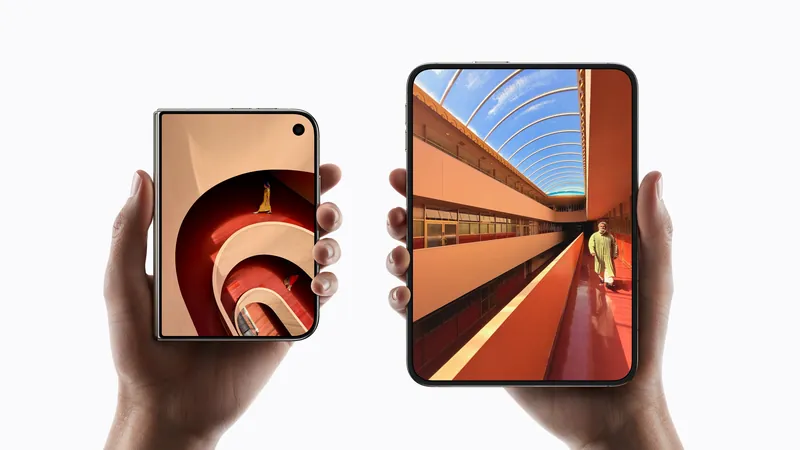
Yes, every iPhone app runs on the iPhone Duo, but how much of the inner display it fills depends on when the developer last rebuilt it. Apple's developer guide states that "all apps will run on iPhone Duo," then sorts them into three tiers by the software development kit (SDK) the app was built with.
The Three Tiers Apple Describes
According to Apple's iPhone Duo developer guide, the tier depends only on the SDK, not on the app itself:
| App built with | What happens on the inner display |
|---|---|
| iOS 26 SDK or earlier | Runs but "won't adapt to all layouts." The app sits "in the center of the display, with empty space surrounding the window." |
| iOS 27 SDK | Resizes "to fill most of the inner display" but still avoids the status bar on the right edge. |
| iOS 27.1 SDK or later | "Optimized for iPhone Duo." Uses the full display, with toolbars and tab bars running vertically below the status bar. |
An app in the first tier still works normally. You tap, scroll and type as on any iPhone, and an update from its developer is what moves it to full screen. iPhone Duo ships with iOS 27.1, and our iOS 27 guide tracks what each point release adds.
How to Check an App Before You Rely on It
The quickest check is the App Store badge. When a developer submits iPhone Duo screenshots, Apple shows a Made for iPhone Duo badge on the app's product page. After that, read the app's version history and look for a release note that mentions the Duo, which is how every confirmed app in this list was checked.
Expect the list to grow. Apple's 22 October developer announcement says more app updates will roll out "throughout the year." Apple has also told developers that from April 2027, apps submitted to the App Store will need iPhone Duo screenshots.
Can iPhone Duo Run iPad Apps?
iPhone Duo runs iPhone apps, and Apple's guidance documents only how iPhone apps behave on it. Apple tells developers that on the inner display, an iPhone app "should look like a natural extension of its iPad layout." You can see it in Things 3, which adds a sidebar of lists when unfolded, and in Fantastical, which shows calendars, tasks and menus together.
How to Use Two Apps Side by Side on iPhone Duo
iPhone Duo runs two apps side by side with Split View, the first iPhone that can. Apple says you move an app to one side of the inner display and launch a second app on the other. You can also swap apps quickly, open two windows of the same app such as Safari, and save pairs of apps to come back to later.
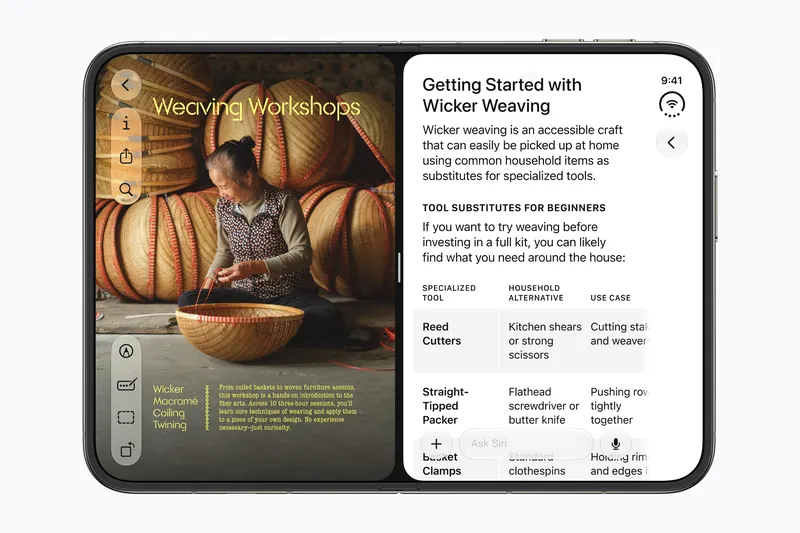
Saved pairs are where the apps on this list work best together, and four are worth saving on day one.
Fantastical and Mail lets you plan the week next to your inbox, the pairing Flexibits itself suggests. Things 3 and Fantastical puts your to-dos beside the calendar you are fitting them into. Fello AI and Safari or Files lets you ask about the page or PDF you are reading without leaving it. Bear and Safari keeps research on one side and notes on the other.
An app that has not been rebuilt for the Duo may not resize well into half the screen, so test a pair before you depend on it. Our full iPhone Duo guide covers Split View with Siri AI and every other AI feature on the phone.
Which iPhone Duo Apps to Install First
Install Things 3 and Fantastical first, because they change how the phone works every day, then add Fello AI for Split View. Those three turn the Duo's inner display into a small desk: a task list, a calendar and an assistant that sit side by side instead of behind each other. Add Flighty before your next flight and NYT Cooking before your next dinner, because those two show what the half-folded pose is for.
Leave the rest of your home screen alone for a few weeks. Apple expects updates to keep arriving through the year, so an app sitting in a box today is likely to fill the screen after its next update.
Frequently Asked Questions
What are the best iPhone Duo apps?
The best iPhone Duo apps are Things 3, Fantastical, Fello AI, Bear, Penbook, CARROT Weather, Flighty, NYT Cooking, Netflix and Headspace. All except Fello AI and Headspace document iPhone Duo support in their App Store release notes or in Apple's 22 October 2026 announcement. Fello AI's support is confirmed by its own team, and Headspace runs as a standard iPhone app.
Do all apps work on the iPhone Duo?
Yes. Apple says all apps will run on iPhone Duo. Apps built with the iOS 26 SDK or earlier appear as a centred window with empty space around it. Apps built with the iOS 27 SDK fill most of the inner display. Apps built with the iOS 27.1 SDK or later use the full screen.
Can you run two apps at once on iPhone Duo?
Yes. Split View on iPhone Duo runs two apps side by side on the inner display, the first time an iPhone can do this. You can also open two windows of the same app, swap apps quickly, and save app pairs to reopen later.
How do I know if an app is optimized for iPhone Duo?
Look for the Made for iPhone Duo badge on the app's App Store page, which Apple shows when the developer has submitted iPhone Duo screenshots. You can also check the app's version history for a release note that mentions iPhone Duo.
Why does an app have empty space around it on iPhone Duo?
The app was last built with the iOS 26 SDK or earlier. Apple's guidance says these apps appear in the centre of the inner display with empty space around the window. The app still works normally, and it fills more of the screen once its developer ships an update built with a newer SDK.