To check whether Gemini is down, open the Gemini row on the Google Workspace Status Dashboard. Then look for a spike of user reports, because the dashboard does not log every outage. If both look normal, the problem is almost always on your side, and a private window or a new chat usually tells you which part.
The distinction matters because the two problems have different fixes. A real Gemini outage leaves you nothing to repair, so the useful move is to switch tools. A local problem, such as a stale session, an extension, a VPN or a usage limit, usually clears in a minute. This guide shows how to tell them apart, which Google status page covers which Gemini product, how long recent outages lasted, and what to use while you wait.
Key Takeaways
- Check here first: the Google Workspace Status Dashboard has a row named Gemini, and Google posts Gemini app incidents there.
- Green is not proof: on 8 October 2026 nearly 10,000 people reported Gemini problems on Downdetector, and the dashboard logged no incident that day.
- Developers use other pages: the Gemini API and AI Studio have their own status page, and Gemini on Google Cloud is on Google Cloud Service Health.
- Outages vary widely: Google's 2026 records run from about 7 hours (11 September) to more than 4 days (4 to 8 May).
- Bard is gone: Google renamed Bard to Gemini on 8 February 2024, so there is no Bard status to check.
Is Gemini Down Right Now? How to Check
Check Google's status dashboard, Google's accounts on X and other users' reports, in that order. The three checks take about a minute, so run them before you troubleshoot your own device.
1. Check the Gemini row on Google's status dashboard
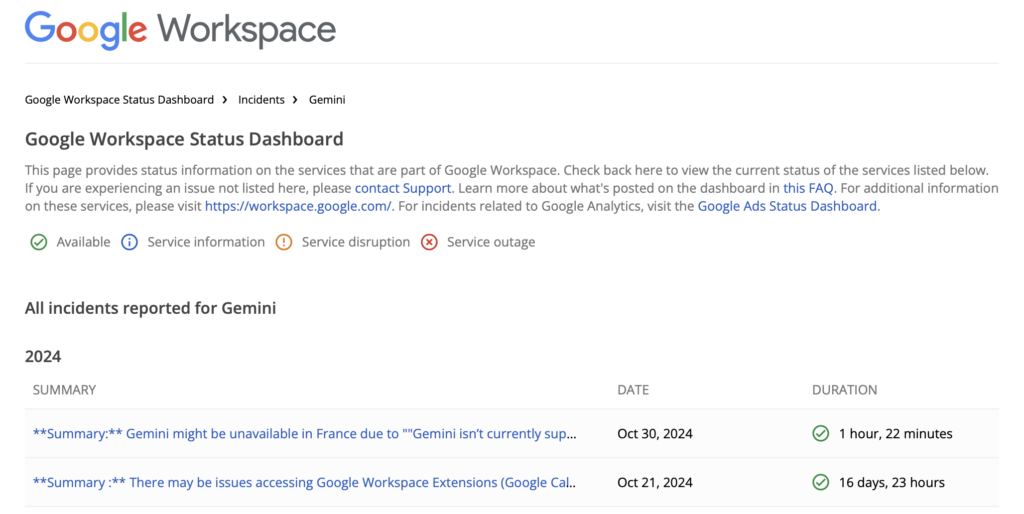
Google posts Gemini app incidents on the Google Workspace Status Dashboard, in a row named Gemini. Despite the Workspace name, this is the right page for the Gemini app. Google's report on the 10 June 2026 outage described Gemini failing "across all surfaces, including web, mobile (iOS and Android), and integrations within Google Chrome." The same dashboard has a separate row, Gemini Notebook, for NotebookLM.
Bard no longer exists as a separate service. Google renamed Bard to Gemini on 8 February 2024, so any guide that tells you to look for a Bard entry is out of date.
2. Check Google's own channels on X
Google runs the Gemini app account as @GeminiApp on X. For Gemini on Google Cloud, the account is @googlecloud on X. Neither account is a status feed, but a large incident usually draws replies there within minutes.
3. Check where other users report problems
r/GeminiAI and outage trackers such as Downdetector fill up quickly during a real incident. A sharp spike of reports is strong evidence of a Google-side problem. A flat line is weaker evidence, because trackers only count the people who bother to report.
Why a Green Google Dashboard Is Not Proof
The Google Workspace Status Dashboard misses some Gemini outages entirely. On 8 October 2026, GV Wire reported more than 6,000 Downdetector reports about Gemini by 9:30 a.m. Pacific time, and nearly 10,000 ten minutes later. Most of those users reported problems with generating responses. The dashboard's Gemini history has no entry for that day.
As of 26 October 2026, the most recent Gemini incident on the dashboard is 11 September 2026. So when Gemini fails and the dashboard is green, check Downdetector and r/GeminiAI before you blame your own setup. If thousands of people report the same failure at the same time, the dashboard is behind, not wrong about your device.
Which Google Status Page Covers Which Gemini Product
Google runs three separate status pages, and each one covers a different Gemini product. Checking the wrong page is the most common reason people conclude Gemini is fine when it is not.
| You use | Status page to check |
|---|---|
| The Gemini app (gemini.google.com, iPhone, Android, Mac, Gemini in Chrome) | Google Workspace Status Dashboard, Gemini row |
| NotebookLM | Google Workspace Status Dashboard, Gemini Notebook row |
| The Gemini API or Google AI Studio | aistudio.google.com/status |
| Gemini on Google Cloud (Gemini on Agent Platform, Gemini Enterprise, Gemini Code Assist) | Google Cloud Service Health |
Developers calling the Gemini API should start with the API's own page. Google's Gemini API documentation links the AI Studio status page as the API's status page. Teams running Gemini through Google Cloud should check Google Cloud Service Health, which lists Gemini on Agent Platform, Gemini Enterprise and Gemini Code Assist as separate products. A green Google Cloud page says nothing about the consumer Gemini app, and the reverse is also true.
Why Is Gemini Not Working When Nobody Else Reports a Problem?
When the dashboard is green and nobody else is complaining, Gemini is failing on your side. Work through the checks below in order, because the first ones fix most cases.
Rule Out a Usage Limit
A usage limit looks like an outage but is not one. Google's Gemini limits page says Gemini Apps have compute-based limits that refresh every 5 hours until you reach a weekly limit. A message such as "Too many requests in a short time period" points to a limit or high traffic, and waiting is the fix. Our guide to Gemini's usage limits explains what each plan gets.
Read the Error Code
A number on the error message tells you more than the message itself. Google's error-code help page says code 1060 means Gemini is not available in your country or region. Codes such as (13), 1099 and 1076 mean Gemini hit an unexpected problem while processing your prompt. Those same codes also appeared during real outages: users saw (13) during the May 2026 incident and 1099 or 1076 during the June 2026 outage. Our guide to Gemini's "Something went wrong" error codes covers each one.
Clear the Local Causes
- Retry, then start a new chat. Google's own first two steps are to resubmit the prompt and to open a new chat without the old context.
- Remove attachments. A large or unsupported file blocks the prompt. Remove it and try again.
- Open Gemini in a private window. A private window runs without extensions and without your cached session. If Gemini works there, an extension or stored site data is the cause.
- Switch networks. Move from Wi-Fi to mobile data, and turn off any VPN. A work or school network sometimes blocks Gemini on purpose.
- Try the browser instead of the app. If gemini.google.com works but the Gemini app does not, close and reopen the app, update it, then reinstall it.
- Test the API separately. Developers whose API calls succeed while the web app fails know the problem is in the Gemini app, not in their integration.
If Gemini responds but takes a long time, that is a different problem with different fixes. Our guide to why Gemini is so slow covers the model and thinking-level settings that cause it.
Why Does Gemini Go Down?
Gemini goes down mostly because of Google's own software changes and databases, not attacks. Google's 2026 incident reports name the cause for each recorded outage, and they follow a clear pattern.
- Database capacity. Google blamed the 4 to 8 May 2026 incident on "a combination of insufficient database resources, and application bugs." The 10 June 2026 outage started with "extreme read contention" in a database that stores tool metadata for Gemini.
- Bad rollouts. Google said the 11 September 2026 errors with Gemini 3.1 Pro on the web and in the Gemini app were "triggered by a recent rollout" and fixed with a code change.
- Data jobs that go wrong. From 18 to 22 February 2026, an internal job deleted conversation metadata, and some users' chat history disappeared from the sidebar. Google restored it from backups.
None of these causes is anything you fix on your side. Claims of a cyberattack circulate during most long outages, but none of Google's 2026 Gemini incident reports names one.
How Long Will Gemini Be Down?
Nobody can predict the length of a single Gemini outage, but Google's own 2026 records show the range. The table below lists every Gemini app incident on the Google Workspace Status Dashboard in 2026, plus the 8 October outage the dashboard did not log.
| Date (2026) | What users saw | How long |
|---|---|---|
| 18 to 22 February | Chat history missing from the sidebar | About 4 days |
| 4 to 8 May | "Something went wrong (13)" in conversations | About 4 days |
| 10 June | Errors 1099 and 1076 on every surface | 6 hours 55 minutes of elevated errors; 14 hours 49 minutes to full recovery |
| 11 September | Intermittent errors with Gemini 3.1 Pro | About 7 hours 20 minutes |
| 8 October | Nearly 10,000 Downdetector reports | Not logged by Google |
In Google's 2026 records, the partial problems lasted longest. The May incident did not take Gemini offline, it broke some conversations for four days. So if Gemini is still flaky after half an hour, stop retrying and move the work somewhere else. To follow an incident, keep the Gemini row on the status dashboard open, because Google updates the entry as the fix progresses.
What to Do When Gemini Is Down
When Gemini is down, switch to another assistant, because nothing on your side fixes a Google outage. You have three options until Gemini comes back.
1. Switch to another assistant
- Claude by Anthropic handles long documents, writing and analysis.
- ChatGPT by OpenAI covers writing, coding, images and voice.
- Microsoft Copilot fits work that already lives in Microsoft 365.
Every assistant has outages too. Our guides to checking whether ChatGPT is down and whether Claude is not responding cover their status pages.
2. Run a model on your own hardware
Open-weight models from Hugging Face run on your own machine and keep working when every cloud service is down. They take setup time and trail the best hosted models in quality, so treat them as a floor, not a replacement.
3. Do the parts that never needed AI
An outage is a good time for outlining, editing what you already have, and making decisions. Those steps keep the project moving without any model.
How to Protect Your Gemini Work Before the Next Outage
To protect your Gemini work, export the answers you need and keep your best prompts outside Gemini. The real risk in an outage is losing access to work that only exists in the chat.
- Export answers you will need. Google's export help page shows how: below a response, click Share & export, then Export to Docs, and Gemini saves a new doc in Google Drive. Tables export to Google Sheets the same way.
- Know where your history lives. When chats vanished from the sidebar in February 2026, Google pointed users to Gemini Apps Activity, which still held every conversation.
- Keep your best prompts outside Gemini. Store them in a notes app or a document, so they survive any single service going down.
Keep Working When Gemini Is Down With Fello AI
When Gemini goes down mid-task, you should not have to sign up for a new assistant and rebuild your context from scratch. Fello AI lets you switch to Claude, GPT, Grok or DeepSeek in the same window and keep going, without a second account or a second subscription.
Gemini is in Fello AI too, alongside Perplexity, Kimi, Qwen and others. So you keep Google's models on the days they work, and switch the moment they do not. Fello AI runs on Mac, iPhone and iPad and has a free tier. If you would rather keep Gemini itself on your Mac, our guides to the Gemini app for Mac and to a Gemini desktop client for macOS cover both routes.
Final Thoughts
Most of the time Gemini is not down. A usage limit, a stale session, an extension or a VPN explains most failures, and a private window or a new chat settles it in under a minute. Check the Gemini row on Google's dashboard first, then the user reports, because the dashboard missed the 8 October 2026 outage.
When Gemini really is down, nothing on your side helps, and Google's own records show outages lasting from hours to days. The one thing that decides whether you lose ten minutes or an afternoon is a second assistant you set up before you need it.
FAQs
Is Google Gemini down right now?
Check the Gemini row on the Google Workspace Status Dashboard, then Downdetector or r/GeminiAI for a spike of reports. If both look normal, open Gemini in a private window or start a new chat, because the problem is most likely on your side.
How long do Gemini outages last?
Google's 2026 records range from about 7 hours on 11 September to more than 4 days from 4 to 8 May. The 10 June outage had 6 hours 55 minutes of elevated errors. Google posts updates on its status dashboard as each fix progresses, and the Google blog covers larger product changes.
Does a Google Cloud outage take down the Gemini app?
Not necessarily. Google tracks the Gemini app and Google Cloud on separate status pages, and the 2026 Gemini app outages came from the app's own databases and rollouts. Check the Gemini row on the Workspace dashboard for the app and Google Cloud Service Health for Gemini on Google Cloud.
How can I tell if the problem is local or a Gemini outage?
Open Gemini on another device or network. If it works there, the problem is local. If it fails everywhere and other users report the same failure, Gemini is down, even when the Google status dashboard is still green.
Is Bard down?
Bard no longer exists. Google renamed Bard to Gemini on 8 February 2024, so check the Gemini row on the Google Workspace Status Dashboard instead.
What are the best alternatives to Gemini during an outage?
Claude, ChatGPT and Microsoft Copilot all cover most of what Gemini does. Signing up for one mid-outage costs the time you were trying to save, so set one up in advance. See the best multi-model AI apps for Mac for apps that put several of them in one window.
How can I report a Gemini outage?
On gemini.google.com, open Settings & help, click Send feedback, describe the problem and attach a screenshot. Google's Gemini help page asks you to include the error number in your description.
Why is Gemini not working?
On your side, the usual causes are a usage limit, a stale browser session, an extension, a VPN or an unsupported attachment. On Google's side, the 2026 outages came from database capacity problems and bad rollouts. The Gemini row on the status dashboard and a spike of user reports tell you which side it is.