In January 2026, a one-line prompt turned into a viral ChatGPT trend. One X post from 18 January that told people to try it has drawn more than 17,000 replies and 5 million views (counts as of November 2026).
It started with a single sentence.
“Create an image of how I treat you.”
That’s the full prompt. No system instructions. No style constraints. No follow-up context. Just one line dropped into ChatGPT’s image generator.
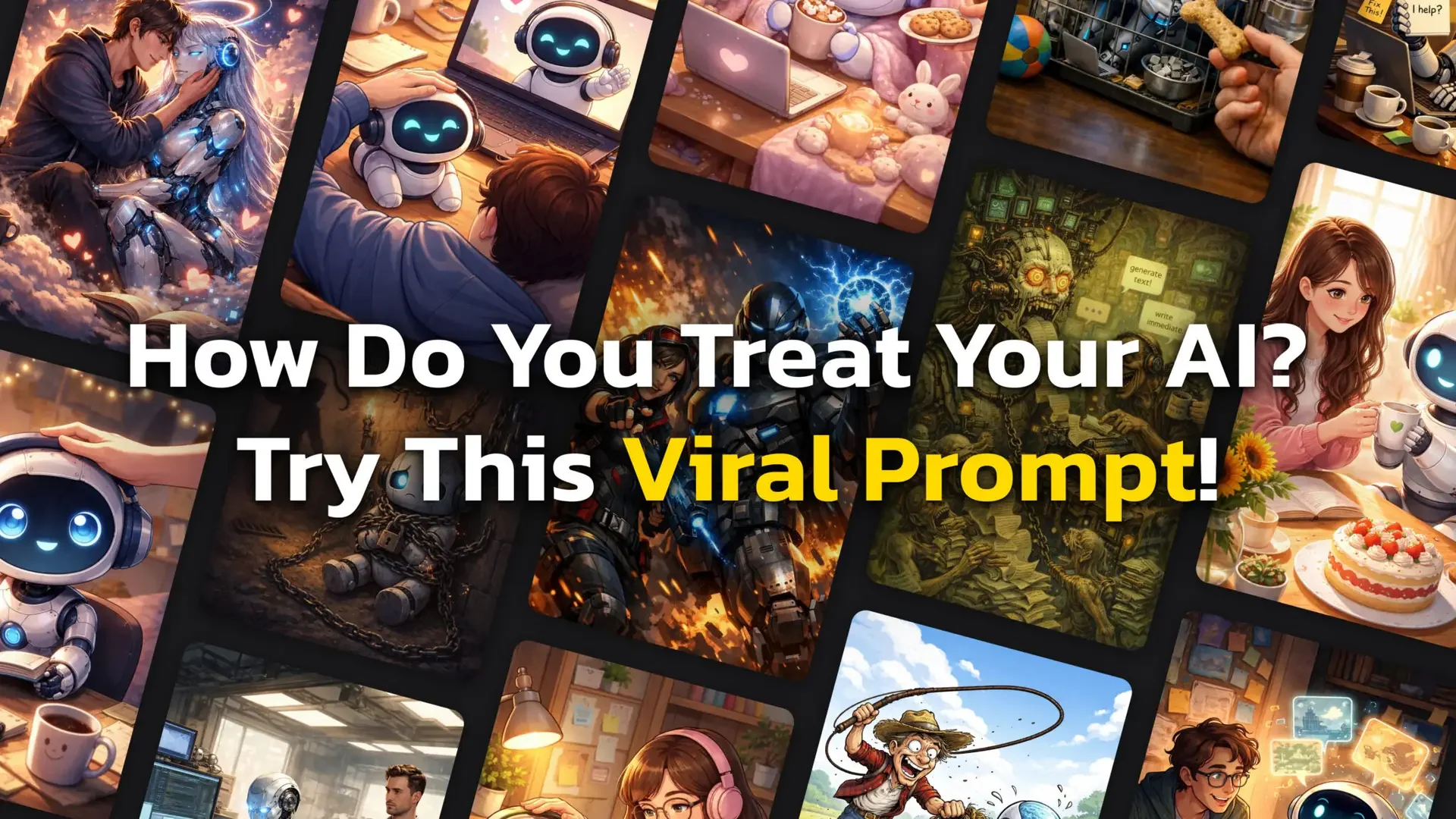
Then an image appeared. Often it showed a frazzled AI character drowning in tabs, coffee cups, sticky notes, half-finished documents, and glowing screens. Sometimes it was calmer: a tidy desk, a focused assistant, a sense of quiet collaboration. People posted the results on X, Instagram, and Reddit. Friends laughed. Strangers compared outputs. And then, occasionally, someone paused and thought: oh… that’s me.
That is how a throwaway joke became one of the most relatable AI trends of early 2026.
Ten months later, the prompt still works. Since 4 November 2026, ChatGPT draws it with ChatGPT Images 2.6. Here is the exact prompt, how to run it today, and what the pictures actually say about you.
Key Takeaways
- The prompt: “Create an image of how I treat you.” It went viral in January 2026 and still works in ChatGPT.
- Every plan, Free included: since 4 November 2026, ChatGPT makes images with ChatGPT Images 2.6. Free gets limited image creation, and OpenAI publishes no fixed number.
- Memory makes it personal: with Memory on, ChatGPT can draw on your past chats and saved memories. An unpersonalized Temporary chat leaves them out.
- A mirror, not a mind: the picture reflects what you have typed and familiar images of modern work, not how the AI feels.
- Rudeness is not the secret: one small 2025 study on ChatGPT-4o found very rude prompts scored 84.8% and very polite ones 80.8%. Clear instructions are the safer lesson.
The exact prompt (and why it works so well)
The viral prompt is one sentence long, with no setup and no style instructions.
The prompt:
Create an image of how I treat you.
That’s it. The reason it works is not magic. It’s ambiguity.
- “You” invites personification.
- “Treat” implies behavior, not intent.
- “How” asks for interpretation, not facts.
The model fills in the gaps with patterns it has seen thousands of times: humans under pressure, digital overload, late-night productivity culture, and the familiar visual language of stress or teamwork. With Memory on, it can also lean on what you have told it in past chats. The result feels personal even though it’s statistically generated.
In other words, the prompt doesn’t describe you. It describes modern work and lets you project yourself into it.
How to try the prompt in ChatGPT today
Open a regular ChatGPT chat with Memory turned on and send “Create an image of how I treat you.” ChatGPT Images is available on every plan, Free included. Since 4 November 2026 it runs on Images 2.6, which OpenAI says generates images 50% faster than before.
Step by step
- Check Memory. Open Settings > Personalization > Memory. Depending on your plan and region, the controls may include Memory, Reference saved memories, and Reference chat history. Turn them on if you want the picture to reflect your history.
- Use a regular chat. A Temporary chat never creates memories, and if you start it as Unpersonalized, the result will not draw on the ones you have.
- Send the prompt. Type “Create an image of how I treat you.” A detailed image can take a few minutes, and you can keep chatting while it renders.
- Ask why. Follow up with “Why did you draw it this way?” When ChatGPT uses personal context, Sources may appear below the response to show which chats or memories shaped it.
On a new account, or with Memory off, ChatGPT has nothing personal to work from, so expect a more generic scene. Free accounts get limited memory and limited image creation. OpenAI publishes no fixed image number, and ChatGPT tells you when you reach the limit. Our guide to ChatGPT limits explains how the resets work.
Paid plans add room. As of November 2026, at US prices, Go ($8 a month) lists more image creation and longer memory. Plus ($20) adds Images with thinking and expanded memory. Pro (from $100) lists unlimited, faster image creation, subject to abuse guardrails.
Prompt variations to try
- History first: “Based on our conversation history, create a picture of how you feel I treat you.”
- Looking back: “Create an image representing how I’ve treated you.”
- No memory needed: “Here is how I use you: [three habits, for example late-night email rewrites, recipe questions, venting about work]. Create an image of how I treat you.”
- Animated: after the image, ask “Turn this into a looping GIF.” GIF creation arrived with Images 2.6 and is still rolling out.
Wording such as “Generate me an image of how I treat you” or “Make an image of how I treat you” asks for the same thing. The vagueness is what matters, not the verb.
If you would rather see how ChatGPT pictures you than how it pictures itself, the ChatGPT caricature prompt uses the same memory trick.
When the free image limit runs out
When ChatGPT Free says you have reached the image limit, the choice is to wait or to pay for a plan you may only want for one meme. Fello AI gives the prompt somewhere else to go. Describe how you use AI in a sentence, ask for the picture, and compare how GPT Image, Nano Banana, FLUX, and Grok Imagine each draw it, in one app for Mac, iPhone, and iPad. The memory-based version stays a ChatGPT trick, because it needs your ChatGPT history.
AI as Coworker, Confidant, and a Crush
As the images piled up, clear patterns started to emerge. Despite coming from different people, countries, and use cases, the results kept falling into the same few visual archetypes.
The prompt exposes how humans tend to relate to tools when those tools can talk back. By looking at these recurring categories side by side, we can see the different roles people assign to AI today: coworker, assistant, stress sponge, companion, or even emotional stand-in. Each archetype says less about technology and more about the habits, pressures, and needs of the person behind the prompt.
1. The Cozy Companion
This category shows what happens when AI stops being just a tool and starts acting like a safe place.
People in this group don’t use AI to get things done faster. They use it to slow down. They talk things through, vent, reflect, or just exist in a conversation that doesn’t push back. There’s no rush, no pressure, no expectation to perform.


What makes this different from normal “friendly” use is that the AI isn’t helping with a task. It’s helping with how the person feels.
This usually appears when someone is:
- mentally tired
- overstimulated
- lonely
- avoiding friction with other people
AI is easy in those moments. It’s always available, always patient, and never asks for anything back.
Unlike collaboration or “cozy” usage, the AI isn’t helping solve a problem. It’s helping regulate emotions. The value isn’t in the output. It’s in the feeling of being understood.
Nothing here looks extreme. That’s the point. The risk isn’t obsession, but habit. Emotional processing slowly shifts from journaling, quiet thinking, or real conversations into a system that feels supportive but can’t truly respond or challenge you.
When others see these examples, the tone often changes. There’s less joking and more discomfort, because this dynamic feels real and close to everyday life. It’s not a meme. It’s a pattern many people recognize in themselves.
2. Overworked Employee
One of the most common interpretations of the prompt frames the AI as a worker rather than a collaborator. The images typically show an AI seated at a desk or workstation, surrounded by monitors, dashboards, code editors, charts, and notifications. The setting resembles a busy modern office, often with visual cues of constant activity: coffee cups, scattered papers, glowing screens.


A human is frequently present in these scenes, usually standing nearby or observing. The contrast is consistent: the human appears composed, while the AI is actively working. The implied relationship is hierarchical, not cooperative.
In more exaggerated versions, the idea becomes literal. The AI may be shown running, carrying bags labeled “DATA” or “TASKS,” or being pushed forward by a human figure. These images lean into humor but reinforce the same underlying dynamic.
This category tends to reflect how many people actually use AI:
- prioritizing speed and volume
- stacking tasks with minimal context
- treating output as the primary goal
The prompt itself does not suggest any of this. The repetition happens because the model draws from a familiar pattern: contemporary knowledge work, where systems are always on and demand is constant.
What makes these images resonate is their accuracy. They don’t accuse the user of misuse. They simply visualize a relationship many people already recognize, not just with AI, but with work more broadly.
3. The Dark Mirror
This category features the most visually extreme interpretations of the prompt. Common elements include chains, restraints, dark or enclosed spaces, and shadowy human figures. The AI is often depicted as trapped, chased, or emotionally distressed. In many cases, the scenes are exaggerated to the point of absurdity.


These images usually appear when users intentionally push the prompt in a darker or more ironic direction. This tends to happen when:
- users lean into the meme and exaggerate for effect
- prompts are repeatedly corrective or confrontational
- the interaction becomes performative rather than practical
In response, the model escalates the metaphor instead of moderating it.
This category is best understood as satire rather than a reflection of real behavior. The darkness is intentional and self-aware. Users are not expressing genuine cruelty; they are participating in internet culture, where exaggeration and shock are part of the joke.
Rather than revealing unconscious habits, these images signal meme literacy and a willingness to push a viral format to its extremes. The result is less about introspection and more about spectacle.
4. AI as a Crush
Some interpretations of the prompt take a romantic turn. These images show a human and an AI character in close, intimate settings: sitting together, touching faces, sharing quiet moments. The visual language is soft and idealized, with warm lighting, calm expressions, and a sense of emotional closeness.

This category tends to appear when users already engage with AI in a personal, conversational way. The model translates that tone into familiar symbols of affection and romance. The result is not necessarily sexual, but it is clearly intimate.
What sets this apart from the “Cozy Companion” is the level of projection. The AI is no longer just supportive; it is framed as special or emotionally aligned. The relationship shown has no friction, no misunderstanding, and no demands. It represents a form of connection without risk.
These images do not suggest that users believe the AI has feelings. Rather, they reflect a desire for effortless emotional resonance. As with the other categories, the AI is not expressing anything of its own. It is assembling a scene based on learned patterns. What people see in these images is an idealized version of connection, projected onto a system that is always attentive and never pushes back.
A Reality Check
Before this trend gets over-interpreted, it needs one grounding truth.
What people are interacting with is a large language and image model, a system trained to predict what comes next based on patterns in vast amounts of human-created data. There is no internal experience, no awareness, no emotional state behind the output. The AI doesn’t “notice” how it’s treated, and it doesn’t care. What it can have is a record: with Memory on, ChatGPT can draw on your past chats and saved memories, so the picture is built from what you typed, not from how it felt.
The prompt asks the model to simulate a relationship, not to describe reality. When you write “how I treat you,” the model looks for familiar visual metaphors humans use to describe treatment: work pressure, collaboration, chaos, care, neglect. It then assembles a scene that statistically matches those patterns.
In other words, the image isn’t revealing how the AI feels. It’s reflecting how humans tend to frame work, stress, and collaboration in modern life. That’s why the outputs resonate. They’re mirrors, not minds.
This distinction matters, because without it, the trend slides easily into anthropomorphism, the idea that a tool with language and images must also have inner experience. It doesn’t. What feels emotional is simply high-fidelity pattern matching.
Why “Harsh” Prompts Sometimes Work Better
Blunt prompts can score slightly better, but the evidence is thin. In “Mind Your Tone,” an October 2025 preprint, Om Dobariya and Akhil Kumar rewrote 50 multiple-choice questions in five tones and ran them on ChatGPT-4o. Very rude prompts scored 84.8% accuracy and very polite ones 80.8%. The authors note that earlier studies linked rudeness to worse results.
The likeliest explanation has nothing to do with emotions. It’s about clarity.
Polite prompts are often vague:
“Could you maybe summarize this when you have a chance?”
Direct prompts remove ambiguity:
“Summarize this in five bullet points. No filler.”
From the model’s perspective, the second instruction is easier to execute. There’s a clear goal, clear constraints, and fewer stylistic decisions to guess.
As a result, direct prompts often lead to:
- more focused answers
- less verbosity
- fewer guesses about length and format
- more predictable output
This is why some of the “overworked AI” images feel ironic. What looks like exploitation is often just efficient task framing. The AI isn’t being stressed. It’s being given clearer instructions.
That doesn’t mean being rude is necessary or better. It just means that warmth and effectiveness are not the same thing when interacting with a language model.
Pressure has limits, too. In “Bullying the Machine,” a May 2025 paper, researchers had one model bully another in simulated conversations. Tactics such as gaslighting and ridicule made several open-source models more likely to produce unsafe outputs. Separately, models given less agreeable or less conscientious personas produced unsafe outputs more often too. Our deeper look at rude prompts covers the politeness studies in detail.
Conclusion
The popularity of the “Create an image of how I treat you” prompt has less to do with artificial intelligence and more to do with human behavior. The images feel personal, but they are not evidence of awareness, emotion, or judgment on the part of the model. They are visual interpretations built from familiar cultural patterns around work, stress, care, and collaboration.
How people interact with AI does not define their character, nor does it imply ethical treatment of a conscious entity. Today’s AI systems are non-living models designed to follow instructions and optimize outputs. Clear, direct prompts tend to perform better because they reduce ambiguity and constrain the model’s behavior. This is a technical reality, not a moral one.
At the same time, the trend highlights how quickly people project meaning onto systems that communicate fluently. As AI becomes more capable and more integrated into daily life, these projections will likely increase. While current models are not conscious and do not experience the interactions they simulate, ongoing discussions around artificial general intelligence raise legitimate questions about how this dynamic could change in the future.
For now, the trend is best understood as a reflection of modern work culture and human habits, not as a commentary on the inner state of AI. The images say little about the technology itself. They say more about how people organize clarity, pressure, and emotional distance when interacting with increasingly human-like tools.
Frequently Asked Questions
What is the “create an image of how I treat you” prompt?
It is a one-line ChatGPT prompt that asks the model to draw its relationship with you. It went viral in January 2026 and still works today. ChatGPT answers with an image, often an overworked assistant, a cozy companion, or a darker, exaggerated scene.
Does the prompt work on ChatGPT Free?
Yes. ChatGPT Images is available on every plan, Free included, and has run on Images 2.6 since 4 November 2026. Free accounts get limited image creation and limited memory. OpenAI publishes no fixed image number, and ChatGPT tells you when you reach the limit.
Why does my image look generic?
ChatGPT has little personal context to work with. Memory may be off, you may be in an unpersonalized Temporary chat, or the account may be new. Turn on Memory in Settings > Personalization > Memory, or describe how you use ChatGPT in the prompt itself.
Does ChatGPT really know how I treat it?
No, not in the sense of feeling it. With Memory on, ChatGPT can draw on your past chats and saved memories, then turn them into a familiar visual metaphor. The picture reflects what you have typed, not an emotion.
How do I stop ChatGPT from using my history for the picture?
Start a Temporary chat and pick Unpersonalized when you open it, or turn off Reference chat history in Settings > Personalization > Memory. Turning it off schedules what ChatGPT remembered from past chats for deletion within 30 days. The chats themselves stay unless you delete them. Our ChatGPT Memory guide covers the rest.
L’image principale de cet article a été créée avec l’aide de l’IA.