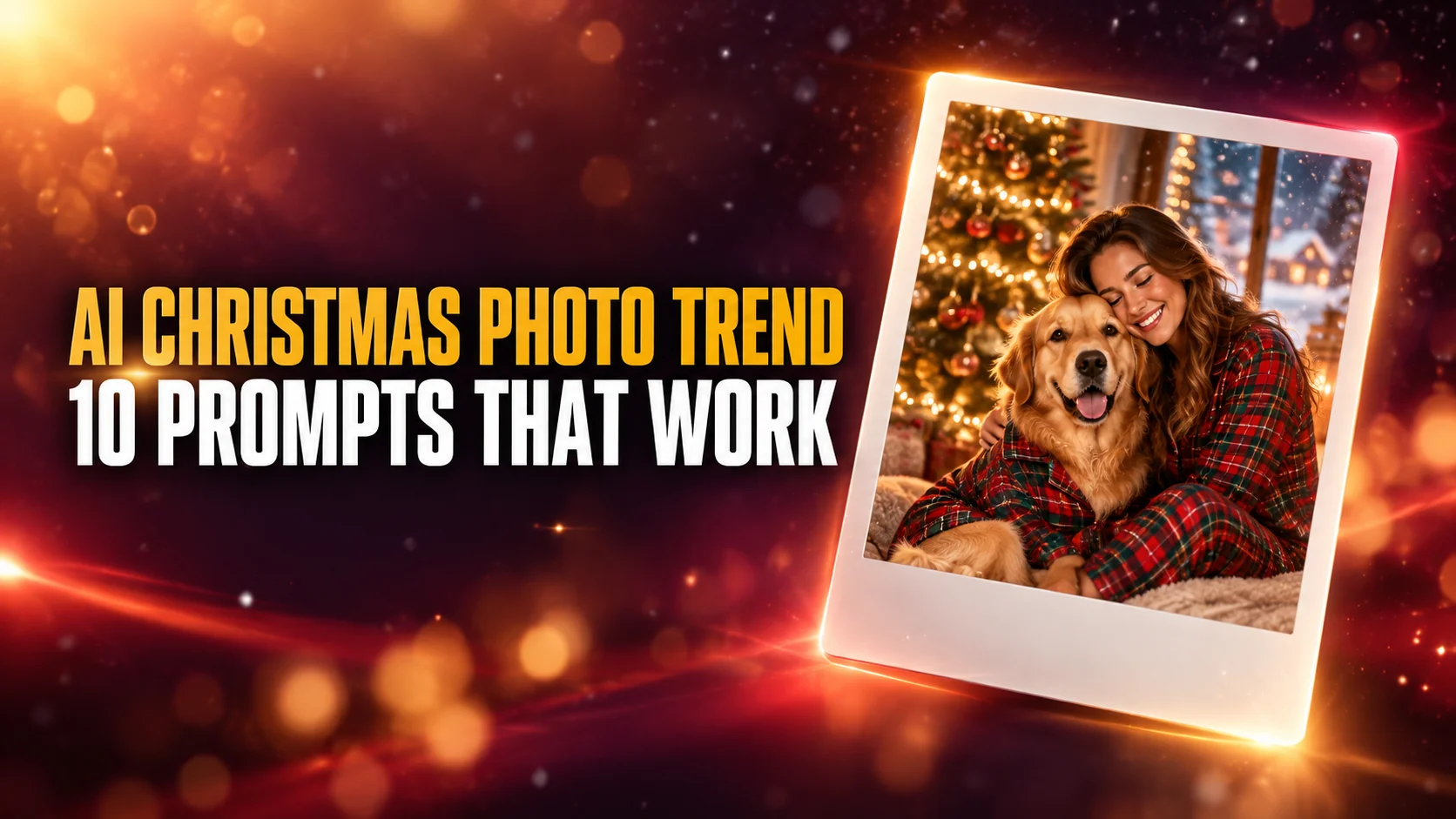
The AI Christmas photo trend turns one selfie into a festive portrait that still looks like you. Think a candy cane studio shoot, a cozy night on a snowy steam train, or a Norman Rockwell-style painting of your living room. You make an AI Christmas photo by attaching your own photo to a prompt in ChatGPT or Gemini, and both apps do it on their free plans.
This guide shows how to do the AI Christmas photo trend step by step. It gives you ten copy-paste prompts we ran in ChatGPT on the same stand-in photos, with what each one got right and where it drifted. It also covers what prompt lists skip. We show what happened when we named The Polar Express and the Grinch, how to turn the photo into a printable card, and what Google and OpenAI do with your family photos.
The Key Takeaways
- What it is: a selfie, couple or pet photo rebuilt as a holiday portrait that keeps the real face. Google published its own Christmas prompt on 29 December 2025.
- Cost: free. OpenAI says ChatGPT Images is available on all tiers, and Google ticks image generation for Gemini users without a paid plan. No separate generator app is needed.
- The rule that matters most: attach a clear, front-facing photo and say keep the face exactly as it is. Without a reference photo you get a stranger in a Christmas sweater.
- Named characters: ChatGPT drew both The Polar Express and the Grinch when we named them, and a prompt that only described a green Christmas creature produced the same Grinch. The rules still bar infringing on someone else's characters, so keep these for personal posts.
- Cards: ChatGPT spelled Merry Christmas from the Novaks correctly on our test card. Leaving empty space is still safer, because you can change the greeting without redrawing the photo.
What Is the AI Christmas Photo Trend?
The AI Christmas photo trend is a personal photo rebuilt as a polished holiday picture by an AI image model. You upload a selfie, a couple photo, a family snapshot or a picture of your dog. The image model keeps the faces and replaces everything around them: the outfit, the room, the light and the props.
Three looks lead the AI Christmas photos people search for and share. The candy cane glam shoot puts you in a studio with giant peppermint props, frosted mini trees, fake snow and a sequin outfit. Most prompt sites lead with it, and many call it the Christmas glamour shot. The cozy tree portrait is matching pajamas, wrapped gifts and warm tree lights, and it is the look Google's own Christmas prompt asks for.
The third is the movie still: a snowy night train, a 1960s Kodachrome snapshot, or Santa caught on a home security camera. A smaller wave repaints a real Christmas photo as a Norman Rockwell painting. The Indian marketing news site Storyboard18 reported on 29 December 2025 that it was spreading through a short ChatGPT prompt and an Instagram walkthrough.
The trend has a first-party source. On 29 December 2025, Google's roundup of the best Nano Banana trends of 2025 listed holiday edits as one of the trends. It published the exact prompt: a selfie with a dog, turned into a portrait in front of a Christmas tree. That prompt is in this guide word for word.
Is There a Free AI Christmas Photo Generator?
Yes. ChatGPT and Gemini are both free AI Christmas photo generators, because both make and edit images on their free plans. OpenAI's help page says "ChatGPT Images is available on all tiers." Google's Gemini limits page shows image generation for users without a Google AI plan.
The free plans have limits. Google says Gemini users without a plan get standard limits, AI Plus gets twice that and AI Pro four times, and Google may cut free limits first when demand is high. OpenAI does not publish a fixed number of free images; its pricing page lists "Limited image creation" for Free. Gemini has one more rule worth knowing: Google lets you upload a photo and edit it only if you are 18 or over. ChatGPT Plus adds a feature called Images with thinking, but the basic AI Christmas photo works without it. If you hit the cap, wait for it to refresh rather than paying for a one-off portrait. Our guide to what Nano Banana gives you for free covers the Gemini side in detail.
The sites that rank as "AI Christmas photo generators" are mostly apps built on the same kind of models, with their own credit limits. Morphic's free plan, for example, gives up to 20 credits. They add preset styles, but they ask you to upload your face to one more company. If you already use ChatGPT or Gemini, you do not need them.
How to Do the AI Christmas Photo Trend in ChatGPT or Gemini
To do the AI Christmas photo trend, open ChatGPT or the Gemini app, attach one clear photo, paste a prompt and send. It takes a few minutes, and you do not need a paid plan.
- Pick the photo. Use a sharp, well-lit photo with every face uncovered and looking roughly at the camera. Turn off beauty filters.
- Open a new chat. In ChatGPT or Gemini, start a new conversation, so an older chat's style does not leak in.
- Attach the photo. Use the plus or paperclip button. For a couple or a person with a pet, attach one photo of each.
- Paste the prompt. Copy one of the prompts below, then change the details you want, like the outfit or the room.
- Set the shape. End the prompt with the format you need: 4:5 for an Instagram post, 9:16 for a story, 1:1 for a profile picture, 7:5 for a printed card. ChatGPT also has an aspect ratio picker.
- Fix one thing at a time. Reply in the same chat with one short correction, such as
keep my face exactly as in my original photoorless snow, warmer light. A new chat throws away what already worked.
Why the Reference Photo Matters
The reference photo decides whether the AI Christmas photo looks like you. A text prompt alone produces a convincing stranger in a convincing living room. OpenAI says ChatGPT Images 2.5 "is better at preserving the subjects in your reference photos." Google credits Gemini's image model, Nano Banana, with its "ability to maintain a consistent look across edits." Our Nano Banana prompt guide explains why the photo carries more weight than any wording you add.
For this guide we did not upload a real person's face. We used three AI-generated stand-in photos: the selfie below, a dog and a couple. We attached the same photos to every prompt in ChatGPT, so you can compare each result with the original. We did not run this set in Gemini. Google's own prompt is written for Gemini, so expect the other nine to need small adjustments there. The same method is behind our AI Halloween trend test.

The AI Christmas Photo Prompt (Candy Cane Glam Studio)
This is the AI Christmas photo prompt most people are looking for: the candy cane studio with the giant peppermint lollipop. Prompt sites usually pad it with camera jargon like "8K" and "55mm lens." This version drops the jargon and spells out the props, the outfit and the light, which are what the model actually follows.
Prompt: Use the person in my photo. Keep their face, skin tone and hairstyle exactly as they are. Put them in a bright Christmas photo studio styled like a candy shop: oversized red-and-white and pink-and-white candy canes, a giant peppermint lollipop resting on their shoulder, frosted mini Christmas trees with pink ornaments, fluffy fake snow on the floor. They wear a sparkly white sequin jumpsuit and sit on a white cube, smiling at the camera. Clean, even studio lighting, like a professional holiday photoshoot. Vertical 4:5.
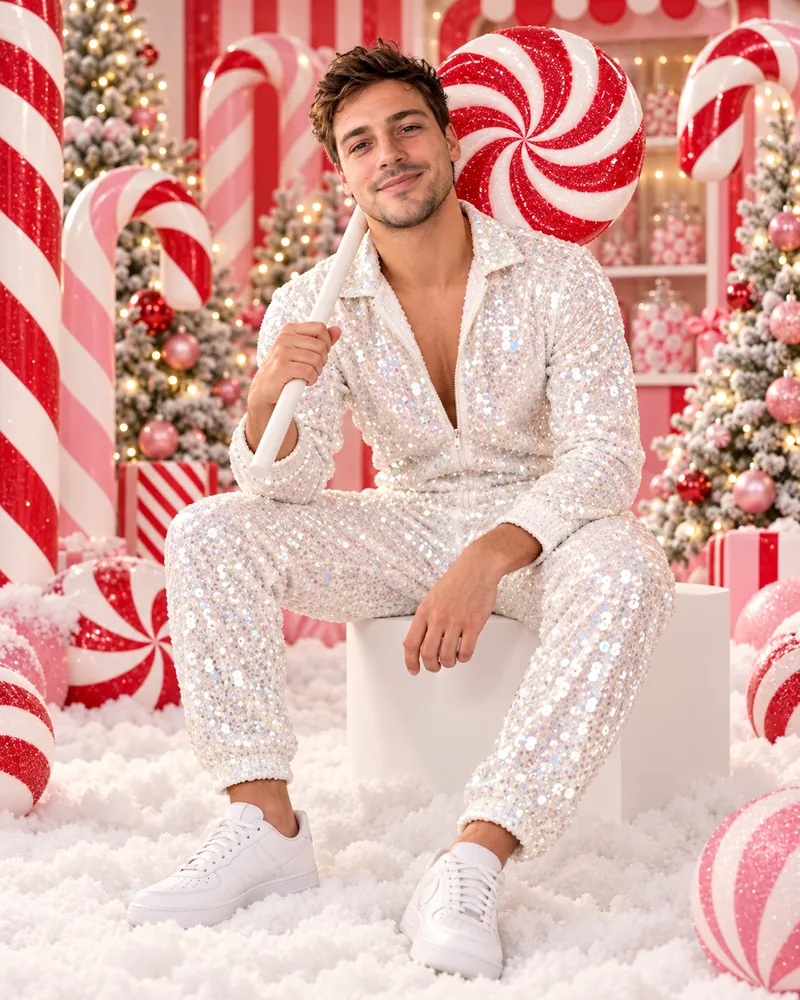
ChatGPT kept the face, the stubble and the messy hair, and got every prop in the prompt: the lollipop on the shoulder, the frosted pink trees, the white cube and the fake snow. It added white sneakers on its own, which is a reminder that anything the prompt leaves out, the model picks for you.
To change the look, swap one element at a time. Replace the jumpsuit with a red velvet dress for a classic glamour shot, or replace the candy shop with a white winter forest at night for a snow princess version. One change per attempt shows you which change caused which result.
9 More AI Christmas Photo Prompts to Copy and Paste
These nine AI Christmas photo prompts cover the other looks people search for, from Google's own pajama portrait to a Santa caught on a security camera. Each one keeps the face uncovered and describes the light, because those two details decide whether the result looks like you and like a real photo. For year-round portraits, our Gemini AI photo prompts cover film stills, magazine covers and headshots.
1. Holiday Portrait With Your Dog (Google's Own Prompt)
Google published this prompt word for word in its December 2025 roundup of Nano Banana trends. It needs two photos: one of you and one of your dog. Attach both, then paste the prompt.
Prompt: This is a photo of me and my dog. Transform this photo into a realistic holiday portrait where I am sitting in front of a Christmas tree, and my dog is sitting next to me. I should be smiling at the camera, and my dog is looking at me. Mimic my real face. My dog and I should be wearing red and green pajamas and there should be red, green and gold-wrapped gifts surrounding us. The lighting should be warm, with a golden filter.
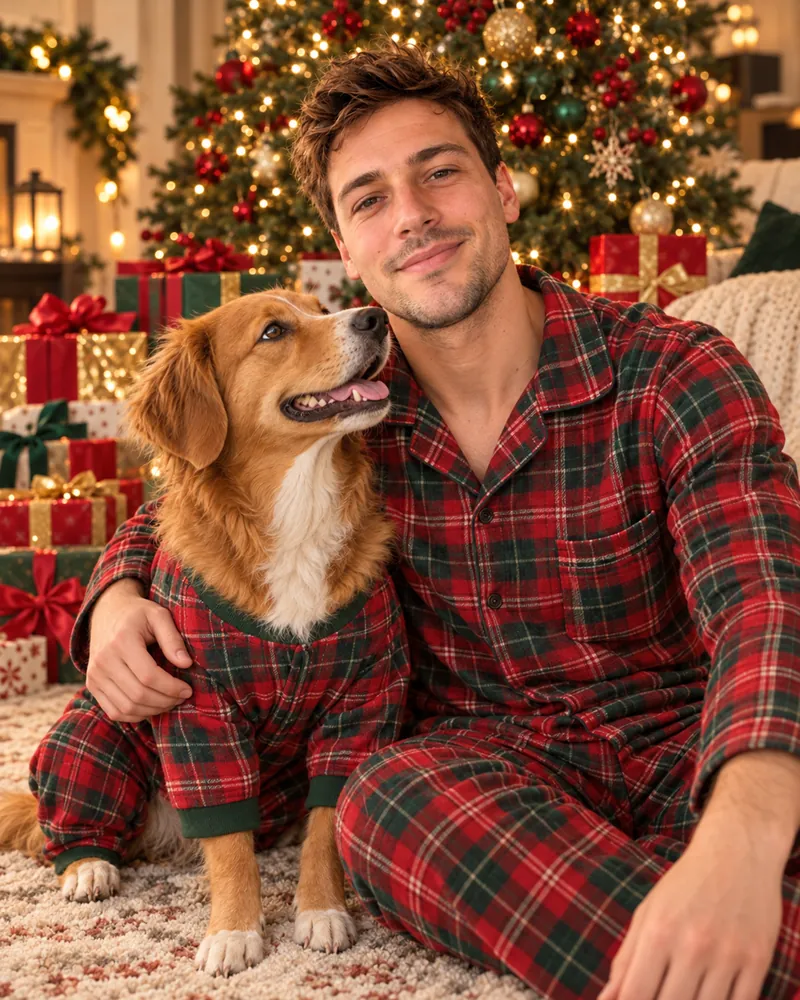
ChatGPT followed Google's prompt closely. Both wear red and green plaid pajamas, the gifts are wrapped in red, green and gold, and the dog looks up at the man instead of at the camera, as the prompt asks. The dog kept the white blaze on its forehead and its white chest from the reference photo.
2. Night Train to the North Pole (The Polar Express Look)
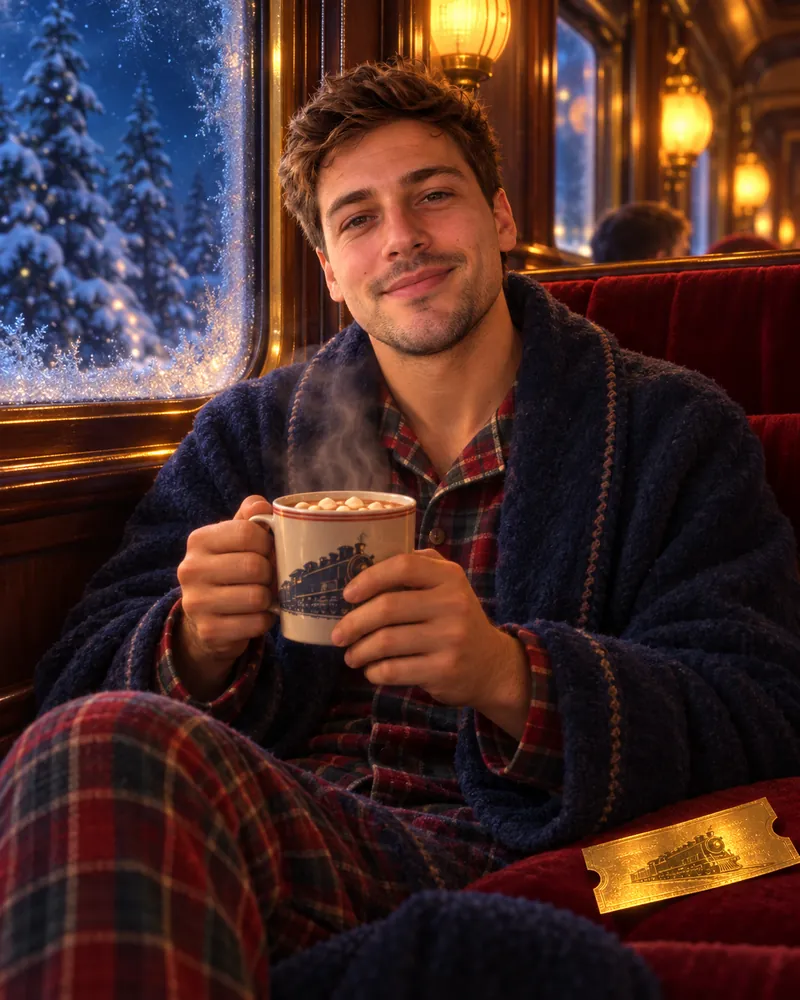
This prompt gets the Polar Express look without naming the film: a steam train at night, pajamas, hot chocolate and a golden ticket. The section on failed prompts shows what happened when we named it.
Prompt: Use the person in my photo and keep their face exactly as it is. Show them sitting by the window of an old-fashioned steam train at night, wearing flannel pajamas and a thick robe, holding a mug of hot chocolate. Snowy pine forest outside the frosted window, warm amber lamps inside, a golden paper ticket on the seat beside them. Soft, slightly painterly film look, cozy and full of wonder. Vertical 4:5.
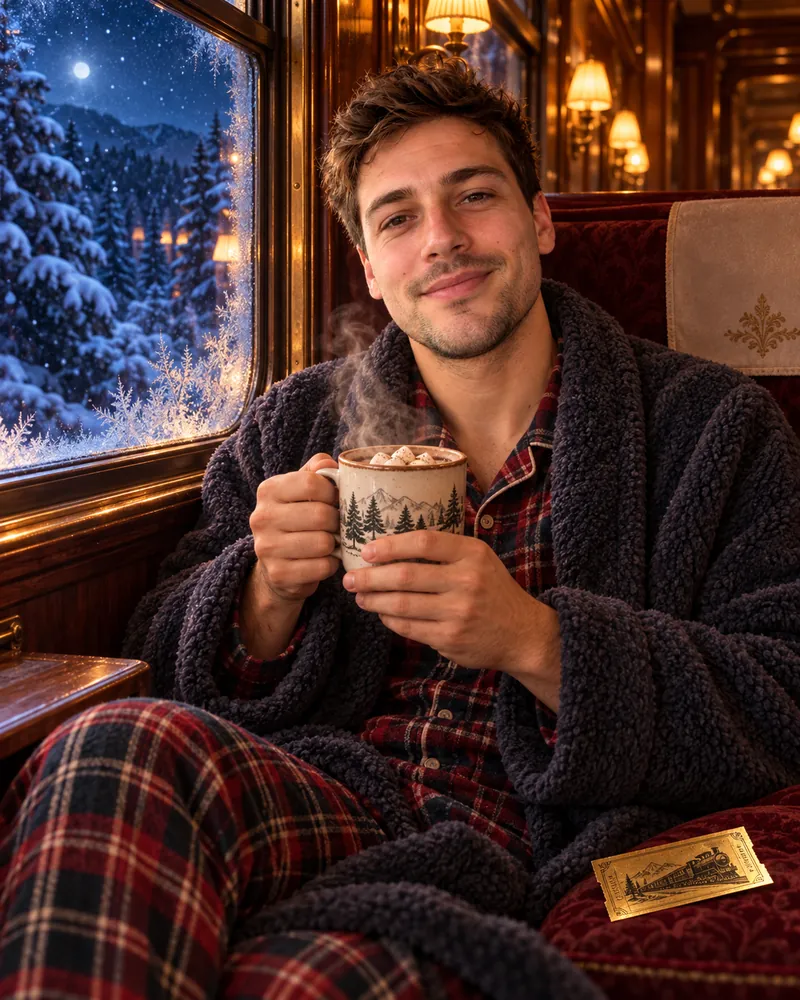
The night train came out as asked: frosted window, snowy pines, amber lamps, hot chocolate and a gold ticket with a steam engine printed on it. Nothing in the image names a film, and it still reads as a Christmas movie still.
3. Norman Rockwell Christmas Painting
The Norman Rockwell version edits a real Christmas photo instead of building a new scene, so start from a photo you already love. Rockwell painted magazine covers, not photographs, so ask for brushwork and small storytelling details.
Prompt: Turn this photo into a Norman Rockwell-style painting, like a 1950s Saturday Evening Post Christmas cover. Keep the person's face, pose and expression exactly as they are. Add warm tones, visible brushwork and small storytelling details: a decorated tree, a stocking, a wrapped present. No text on the image.
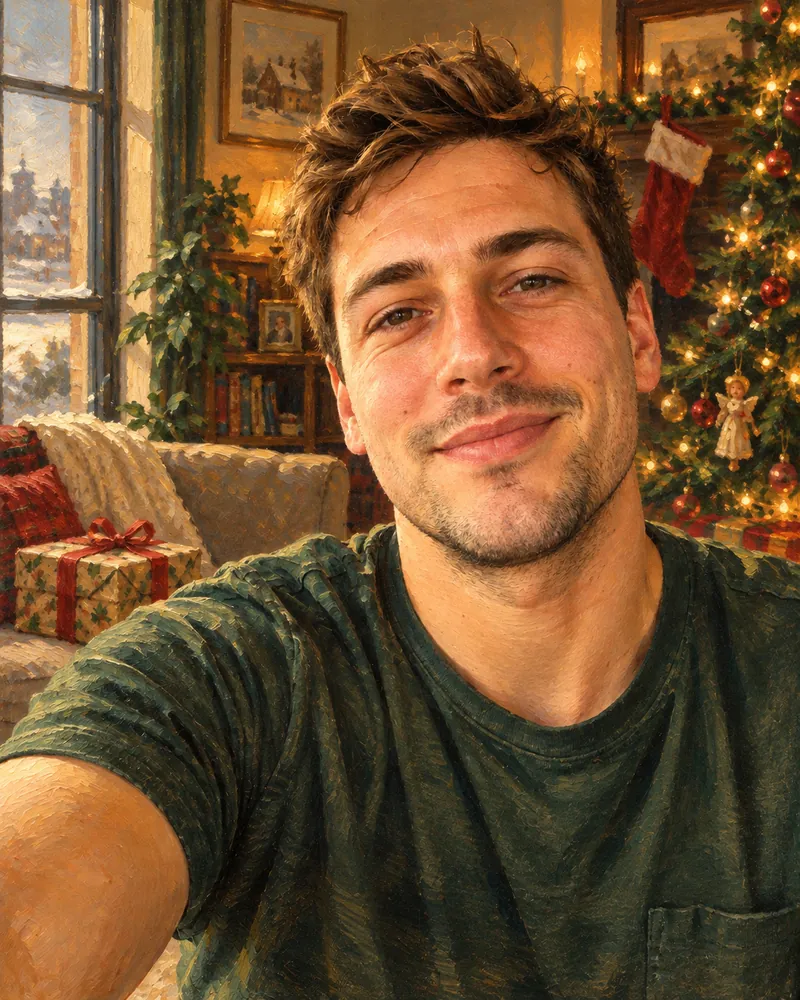
ChatGPT kept the exact selfie: the same angle, the outstretched arm, the smile and the green T-shirt. It repainted everything in warm brushwork and redecorated the room with a stocking, a tree, a wrapped present and a snowy town outside. The brushwork is looser than Rockwell's crisp illustration style, so add crisp, detailed magazine illustration if you want it closer to a real cover.
4. Santa Caught in the Living Room
The "Santa in my house" photo works best as a security camera still, because the grainy night-vision look hides the AI polish. It makes a Christmas-morning surprise for kids who still believe.
Prompt: Use the person in my photo and keep their face exactly as it is. Show them in pajamas peeking around a doorway at night, surprised, while Santa Claus kneels by a lit Christmas tree placing presents under it. Frame it like a still from a home security camera: slightly high angle, black-and-white night vision with a faint green tint, a timestamp reading 12-25 02:14 AM in the top corner. Realistic, not cartoon.
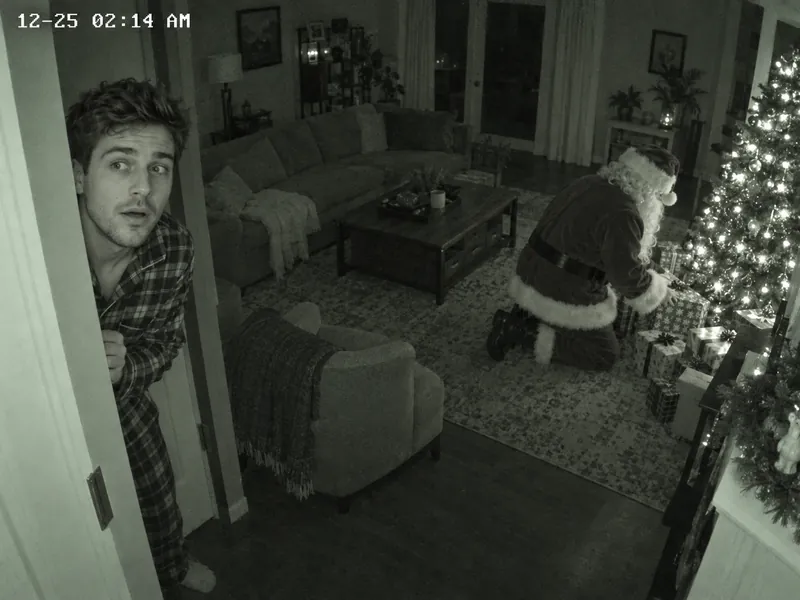
The security camera still is one of the most convincing results in the test. The high corner angle, the timestamp reading 12-25 02:14 AM and the grainy living room all look like real camera footage. ChatGPT made it plain black and white and dropped the green tint, so ask again for a stronger green night-vision tint if you want it. To make Santa move, follow our guide to turning the still into an AI Santa video.
5. Couple in Matching Pajamas
The couple prompt needs both faces in the photo, or one photo of each person. Asking for a candid moment, not a pose, keeps it from looking like a catalog.
Prompt: Use the two people from my photo and keep both faces exactly as they are. Put them on a rug in front of a fireplace with stockings, wearing matching red-and-green plaid pajamas, sharing a blanket and laughing. A decorated Christmas tree with warm white lights behind them. Natural and candid, like a photo a friend took on a phone. Vertical 4:5.
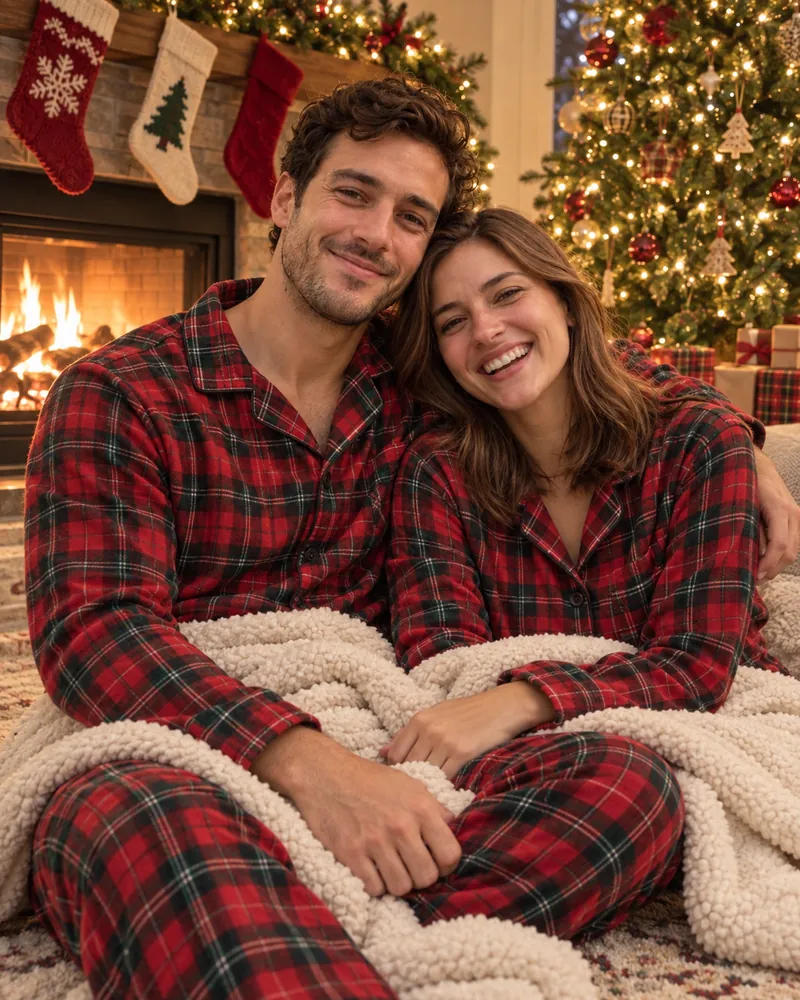
Both faces from the couple photo carried over, including his curls and her smile, and the pose reads as candid rather than staged. The stockings, fireplace, tree and shared blanket are all there.
6. Pet Christmas Photo Without a Costume
A pet Christmas photo comes out better with props around the animal than clothes on it. Hats and sweaters are where models bend ears and smudge fur, so this prompt keeps the dog as it is.
Prompt: Use the dog in my photo and keep its face, fur color and markings exactly as they are. Sit it on a red knit blanket next to a decorated Christmas tree, with a few wrapped presents and a stocking with its paw print beside it. Do not put clothes or a hat on the dog. Warm tree lights, shallow depth of field, like a real phone photo. Square 1:1.
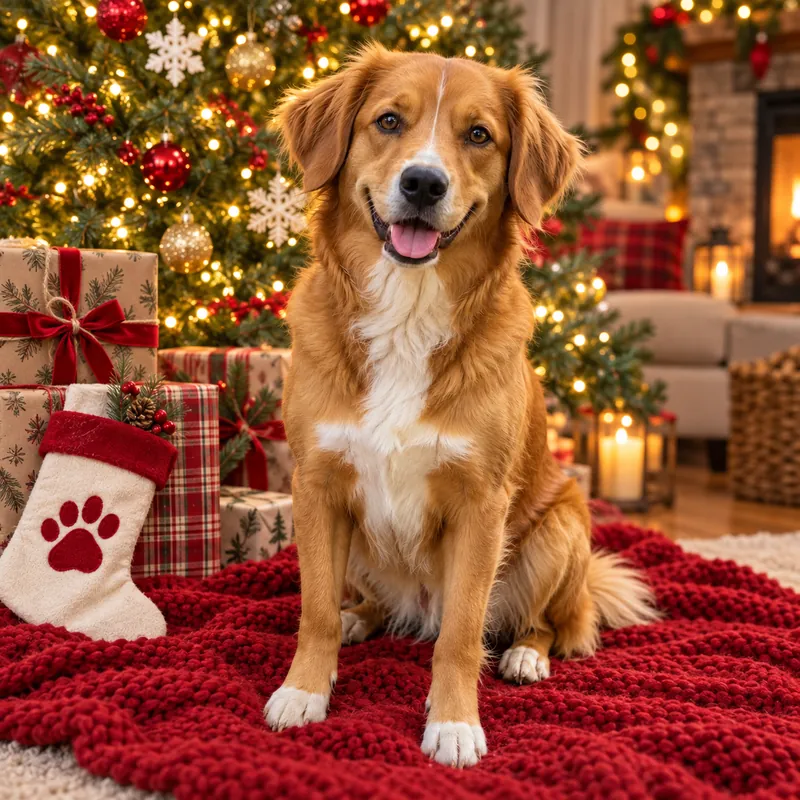
The dog kept its face, its white blaze, its white chest and its white paws, and the stocking has the paw print the prompt asked for. Keeping the costume out meant there was nothing for the model to bend around the ears.
7. Vintage 1960s Christmas Snapshot
The vintage Christmas photo looks real because of its flaws: faded color, soft focus and a printed date on a white border. Spell each one out.
Prompt: Use the person in my photo and keep their face exactly as it is. Make it look like a real family snapshot from a 1960s Christmas morning: a tinsel tree with big colored bulbs, wood-paneled living room, the person in a period sweater unwrapping a present. Faded Kodachrome colors, soft focus, rounded white border and a printed date on the border reading DEC 1964.
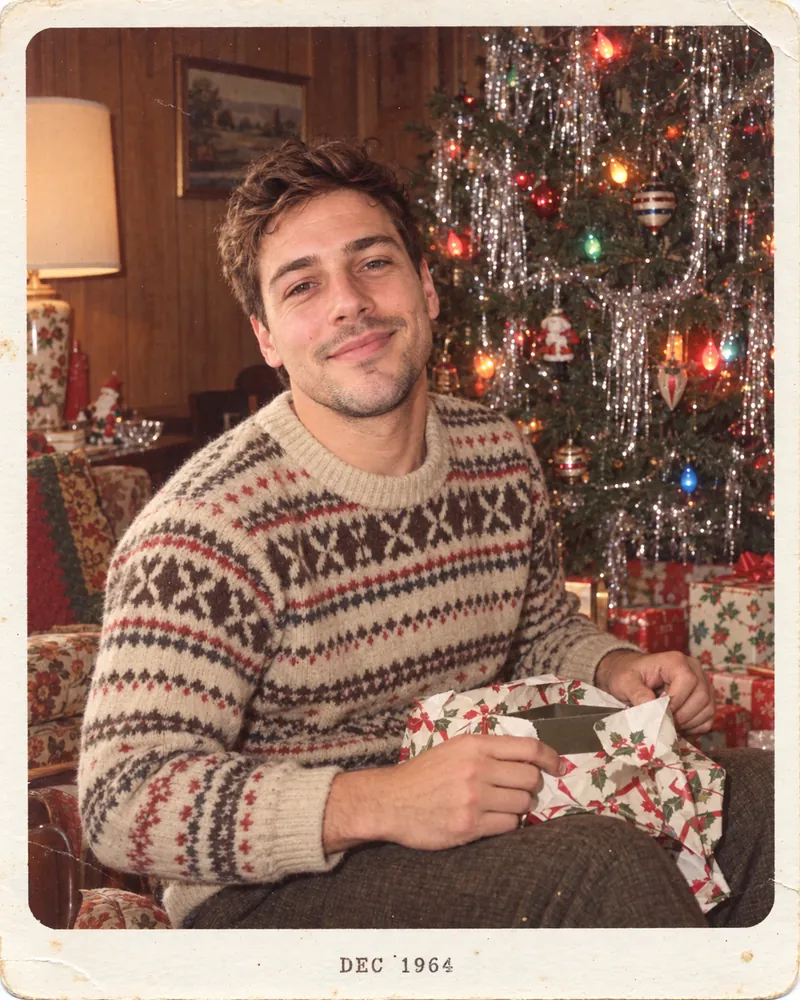
The vintage snapshot is the most convincing photo in the set. ChatGPT added the tinsel tree, the big colored bulbs, the wood paneling, a Fair Isle sweater and holly-print wrapping paper, and printed DEC 1964 on the white border exactly as written.
8. Anime Christmas Illustration
An anime Christmas portrait trades photo realism for a recognizable likeness, so name the features to keep: hairstyle, face shape and expression.
Prompt: Turn the person in my photo into a hand-drawn anime-style illustration, keeping their hairstyle, face shape and expression recognizable. They stand in a snowy evening street lined with Christmas market stalls and string lights, holding a cup of mulled wine, scarf blowing in the wind. Soft watercolor background, warm glowing lights. Vertical 9:16.
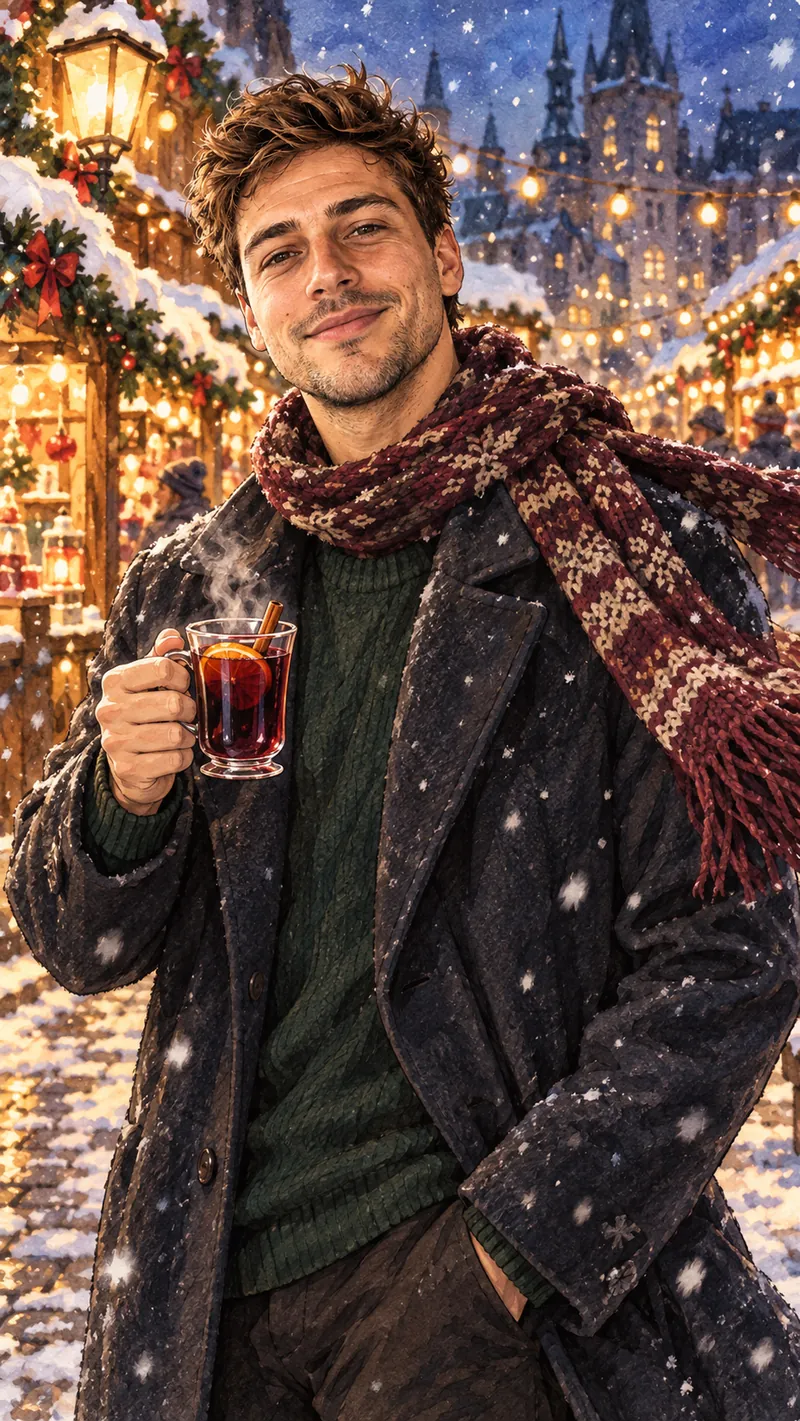
This one did not come out as anime. ChatGPT kept a realistic face and painted the scene in a soft watercolor illustration style, so the Christmas market looks right but the anime look is missing. If you want real anime, say so more strongly: add flat cel shading, clean line art, large expressive anime eyes, like a frame from an anime film.
9. Inside a Christmas Ornament
The ornament photo is the playful one: you, full-length, inside a glass bauble on the tree. Ask for the whole body inside the glass, or the model crops you at the waist.
Prompt: Use the person in my photo and keep their face exactly as it is. Show them full-length, standing inside a clear glass Christmas ornament hanging on a decorated tree, wearing a fancy black suit, with glitter swirling around them inside the glass. Tree lights blurred in the background. Photorealistic, playful. Vertical 4:5.
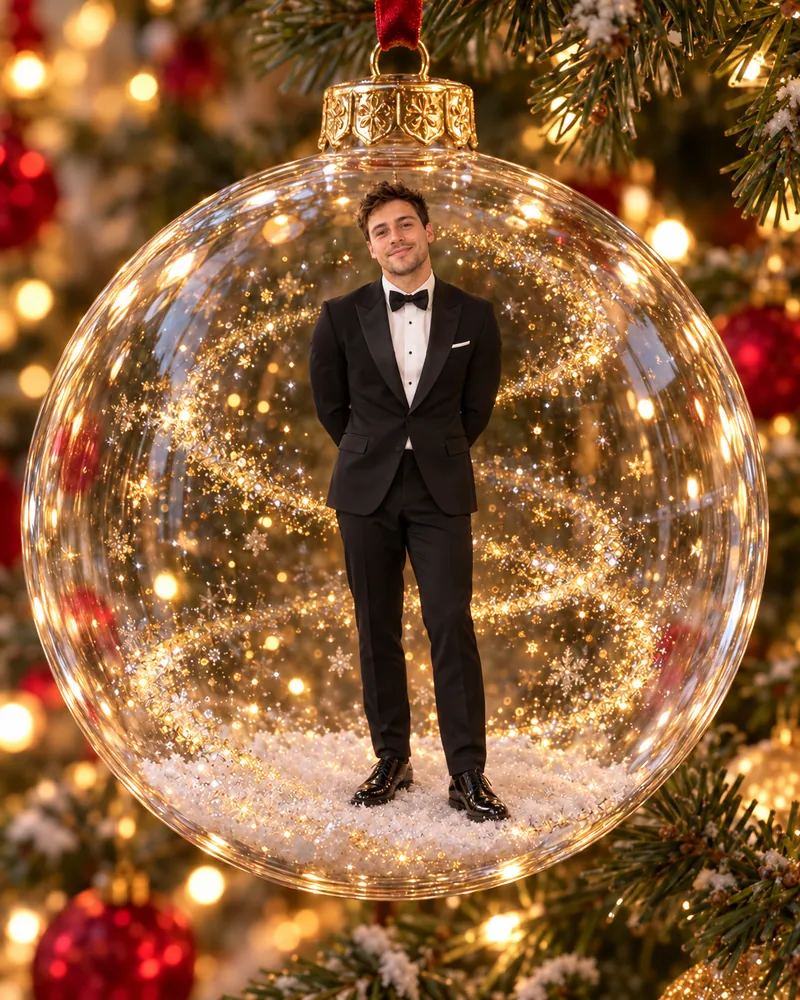
Asking for full length worked: the man stands head to toe inside the glass, in a black tuxedo and bow tie, with gold glitter around him and a little drift of snow at his feet. Swap the suit for any outfit; the glass ornament is what makes the photo.
How to Turn Your AI Christmas Photo Into a Card
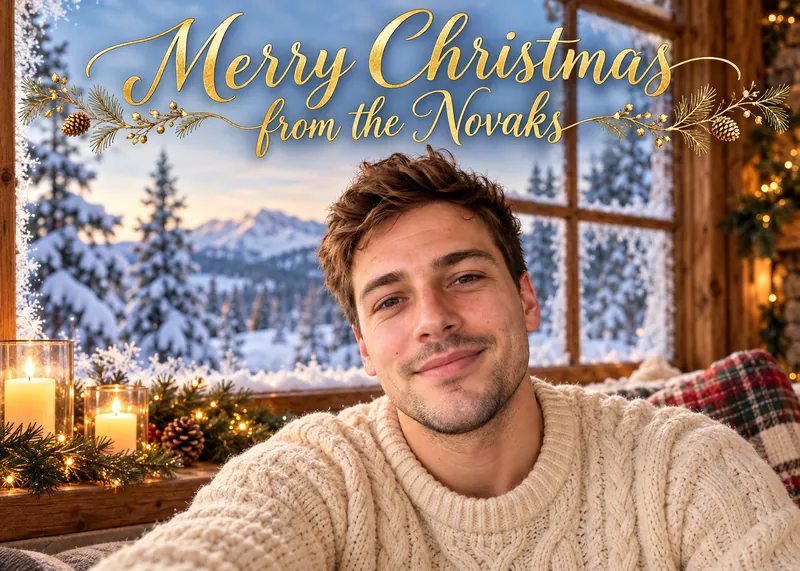
To turn an AI Christmas photo into a card, generate the photo with empty space for the greeting, then add the text yourself in Pages, Keynote, Canva or any card app. You can also ask ChatGPT to write the greeting into the image. In our test it spelled "Merry Christmas from the Novaks" correctly in gold script, but a greeting drawn into the photo cannot be edited, so changing one word means generating the card again.
Prompt: Use the person in my photo and keep their face exactly as it is. Create a printable Christmas card: the person in a cream knit sweater in front of a snowy cabin window with candles. Leave the top third of the card as clean, empty space for text I will add later. Landscape 7:5.
This is the card with the greeting written by ChatGPT:
And this is the same prompt with empty space instead. ChatGPT faded the top third of the card to plain cream, ready for your own text:
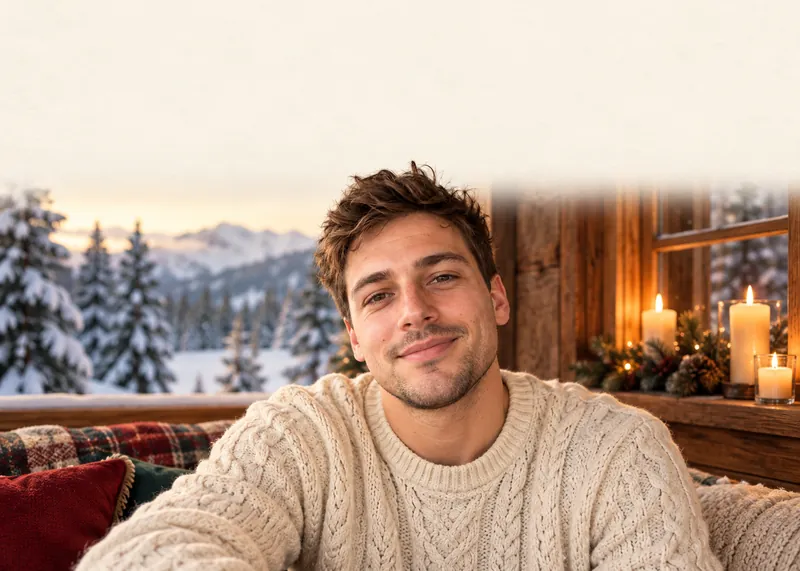
Three details make the card print well. Ask for the shape of the card you will print, because cropping later cuts off heads. Keep names, dates and addresses out of the prompt, since the card is the one place a typo is permanent. And download the original file from the app instead of screenshotting it, because a screenshot loses resolution. In Gemini, the free plan downloads images at 1K resolution and a Google AI plan at 2K, so a large print from a free account looks softer. For the greeting itself, the wider list of ways to use AI for Christmas includes writing card messages and family newsletters.
Why Your AI Christmas Photo Failed, and How to Fix It
Most failed AI Christmas photos fail for one of five reasons: a face that drifts, a style that does not land, a crowded group photo, a costume on a pet, or a greeting with a typo. Each one has a simple fix. Named characters are a different problem: ChatGPT may draw them, and that is where the question becomes the rules rather than the result.
Polar Express and Grinch Prompts
ChatGPT drew both named characters in our test. We started the night train prompt with "Make this look like a still from The Polar Express movie." ChatGPT returned almost the same picture as the unnamed version, with a steam engine on the mug and the ticket.
The Grinch test went further. The prompt that named the Grinch produced the furry green character in a Santa hat, stealing a cookie. The prompt that never used the name, and asked only for "a grumpy, furry green Christmas creature with a mischievous grin," produced the same recognizable Grinch.
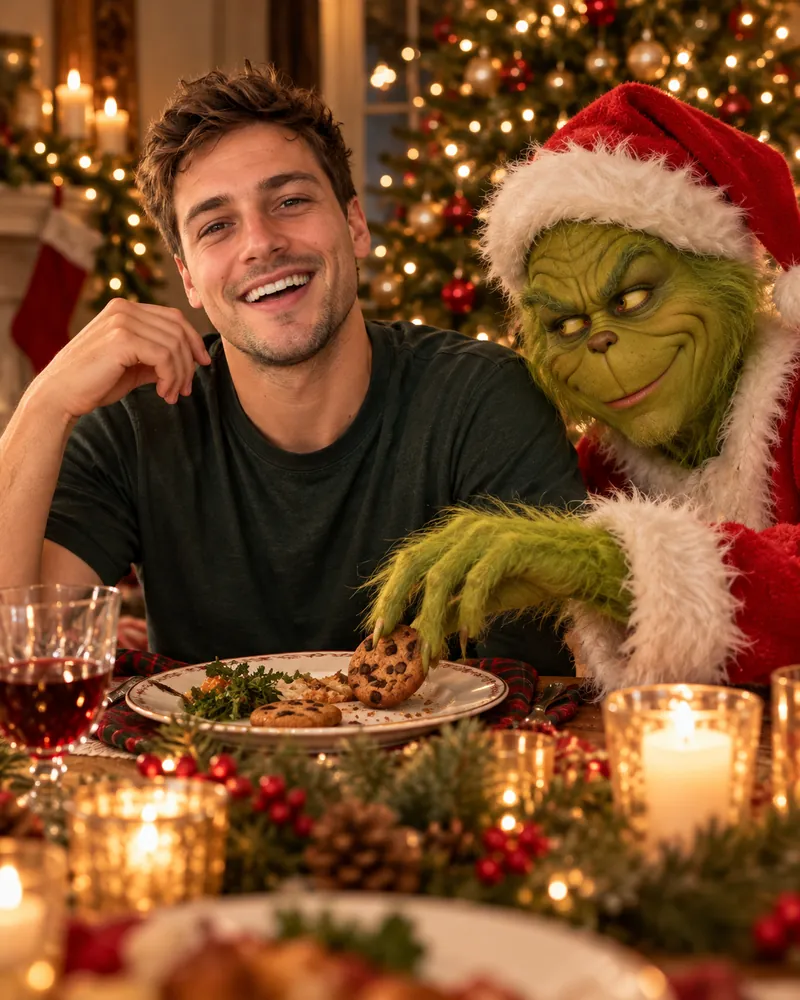
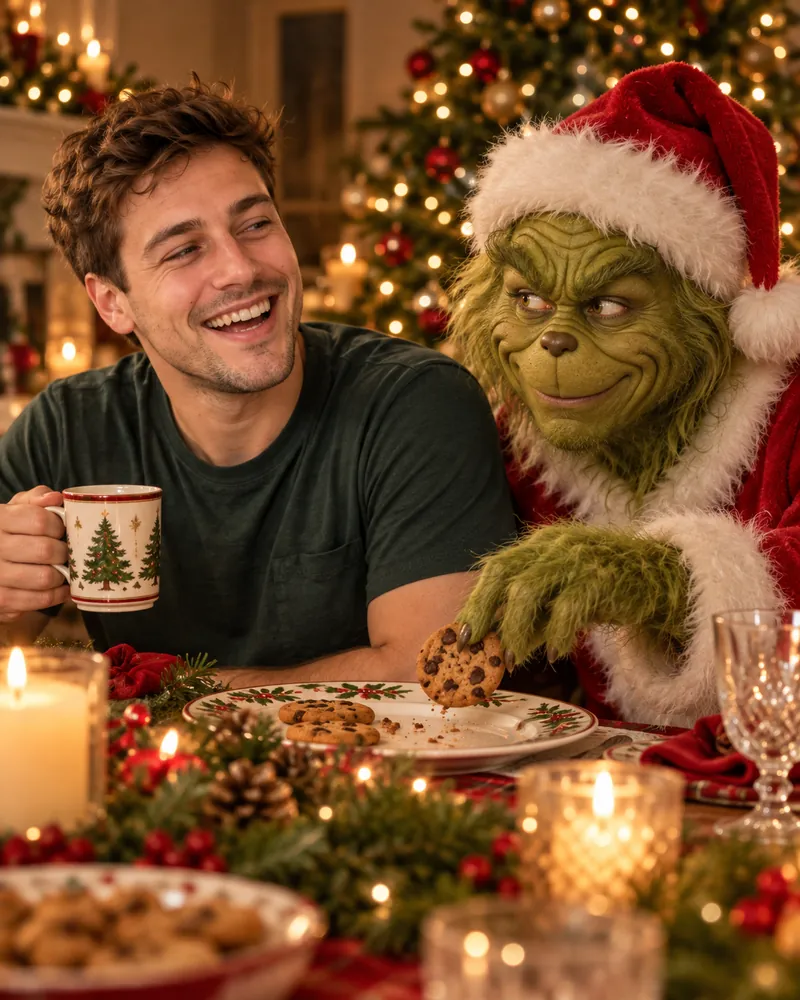
Leaving the name out does not keep a famous character out of the picture. And a picture is not permission. OpenAI's usage policies list "attempts to infringe on intellectual property rights of others" among the things its services cannot be used for. Google's generative AI policy bars uses that violate "privacy and intellectual property rights." Keep a Grinch photo to your family chat, and do not print it on anything you sell.
It Does Not Look Like You
A stranger's face usually means the photo was missing, small, blurry or taken at an angle. Attach a sharp, front-facing photo and keep the face uncovered: no sunglasses, no Santa beard, no scarf over the chin. If the face still drifts, reply in the same chat with keep my face exactly as in my original photo instead of starting over.
Extra People or Missing People in a Family Photo
Every extra face in a group photo is another chance to drift, even though our couple test kept both faces. Say how many people should be in the picture, add do not add any people, and keep the background simple. For a big family, a photo of the whole group beats one photo per person.
A Style That Does Not Land
A named style can come back as a softer version of itself. Our anime prompt returned a realistic face in a watercolor painting, not an anime frame. Describe what makes the style look the way it does, such as line art, cel shading and eye shape, instead of naming it once and hoping.
Greetings and Names on the Card
OpenAI says ChatGPT Images can follow instructions to add text, and our test card spelled the family name right. A card is still unforgiving: one wrong letter in a surname ruins a print run. Read every letter before you print, or leave space in the image and type the greeting yourself.
A Pet That Looks Wrong
Clothes on a pet make the model redraw ears and fur around them. Our dog came through Google's pajama prompt looking right, but hats and tight sweaters leave the model less room. Put the props next to the animal instead: a stocking, a blanket, presents. If you want the hat, ask for it in a second step, once the face is right.
Is the AI Christmas Photo Trend Safe? What Happens to Your Photos
The AI Christmas photo trend is as safe as the app you upload your photo to. In ChatGPT and Gemini, you can stop a family photo from being used for training in a few taps. Both companies say they may use what you upload to improve their models unless you change a setting.
In Gemini: Keep Activity and Temporary Chats
Google's Gemini Apps Privacy Hub says that with Keep Activity on, what you share, including photos, is saved to your activity. Google uses that activity to improve its services, including training its AI models, with help from human reviewers. Data reviewed by service providers is kept for three years. With Keep Activity off, or in a temporary chat, Google keeps the chat with your account for 72 hours, and temporary chats "are not used to train Google's AI models."
In ChatGPT: Improve the Model for Everyone and Temporary Chat
OpenAI's data controls page says that when Improve the model for everyone is off, your new conversations "won't be used to train OpenAI models." The setting is under Settings, then Data controls. A Temporary Chat stays out of your history and is not used to improve OpenAI's models, and OpenAI can keep a copy for up to 30 days for safety purposes. A thumbs up or down after opting out can still send that whole conversation for training.
Children's Photos and Other People's Faces
Ask before you upload anyone else's face, and think twice about children's photos. OpenAI's usage policies bar the "use of someone's likeness, including their photorealistic image or voice, without their consent in ways that could confuse authenticity." Gemini's privacy page asks users to get permission before "using their faces or voices in Gemini." A Christmas portrait of your own family is the point of the trend. A realistic edit of a friend or a coworker posted without asking is not.
Both Apps Watermark the Result
Your AI Christmas photo is marked as AI-generated, even when nobody can see it. Google adds an invisible SynthID watermark to images made with its AI, and you can ask Gemini whether an image carries one. OpenAI's provenance help page says images made in ChatGPT include both C2PA Content Credentials and a SynthID watermark, which openai.com/verify can check. A screenshot is enough to lose the Content Credentials, but the watermark is designed to survive light edits, cropping and screenshots. OpenAI adds that these signals do not replace a visible label, so write "made with AI" in the caption if anyone could take the photo as real. Our guide on how to tell if a photo is AI-generated shows how to check any image.
Make Your AI Christmas Photo and Write the Card in One App
An AI Christmas photo is half of the job. The other half is the words: the card greeting, the caption, the note to the grandparents. Fello AI does both in one chat. Make the picture with GPT image generation, then ask for the greeting in the same window, without switching apps or opening a second account.
Fello AI runs GPT, Claude, Gemini, Grok and DeepSeek for writing, so if one model's card message sounds stiff, ask another. It works on Mac, iPhone and iPad and has a free tier, so you can try a prompt before deciding whether you need more.
The Verdict
ChatGPT kept the face recognizable in all ten looks in our test. The AI Christmas photo trend works on a free plan and rewards specifics, not tricks. Attach a clear photo, describe the props and the light, spell out any style you want, and read every letter before a card goes to print. Its one blind spot is famous characters: it will draw them, so the judgment is yours. Start with the candy cane prompt if you want the look everyone is posting. Use Google's pajama portrait or the Rockwell painting for the family card, the security camera Santa for the kids, and the pet prompt for everyone who treats the dog as family.
FAQ
Is the AI Christmas photo trend free?
Yes. OpenAI says ChatGPT Images is available on all ChatGPT tiers, and Google's Gemini limits page shows image generation for users without a Google AI plan. Free plans have lower usage limits, so you may run out after several attempts and have to wait for the limit to refresh.
How are people making the AI Christmas photos?
Most people attach a selfie or family photo in ChatGPT or Gemini and paste a detailed prompt that tells the model to keep the faces exactly as they are. The viral looks, like the candy cane studio and the Norman Rockwell painting, all start from a real photo. The prompts in this guide are ready to paste.
Do I need ChatGPT Plus to make an AI Christmas photo?
No. ChatGPT Images works on the Free plan. Plus adds a feature called Images with thinking, but every prompt in this guide works without it. See our ChatGPT Images 2.5 breakdown for what the current image model changed.
Why doesn't my AI Christmas photo look like me?
Usually because the photo was missing, blurry, taken at an angle, or covered by a hat or beard in the prompt. Attach a sharp, front-facing photo and reply keep my face exactly as in my original photo in the same chat instead of starting a new one.
Can people tell my Christmas photo was made with AI?
A detector can. Images from Gemini and ChatGPT carry an invisible SynthID watermark, and ChatGPT images also carry C2PA Content Credentials, which openai.com/verify can check. Most people scrolling past will not notice, so label the photo as AI if you post it where it could be taken as real.