Want to see your car in a new colour, on different wheels or sitting lower before you spend money on parts? AI car modification means uploading a photo of your own car to an image model and asking it to change one part: the paint, the wheels, the ride height or the body kit. Everything else stays exactly as it was. ChatGPT does it in an ordinary chat, with no tuning app and no extra subscription.
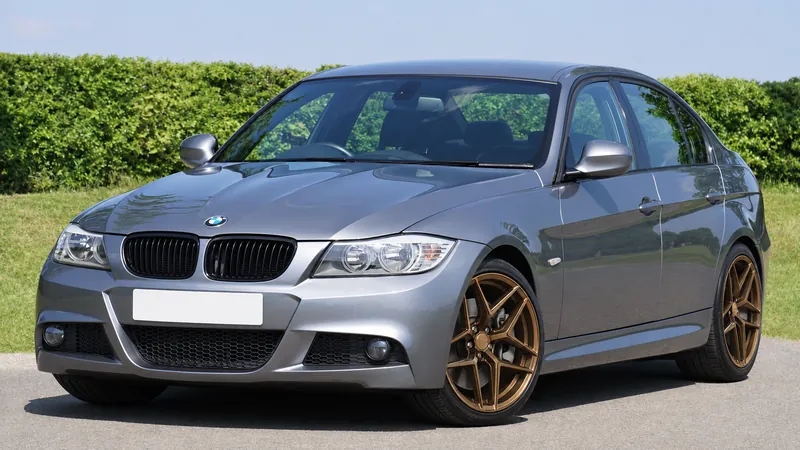
We ran the Fello AI car mod test on one photo of a grey BMW 3 Series: seven edits in ChatGPT, each in a fresh chat. They ranged from a simple colour change to a full build in a single prompt. Every result kept the same car, camera angle and background. The misses were in the details. A ducktail spoiler barely shows from the front, the mirror caps took the new paint, and a copied reference wheel brought its own branded centre cap onto the BMW.
The Key Takeaways
- One lock line does most of the work: start every prompt by telling ChatGPT to keep the same car, angle, lighting and background, then list only the change you want.
- Single changes held: paint, wrap, wheels, lowering and a body kit each came back on the same BMW in the same scene in ChatGPT Images 2.6.
- One prompt can carry a full build: paint, wheels, lowering and a body kit together gave the cleanest image of the whole test.
- The camera angle decides what shows: from a front three-quarter photo, a ducktail spoiler is a small tip on the boot lid.
- A reference photo beats a description: ChatGPT copied an uploaded wheel's spoke design closely, centre cap logo included.
What Is AI Car Modification?
AI car modification is editing a photo of your own car with an image model to show a new paint colour, wrap, wheels, ride height or body kit. You upload the photo, describe the change in plain words, and the model redraws only those parts. The result shows whether a build looks right on your car. It does not show whether the parts fit.
There are two ways to do it. Dedicated apps such as Mody and AutoStyle put an image model behind menus for rims, colours and stance, and charge a weekly, monthly or yearly subscription. General chatbots such as ChatGPT and Gemini take a photo and a sentence instead, and they come with plans many drivers already have.
The car apps are open about the limit. TunedRides, which sells its own car modification app, writes that AI renders "answer 'does this look right?' more reliably than 'will this fit?'". Treat every image in this guide the same way: a preview of the look, not a fitment check for wheel offset, tyre size or clearance.
How We Ran the Fello AI Car Mod Test
The Fello AI car mod test is one stock car photo, seven modification prompts and ChatGPT's built-in image model. Every prompt went into a fresh chat, so no edit could inherit the one before it. We ran it on 7 November 2026 on a ChatGPT Plus account. ChatGPT Images 2.6 had launched three days earlier, and OpenAI's Images 2.6 announcement says it is available "across all subscription tiers on desktop, mobile, and web".
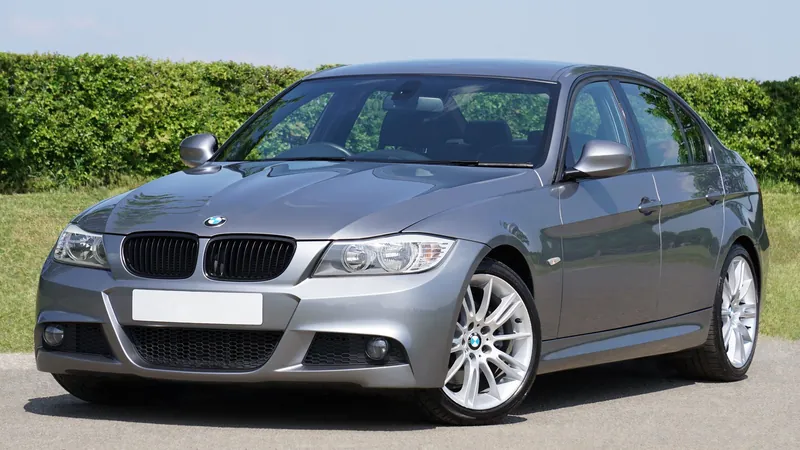
The car is a grey BMW 3 Series sedan from a free stock photo, shot from the front three-quarter angle at eye level in daylight, with a blank number plate. For each result we checked five things. Was it still the same car? Did the hedge, sky and reflections stay put? How many spokes did the wheels have? Did the badges or plate change? And did ChatGPT add anything we did not ask for?
One limit of the test: every image below comes from a single prompt in a single chat. We did not test stacking edits one after another in the same conversation, so this guide makes no claim about how the car holds up over many turns.
How to Take a Car Photo That AI Can Modify
A good AI car modification starts with a plain, well-lit photo of the whole car, taken from the side you want to change. The model can only redraw what it can see, and a busy or badly framed photo gives it more to get wrong.
Pick the angle for the mod. A front three-quarter view shows the face, the front wheel and the whole side, but it hides the rear. For spoilers, diffusers and exhausts, shoot a rear three-quarter photo instead.
Shoot in daylight, at eye level, with the whole car in frame and some space around it. Even light keeps the paint readable. A cropped bumper or wheel leaves ChatGPT to invent the missing part.
Cover or blur the number plate before you upload the photo anywhere. Then use that same photo for every attempt, because comparing two builds on two different photos tells you nothing.
The Lock Line: An AI Car Modification Prompt Formula
The lock line is one sentence at the start of every prompt that tells ChatGPT what must not change. Every prompt in the Fello AI car mod test began with it:
Edit this photo of my car. Keep the exact same car, body shape, camera angle, lighting, background and reflections. Change only what I list below.
After the lock line, name one change and then say what stays. An image model redraws the whole picture, not just the part you mention, so the "keep" list is what stops a wheel swap from also changing the paint. OpenAI pitches Images 2.6 on exactly this, saying it keeps "characters, products, and brand details consistent as you edit".
Precise words get precise results. Name the finish (gloss, satin or matte) and a real colour name, such as Nardo grey. Give sizes in inches or millimetres, a spoke count, and the real part names: front lip splitter, side skirts, ducktail spoiler. For more prompt structure, our ChatGPT photo editing prompts use the same keep-and-change pattern on portraits.
AI Car Modification Prompts Tested on a BMW
Each prompt below is copy-paste ready, lock line included, followed by what ChatGPT Images 2.6 actually did with it. Swap in your own colour, wheel or part.
Change the Paint Colour
Edit this photo of my car. Keep the exact same car, body shape, camera angle, lighting, background and reflections. Change only what I list below.

Change only the paint to satin Nardo grey. Keep the wheels, trim, glass and badges exactly as they are.
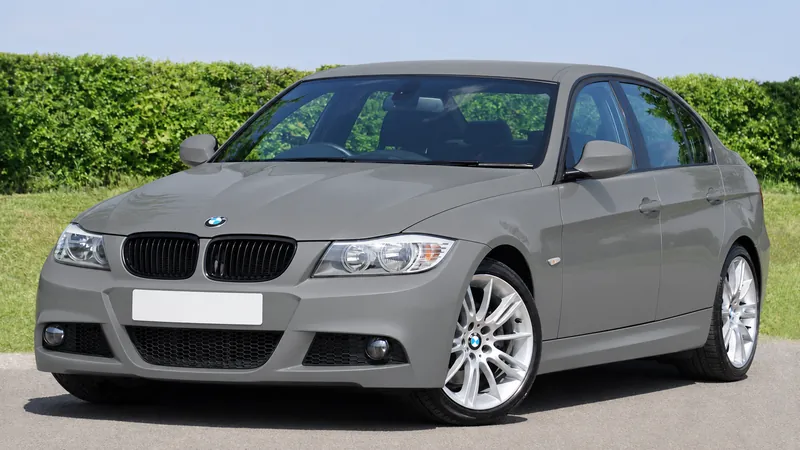
The colour change was clean. The satin finish reads as satin, the silver wheels, BMW badges and blank plate are untouched, and the hedge behind the car is identical. The one drift: the silver mirror caps took the new grey too, even though the prompt said to keep the trim. If your car has contrast trim you want to keep, name each part in the prompt.
Try a Vinyl Wrap
Edit this photo of my car. Keep the exact same car, body shape, camera angle, lighting, background and reflections. Change only what I list below.

Change only the paint to a matte black vinyl wrap with a thin gloss red pinstripe along the side character line.
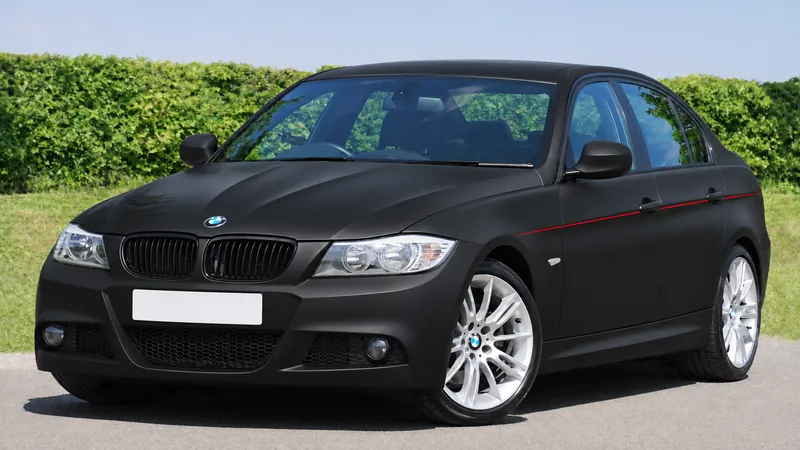
The wrap is convincing: flat black with soft highlights instead of mirror reflections. The red pinstripe runs from just behind the front wheel to the rear of the car along the door-handle line, which is where the prompt put it. The wheels stayed silver, but the mirror caps went black with the wrap, the same trim drift as the paint test.
Swap the Wheels
Edit this photo of my car. Keep the exact same car, body shape, camera angle, lighting, background and reflections. Change only what I list below.

Replace only the wheels with 19-inch gloss bronze six-spoke wheels. Keep the tyres, brakes, ride height and body unchanged.
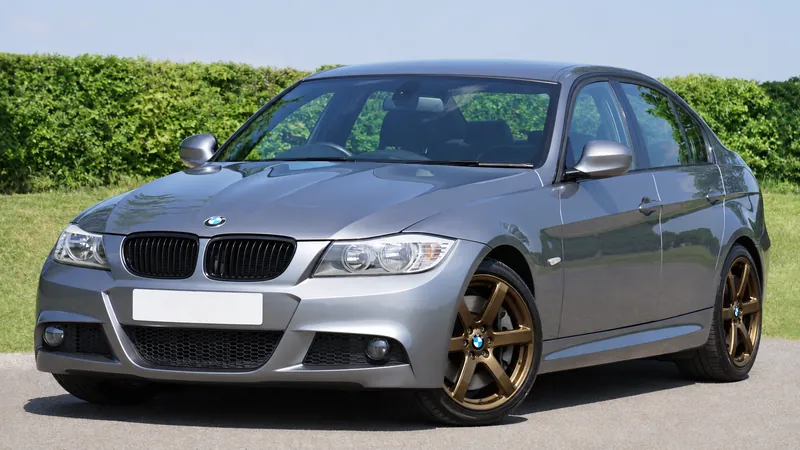
ChatGPT got the spoke count right: six spokes, gloss bronze, on all visible corners. It kept the BMW roundels on the centre caps and left the paint, glass and hedge alone. What a photo cannot prove is the size. The new wheels fill the arches about as the originals did, but nothing in an image tells you whether they are 18 or 19 inches.
Lower the Suspension
Edit this photo of my car. Keep the exact same car, body shape, camera angle, lighting, background and reflections. Change only what I list below.

Lower only the suspension by about 40 mm so the gap between tyre and wheel arch is small and even front and rear. Do not change the wheels.
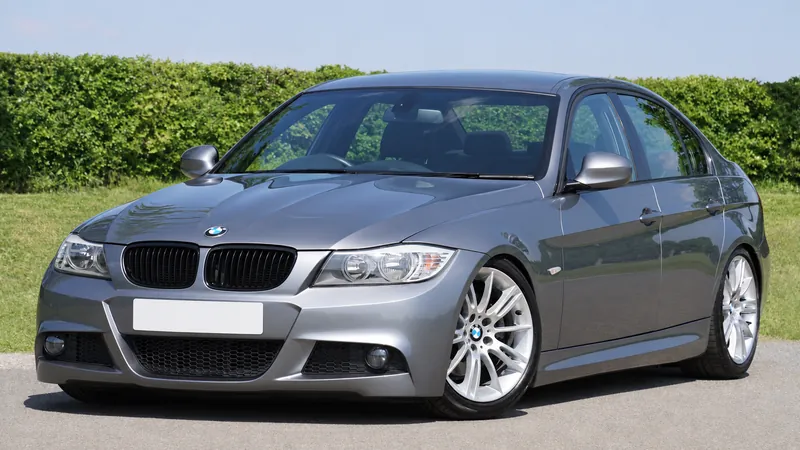
The drop is real but subtle. The gap between tyre and arch shrank front and rear, and the original wheels stayed. Side by side with the stock photo it is obvious; on its own it reads as a mild drop. ChatGPT does not measure millimetres, so if you want a stance look, ask for a bigger number or describe the result, such as a tyre that almost touches the arch.
Add a Body Kit
Edit this photo of my car. Keep the exact same car, body shape, camera angle, lighting, background and reflections. Change only what I list below.

Add only a gloss black front lip splitter, side skirts and a small ducktail rear spoiler. Keep the paint colour and wheels unchanged.
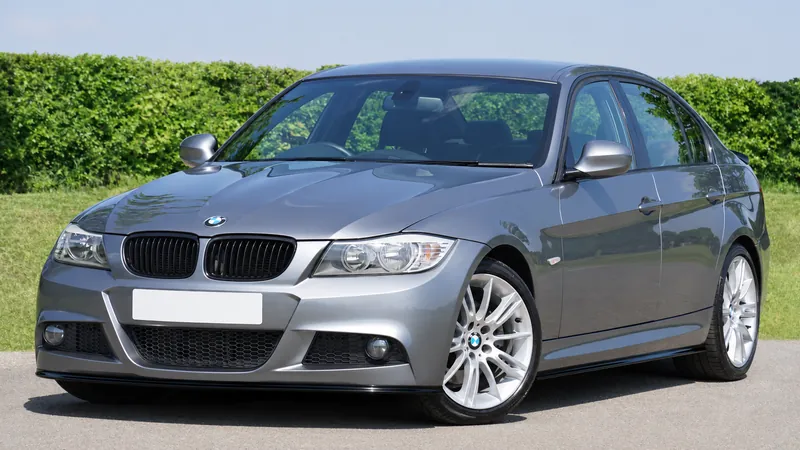
The front lip and side skirts are clean, gloss black and fitted to the existing bumper and sills. The ducktail spoiler is there, but from this angle it is only a small black tip at the edge of the boot lid. That is not ChatGPT failing; the camera simply cannot see the rear. For rear parts, start from a rear three-quarter photo.
Do the Full Build in One Prompt
Edit this photo of my car. Keep the exact same car, body shape, camera angle, lighting, background and reflections. Change only what I list below.

Paint it satin Nardo grey, fit 19-inch gloss bronze six-spoke wheels, lower it by about 40 mm, and add a gloss black front lip, side skirts and a ducktail spoiler.
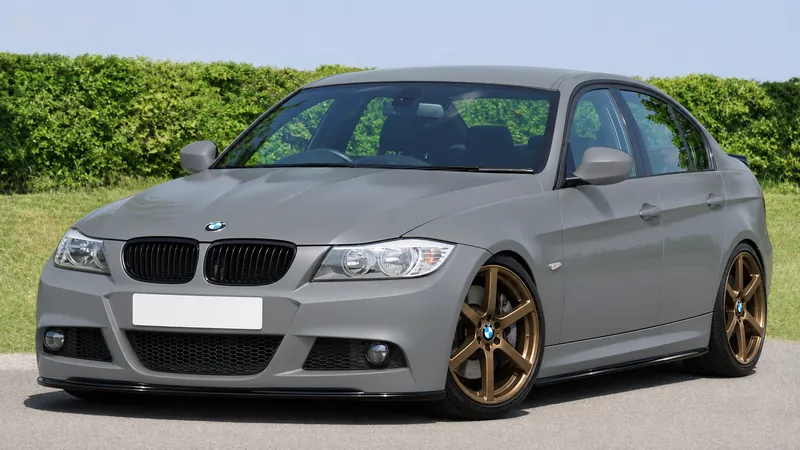
The full build was the best image of the test. All six changes landed in one go: satin grey paint, six-spoke bronze wheels with BMW caps, a visible drop, the front lip, the side skirts and the spoiler tip. The car, angle and background still match the stock photo. If you already know the build you want, one prompt is enough.
Copy a Real Wheel From a Photo
Upload the car photo first and a product photo of one real wheel second, then send:
Put the wheel from the second image on all four corners of the car in the first image. Keep everything else the same.
This is the closest thing to a real parts preview. We used a bronze split five-spoke wheel from an aftermarket brand's product shot, and ChatGPT reproduced its spoke shape and finish closely, at the right angle for each corner. It also copied too much: the BMW roundel is gone, replaced by the reference wheel's own branded centre cap.
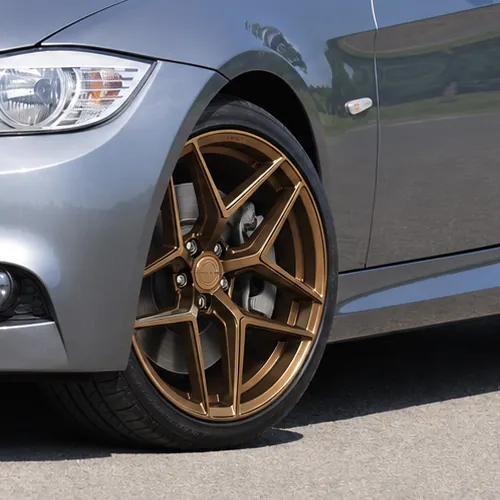
If you want your car's own caps, add "Keep the original BMW centre caps" to the prompt. Mody's App Store reviews show why this matters: one reviewer says that when they uploaded a wheel in that app, it changed their Mercedes G-Wagon into a pickup truck instead.
Where AI Car Modification Goes Wrong, and How to Fix It
AI car modification in ChatGPT goes wrong in the details: trim that changes colour with the paint, parts the camera cannot see, and logos copied from a reference photo. In the Fello AI car mod test, ChatGPT never swapped the car for a different model, never moved the background and never invented a number plate. Every mistake was fixable with one extra line.
| Problem | What happened in our test | Line to add |
|---|---|---|
| Trim changes with the paint | Silver mirror caps turned grey (paint) and black (wrap) | "Keep the silver mirror caps as they are." |
| Part hidden by the angle | Ducktail spoiler showed only as a small tip | Use a rear three-quarter photo for rear parts |
| Logos travel with a reference | Reference wheel brought its own branded centre cap | "Keep the original BMW centre caps." |
| Drop too subtle | About 40 mm read as a mild lowering | Ask for a larger drop, or describe the tyre-to-arch gap you want |
| Size cannot be checked | 19-inch wheels look plausible but cannot be measured | Check sizes and offset with a wheel shop, not the image |
When a result goes wrong, start a new chat with the original photo rather than correcting the edited image. Each test here began from the untouched photo, which is why none of the drift carried over from one edit to the next.
Is AI Car Modification Free?
Yes, AI car modification is free in ChatGPT and Gemini, within limits. ChatGPT's Free plan includes Images 2.6 and Gemini's free tier edits photos too, but both cap image use and neither publishes the daily number. Dedicated car apps charge a subscription for the same job.
ChatGPT Free vs Plus
Images 2.6 is on every ChatGPT plan, according to OpenAI's launch post. The difference is how much you can use it. OpenAI's help centre says that on Free, "file uploads, image generation, voice, data analysis, and other tools have separate usage limits", and that "ChatGPT will notify you when you reach an applicable limit". It does not give a number. We ran this test on Plus, so we cannot tell you how many of these seven edits a Free account gets in a day. Our guide to what ChatGPT's free plan includes covers the rest of the Free limits.
Gemini for Car Edits
Gemini also edits uploaded photos. Its Gemini image help page lists "local edits", which Google describes as "making quick and specific changes to parts of an image". We did not test Gemini here, but three of Google's own rules matter for car edits.
First, age: "To generate and edit images, you must be 18 or over." Second, resolution: downloads are 1K without a Google AI plan and 2K with one.
Third, the free model. Since 9 October 2026, Google's free plan defaults to Auto, which picks Gemini 4 Hydrogen or a fast, lightweight model for each prompt. The image help page says Flash-Lite image requests use what it calls Nano Banana Lite, which "isn't designed for multiple image references or for multiple edits". On a free Gemini account, where Auto can hand your prompt to the lightweight model, the reference-wheel trick is the one most likely to struggle.
For how the free tier works in more detail, read whether Nano Banana is free, and for Gemini prompt structure, our Nano Banana prompt formula.
What Car Modification Apps Cost
Dedicated car modification apps charge from a few dollars a week to about $70 a year. These are the US prices listed on 7 November 2026:
| Tool | Price | What you get |
|---|---|---|
| ChatGPT | Free; also included in Plus | Images 2.6, any edit you can describe, unpublished Free limit |
| Gemini | Free; more with a Google AI plan | Photo edits, 18+, Nano Banana Lite on some free prompts, 1K downloads |
| Mody | $6.99/week, $39.99/year, $69.99 lifetime | Style Builder, custom prompts, part-by-part edits; 4.5 from 6.3K ratings |
| AutoStyle AI | $4.99/month; yearly plans listed from $19.99 to $49.99 | Wrap and colour visualiser; 4.2 from 69 ratings |
| TunedRides | 3 free watermarked renders; Pro $14/month or $69/year | Preset styles such as widebody and stance; 250 credits a month on Pro |
The apps give you menus, and the Mody App Store listing promises part-by-part edits to "color, rims, tires, suspension" and more. Its reviews are mixed: one reviewer writes that "wheel brands/styles are super generic". ChatGPT has no menus, but it will take any wheel, colour or part you can name or photograph.
Render a Build Idea in Fello AI
When you want to see a build idea before you have the right photo, Fello AI turns the description into an image, with no car-app subscription. Describe a satin grey sedan on bronze six-spoke wheels, or a matte black wrap with a red pinstripe, and get the picture back from GPT Image.
It happens in the same app where you already chat with ChatGPT, Claude and Gemini. Ask one model to suggest three wrap colours for your car, then ask for a render of the one you like. There is no second tab to open and no $6.99-a-week car app to pay for. Fello AI runs on Mac, iPhone and iPad, has a free tier, and holds a 4.7-star rating from more than 27,000 reviews.
Use the same vocabulary as the prompts in this guide: a real colour name, a finish, a spoke count and the part names. Our ChatGPT image generator guide covers prompt patterns for clean, photo-real renders.
Verdict: ChatGPT Is a Real AI Car Modification Tool
For previewing paint, wraps, wheels, a drop and a body kit on your own car, ChatGPT is now good enough that a paid car app is hard to justify. TunedRides' FAQ says general-purpose tools like Midjourney "lack the accuracy of purpose-built car modification AI". In our test, ChatGPT kept the car, the angle and the scene through seven edits, and its mistakes were trim and logos, not a different car.
Its limits are the ones every render shares: it cannot tell you whether a wheel fits, and it shows only what the camera sees. Take one clean photo from the side you want to change, paste the lock line, and start with the full build in one prompt. If something drifts, add one "keep" line and run it again from the original photo.
Frequently Asked Questions
Can ChatGPT modify a photo of my car?
Yes. Upload a clear photo of your car, start the prompt with a line telling ChatGPT to keep the same car, angle, lighting and background, then name the change. In our test, ChatGPT Images 2.6 changed paint, wrap, wheels, ride height and a body kit on a BMW 3 Series without changing the car itself.
Is AI car modification free?
Yes, within limits. ChatGPT's Free plan includes Images 2.6 and Gemini's free tier edits photos, but both limit image use without publishing a daily number. Gemini also requires you to be 18 or over for image editing. Dedicated apps such as Mody start at $6.99 a week.
Will the parts fit if they look right in the AI image?
Not necessarily. An AI render shows how a build looks, not whether a wheel's size, offset or tyre clears your arches and brakes. Use the image to choose a look, then confirm fitment with a wheel or tuning shop.
Why did the AI change a part of my car I did not mention?
Image models redraw the whole picture, so parts close to the change can drift. In our paint and wrap tests, ChatGPT repainted the silver mirror caps along with the body. Name any part you want to keep in the prompt, and restart from the original photo instead of editing the edited image.
Can I put a specific brand of wheel on my car with AI?
Yes, with a reference photo. Upload your car photo and a product photo of the wheel, and ask ChatGPT to put that wheel on all four corners. It copied the spoke design closely in our test, but it also replaced the BMW centre caps with the wheel brand's own, so add a line to keep your original caps.
A imagem de destaque deste artigo foi criada com a ajuda de IA.