Studijní režim ChatGPT je rok starý. OpenAI ho spustila 29. 7. 2025 jako bezplatný způsob, jak přimět ChatGPT, aby učil místo toho, aby jen odpovídal, a dnes funguje na každém tarifu ChatGPT včetně bezplatné verze. Místo hotového řešení klade otázky, nabízí nápovědy a před přechodem k dalšímu kroku ověřuje, zda ten poslední skutečně dosedl.
Tento návod popisuje, co studijní režim mění v praxi, přesné kroky k jeho zapnutí, které tarify ho zahrnují, jak fungují nové Study Hours a jak si stojí proti Guided Learning od Googlu. Zabývá se i tím, co většina článků vynechává, tedy omezením, které OpenAI přiznala už v den spuštění a od té doby ho neuzavřela.
To hlavní ve zkratce
- Zdarma na každém tarifu ChatGPT, včetně bezplatné verze, na webu, v iOS i v Androidu.
- Volba, kterou hledáte, se jmenuje Study a najdete ji pod položkou Plugins, ne „Study Mode“, a právě proto ji lidé přehlédnou.
- Spuštěn 29. 7. 2025 na tarifech Free, Plus, Pro a Team, tarif Edu se přidal o několik týdnů později.
- Od 16. 7. 2026 může rodič nastavit, aby se studijní režim u propojeného účtu náctiletého spouštěl ve výchozím nastavení.
- Study Hours dorazily 18. 8. 2026 a zapínají studijní režim ve zvolených denních časech. Nastavit si je může teenager sám, nebo mu je nastaví propojený rodič.
- Studentovi nic nebrání ho vypnout, což je mezera, kterou OpenAI potvrdila v den spuštění.
Co je studijní režim ChatGPT?
Studijní režim ChatGPT je bezplatný učební režim, který vás vede k odpovědi, místo aby vám ji rovnou předložil. Klade otázky, dává nápovědy a průběžně ověřuje, zda látce rozumíte. OpenAI ho spustila 29. 7. 2025 a dnes funguje na každém tarifu ChatGPT.
Návrh je sokratovský, což znamená, že model vede rozhovor otázkami, ne závěry. Zadejte mu ve studijním režimu vyřešení kvadratické rovnice a obvykle se zeptá, co už znáte, kde jste se zasekli a jaký krok byste zkusili dál. K odpovědi se stejně dostanete, ale dojdete k ní tak, že jste si úvahu prošli sami.
Jak mění odpověď, kterou dostanete
Rozdíl se nejrychleji projeví u úloh, které byste s malým popostrčením zvládli vyřešit sami. Běžný ChatGPT vám vypracované řešení předá v jediné odpovědi. To je efektivní a naučí vás to jen velmi málo. Studijní režim rozdělí tutéž úlohu na fáze a u každé se zastaví, aby ověřil, že krok dosedl, než pokročí dál.
Funguje i s materiály, které přinesete. Můžete nahrát poznámky z přednášky, sadu úloh nebo text ke čtení a studijní režim postaví otázky kolem tohoto zdroje, ne kolem obecných znalostí. Díky tomu je pro opakování podstatně užitečnější než běžný chat, protože otázky sledují osnovu, ze které vás skutečně zkoušejí. Pokud chcete verzi téže myšlenky založenou na promptech, náš článek o studijních promptech, které opravdu fungují popisuje ruční postup.
Jak zapnout studijní režim ChatGPT
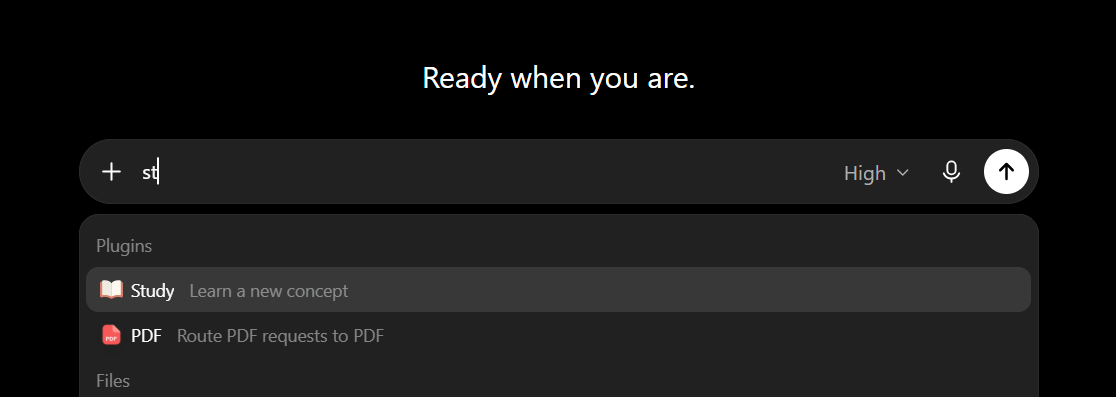
Zdaleka nejčastější důvod, proč lidé studijní režim nemohou najít, je ten, že rozhraní ho nenazývá studijním režimem. Nabídka editoru zprávy ho uvádí pod položkou Plugins, prostě jako Study. Jakmile víte, jak se popisek jmenuje, zapnutí zabere asi čtyři vteřiny.
Na webu a v počítači
- Otevřete ChatGPT a začněte nový chat.
- Začněte psát do editoru zprávy. Otevře se nabídka s položkami Plugins a Files.
- Pod položkou Plugins zvolte Study, popsané jako Learn a new concept.
- Položte svou otázku nebo popište téma, kterým se chcete zabývat.
Existuje i zkratka. Když přejdete přímo na chatgpt.com/studymode, otevře se chat s již zvoleným režimem, což se vyplatí uložit do záložek, pokud ho používáte denně.
Na iPhonu a Androidu
Postup na mobilu odpovídá tomu na počítači, prochází se stejnou nabídkou editoru. Studijní režim funguje s libovolným modelem, který v ChatGPT můžete zvolit, takže není potřeba nejdřív přepnout na konkrétní model a nepřijdete o něj ani změnou modelu uprostřed konverzace.
Je studijní režim ChatGPT zdarma?
Ano. Studijní režim je zdarma na každém tarifu ChatGPT, včetně bezplatné verze. Spustil se na tarifech Free, Plus, Pro a Team v červenci 2025, o několik týdnů později dorazil na Edu a Enterprise a dnes je celosvětově dostupný přihlášeným uživatelům bez příplatku. Není k němu samostatné předplatné ani prémiová bariéra.
Jeden detail v názvech lidi mate. Team byl název tarifu při spuštění a v současné nabídce ChatGPT už se neobjevuje, místo něj je uveden Business. Spousta návodů stále opakuje znění z července 2025. Pokud máte Business a čtete, že studijní režim pokrývá „Free, Plus, Pro a Team“, jde o formulaci z dne spuštění, ne o mezeru ve vašem tarifu.
| Tarif | Studijní režim zahrnut | Poznámky |
|---|---|---|
| Free | Ano | Dostupný ode dne spuštění, není potřeba upgrade |
| Go | Ano | Pokryt plošným zavedením na všechny tarify |
| Plus | Ano | Dostupný ode dne spuštění |
| Pro | Ano | Dostupný ode dne spuštění |
| Business | Ano | Při spuštění se tarif jmenoval Team |
| Enterprise | Ano | Dorazil po spotřebitelských tarifech |
| Edu | Ano | Dorazil několik týdnů po spuštění |
Protože studijní režim nic nestojí, je jedním z mála pádných důvodů, proč zůstat na bezplatné verzi a neupgradovat. Ucelenější přehled o bezplatném tarifu najdete v našem rozboru toho, co bezplatný tarif ChatGPT zahrnuje. Náš aktuální průvodce cenami ChatGPT pokrývá placené tarify, pokud zvažujete upgrade z jiných důvodů.
Co se od spuštění změnilo: časová osa studijního režimu ChatGPT
Studijní režim se během prvního roku potichu přebudoval a řada článků stále popisuje verzi ze spuštění. Záleží na čtyřech datech.
29. 7. 2025: Spuštění
OpenAI dodala studijní režim přihlášeným uživatelům na tarifech Free, Plus, Pro a Team, přičemž ChatGPT Edu byl přislíben do několika týdnů, jak tehdy informoval TechCrunch. Prezentace cílila výslovně na problém podvádění a představovala funkci jako způsob, jak budovat kritické myšlení, ne jak si ho zkrátit.
10. 3. 2026: Interaktivní matematika a přírodní vědy
OpenAI přidala interaktivní vizuální výklady pro matematiku a přírodní vědy, které odstartovaly s více než 70 základními koncepty a byly plošně zavedeny na všech tarifech. Ukazují, jak se vzorce, proměnné a vztahy chovají v reálném čase, když je měníte. Týká se to vizuální stránky, nikoli samotného řešení, a náš test nejlepší AI na matematiku ukazuje, který model je nejspolehlivější, když musí výsledek sedět.
Jde o funkci oddělenou od studijního režimu a na tom rozdílu záleží, protože obojí se neustále zaměňuje. Když narazíte na čísla jako 18 milionů týdenních uživatelů napříč více než 250 tématy, popisují interaktivní nástroje pro matematiku a přírodní vědy, ne studijní režim. OpenAI pro samotný studijní režim žádný počet uživatelů nezveřejnila.
16. 7. 2026: Rodiče ho mohou nastavit jako výchozí
Nejvýznamnější změna je zároveň nejnovější a téměř žádný návod ji nezmiňuje. Rodič s propojeným účtem náctiletého teď může studijní režim zapnout jako výchozí v rodičovském nastavení ChatGPT, takže se aktivuje automaticky pokaždé, když ten náctiletý otevře nový chat. Digital Trends o aktualizaci informoval spolu s častějšími připomínkami přestávek pro náctileté.
O tři dny dříve, 13. 7. 2026, OpenAI rozšířila upozornění, která rodiče dostávají, i na případy, kdy je propojený účet náctiletého deaktivován kvůli násilným výhrůžkám. Obě změny přišly ve stejné vlně, kterou OpenAI zarámovala kolem přístupu náctiletých k AI, ne kolem studijních návyků.
18. 8. 2026: Study Hours a ChatGPT for Teens
Ze studijního režimu se stal střed celého produktu. OpenAI začala globálně zavádět ChatGPT for Teens, prostředí automaticky uplatňované na účty vyhodnocené jako mladší 18 let, a studijní režim je díl, kolem kterého je postavené. Spolu s ním dorazily tři věci, které mění způsob, jak se režim používá.
Tou podstatnou jsou Study Hours a mají vlastní sekci níže. Vedle nich se nově objevují responsible homework reminders, upozornění, která se spustí, když model vyhodnotí, že si teenager chce úkol zkrátit, a místo odpovědi ho nasměrují do studijního režimu. Do stejného balíčku byly zařazeny kvízy a výukové vizualizace, přičemž vizuální vysvětlení nyní pokrývají více než 300 témat.
Jednu věc je potřeba říct jasně, protože velká část článků o spuštění to pochopila obráceně. ChatGPT for Teens studijní režim ve výchozím nastavení nezapíná. Lauren Jonas, která v OpenAI vede oblast mládeže a rodin, to potvrdila pro Engadget. Teenageři dostávají úvodní návrhy promptů zaměřené na učení a pobídky u domácích úkolů, ale samotný režim zůstává dobrovolný, dokud nejsou nastavené Study Hours nebo rodičovské ovládání.
ChatGPT Study Hours: studijní režim podle rozvrhu
Study Hours zapínají studijní režim automaticky v denních časech, které si zvolíte. Vyšly 18. 8. 2026 jako součást ChatGPT for Teens. Nastavit si je může teenager sám, nebo mu je nastaví propojený rodič, a OpenAI je popisuje jako způsob, jak z lepších studijních návyků udělat rutinu místo rozhodnutí, které se musí znovu udělat v každém chatu.
Je to třetí a nejlepší odpověď na stejný problém. Přepínač u jednotlivého chatu spoléhá na to, že se student rozhodne učit pomalejší cestou přesně ve chvíli, kdy chce odpověď. Rodičovské nastavení ze 16. 7. 2026 to vyřešilo tím, že volbu odebralo úplně, což funguje a zároveň je to přesně ten typ nastavení, který teenagera dráždí a který obchází. Study Hours stojí mezi tím: mezi čtvrtou a šestou odpoledne je výchozím stavem studijní režim a po zbytek dne běžný ChatGPT.
Praktický rozdíl je v tom, že o rozvrhu se dá vyjednávat. Plošné výchozí nastavení je něco, co se teenagerovi udělá, zatímco okno na domácí úkoly je něco, s čím může souhlasit a co si může nastavit sám, což je podstatně lepší výchozí pozice pro rozhovor, na kterém stejně celá věc stojí.
Dva limity stojí za zmínku. Study Hours jsou navázané na prostředí pro teenagery, takže to není funkce plánování, kterou by dostaly běžné účty dospělých. A nastavují výchozí stav, ne zámek: v okně Study Hours režim začíná zapnutý, ale stále platí možnost vypnutí popsaná níže. Pokud chcete verzi rodičovského ovládání, která není navázaná na rozvrh, celý panel rozebíráme v průvodci rodičovským ovládáním ChatGPT.
Studijní režim ChatGPT vs. Gemini Guided Learning
Google odpověděl o osm dní později a 6. 8. 2025 oznámil Guided Learning. Je to obdoba výukového režimu v Gemini a oba jsou si natolik blízké, že volba se scvrkne na to, kterého asistenta už používáte.
| Funkce | Studijní režim ChatGPT | Gemini Guided Learning |
|---|---|---|
| Spuštěno | 29. 7. 2025 | 6. 8. 2025 |
| Cena | Zdarma na všech tarifech | Google nezveřejňuje žádný požadavek na tarif kromě přihlášení |
| Jak ho zapnete | Nabídka editoru, pak Study pod položkou Plugins | More tools, pak Guided Learning |
| Na mobilu | Tatáž nabídka editoru | Klepněte dole na Guided Learning |
| Metoda výuky | Sokratovské otázky a nápovědy | Plán krok za krokem s průběžnými kontrolami |
| Funguje s vašimi soubory | Ano | Ano, včetně studijních příruček z materiálů ke kurzu |
| Další formáty | Kvízy a otevřené otázky | Obrázky, diagramy, videa a kvízy |
V čem vítězí studijní režim ChatGPT
Studijní režim má silnější pozici v důslednosti kladení otázek. Je ochotnější odpověď zadržet a dál tlačit, což je přesně to, co chcete, když je cílem zapamatování, ne hotový úkol. Pro domácnost s náctiletým to rozhoduje výchozí rodičovské nastavení.
V čem vítězí Gemini Guided Learning
Guided Learning se víc opírá o multimédia, přitahuje k výkladu diagramy a videa a před začátkem rozvrhne studijní plán tématu. Pokud se lépe učíte z obrazu než z dialogu, je z těch dvou příjemnější. Google na tom mezitím postavil hlubší vrstvu, studijní sešity Gemini, které spustí vstupní kvíz a sledují cíle napříč celým předmětem. Pro úplnější srovnání ve všem ostatním, co student potřebuje, jsme ChatGPT a Gemini pro studenty porovnali podrobně.
V čem studijní režim ChatGPT zaostává
Upřímným omezením je to, které OpenAI přiznala hned první den. Student, který chce odpověď, může studijní režim jednoduše vypnout a zeptat se znovu, a Education Week informoval, že podle OpenAI proti přesně tomuhle v současnosti neexistují žádné pojistky. Výuková struktura je dobrovolná, což znamená, že pomáhá studentům, kteří se učit chtějí, a nijak nezastaví ty, kdo nechtějí.
Studijní režim je lepší doučovatel. Nikdy nebyl zámkem na dveřích.
Toto zarámování má význam především pro učitele. Studijní režim není nástroj proti podvádění a nikdy tak nebyl postaven, takže brát ho jako pojistku znamená chybně chápat, co dělá. Mezeru u účtů náctiletých zúžily tři změny: výchozí rodičovské nastavení z července 2026, Study Hours a upozornění u domácích úkolů, která přesměrují náctiletého, jenž si zjevně chce úkol zkrátit. Žádná z nich není zámek a u běžného účtu dospělého zůstává přepínač zcela v rukou uživatele. Jestli je jeho použití u konkrétního úkolu povolené, je jiná otázka. To, jestli ho vaše škola povoluje, určuje vyučující.
Existuje i výhrada ke kvalitě, která platí pro každého AI doučovatele. Model se stále může sebejistě mýlit a styl kladení otázek ve studijním režimu může chybný výklad učinit působivějším, protože přichází v učitelských krocích. Kontrolovat jeho úvahy proti vašim skutečným studijním materiálům není volitelné, což je další argument pro nahrání vašich poznámek a udržení modelu ukotveného ke zdroji.
Jak ze studijního režimu vytěžit maximum
Studijní režim odměňuje konkrétnost. „Pomoz mi s chemií“ vede k mlhavému přešlapování, zatímco „proveď mě vyrovnáním této rovnice, pořád ztrácím přehled o atomech kyslíku“ mu dá něco, s čím může pracovat. Pojmenovat, kde jste se zasekli, je nejrychlejší cesta k užitečnému sezení.
Vyplatí se ho také použít před panikou, ne během ní. Režim je záměrně pomalejší než běžná odpověď, takže začínat s opakováním večer před termínem jde proti celému jeho pojetí. Používán týdně po celý semestr funguje jako trpělivý doučovatel, a použit o půlnoci působí prostě jen obstrukčně.
Jakmile látku pochopíte, výsledek je obvykle stále potřeba vytvořit, a to je jiná práce než se to naučit. Studijní režim vás dovede k pochopení, a pak nástroje postavené pro tvorbu promění toto pochopení v hotovou esej, prezentaci nebo sadu poznámek.
Náš návod, jak používat AI pro prezentace, eseje a studijní dokumenty pokrývá tuto polovinu pracovního postupu. Silnou volbou je tu i Fello AI, který dává několik předních modelů do jedné aplikace pro Mac, takže se dostanete od pochopení tématu k rozpracování toho, z čeho vás skutečně hodnotí. Studijní režim doplňuje, ne nahrazuje.
Pokud si skládáte kompletní studijní výbavu, náš přehled nejlepších AI nástrojů pro studenty zasazuje studijní režim do souvislostí vedle nástrojů na dělání poznámek, rešerše a psaní.
Měli byste ho používat?
Pokud cokoli studujete, ano. Studijní režim je zdarma na každém tarifu, zapne se dvěma kliknutími a je znatelně lepší než běžný ChatGPT u čehokoli, co si potřebujete zapamatovat, ne jen odbýt. Laťka pro vyzkoušení je asi tak nízko, jak jen software dovolí.
Realistické očekávání je, že motivovaným studujícím pomáhá výrazně a disciplinovaným podvodníkům vůbec, což je zhruba to, k čemu ho OpenAI navrhla. Otevřete nabídku editoru, zvolte Study pod položkou Plugins, nahrajte materiál, ze kterého vás skutečně zkoušejí, a než rozhodnete, zda vám vyhovuje, věnujte mu týden opravdového opakování.
Časté dotazy
Je studijní režim ChatGPT zdarma?
Ano. Studijní režim je zahrnut na každém tarifu ChatGPT bez příplatku, včetně bezplatné verze. Není k němu samostatné předplatné ani prémiová bariéra.
Proč nemohu studijní režim v ChatGPT najít?
Protože rozhraní tento název nepoužívá. Začněte psát do editoru zprávy a pak pod položkou Plugins hledejte Study, popsané jako Learn a new concept. Můžete také přímo otevřít chatgpt.com/studymode.
Funguje studijní režim ChatGPT na iPhonu a Androidu?
Ano. Studijní režim funguje na webu, v iOS i v Androidu a běží s libovolným modelem, který v ChatGPT můžete zvolit, takže není potřeba nejdřív přepínat modely.
Můžou studenti studijní režim prostě vypnout, aby dostali odpověď?
Ano, a OpenAI při spuštění potvrdila, že tomu žádné pojistky nebrání. Výjimkou jsou účty náctiletých a jsou tu už tři: od 16. 7. 2026 může rodič nastavit, aby studijní režim běžel ve výchozím nastavení, od 18. 8. 2026 ho mohou ve zvolených časech zapnout Study Hours a upozornění u domácích úkolů přesměrují náctiletého, který si zjevně chce úkol zkrátit. Všechny tři nastavují výchozí stav, ne zámek.
Co jsou ChatGPT Study Hours?
Study Hours zapínají studijní režim automaticky v denních časech, které si zvolíte. Vyšly 18. 8. 2026 jako součást ChatGPT for Teens. Okno si může nastavit teenager sám, nebo mu ho nastaví propojený rodič. Platí pro prostředí pro teenagery, ne pro běžné účty dospělých, a pro dané hodiny nastavují výchozí stav místo toho, aby režim zamkly.
Čím se studijní režim liší od Guided Learning od Gemini?
Oba jsou výukové režimy, které učí krok za krokem, místo aby předaly odpověď. Studijní režim se víc opírá o sokratovské kladení otázek a je zdarma na každém tarifu ChatGPT, zatímco Guided Learning přidává víc vizuálních prvků, jako jsou diagramy a videa, a nejdřív rozvrhne studijní plán.