ChatGPT Study Mode still exists, it just moved. OpenAI launched it on 29 July 2025 as a free way to make ChatGPT teach rather than answer, and as of November 2026 it still runs on every ChatGPT plan, including the free tier. The launch-era Study and learn entry under Tools is now a Study option: type @study in the message composer, or open the + menu and search for it. Instead of handing over a finished solution, it asks you questions, offers hints, and checks whether the last step actually landed before moving on to the next one.
This guide covers what Study Mode changes in practice, the exact steps to switch it on, why it can seem to disappear, which plans include it, how Study Hours works for teens, and how it stacks up against Google’s Guided Learning. It also covers the part most write-ups leave out, which is the limitation OpenAI acknowledged on launch day and has not closed since.
The Key Takeaways
- Free on every ChatGPT plan, including the free tier, across web, iOS and Android.
- The option is called Study, not “Study Mode”. Type @study in the composer, or open the + menu and search for it. The launch label, Study and learn under Tools, no longer appears in OpenAI’s instructions, which is one reason people think the mode was removed.
- Study does not appear in Temporary Chats, GPTs or Projects. Start a regular chat, or open chatgpt.com/studymode on the web.
- Launched 29 July 2025 on Free, Plus, Pro and Team, with Edu following on 6 August and Enterprise on 14 August 2025.
- Since 16 July 2026, a parent can set Study Mode to run on by default for a linked teen account.
- Study Hours arrived on 18 August 2026 and starts new chats in Study Mode during set times of day. OpenAI now documents it as a parental-control schedule for linked teen accounts.
- Nothing stops a student switching it off, a gap OpenAI confirmed on launch day and, for Study Hours, again in October 2026.
What Is ChatGPT Study Mode?
ChatGPT Study Mode is a free learning mode that guides you toward an answer instead of handing it over. It asks questions, gives hints, and checks your understanding as you go. OpenAI launched it on 29 July 2025, and it now works on every ChatGPT plan.
The design is Socratic, meaning the model leads with questions rather than conclusions. Ask it to solve a quadratic equation in Study Mode and it will typically ask what you already know, where you got stuck, and which step you would try next. You still reach the answer, but you arrive at it having done the reasoning yourself.
How It Changes the Answer You Get
The difference shows up fastest on problems you could have solved yourself with a nudge. Normal ChatGPT hands you a worked solution in one response. That is efficient, and it teaches you very little. Study Mode breaks the same problem into stages and stops at each one to check the step landed before it moves on.
It also works on material you bring. You can upload lecture notes, a problem set or a reading, and Study Mode will build its questions around that source rather than around general knowledge. That makes it considerably more useful for revision than a generic chat, because the questions track the syllabus you are actually being examined on. If you want the prompt-driven version of the same idea, our study prompts that actually work cover the manual approach.
How to Turn On ChatGPT Study Mode
The most common reason people cannot find Study Mode is that the interface does not call it Study Mode. The option is labelled Study. At launch it sat under Tools as Study and learn, and today OpenAI’s help page sends you through the message composer instead. Once you know the label, it takes about four seconds to switch on.
On the Web and Desktop
- Open ChatGPT and start a new, regular chat.
- Type @study in the message composer, or select + and type study to search the menu.
- Choose Study from the suggestions. In our screenshot it appears under Plugins, described as Learn a new concept.
- Ask your question, or describe the topic you want to work through.
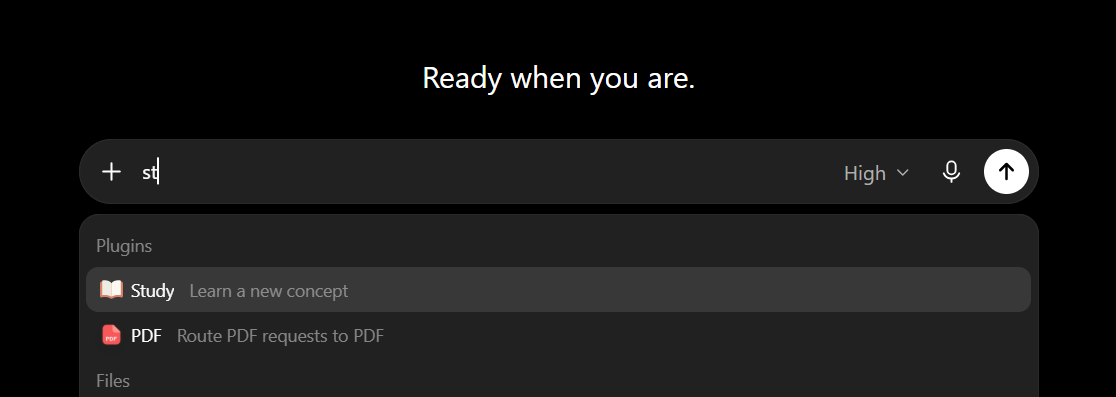
There is also a shortcut. Going straight to chatgpt.com/studymode opens a chat with the mode already selected, which is worth bookmarking if you use it daily. To switch Study Mode off, delete the Study token from the composer, or select the × next to it.
On iPhone and Android
On iPhone and Android, tap + to open the available tools and select Study. If it is not in the first list, search the menu for it, since layouts vary by app version. Study Mode works with any model available to you, so you do not need to switch to a specific model first.
Why Study Mode Seems to Have Disappeared
Study Mode has not been removed. As of November 2026, OpenAI’s study mode help page still lists it across ChatGPT plans on web, iOS and Android. When the option seems to be gone, one of four things is usually going on.
- You are looking for the old label. Study and learn under Tools is now Study, reached through @study or the + menu.
- You are in the wrong kind of chat. Study is not available in Temporary Chats, GPTs or Projects, so start a regular conversation.
- The menu is collapsed. If Study is not in the first list, type study to search for it, or open chatgpt.com/studymode on the web. OpenAI also suggests updating the app or hard-refreshing the page.
- Your school manages it. Some ChatGPT Edu workspaces let an admin require Study Mode, and then the Study selector does not appear because the mode is already on.
Is ChatGPT Study Mode Free?
Yes. Study Mode is free on every ChatGPT plan, including the free tier. It launched on Free, Plus, Pro and Team on 29 July 2025, reached Edu on 6 August and Enterprise on 14 August 2025, and OpenAI’s help page now lists it across ChatGPT plans globally. There is no separate subscription and no premium gate. It does share your plan’s normal limits: Study Mode adds no extra messages, and file uploads follow the same limits as in any other chat.
One naming detail catches people out. Team was the plan name at launch, and it no longer appears in ChatGPT’s current lineup, which lists Business instead. Plenty of guides still repeat the July 2025 wording. If you are on Business and reading that Study Mode covers “Free, Plus, Pro and Team”, that is launch-day phrasing rather than a gap in your plan.
| Plan | Study Mode included | Notes |
|---|---|---|
| Free | Yes | Available from launch day, no upgrade needed |
| Go | Yes | Covered by the all-plans rollout |
| Plus | Yes | Available from launch day |
| Pro | Yes | Available from launch day |
| Business | Yes | The plan was called Team at launch |
| Enterprise | Yes | Arrived on 14 August 2025 |
| Edu | Yes | Arrived on 6 August 2025; some workspaces can require it |
Because Study Mode costs nothing, it is one of the few solid reasons to stay on the free tier rather than upgrade. For a fuller picture of the free plan, see our breakdown of what the free ChatGPT plan includes. Our current ChatGPT pricing guide covers the paid tiers if you are weighing an upgrade for other reasons.
What Changed Since Launch: The ChatGPT Study Mode Timeline
Study Mode has been quietly rebuilt since launch, and a lot of coverage still describes the launch version. These are the dates that matter.
29 July 2025: Launch
OpenAI shipped Study Mode to logged-in users on Free, Plus, Pro and Team, with ChatGPT Edu promised within weeks, as TechCrunch reported at the time. The pitch was explicitly aimed at the cheating problem, positioning the feature as a way to build critical thinking rather than to shortcut it.
10 March 2026: Interactive Math and Science
OpenAI added interactive visual explanations for math and science, launching with more than 70 core concepts and rolling out globally across all plans. These show how formulas, variables and relationships behave in real time as you change them. That covers the visual side rather than the solving itself, and our benchmark of the best AI for math shows which model is most reliable when the answer has to be right. For physics, our guide to the best AI for physics does the same and shows why the thinking setting matters most.
This is a separate feature from Study Mode, and the distinction matters because the two get merged constantly. The headline figure from that launch, 140 million people a week using ChatGPT to understand math and science concepts, describes ChatGPT as a whole, not the interactive tools and not Study Mode. None of OpenAI’s Study Mode announcements gives a user count for the mode itself.
16 July 2026: Parents Can Make It the Default
A parent with a linked teen account can switch Study Mode on as the default from ChatGPT parental controls, so every new chat in the main ChatGPT experience starts in Study Mode. The setting controls how new chats start rather than blocking anything, and it does not apply to GPT or Project conversations. Digital Trends covered the update alongside more frequent break reminders for teens.
OpenAI’s parental-controls announcement files the same toggle under an update dated 13 July 2026, next to wider parent alerts for a linked teen account banned for violent activity. Both changes landed in the same push, which OpenAI framed around teen access to AI rather than around study habits.
18 August 2026: Study Hours and ChatGPT for Teens
Study Mode became the centrepiece of a product. OpenAI began rolling out ChatGPT for Teens globally, an experience applied automatically to accounts it identifies as under 18, and Study Mode is the piece it is built around. Three things shipped with it that change how the mode is used.
Study Hours is the significant one and gets its own section below. Alongside it, responsible homework reminders now fire when the model detects a teen appears to be shortcutting an assignment, and redirect them toward Study Mode rather than answering. Quizzes and learning visualizations were folded into the same bundle, and OpenAI told Engadget the visual explanations now cover more than 300 topics, up from the 70 or so they launched with.
One thing to be clear about, since much of the launch coverage got it backwards. ChatGPT for Teens does not turn Study Mode on by default. OpenAI head of youth and families Lauren Jonas confirmed this to Engadget. Teens get learning-focused starter prompts and the homework nudges, but the mode itself stays opt-in unless Study Hours or the parental control is set.
Since August 2026: Quizzes and Flashcards
Two learning tools now sit beside Study Mode. Interactive quizzes inside the chat reached all consumer plans and Edu on 14 August 2026, on web and mobile: ask ChatGPT to quiz you and answer the questions in the conversation. Built-in flashcards followed on 22 September 2026 on all plans, on web and mobile: ask for cards on a topic or upload your notes, flip each card, and mark whether you knew it. Both are ChatGPT features in their own right, but they pair naturally with Study Mode, and inside Study Mode you can ask for a quiz or flashcard-style review directly.
ChatGPT Study Hours: Study Mode on a Schedule
Study Hours turns Study Mode on automatically during set times of day. It shipped on 18 August 2026 as part of ChatGPT for Teens. OpenAI’s launch post said teens or parents could choose the times. As of November 2026, its help pages describe Study Hours as an optional parental-control schedule that a linked parent manages in Settings > Parental controls, and that cannot be changed from inside a conversation. Either way, the aim is to make better study habits a routine rather than a decision to re-make in every chat.
This is the third and best answer to the same problem. The per-chat toggle relies on a student choosing to learn the slow way at the exact moment they want an answer. The 16 July parental control fixed that by making Study Mode the starting point of every new chat, which works and is also the kind of blanket setting a teenager resents and routes around. Study Hours sits between the two: Study Mode can be the default between four and six in the afternoon, for example, and normal ChatGPT the rest of the time.
The practical difference is that a schedule is negotiable. A blanket default is something done to a teenager, while a homework window is something they can agree to and set themselves, which is a materially better starting position for the conversation that actually determines whether any of this works.
What Study Hours Does Not Do
Study Hours has three limits worth knowing. It is tied to the teen experience, so it is not a scheduling feature ordinary adult accounts get. It only shapes new conversations in the main ChatGPT experience, not existing chats, GPTs or Projects. And it sets a default rather than a lock: within a Study Hours window the mode starts on, but the same opt-out below still applies. If you want the parental-control version that is not scheduled, we cover the full panel in our guide to ChatGPT parental controls.
The missing lock is deliberate. In October 2026 Common Sense Media reported that teens could easily get around parent-set Study Hours, and OpenAI confirmed to Axios that the ability to exit Study Mode during Study Hours is intentional, not a loophole. OpenAI said it designed Study Hours as a flexible experience after consulting education experts and teens, rather than as a hard parental lock.
OpenAI’s own pages also disagree about the older always-on setting. The study mode help page says Study Hours replace it, while the parental-controls page, updated in November 2026, still lists the Study mode setting and Study Hours side by side. If the always-on toggle is missing from your panel, use Study Hours, which both pages document.
ChatGPT Study Mode vs Gemini Guided Learning
Google answered eight days later, announcing Guided Learning on 6 August 2025. It is Gemini’s equivalent tutoring mode, and the two are close enough that the choice comes down to which assistant you already use.
| Feature | ChatGPT Study Mode | Gemini Guided Learning |
|---|---|---|
| Launched | 29 July 2025 | 6 August 2025 |
| Cost | Free on all plans | Google does not publish a plan requirement beyond being signed in |
| How you turn it on | Type @study, or + and then Study | Add files menu, then More tools, then Guided Learning |
| On mobile | Tap +, then Study | Tap Add files, then Guided Learning at the bottom |
| Teaching method | Socratic questioning and hints | Step-by-step plan with check-ins |
| Works with your files | Yes | Yes, including study guides from course material |
| Extra formats | Quizzes, flashcards and open questions | Images, diagrams, videos and quizzes |
Where ChatGPT Study Mode Wins
Study Mode has the stronger claim on questioning discipline. It is more willing to withhold the answer and keep pushing, which is what you want when the goal is retention rather than a finished assignment. For a household with a teenager, the parental-control default and Study Hours settle it.
Where Gemini Guided Learning Wins
Guided Learning leans harder on multimedia, pulling in diagrams and videos alongside the explanation, and it will lay out a study plan for a topic before starting. If you learn better from visuals than from dialogue, it is the more comfortable of the two. Google has since built a deeper surface on top of it, Gemini study notebooks, which run a diagnostic quiz and track objectives across a whole course. For the fuller matchup across everything else a student needs, we compared ChatGPT and Gemini for students in detail.
Where ChatGPT Study Mode Falls Short
The honest limitation is the one OpenAI admitted on day one. A student who wants the answer can simply turn Study Mode off and ask again, and Education Week reported that there are currently no guardrails against exactly that, according to OpenAI. The scaffolding is opt-in, which means it helps students who already want to learn and does nothing to stop the ones who do not.
Study Mode is a better tutor. It was never a lock on the door.
That framing matters for teachers especially. Study Mode is not an anti-cheating tool and was never built as one, so treating it as a safeguard misreads what it does. Three changes have narrowed the gap for teen accounts, the July 2026 parental-control default, Study Hours, and the homework reminders that redirect a teen who looks like they are shortcutting an assignment. None of them is a lock, and OpenAI says that is by design. For an ordinary adult account the toggle remains entirely in the user’s hands. Whether it is permitted on a given assignment is a separate question, and whether your school permits it is decided by your instructor.
There is also a quality caveat that applies to every AI tutor. The model can still be confidently wrong, and Study Mode’s questioning style can make a wrong explanation feel more authoritative because it arrives in teacherly steps. Checking its reasoning against your actual course material is not optional, which is another argument for uploading your notes and keeping it anchored to a source.
Getting the Most Out of Study Mode
Study Mode rewards specificity. “Help me with chemistry” produces a vague back-and-forth, while “walk me through balancing this equation, I keep losing track of the oxygen atoms” gives it something to work with. Naming where you got stuck is the fastest way to get a useful session.
It also pays to use it before the panic, not during it. The mode is deliberately slower than a normal answer, so starting revision the night before a deadline works against its whole design. Used weekly across a term it functions as a patient tutor, and used at midnight it just feels obstructive.
Once you understand the material, the work usually still has to be produced, and that is a different job from learning it. Study Mode gets you to comprehension, then tools built for creating turn that comprehension into a finished essay, deck or set of notes.
Our guide to using AI for presentations, essays and study docs covers that half of the workflow. When you get there, ask for the revision deck and get a PowerPoint file back, not another chat transcript to copy out. Fello AI does that from your lecture PDFs, with ChatGPT, Claude and Gemini in one app on Mac, iPhone and iPad. It complements Study Mode rather than replacing it.
If you are assembling a full study stack, our roundup of the best AI tools for students puts Study Mode in context alongside note-taking, research and writing tools.
Should You Use It?
If you are studying anything, yes. Study Mode is free on every plan, takes seconds to switch on, and is meaningfully better than normal ChatGPT for anything you need to remember rather than just finish. The bar for trying it is about as low as software gets.
The realistic expectation is that it helps motivated learners a great deal and disciplined cheaters not at all, which is roughly what OpenAI designed it to do. Start a regular chat, type @study, upload the material you are actually being tested on, and give it a week of real revision before deciding whether it works for you.
FAQ
Is ChatGPT Study Mode free?
Yes. Study Mode is included on every ChatGPT plan at no extra cost, including the free tier. There is no separate subscription and no premium gate, though it uses your plan’s normal message and upload limits.
Why can’t I find Study Mode in ChatGPT?
Because the interface does not use that name. Type @study in the message composer, or select + and search for Study. It does not appear in Temporary Chats, GPTs or Projects. You can also open chatgpt.com/studymode directly.
Did OpenAI remove ChatGPT Study Mode?
No. As of November 2026, OpenAI still lists Study Mode on every ChatGPT plan. The launch-era Study and learn entry under Tools was replaced by a Study option you reach with @study or the + menu, which is why it can look as if it disappeared. If it still does not show, start a regular chat rather than a Temporary Chat, GPT or Project.
Does ChatGPT Study Mode work on iPhone and Android?
Yes. Study Mode works on web, iOS and Android. On mobile, tap + and select Study. It runs with any model available to you, so you do not need to switch models first.
Can students just turn Study Mode off to get the answer?
Yes, and OpenAI confirmed at launch that there are no guardrails preventing it. Teen accounts get three nudges: since 16 July 2026 a parent can set Study Mode to run on by default, since 18 August 2026 Study Hours can switch it on during set times, and homework reminders redirect a teen who appears to be shortcutting an assignment. All three set a default rather than a lock, and OpenAI told Axios in October 2026 that leaving Study Mode during Study Hours is intentional.
What is ChatGPT Study Hours?
Study Hours switches Study Mode on automatically during set times of day. It launched on 18 August 2026 as part of ChatGPT for Teens. OpenAI’s help pages now describe it as an optional parental-control schedule that a linked parent manages in Settings > Parental controls. It applies to new conversations in the teen experience rather than to ordinary adult accounts, and it sets a default for those hours rather than locking the mode on.
How is Study Mode different from Gemini’s Guided Learning?
Both are tutoring modes that teach step by step rather than handing over the answer. Study Mode leans harder on Socratic questioning and is free on every ChatGPT plan, while Guided Learning adds more visuals such as diagrams and videos and will map out a study plan first.