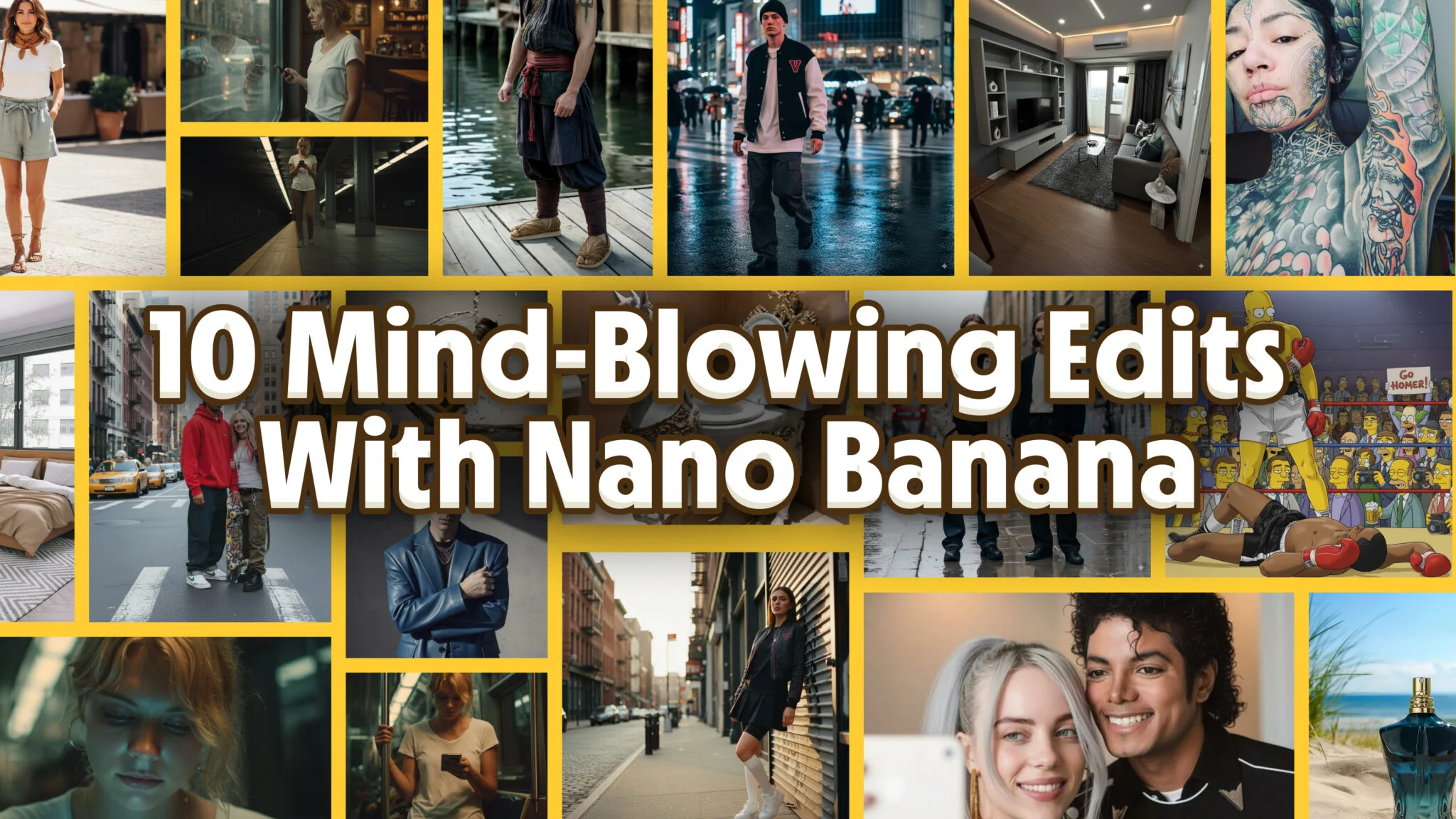
Nano Banana is Google’s new image model built for contextual editing and photo‑real generation. In plain English: you tell it exactly what to change in a picture, and it edits only that while keeping everything else intact — lighting, perspective, textures, text on products, even a person’s face.
Creators are already posting crazy examples on X and YouTube. Below are the most useful workflows I’ve seen, written for “how‑to” intent: what to do, why it works, and prompts you can try today.
How to try Nano Banana (fast)
- Gemini on the web/app: open Gemini, choose Create image from the plus menu, upload your image(s), and give precise edit instructions. Use multi-turn edits (one change at a time) and reference photos for better accuracy (“use the yellow Porsche as the car”). It is free to start, with the daily limits explained in Is Nano Banana free? and the menus mapped out in where Nano Banana lives in the Gemini app.
- AI Image Studio on iOS: download the app, upload a photo, and type your edit prompt. The app uses Gemini’s Nano Banana models under the hood and is optimized for quick, clean edits. No sign-up needed.
- Other Third‑party testers: some folks use “battle mode” sites that pit models head‑to‑head. If you use one, be cautious with uploads and never pay shady sites claiming “official Nano Banana.”

We did Ai image generators one prompt faceoff between Nano Banana Pro and 3 other models. The results are suprising!
Prompt basics
Be specific with your edits. Instead of saying “change background,” say something like “make the background a neon diner at night.” Clear, detailed instructions give you better results.
Use multi-turn edits. Don’t try to change everything at once—start with one edit, see how it looks, then add the next. This gives you more control and avoids weird surprises.
When you need high accuracy, always upload reference images and refer to them by name in your prompt. For example: “Use the yellow Porsche photo as the car” or “Match the lighting from the sunset image.”
Not sure where to start? Browse our wild examples to see what Nano Banana can really do — from turning a café scene into a futuristic cityscape to making someone ride a tiger on Mars. The more creative (and specific) you get, the better the results.
For portrait-style edits specifically, our copy-paste Gemini AI photo prompts cover cinematic, magazine, and polaroid looks.
1) Combine photos into one believable scene
Want a woman from Photo A to sit with a man in Photo B and look at a phone together? Nano Banana excels at merging elements while matching shadows, lens, and color.
Try this
- Upload both photos.
- Prompt: “Place the woman from Image 2 next to the man in Image 1. They sit together, looking at the phone and laughing. Keep cafe lighting and depth of field.”
Pro tip: Add “match skin tones and reflections to the original scene” for cleaner composites.

2) Consistent character across new angles
From one restaurant shot, creators generate close‑ups, wides, and overheads without breaking identity or set design.
Try this
- Upload the base scene.
- Prompts (run as separate turns):
- “Medium close‑up of the man, identical outfit and lighting.”
- “Close‑up of the woman from the same scene.”
- “Overhead shot of the same table. Keep the same glasses, plates, and background.”
Use cases: pre‑viz, ad storyboards, YouTube b‑roll planning.

3) Product placement in real environments
Drop a soda can, sneaker, or perfume bottle into a lifestyle photo and keep it photoreal.
Try this
- Upload the lifestyle image and a clean product photo.
- Prompt: “Replace the black can with the orange ‘GUERRILLA’ can from Image 2. Match hand pose, reflections, and metal specular highlights. Keep label readable.”
Pro tip: If it warps labels, add “preserve text legibility; no stylization.”
4) Weather and crowd edits
Turn sunny into overcast, add rain, and give everyone umbrellas — while keeping faces and clothing consistent.
Try this
- Prompt: “Make the scene overcast and lightly rainy. Add umbrellas to most people, keep the same faces and outfits. Keep light direction consistent.”
Tip: Ask for intensity and time of day for more control: “blue‑hour drizzle, wet streets, subtle reflections.”
5) Interior redesign and staging
Place furniture into an empty room and keep camera geometry intact.
Try this
- Upload the empty room + furniture references.
- Prompt: “Decorate the room with a warm, minimalist Buddhist theme: floor‑to‑ceiling bookshelf on the back wall, low walnut sofa (Image 2), linen rug, soft window light. Keep wall proportions and floor seams.”
Deliverables: ask for “three variations” to compare styles.
6) Virtual try‑on and outfit swaps
Put a dress from Image 2 onto a model from Image 1. Nano Banana maps fabrics and preserves design details.
Try this (multi‑turn works best)
- “Make the woman from Image 1 wear the red dress from Image 2. Keep the dress’s original design and fit.”
- If clothes overlap: “Remove her original outfit so only the dress remains. Keep skin and hands natural.”
- “Turn into a white‑background e‑commerce studio shot. Even lighting. 3:4 framing.”
Limitations: after many edits, faces can drift. Reset with the original image if identity softens.

7) Clean text edits in context
This is where Nano Banana feels unfair. It can replace text with matching fonts and perspective.
Try this
- Prompt: “Change the text on the can from ‘PRMPT’ to ‘GUERRILLA’. Maintain font weight, curvature, and reflections. No other changes.”
- Or: “Replace ‘OpenAI’ with ‘ClosedAI’ on the billboard. Match kerning and perspective warp.”
Tip: If it invents fonts, say “reuse the original font appearance; keep brand colors identical.”
8) Background swaps and location moves
Move a portrait to Marrakech. Put a runner on a track. Drop a mug into a Paris café. It respects lighting and lens look.
Try this
- Prompt: “Change background to a Marrakech street market at golden hour. Keep the subject’s face, clothing, and rim light consistent. Subtle dust in the air.”
Bonus: Add “shallow depth of field; f/2 look” if you want creamy bokeh.

9) Restoration, colorizing, and de‑blur
People are fixing passport scans, old family photos, and mild motion blur without turning faces into plastic.
Try this
- Prompt: “Restore this photo: remove motion blur, enhance sharpness, keep skin texture natural, no smoothing. Maintain original grain.”
- For colorizing: “Add natural color as if shot on Kodak Portra. No teal‑orange grading.”
Tip: If it over‑smooths, add “preserve pores, hair wisps, and micro‑contrast.”
10) Social content pack from one selfie
Turn one photo into a week of posts: story, carousel, thumbnail, poster, and a meme—fast. Nano Banana keeps your face, outfit, and vibe consistent while it changes backgrounds, layouts, and text plates.
Try this (run as separate turns)
- “Make a 9:16 TikTok/IG Story from this selfie. Neon diner background, soft rim light, space at top for text. Keep my face identical.”
- “Now a 1:1 IG post. Clean studio backdrop, subtle grain, high contrast. Add a white border.”
- “Make a 16:9 YouTube thumbnail. Cinematic close‑up, punchy lighting, room on the right for text.”
- “Create a poster look. Bold color block background, fake halftone texture, my silhouette cutout. Keep outfit unchanged.”
- “Meme remix: replace the notebook text with ‘Dropped a new vid’. Match font/perspective; nothing else changes.”
Variations
- “Festival edit: desert sunset, dust in the air, glitter highlights on cheeks. 9:16.”
- “Campus vibe: library stacks, warm tungsten lights, shallow depth of field.”
- “Streetwear drop mockup: add floating caption cards and price tags; keep face/hands identical.”
Tips
- Lock your identity: “same face, hair, makeup, and earrings across all outputs.”
- Ask for export‑ready crops: “Export three versions: 9:16, 1:1, 4:5. Keep framing consistent.”
- If text gets fuzzy, add: “crisp, vector‑clean typography; no stylization on letters.”
Power Tips for Elite Results
To get truly pro-level results, think in campaigns, not single images. Start with one great photo—like a product shot or portrait—and spin out a full set: social posts, packaging mockups, even fake ads. Staying in one session helps keep style and characters consistent.
Edit with intent. Precise prompts like “make the background a neon diner, 1980s style, red booth reflections” work far better than vague ones. If you want consistency across outputs, lock your invariants: add phrases like “keep the same face, outfit, camera angle, and lighting” to avoid drift. The formula behind prompts like these is covered in our Nano Banana prompt guide.
Work like a designer—one focused edit at a time, then review and refine. Multi-turn iteration gives you better control than dumping everything into one giant prompt.
Some quick fixes: if text looks blurry, ask for “vector-clean edges and crisp typography” or upscale after. If hands or edges look weird, zoom in and say “refine fingertips only; keep everything else the same.” And if the image starts to drift after many edits, just re-upload the original and continue from there.
Finally, use it responsibly. Don’t edit real people without consent or try to pass off altered news photos. Ethics matter—especially when the results look this real.
Final Thoughts
What’s wild about Nano Banana is how fast this kind of AI has arrived.
Just a year ago, clean photo edits like these would’ve taken hours in Photoshop, or been impossible altogether. Now you describe what you want in plain language, and 15 seconds later, it’s done. With perfect lighting, textures, and perspective.
This is the kind of leap that doesn’t just save time — it changes how people imagine. You don’t need a whole photo team to test an idea. You can build a campaign, re-style a brand, or visualize something that’s never existed, instantly.
The real magic isn’t just in the tool — it’s in what it unlocks. For creators, marketers, designers, and even casual users, this opens up a new phase of imagination. Faster cycles. Weirder ideas. And a lot less friction between “what if” and “here it is.” If you want that friction lower still, our Nano Banana desktop client guide for macOS covers running these prompts from a Mac app instead of a browser tab.