Grok é um chatbot de IA generativa desenvolvido pela xAI, a empresa de investigação em IA de Elon Musk. Desde o lançamento em novembro de 2023, o Grok evoluiu rapidamente e, em 2026, é um dos modelos de IA mais poderosos disponíveis. O Grok 4.6, lançado a 12 de agosto de 2026, obtém 61 pontos no Artificial Analysis Intelligence Index, empatando com o GPT-5.6 Sol e ficando a dois pontos do líder, o Claude Opus 5. Com conhecimento em tempo real do X, uma personalidade distintiva e geração de imagem e vídeo integrada, o Grok oferece uma experiência de IA genuinamente diferente.

Utilize o Grok em segurança no Mac sem iniciar sessão!
Aceda a toda a potência do Grok sem os riscos de privacidade. Alojado com segurança nos EUA, totalmente sem censura, diretamente no seu Mac.
O Grok está disponível gratuitamente em grok.com com utilização limitada, mas também pode aceder-lhe no Mac sem necessitar de uma subscrição X, através de uma aplicação multi-modelo como o Fello AI.
Neste artigo, exploramos o que é o Grok em 2026, o que mudou desde o lançamento, e como configurá-lo no Mac para uma experiência fluida, semelhante a uma aplicação de secretária.
O Que É o Grok em 2026?
Desenvolvido pela xAI sob a direção de Elon Musk, o Grok é um chatbot de IA conversacional concebido para interações em tempo real. Desde a versão inicial Grok-1, a xAI lançou várias atualizações importantes. A linha atual inclui o Grok 4.6 — o modelo de raciocínio topo de gama — e o mais acessível Grok 4.1 Fast, otimizado para velocidade e trabalho em grande volume. Na sequência da aquisição da xAI pela SpaceX em fevereiro de 2026, o ritmo de desenvolvimento apenas acelerou.
O Grok 4.6 é um modelo de IA de topo que obtém 61 pontos no Artificial Analysis Intelligence Index, colocando-o em conjunto no terceiro lugar da fronteira, a par do GPT-5.6 Sol e atrás apenas do Claude Opus 5 e do Claude Fable 5. Suporta uma janela de contexto de 500 mil tokens e custa $2 por milhão de tokens de entrada e $6 por milhão de saída, embora pedidos com 200.000 tokens ou mais sejam faturados ao dobro na totalidade. Se precisar de uma janela muito maior por menos dinheiro, o Grok 4.1 Fast mais antigo ainda oferece 2 milhões de tokens por $0,20 / $0,50 — suficiente para processar bases de código inteiras ou coleções de documentos de grande dimensão num único pedido.
O Grok obtém informação em tempo real do X (anteriormente Twitter) e da web aberta, conferindo-lhe uma vantagem significativa sobre modelos que dependem apenas de dados de treino estáticos. Obtém respostas baseadas no que está a acontecer agora mesmo — notícias de última hora, temas em tendência, movimentos de mercado e sentimento nas redes sociais.
Para além de texto, o Grok conta agora com o Grok Imagine — o motor criativo nativo da xAI para geração de imagem e vídeo. Cria imagens de alta qualidade a partir de descrições textuais (retratos fotorrealistas, ilustrações, logótipos com texto incorporado preciso), suporta a edição de imagens existentes e gera vídeos de 6 a 10 segundos com áudio sincronizado em cerca de 17 segundos. O Grok Voice acrescenta interação por voz de baixa latência em dezenas de idiomas com suporte total a chamadas de ferramentas.
O Grok é também conhecido pela sua personalidade distintiva — espirituoso, direto e ocasionalmente irreverente. É possível alternar entre modos como «Researcher» para output profissional e «Fun» para uma experiência conversacional mais descontraída.
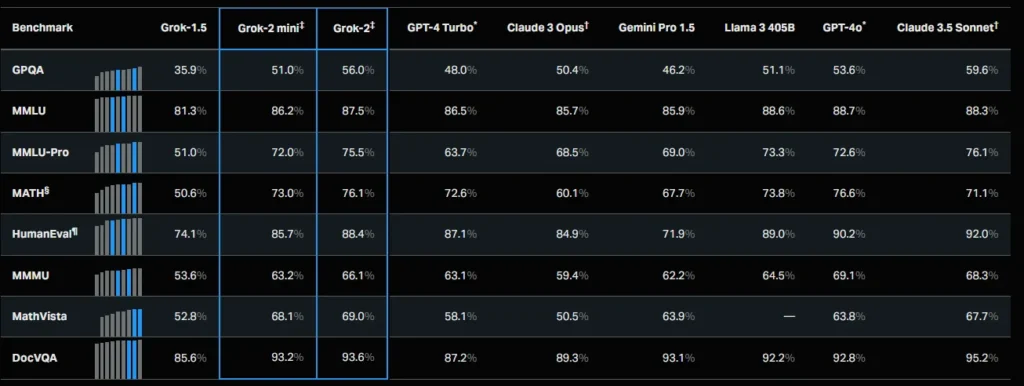
Apesar destes avanços, o Grok não está isento de desafios. Como todos os modelos de IA, pode ocasionalmente produzir respostas imprecisas ou enganosas. As preocupações éticas em torno da geração de imagens persistem, embora a xAI continue a implementar salvaguardas. Verifique sempre informação crítica de forma independente.
No geral, o Grok 4.6 representa um salto significativo na IA conversacional — oferecendo informação em tempo real, raciocínio poderoso, ferramentas criativas integradas e uma personalidade única que o distingue do ChatGPT, do Claude e do Gemini.
Como Configurar o Grok no Mac
Quer saber como descarregar o Grok IA no Mac? A xAI ainda não disponibiliza uma aplicação nativa para Mac, mas existem várias formas eficazes de utilizar o Grok no Mac agora mesmo:
Opção 1: Utilizar o Fello AI
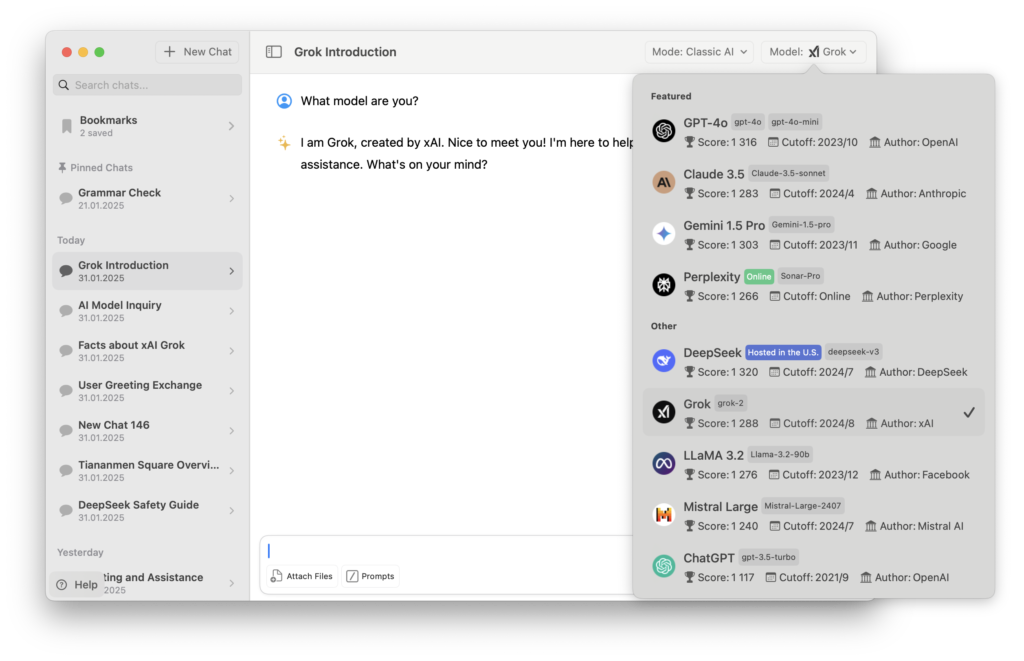
Fello AI é uma aplicação nativa para Mac que integra vários modelos de linguagem de grande dimensão, incluindo o Grok. Proporciona uma verdadeira experiência de secretária, sem necessidade de subscrições separadas para cada modelo. Se estiver a ponderar entre o Grok e os outros grandes assistentes no computador, consulte a nossa comparação ChatGPT vs Claude vs Gemini no Mac.
- Descarregar e Instalar o Fello AI: Aceda à Mac App Store e pesquise por Fello AI. Instale a aplicação no seu Mac.
- Abrir o Fello AI: Inicie a aplicação — não é necessário iniciar sessão nem fazer registo.
- Selecionar o Grok: Escolha «Grok» no menu de seleção de modelos.
- Começar a Conversar: Faça perguntas, gere texto, crie imagens com o Grok Imagine ou analise documentos. Os dados em tempo real do Grok e a sua personalidade distintiva estão totalmente disponíveis na aplicação.
Para além do Grok, o Fello AI suporta ChatGPT (GPT-5.2), Claude 4.5, Gemini 3, DeepSeek e Perplexity — tudo numa só aplicação, em macOS, iOS e iPadOS.
Opção 2: Utilizar o grok.com
O Grok oferece uma interface web gratuita em grok.com com acesso aos modelos Grok, embora a versão mais recente esteja normalmente reservada para os planos pagos. Os utilizadores do plano gratuito têm aproximadamente 10 mensagens a cada duas horas. Para acesso ilimitado, a xAI oferece o SuperGrok por $30/mês, que elimina os limites de mensagens e dá acesso prioritário aos modelos mais recentes.
Opção 3: Criar uma Progressive Web App (PWA)
Pode transformar o grok.com numa experiência semelhante a uma aplicação de secretária criando uma Progressive Web App:
- Abrir o Safari: Navegue para grok.com.
- Adicionar ao Dock: Clique em «Partilhar» e depois em «Adicionar ao Dock» para criar um atalho.
- Abrir a Partir do Dock: Aceda ao Grok diretamente a partir do dock sem abrir uma janela de browser completa.
Para a melhor experiência com desempenho nativo, acesso a múltiplos modelos e sem a sobrecarga do browser, o Fello AI continua a ser a opção recomendada.
Perguntas Frequentes
Por que razão utilizar o Grok no macOS?
Se utilizar o Grok com regularidade, depender de um browser torna-se tedioso — os separadores acumulam-se, as sessões expiram e o contexto perde-se facilmente. Com uma aplicação dedicada como o Fello AI ou um atalho PWA, tem acesso com um clique a partir do dock, poupando tempo e tornando a experiência muito mais fluida. Reduz as interrupções, aumenta a produtividade e permite tirar pleno partido dos dados em tempo real e das ferramentas criativas do Grok. Não sabe se precisa de pagar? Explicamos se o Grok é gratuito e o que cada plano oferece.
O Grok é gratuito?
Sim. O Grok oferece agora um plano gratuito em grok.com e através da aplicação X, com aproximadamente 10 mensagens a cada duas horas. Para acesso ilimitado, a xAI oferece o SuperGrok por $30/mês, que elimina os limites de mensagens e dá acesso prioritário ao Grok 4.6 e à linha de modelos Grok. Existe também o SuperGrok Heavy por $300/mês para utilizadores mais exigentes. Através do Fello AI, pode aceder ao Grok como parte dos modelos suportados pela aplicação.
O Grok requer uma subscrição X para funcionar?
Já não. O Grok está agora disponível para todos em grok.com com um plano gratuito — sem necessidade de subscrição X. Para limites de utilização mais elevados e acesso aos modelos mais poderosos, pode subscrever diretamente o SuperGrok. Também pode utilizar o Grok através do Fello AI sem qualquer conta X.
O Grok acede a dados em tempo real do X?
Sim, esta continua a ser uma das características diferenciadoras do Grok. Obtém dados em direto do X e da web aberta para fornecer informação ao minuto — notícias de última hora, temas em tendência, sentimento nas redes sociais e movimentos de mercado. Este acesso em tempo real está disponível em todos os planos, incluindo o gratuito.
Em que difere o Grok do ChatGPT?
O Grok 4.6 lidera no acesso a dados em tempo real através da sua integração nativa com o X, o que lhe confere vantagem para eventos atuais e inteligência social. Tem também uma personalidade distintiva com modos de tom ajustáveis e geração de imagem e vídeo integrada via Grok Imagine. O ChatGPT com GPT-5.6 continua a ser o assistente mais versátil, destacando-se em tarefas criativas, interação por voz, navegação web e o seu maduro ecossistema de extensões. Escolha o Grok para informação em tempo real e personalidade; escolha o ChatGPT para máxima versatilidade.
O que é o SuperGrok?
O SuperGrok é a subscrição premium da xAI a $30/mês ($300/ano). Elimina os limites diários de mensagens, oferece encaminhamento prioritário e desbloqueia toda a potência do Grok 4.6 e da linha de modelos Grok. Para profissionais que necessitem dos limites de utilização mais elevados, o SuperGrok Heavy está disponível por $300/mês.
O Grok continuará a receber atualizações?
Sim. A xAI é um dos laboratórios de IA com desenvolvimento mais ativo, com o Grok 5 já previsto para breve. Na sequência da aquisição da xAI pela SpaceX no início de 2026, a empresa dispõe de recursos significativos para continuar o desenvolvimento. Esperam-se melhorias contínuas no raciocínio, nas capacidades criativas e em novas funcionalidades.
Crianças ou menores podem utilizar o Grok?
O Grok não foi concebido para utilizadores com menos de 13 anos. Jovens entre os 13 e os 18 anos necessitam de autorização parental. Embora o Grok possua filtros de conteúdo, pode produzir conteúdo inapropriado em determinados modos, como o «Fun». Os pais devem agir com precaução.
Como trata o Grok as minhas informações pessoais?
A xAI segue políticas de privacidade rigorosas e não vende os seus dados. Os seus pedidos podem ser utilizados para melhorar o desempenho da IA, exceto se optar por não participar. Ao utilizar o Grok através do Fello AI, os dados das conversas são armazenados localmente no seu dispositivo — nada é guardado nos servidores do Fello AI. Optámos por não autorizar que as conversas sejam utilizadas para treino de modelos, embora não possamos garantir plenamente o tratamento que a xAI dá aos dados da sua parte.
O Grok comete erros?
Sim. Como todos os modelos de IA, o Grok pode ocasionalmente produzir respostas imprecisas, incompletas ou enganosas. Embora o Grok 4.6 se situe entre os modelos de topo nos benchmarks de precisão, não é infalível. Verifique sempre informação crítica de forma independente — especialmente em assuntos médicos, jurídicos, financeiros ou relacionados com segurança.
O Grok consegue gerar imagens e vídeo?
Sim. O Grok Imagine é o motor criativo integrado da xAI. Gera imagens de alta qualidade a partir de descrições textuais, suporta a edição de imagens existentes (reestilização, adição/remoção de objetos) e cria vídeos de 6 a 10 segundos com áudio sincronizado. Vários modos criativos (Normal, Fun, Custom) permitem controlar o estilo e o tom. No Fello AI, pode utilizar o Grok Imagine diretamente na conversa.
Posso personalizar a minha experiência com o Grok?
Sim. O Grok oferece definições de personalização que lhe permitem utilizar os seus dados do X para adaptar as interações. Pode alternar entre modos de personalidade — do «Researcher» profissional ao modo «Fun» mais informal. Estas opções podem ser geridas nas definições da conta.
É possível eliminar os meus dados ou conta?
Sim, pode eliminar o seu histórico de conversas ou a sua conta através das Definições na aplicação ou no site do Grok. Os dados são normalmente removidos no prazo de 30 dias, salvo quando razões legais ou de segurança o impeçam.
Onde posso utilizar o Grok?
O Grok está disponível através da aplicação móvel Grok em iOS e Android, no site grok.com, e no X como parte dos serviços Premium. No Mac, pode utilizar o Fello AI para uma experiência nativa de secretária ou criar um atalho PWA a partir do grok.com. O Grok está também integrado nos veículos Tesla em vários mercados.
Como posso contactar a xAI para obter assistência?
Pode contactar [email protected] para questões relacionadas com privacidade ou tratamento de dados. Para suporte geral, informações de contacto adicionais estão disponíveis nas definições da conta em grok.com.