
Switching from ChatGPT to Claude takes about five minutes if all you want is your saved context moved across. Anthropic ships an import tool that reads your ChatGPT memory and writes it into Claude. Per Anthropic’s memory import documentation it runs on the Free, Pro, Max and Team plans, on the web and in Claude Desktop. The harder question is what actually changes after you move, and the answer looks different than it did in the spring. Claude’s flagship is now Claude Opus 5, released July 24, 2026, and it sits at 61 on the Artificial Analysis Intelligence Index against GPT-5.6 Sol at 59.
This guide is written for ChatGPT users making the move. It covers why the exodus started and the exact steps to get set up, including the memory import. It also covers what Claude does better, what it will not do at all, and the habits worth changing on day one. If you would rather not pick a side, the last section covers running both without losing your place.
The Key Takeaways
- The memory import lives at Settings > Memory > Start import and takes about 5 minutes. It is available on the free plan, and Anthropic still labels it experimental.
- Claude Opus 5 and Sonnet 5 support a 1M token context window on all paid plans in chat. OpenAI does not publish a per-plan figure for ChatGPT.
- On the Artificial Analysis boards checked July 25, 2026, Opus 5 leads Intelligence 61 to 59 and Agentic 55.3 to 54.0, while GPT-5.6 Sol leads Coding 78.3 to 78.0.
- Claude Pro is $20/month, or $17 if you pay annually. ChatGPT Plus is also $20/month, so cost is not the deciding factor.
- Claude still does not generate images. If you use DALL-E-style generation daily, plan to keep a second tool.
Why People Are Switching from ChatGPT to Claude
The move was never driven by one thing. It started as a protest, then a lot of the people who tried Claude stayed for reasons that had nothing to do with the news cycle.
The QuitGPT Backlash
The trigger was OpenAI’s deal to deploy its models on classified US military networks, announced shortly after Anthropic declined the same arrangement. Per IBTimes UK, citing app analytics firm Sensor Tower, US ChatGPT mobile uninstalls jumped 295% on February 28, 2026, against an average daily churn of about 9%. By March 5, 2026 the #QuitGPT pledge had passed 1.5 million signatures, and Forbes put the figure at 2.5 million by early April.
Claude was the direct beneficiary. It hit number one on the US App Store for the first time on March 2, 2026. TechCrunch reported free Claude accounts up more than 60% since January 2026, with paid subscriptions more than doubling over the year.
Complaints About Writing Quality
The other half of the story was product. On January 27, 2026, Sam Altman told a developer town hall that OpenAI “just screwed that up” on GPT-5.2’s writing. The team had limited bandwidth, he said, and went “all in on the left brain” by prioritising reasoning, coding and engineering. Users had spent weeks calling the output unwieldy and hard to read.
OpenAI has shipped twice since then and GPT-5.6 reached general availability on July 9, 2026, so the specific complaint about 5.2 is history. The habit it created, of checking whether a second model gives you a straighter answer, is not.
Where Claude Leads on the Boards
Benchmarks moved in Claude’s favour in July. Checked live on July 25, 2026, Artificial Analysis has Claude Opus 5 at 61 on the Intelligence Index against GPT-5.6 Sol at 59. The Agentic Index reads 55.3 against 54.0. Both are the max-effort variants.
Coding is the honest exception. On the same site’s Coding Index, GPT-5.6 Sol scores 78.3 against Opus 5’s 78.0, so anyone telling you Claude has simply won coding is skipping a board. Anthropic publishes no SWE-bench Verified figure for Opus 5 at all, only relative claims against its own earlier models, so treat third-party SWE-bench numbers for it with suspicion. For a task-by-task breakdown, see our guide on when to use which AI.
Claude Opus 5 leads the Artificial Analysis Intelligence Index at 61 and the Agentic Index at 55.3. GPT-5.6 Sol still edges the Coding Index, 78.3 to 78.0.
How to Switch from ChatGPT to Claude: Step by Step
The full migration is five steps and most of the clock time is ChatGPT preparing your data export. If you are in a hurry, do steps 2 and 3 and skip the rest until later.
1. Export Your ChatGPT Data
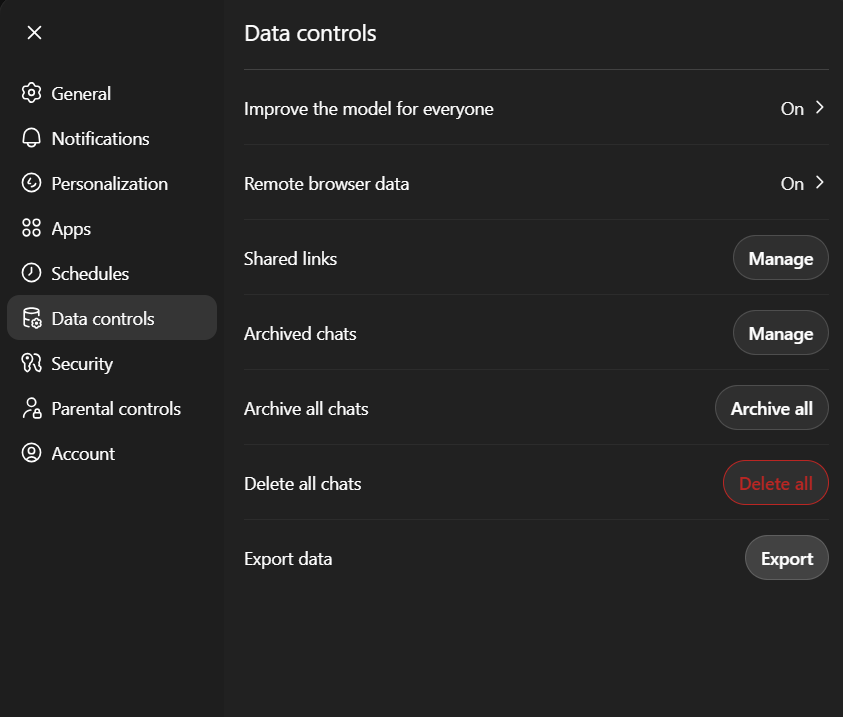
In ChatGPT, open Settings > Data Controls > Export and allow up to 24 hours for delivery. You get an archive of your conversation history, saved memories and custom instructions in text and JSON. You do not need to read it, but having it means you can search old work later and upload the relevant pieces into a Claude Project.
2. Create Your Claude Account
Go to claude.ai and sign up with an email address. Claude sends a login code and that is the whole process. You can also install the Claude desktop app for Mac or Windows, or the mobile app for iOS and Android.
The free plan costs nothing and needs no card, but it caps your weekly usage and limits which models you can reach. Claude Pro is $20/month, or $17/month billed annually, and it adds higher limits, more models, unlimited projects, Research, and Claude Code and Claude Cowork in the same subscription. Our full Claude pricing breakdown covers the Max and Team tiers if you need more headroom.
3. Import Your ChatGPT Memory in About Five Minutes
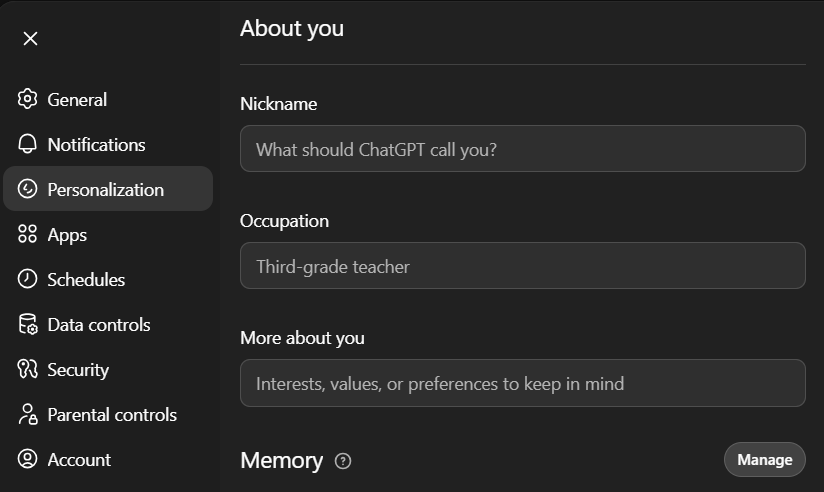
This is the step most guides miss, and it is the one that makes Claude feel familiar immediately. Start in ChatGPT at Settings > Personalization > Memory > Manage and copy what is stored there. If you see a memory summary rather than a list of entries, our ChatGPT memory guide explains what changed and where to copy from.
Then open Claude and go to Settings > Memory and choose Start import. Paste the exported text into the box and click Add to memory. Claude reads it, pulls out the useful parts, and stores them as individual memory entries that merge with anything already there instead of overwriting it.
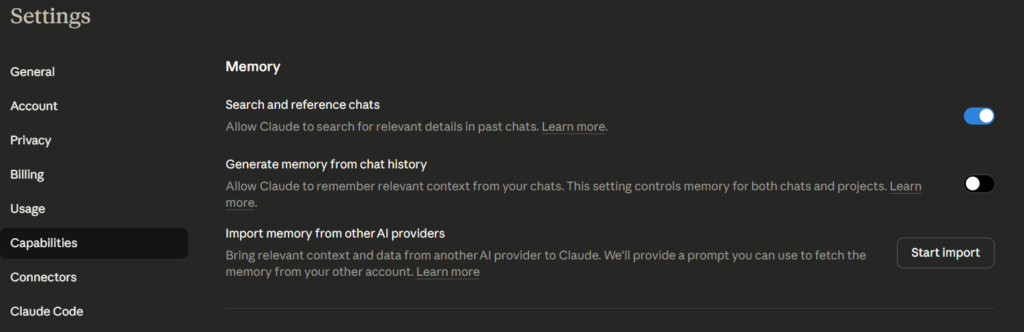
Two caveats worth knowing. Anthropic describes memory imports as experimental and still in active development, so Claude may not pick up everything on the first pass, and it is worth skimming the result. Imported context also goes stale after roughly 8 to 12 weeks as your work moves on, so review it periodically rather than treating it as permanent.
4. Set Up a Claude Project for Your Main Use Case
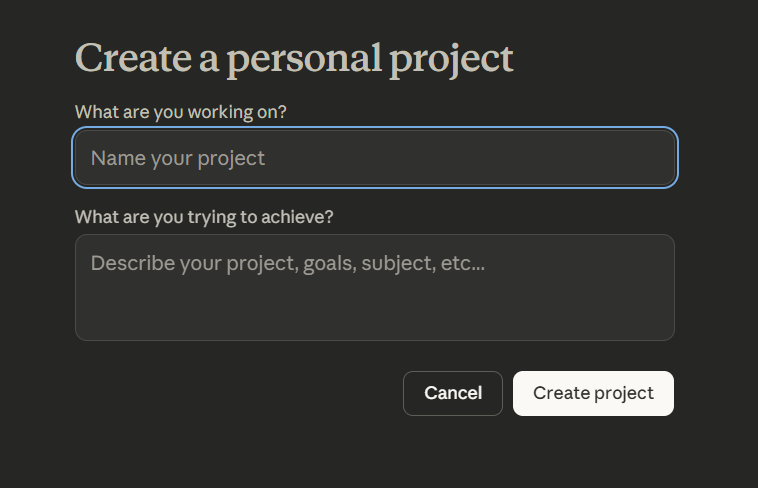
Projects are Claude’s answer to custom GPTs and they are more flexible. Create one per major area of your work, whether that is writing, coding or research. Upload the relevant files, write a short set of instructions describing your goals and preferences, and Claude carries that context into every conversation inside the project automatically.
5. Start Prompting
Expect shorter, flatter answers than you are used to. The biggest adjustment ChatGPT users report is that Claude does not fill space, does not restate your question back at you, and does not open with a paragraph about how great the question was. If an answer feels too thin, ask it to expand. Most people stop wanting the padding back after a week.
Claude vs ChatGPT in 2026: The Differences You Will Notice
| Feature | Claude (Opus 5 / Sonnet 5) | ChatGPT (GPT-5.6) |
|---|---|---|
| Flagship model | Claude Opus 5, out July 24, 2026 | GPT-5.6 Sol, GA July 9, 2026 |
| Context window in chat | 1M tokens on all paid plans | Not published per plan by OpenAI |
| Free plan | Yes, lower weekly limits and fewer models | Yes, defaults to GPT-5.5 Instant |
| Entry paid plan | $20/month Pro ($17 annual) | $20/month Plus |
| AA Intelligence Index | 61 | 59 |
| AA Agentic Index | 55.3 | 54.0 |
| AA Coding Index | 78.0 | 78.3 |
| Image generation | No, diagrams and SVG only | Yes, native |
| Web search | Yes, all plans | Yes |
| Voice mode | Yes, beta, all plans | Yes |
| Writing style | Direct, little filler | More verbose |
| Memory | Editable and transparent, with import | Auto-managed |
| Projects and custom tools | Projects | Custom GPTs |
Board figures are the max-effort variants, read live from Artificial Analysis on July 25, 2026. Effort settings move these numbers by several points, so a comparison that does not name the effort tier is not telling you much.
The context row is the one that changed most, so be precise about it. Per Anthropic’s help center, Opus 5 and Sonnet 5 support a 1M token context window on all paid plans when chatting with Claude. Older Opus 4.x models sit at 500K and everything else at 200K. OpenAI publishes no equivalent per-plan number for the ChatGPT apps, and the third-party figures disagree with each other, so we are not printing one.
The practical effect is that you can drop a full codebase, a contract set or a book-length manuscript into one Claude conversation and keep working. Style is the other difference you feel on day one. If you had a habit of skimming ChatGPT answers to find the actual content, that habit stops being useful.
What ChatGPT still does better is image generation and the breadth of its tool ecosystem. For how the two stack up across every benchmark we track, see our AI model rankings.
Claude Features You Need to Know as a Switcher
Claude Projects
A Project gives Claude persistent context across every conversation inside it. Upload PDFs, documents and code, write custom instructions, and Claude remembers all of it each time you open that project. Treat it as a dedicated workspace per use case rather than a one-off configuration.
To create one, click the + icon next to Projects in the left sidebar, name it, add your files, and write a short brief describing your goals and preferences.
Claude Memory
Claude’s memory is editable and transparent rather than something that accumulates quietly in the background. You can read exactly what it has stored, add to it, correct it or delete entries. That is a genuine difference from ChatGPT’s auto-managed approach, and it means you are never surprised by what the model thinks it knows about you.
Web Search
If you read an older comparison saying Claude barely touches the web, that is out of date. Anthropic rolled web search out globally on all Claude plans in May 2025, and it now runs across Free, Pro, Max, Team and Enterprise, with citations attached to the sources it used. Free searches count against your normal limits, and Team or Enterprise admins have to switch it on first.
Voice Mode
Voice mode is a beta feature on all plans, across iOS, Android, Claude Desktop and the web. On desktop or web you open a new chat and click the sound-wave icon in the lower right. Since July 2026 it runs on Opus and Sonnet rather than only the lightweight Haiku model, and it can reach your connected tools such as email and calendar. Voice conversations draw on the same usage limits as text.
Cowork and Claude Code
Both are bundled into the same Pro subscription rather than sold separately, which surprises a lot of switchers. Claude Code runs agentic work in your terminal, and Cowork does something similar in a desktop and web app aimed at people who do not live in a command line. Our Claude Cowork guide walks through the setup if that is the part you are moving for.
What Claude Still Will Not Do
Anthropic is direct about this in its own help center. Claude does not generate photos or illustrations the way an image model does, and that is a deliberate product decision rather than a gap waiting to be filled. What it does instead is build diagrams, charts and interactive visuals in HTML and SVG inside the conversation, and it can read and analyse images you upload.
For most writing and analysis work that is enough. If your workflow depends on generated imagery, keep a dedicated tool or keep ChatGPT for that one job. We cover the workarounds in detail in what Claude does instead of generating images.
Basic Claude Tips for ChatGPT Users
Switching AI tools means a short adjustment period. These are the changes that make the biggest difference in the first week.
1. Be direct. Claude does not need “please” or soft framing. “Rewrite this paragraph to be more concise” beats “could you maybe help me make this a little shorter?”
2. Give it context upfront. Instead of “explain SEO”, try “explain SEO to a small business owner who wants more local customers”. Specificity moves output quality more than any prompt trick.
3. Break big tasks into stages. Claude handles complex work well, but you get better results asking for an outline first, then “now write section 2”.
4. Use Projects for anything recurring. If you keep starting new chats about the same work, you are re-explaining yourself every time. A Project carries the context forward.
5. Edit the memory regularly. After a few weeks, check what Claude has stored, remove what is outdated and add what it should know. A maintained memory is the difference between a useful assistant and a confident wrong one.
6. Ask for a real opinion. Claude hedges less than ChatGPT, but you still get a better answer by asking explicitly: “which option would you actually recommend, and why?”
7. Plan around the image gap. Nothing in Claude will produce a picture, so decide upfront where that work is going to happen.
Want to Use Both? Here Is How
You do not have to pick one. Plenty of people run Claude for writing, reasoning and long documents while keeping ChatGPT for image generation and a handful of specific workflows. If you are weighing that up, it helps to know what the ChatGPT free plan still gives you before you cancel anything. The practical annoyance is switching between two apps and losing your place in both.
Fello AI is built for exactly that. It runs Claude, ChatGPT, Gemini and other top models side by side in one app on Mac, iPhone and iPad. Send one prompt to several models and compare the answers instead of guessing which one to ask. It starts at $9.99/month and carries 27,000+ reviews. Treat it as a complement to a subscription rather than a full replacement, and as the cheapest way to stay undecided while you work out which model you prefer per task.
Conclusion
Switching from ChatGPT to Claude is low-friction. The memory import takes five minutes and runs on the free plan, so you can test the whole thing before spending anything. The real adjustment is Claude’s directness, plus the missing image generation, and the boards now back the move on general intelligence and agentic work even though GPT-5.6 Sol still edges coding.
Do this in order: export your ChatGPT data, create a free Claude account, run the memory import, and set up one Project for whatever you spend the most time on. Give it a week before you cancel anything. If you would rather not choose at all, run both in one app and let the comparison decide for you. If your daily driver is a Mac, our guide to the ChatGPT desktop client for Mac covers the app you would be leaving behind.
FAQ
How long does it take to switch from ChatGPT to Claude?
The memory import takes about 5 minutes. Setting up your first Claude Project takes another 10 to 15 minutes. The full ChatGPT data export is the slow part and can take up to 24 hours to arrive, but you do not have to wait for it before you start using Claude.
Where is the memory import in Claude?
Go to Settings > Memory and select Start import, then paste in the text you copied out of ChatGPT and click Add to memory. It is available on the Free, Pro, Max and Team plans, on the web and in Claude Desktop, and Anthropic still labels it experimental.
Can I use Claude for free?
Yes. The free plan needs no card and includes chat on web, mobile and desktop, web search, memory, code execution and connectors, with lower weekly usage limits and access to fewer models. Claude Pro costs $20/month, or $17/month billed annually, the same ballpark as ChatGPT Plus at $20.
How big is Claude’s context window compared to ChatGPT?
Anthropic documents a 1M token context window for Claude Opus 5 and Sonnet 5 on all paid plans when chatting with Claude. Older Opus 4.x models are 500K and the rest are 200K. OpenAI does not publish a per-plan context figure for the ChatGPT apps, so any direct number you see compared against Claude is someone’s estimate.
Does Claude browse the internet?
Yes. Web search has been available globally on every Claude plan since May 2025, and answers come back with citations to the pages used. Team and Enterprise admins need to enable it in admin settings first, and on the free plan searches count against your normal usage limits.
Does Claude generate images?
No. Anthropic states plainly that Claude does not generate photos or illustrations the way image-generation tools do. It will build diagrams, charts and interactive visuals in HTML and SVG, and it can analyse images you upload, but if you need generated imagery you need a second tool.
Can I use Claude and ChatGPT at the same time?
Yes, and many people do, choosing per task. If you want them side by side without app-switching, Fello AI runs multiple top models in one interface on Mac, iPhone and iPad from $9.99/month.