
ChatGPT stops mid-task and the first question is always the same: is it down for everyone, or is it broken just for you? That one answer decides everything you do next. A real outage means there is nothing on your side to fix and your time is better spent switching tools. A problem on your end is usually a sixty-second fix, and most of the time that is what it turns out to be.
The trouble is that the two look identical from where you are sitting. A spinning cursor, a network error, a blank screen, or a reply that never arrives all present the same way whether OpenAI’s servers are struggling or your browser is holding on to a stale session. Developers calling the API hit the same ambiguity, and so does anyone using ChatGPT inside another app.
This guide separates the two. First, how to tell in under a minute which one you are dealing with. Then why ChatGPT goes down, why it might be broken only for you, how long outages usually last, and what to use while you wait.
How to Check If ChatGPT Is Down
Before you troubleshoot anything, find out whether the problem is even yours. Four checks cover it, and together they take about a minute. One thing to rule out first: if ChatGPT loads fine but refuses to answer and the message names a time rather than an error, that is a usage limit rather than an outage, and waiting is the only fix.
1. Check OpenAI’s status page
The fastest confirmation is OpenAI’s status page. It lists ChatGPT, the API, Sora and the other services separately, which matters: the API can be degraded while the chat interface is fine, and vice versa. The page also distinguishes a full outage from degraded performance, which is the more common state and the one that makes ChatGPT feel broken without ever going fully offline.
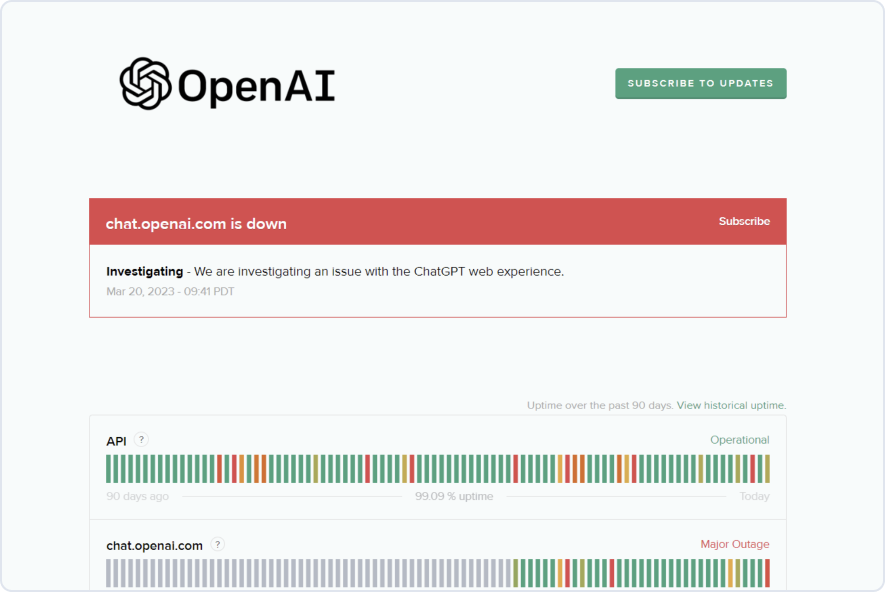
2. Check OpenAI’s own channels
OpenAI posts about significant disruptions on X, usually faster than a detailed status entry appears. Worth thirty seconds if the status page still shows green but nothing is working.
3. Check where other users are complaining
r/OpenAI is the quickest read on whether an outage is real and widespread. During an incident the subreddit fills with reports within minutes, and it is often ahead of the official status page.
4. Check an outage tracker, with a pinch of salt
Sites like Downdetector chart user-submitted reports. A steep spike is good evidence something real is happening. A flat line is weaker evidence than it looks, because these trackers only see the people who bother to report, and a regional problem can be invisible in a global chart.
If all four come back clean, the problem is almost certainly on your side, and the next section is the one you want.
Why Is ChatGPT Down? The Usual Causes
OpenAI does not usually publish a detailed post-mortem for a short incident, so the specific cause of any given outage often never becomes public. The underlying patterns are well established, though, and nearly every disruption falls into one of four buckets.
- Deployments and maintenance. Some downtime is deliberate. New models, new features and infrastructure changes all ship continuously, and a rollout that misbehaves is the single most common reason a service briefly stops working.
- Demand outrunning capacity. ChatGPT serves an enormous number of people at once, and demand is spiky. A viral feature, a new image model or a popular launch can pull far more traffic than was provisioned, which typically shows up as slowness and timeouts before it shows up as a hard outage.
- Bugs and bad releases. A change that passes testing can still break something in production. These tend to produce the strangest symptoms: one feature failing while everything else works, or errors that hit only some accounts.
- Attacks, which are mostly speculation. Every prolonged outage brings claims of a DDoS attack. Large services genuinely are targets, but attribution is rarely confirmed and almost never confirmed quickly, so treat this explanation as a rumour unless OpenAI says otherwise.
Notice what these have in common: none of them are things you can fix, and none of them come with a reliable estimate of when service returns. That is the practical case for having something else to work in, which the later sections cover.
Why Is My ChatGPT Not Working When Everyone Else’s Is Fine?
This is the more common situation by a wide margin. The status page is green, other people are using ChatGPT normally, and yours will not load, will not log in, or will not answer. Work down this list in order; the earlier items account for most cases.
Start With the Browser
Browser state is the leading cause of a personal ChatGPT failure. Do a hard refresh first, then clear cookies and cached files for the site specifically rather than wiping everything. A stale session token is a classic culprit and produces a page that loads halfway and then stops.
If that does not help, open ChatGPT in a private window. This is the single most useful diagnostic on the list, because a private window runs without your extensions and without your cached session. If it works there, the problem is an extension or your stored site data, not ChatGPT. Ad blockers, privacy and anti-tracking extensions, and script blockers are the usual offenders, so disable them for the site one at a time until the page comes back.
Check Your Connection
Switch networks to rule your connection in or out: if you are on Wi-Fi, try mobile data, and if you are tethered, try Wi-Fi. If ChatGPT works on one and not the other, the network is the problem, not the service.
Two specific network causes are worth knowing. A VPN can route you through a region or an IP range that gets blocked or rate-limited, so turn it off and retry. A work or school network may filter ChatGPT deliberately, which usually looks like a page that never loads rather than an error message. If you see a Cloudflare check instead, our guide to the ChatGPT Cloudflare error covers both causes. Restarting your router clears a surprising number of the remaining cases.
Check Your Account and Session
Sign out completely and sign back in. Sessions expire, and an expired one often fails silently rather than sending you to the login screen. While you are there, confirm you are in the account you think you are in: if you have a personal login and a work login, it is easy to land in the wrong one and find your conversations and custom instructions missing, which reads like a broken app rather than a wrong account.
If a paid feature specifically has stopped working while the rest of ChatGPT is fine, check your subscription is still active. A lapsed payment drops you to the free tier without making much noise about it.
App Versus Browser
Open ChatGPT in a browser and see whether it works there. If the website is fine and the app is not, the app is the problem, and the fix order is: force quit and reopen, check for an update, then sign out and back in, then reinstall. This applies equally to the Mac app, the iPhone and Android apps, and ChatGPT running inside another tool.
On a Mac this is also worth checking the other way around, because a desktop app that has quietly stopped updating can sit several versions behind the web. Our guide to the ChatGPT desktop client for Mac covers the official app and how to keep it current.
When Only One Feature Is Broken
If chat works but image generation, voice, file uploads or web search do not, ChatGPT is not down. Individual features fail independently, sometimes because that specific subsystem is degraded, sometimes because you have hit a cap on that feature alone. The status page breaks some of these out separately, so check there before assuming your account is broken.
And if ChatGPT is answering but painfully slowly rather than failing outright, that is a different problem with different fixes. Our guide to why ChatGPT is so slow runs through them.
For Developers
Call the API directly. If the API responds while the web interface does not, the problem is confined to the frontend and your integrations are safe. If both fail, check whether your key is still valid, whether you have hit a rate limit, and whether your billing is current, because all three produce errors that are easy to mistake for an outage.
How Long Do ChatGPT Outages Usually Last?
There is no useful answer for any individual incident, and anyone offering one is guessing. What can be said generally is that outages range from a few minutes to several hours depending on the cause, and that the short end is far more common than the long end.
One pattern is worth planning around: partial degradation tends to last longer than a full outage. A hard failure gets rolled back quickly because it is unambiguous. A service that is up but slow, dropping some requests, or failing only one feature can persist for hours, and it is the state most likely to quietly eat your afternoon while you keep retrying. If you are half an hour in and things are still flaky, stop retrying and switch.
- Watch the status page entry, which is updated as an incident is investigated, identified and resolved. The move from "investigating" to "identified" is usually the signal that a fix is close.
- Follow OpenAI’s own channels for anything significant enough to warrant a public note.
- Do not wait idly. Assume it will take longer than you would like and move your work somewhere else, which is the next section.
What to Do When ChatGPT Is Down
Once you have confirmed the outage is real, there is nothing left to troubleshoot, and the only question is what you work in until it comes back. The obvious options are Claude, Gemini and Copilot, all of which are capable enough to carry most of what you were doing. Gemini has outages of its own, so check whether Gemini is down before you move your work there.
The catch is that setting up a fallback during an outage is the worst possible time to do it. You are signing up for an account, learning a new interface, and re-establishing whatever context you had built up, all while the deadline that made you notice the outage is still approaching. The fallback only helps if it is already there.
This is exactly the problem Fello AI is built for. It is a native Mac app that puts Claude, Gemini, ChatGPT, Mistral, LLaMA, DeepSeek and more behind a single window, and switching models is a dropdown rather than a new tab, a new login and a new subscription. When one provider goes down you change the model and carry on in the same conversation, with the same history, the same prompt library and the same files already attached. There is no migration, because you never left.
It also works out cheaper than holding subscriptions to three assistants purely as insurance, and it earns its place on the days nothing is broken: full-text search across everything you have ever asked, PDF and document uploads, a prompt library, and a keyboard shortcut that puts it in front of whatever you are working on. If you want a wider look at the field first, we compare the options in the best ChatGPT alternatives for Mac.
Two lower-tech moves are worth remembering as well. Outages are a good moment to do the parts of the task that never needed AI in the first place: outlining, deciding, editing what you already have, or simply talking it through with someone. And if a deadline is genuinely immovable, do not schedule the AI-dependent step for the last hour before it.
How to Protect Your Work Before the Next Outage
The quiet risk in an outage is not lost time, it is lost context. Long conversations accumulate a great deal of work, and when the service is unreachable so is all of it. A few habits make that irrelevant.
- Get anything important out of the chat. The moment a conversation produces something you would be annoyed to lose, paste it into a document. Chat history is a working surface, not storage.
- Export your data periodically. ChatGPT can export your full conversation history from settings, and it is worth doing occasionally regardless of outages.
- Keep your prompts somewhere else. The prompts you have refined over months are the hardest part to reconstruct. Keep them in a file, a notes app, or a tool with its own prompt library, so they survive any single service being unavailable.
None of this takes long, and it converts an outage from a crisis into an inconvenience.
Business Continuity Tips
Failover
If a workflow depends on one AI provider, it inherits that provider’s downtime. The fix is the ordinary one from every other part of infrastructure: have a second option configured and tested before you need it. For teams, that means agreeing in advance which tool people move to, rather than leaving everyone to improvise separately.
Self-hosted models
Running open-weight models on your own hardware removes the dependency entirely. It costs real money and real expertise, and the quality ceiling is lower than the frontier hosted models, so it makes sense as a floor rather than a replacement: something that keeps working when everything else does not.
Know which steps actually need AI
Most workflows that feel AI-dependent have only one or two steps that genuinely are. Identifying them tells you precisely what an outage costs you, and often reveals that the answer is much less than it felt like.
Final Thoughts
Most of the time ChatGPT is not down. Most of the time it is a stale session, an extension, a VPN, or an app three versions behind, and a private window would have told you so in fifteen seconds. Checking before troubleshooting is the whole trick, because the two problems have completely different solutions and no overlap at all.
When it genuinely is down, there is nothing to fix and nothing to wait for productively. What determines whether that costs you ten minutes or an afternoon is entirely whether you set up an alternative beforehand. That is the one piece of this you can do right now, on a day when everything is working.
Frequently Asked Questions (FAQs)
How do I check if ChatGPT is down?
Check OpenAI’s status page first, which lists ChatGPT and the API separately, then r/OpenAI for whether other people are reporting the same thing. If both look normal, the problem is on your side.
Why is my ChatGPT not working when it works for everyone else?
Usually a stale browser session, a browser extension, or a VPN. Open ChatGPT in a private window: that runs without extensions and without your cached session, so if it works there you have found the cause. After that, try a different network, then sign out and back in.
How long will ChatGPT be down?
There is no reliable estimate for any individual incident. Outages run from a few minutes to several hours depending on the cause, and partial degradation usually lasts longer than a complete outage because it is harder to diagnose. Watch the status page entry rather than refreshing the app.
Why is ChatGPT down?
Most outages come down to a deployment going wrong, demand outrunning capacity, or a bug reaching production. OpenAI rarely publishes a detailed cause for short incidents, so for any given outage the specific reason is often never made public. Claims of a DDoS attack circulate during most long outages and are rarely confirmed.
Is ChatGPT shutting down?
This question spikes during outages, but an outage is a temporary service interruption and implies nothing about a shutdown. OpenAI announces changes to its services on its own channels, so an unreachable app on its own is not evidence of anything beyond an incident. Check the status page rather than the rumour.
What are the best alternatives to ChatGPT during an outage?
Claude, Gemini and Copilot all handle most of what ChatGPT does. The practical problem is that signing up for one mid-outage costs you the time you were trying to save, which is why a multi-model app like Fello AI works better: the alternatives are already configured and switching is a dropdown. See the best ChatGPT alternatives for Mac for a fuller comparison.
ChatGPT is slow rather than down. Is that the same thing?
No, and it has different fixes. Slowness can be degraded performance on OpenAI’s side, a long conversation that has grown expensive to process, or a heavy model doing more work than the task needs. Our guide to why ChatGPT is so slow covers the causes.
How often is ChatGPT down?
Rarely enough that most people go weeks without noticing, but at ChatGPT’s scale even a brief incident is visible to millions of people at once, which is why outages make the news out of proportion to how long they last. OpenAI keeps a running incident history on its status page, and that is the only place worth checking for how frequent recent incidents have actually been. Treat any fixed list of outage dates you find elsewhere as a snapshot that went stale shortly after it was written.