Mistral on Mac

The best way to use
Mistral on your Mac

Mistral runs its assistant on the web, on mobile, and in the terminal, but it has never shipped a Mac app. Fello AI is a native Mac app that gives you Mistral alongside every other frontier model in one place. No browser tabs, no second subscription.

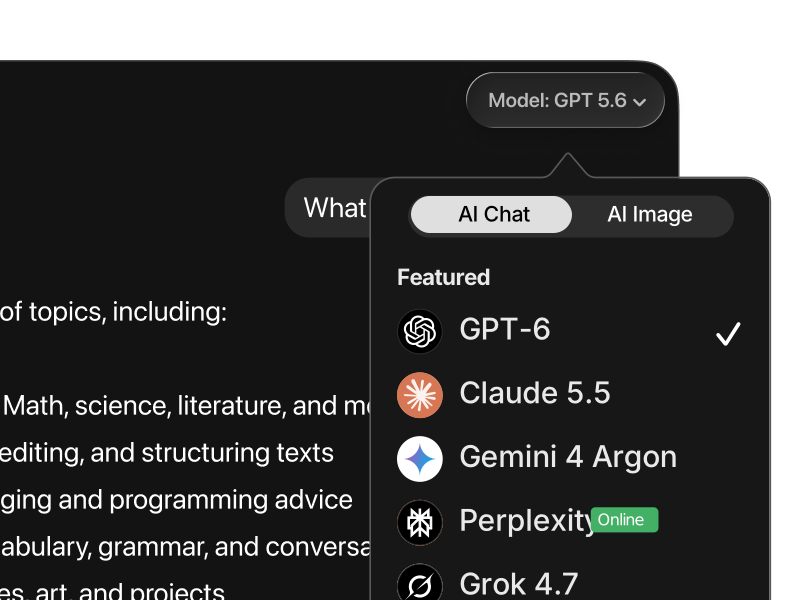
Fello AI on macOS with the model picker open, showing 11 AI models
What is Mistral

What Mistral actually is

Mistral AI is a French artificial intelligence company founded in Paris in April 2023 by Arthur Mensch, Timothée Lacroix, and Guillaume Lample, three researchers who had worked at Google DeepMind and Meta. In under three years it became Europe's most significant answer to the American labs, and it did it on a combination no other frontier lab offers: genuinely open weights, aggressive pricing, and the whole operation run from inside the European Union.

That strategy has been funded properly. Mistral raised €1.7 billion in September 2025 in a Series C led by the Dutch chip-equipment maker ASML, at an €11.7 billion post-money valuation. On 8 September 2026 it raised a further €3 billion in a Series D led by Samsung Electronics, at a post-money valuation above €21 billion, which Mistral says is the largest equity fundraising round ever completed by a European technology company. Its customer list reads like a European industrial register: BNP Paribas, Stellantis, SNCF, La Banque Postale, CMA CGM, and the Government of Luxembourg.

For everyday work, Mistral is fast, cheap, and unusually good in European languages. The cost-efficient flagship, Mistral Large, runs at $0.50 per million input tokens and $1.50 per million output tokens, which undercuts the American flagships by an order of magnitude, and Mistral Medium 3.5 is the model Mistral itself recommends for most general tasks and coding. Alongside the hosted models, Mistral keeps publishing open-weight releases. Most of them are Apache 2.0, which lets anyone use, distribute, modify, and share them for any purpose; some, including Devstral 2, ship instead under a modified MIT license with the same permissions plus one condition, that companies with monthly revenue above $20 million buy a commercial license or run the model through Mistral Studio. Check the model card before you build on one.

Le Chat is now Vibe: If you remember Mistral's assistant as "le Chat", this is it. Mistral's own help center announced on 12 August 2026 that le Chat had become Vibe, its unified agent for professional productivity and coding, in its words the new name for what you knew as le Chat with a broader set of capabilities. Accounts, plans, conversations, and saved content all carried over. It comes in three modes: Vibe Work for multi-step tasks across your apps, Vibe Code for developers, and Vibe Chat, the turn-based conversation le Chat was known for. The URL did not change: chat.mistral.ai still works.

Paris, France
Built and hosted inside the EU
Mostly Apache 2.0
Open Mistral models, licence varies by model
$0.50 / $1.50
Mistral Large, per million tokens in and out
No Mac app
Vibe ships on web, mobile, CLI, and IDE only

Getting started

3 ways to use Mistral on Mac

02
Vibe on the web (chat.mistral.ai)

Mistral's own assistant, formerly le Chat, lives at chat.mistral.ai. The free plan gives you the current models, image generation, web search, and more than 100 connectors, with limited messages and coding sessions; Pro is $14.99/month and Team is $24.99 per user per month. Mistral publishes its interfaces plainly on its pricing page: web, mobile for iOS and Android, a CLI, and a VS Code extension. There is no desktop app on that list, so on a Mac it is a browser tab.

03
API and open weights

Developers can call Mistral through its Studio API, where Mistral Large costs $0.50 per million input tokens and $1.50 per million output, with batch processing cutting that in half and cached input tokens reducing input cost by up to 90% on repeated prompts. Separately, Mistral publishes open-weight models you can download and self-host, most under Apache 2.0 and some under a modified MIT license that adds a commercial-license requirement above $20 million in monthly revenue. The smaller ones, including the Ministral sizes built for on-device use, run comfortably on a modern Apple silicon Mac.


Why Fello AI

Mistral, done right

Mistral is one of the best value models in the world and a genuine European alternative to the American labs. What it does not have is a Mac app. Fello AI gives you Mistral in a real native app, next to Claude, ChatGPT, and Gemini, and adds AI image generation plus the ability to turn any answer into a real PowerPoint, Excel, or Word file.

A native Mac app, not a browser tab
Mistral has never shipped a Mac app, and its own pricing page lists web, mobile, CLI, and IDE as the only ways in. Fello AI fills that gap with a real native app weighing 30-50MB that launches instantly, uses negligible RAM, and runs on any Mac with macOS 12 or later.
Mistral plus the frontier stack
Mistral is fast, cheap, and strong in European languages. For polished long-form writing Claude 5 is stronger, GPT-6 handles computer-use tasks best, and Gemini takes the biggest documents. Fello AI gives you all of them in one app with instant switching mid-conversation.
Answers that become real files
Mistral's own assistant cannot hand you a finished document. Fello AI turns any answer into a downloadable PowerPoint deck, an Excel sheet with working formulas, a Word file, or a PDF, and reads up to 16 PDFs at once when you need to go the other way.

Side by side

Fello AI vs Mistral Vibe

Feature Fello AI Vibe (chat.mistral.ai)
Price Free tier + $9.99/mo or $79.99/yr Free tier + $14.99/mo Pro, $24.99/user/mo Team
Access to Mistral ✓ Yes ✓ Yes (limited on the free plan)
Native Mac app ✓ macOS 12+, Intel + Apple silicon ✗ Web, mobile, CLI, and IDE only
Models available ✓ Mistral, Claude 5, GPT-6, Gemini, Grok, DeepSeek and more ✗ Mistral models only
Image generation ✓ GPT Image 2, Nano Banana 2, Seedream 5, FLUX.2 ✓ Yes, limits by plan
Create Office files and PDFs ✓ PowerPoint, Excel, Word, PDF ✗ No
PDF support ✓ Up to 16 PDFs at once Document upload, capped by plan
iPhone and iPad ✓ Yes, same app ✓ Yes, iOS app

In depth

A closer look at Mistral

Europe's frontier lab, by some distance

Mistral is Europe's clearest answer to the American labs, and the market has priced it that way: its September 2026 Series D was, in Mistral's own words, the largest equity fundraising round ever completed by a European technology company. That matters beyond national pride: for organisations that need their AI processed under European law, Mistral is one of very few options that is both credible on capability and straightforwardly based in the EU. Its customer list, which includes BNP Paribas, Stellantis, SNCF, and the Government of Luxembourg, is mostly made of buyers for whom that was the deciding factor.

Genuinely open weights, with one condition to read

Mistral publishes a substantial part of its lineup as open weights. Most are Apache 2.0, which permits commercial use, modification, and self-hosting with no strings attached. Some, Devstral 2 among them, use a modified MIT license that grants the same permissions except that companies with monthly revenue above $20 million need a commercial license or must run the model through Mistral Studio. Either way it is a meaningfully stronger commitment than GPT-6 or Claude, which are only reachable through their companies' APIs, but read the model card rather than assuming one licence covers the whole lineup. The Ministral models are built small enough for on-device use, so the open half of Mistral's lineup includes sizes that actually run on a laptop rather than only in a data centre.

Frontier capability at a fraction of frontier prices

Mistral Large is priced at $0.50 per million input tokens and $1.50 per million output, an order of magnitude below the American flagships, and batch processing halves it again while cached input tokens cut input cost by up to 90% on repeated prompts. On the consumer side, Vibe Pro at $14.99 a month is one of the cheapest premium plans any major lab sells. Cheap is not the same as weak here: Mistral recommends Medium 3.5 for most general tasks and coding, and it holds up.

Strong in European languages

Mistral was built by a French team for a European market, and it shows in how it handles French, German, Spanish, Italian, and Portuguese. Plenty of models translate competently; fewer write naturally in those languages, keep register consistent, and get idiom right. If a lot of your work is not in English, Mistral is worth having in the picker even when another model is your default.


Model comparison

How does Mistral compare to other AIs?

The AI landscape in 2026 is competitive at the frontier level. ChatGPT leads in computer-use automation, Claude 5 excels at writing and complex analysis, and Gemini holds the context-length record. Where does Mistral actually stand?

Mistral is the value and sovereignty play. It is fast, priced far below the American flagships, strong in European languages, and it ships real open weights, most of them Apache 2.0. It does not try to win every benchmark, and on the hardest long-form writing or agentic tasks it does not. What it offers instead is frontier-adjacent quality at a price and a legal home that no American lab matches.

Mistral VS ChatGPT

Mistral vs ChatGPT

ChatGPT is the established standard. Mistral is the cheaper European one.

ChatGPT powered by GPT-6 is the strongest model for computer-use tasks. It can operate software, navigate interfaces, and complete multi-step desktop workflows autonomously. It is backed by the largest ecosystem of integrations and the deepest bench of third-party tooling of any model.

Mistral competes on economics and jurisdiction rather than on raw ceiling. Mistral Large is roughly an order of magnitude cheaper per token, Vibe Pro undercuts ChatGPT Plus, and Mistral's open weights let you audit or self-host a large part of the lineup. For European organisations with data-residency requirements, that combination is often decisive.

Use ChatGPT for computer-use tasks, ecosystem integrations, and the highest ceiling. Use Mistral when cost, openness, or European data residency matters.

Mistral VS Claude

Mistral vs Claude

Claude is the quality benchmark. Mistral is the value one.

Claude 5 is the best model available for writing quality and following complex instructions. It produces the most natural, well-structured output of any major model, maintains consistency across very long documents, and is significantly more reliable at detailed multi-part tasks without drift.

Mistral will not match Claude on nuanced long-form writing, and it is not trying to. It is quick, direct, and very cheap, which makes it the sensible default for high-volume everyday work: drafting, summarising, reformatting, and anything in a European language. Save Claude for the pieces that have to read perfectly.

Use Claude 5 for writing quality, structured analysis, and complex instruction-following. Use Mistral for fast, cheap, high-volume work and European languages.

Mistral VS Gemini

Mistral vs Gemini

Gemini scales wider. Mistral stays in Europe.

Gemini leads on context length, processing enormous documents in a single session, and pairs that with native Google Search grounding for real-time factual access. It also understands images, audio, and video natively, and it is deeply wired into Google Workspace.

Mistral's context windows are smaller, but the trade comes with a legal home inside the EU, open weights you can self-host, and prices far below Google's paid tiers. For organisations that cannot route data through Google, or that simply want to own the model they run, Mistral is the practical alternative.

Use Gemini for massive documents, Google integrations, and multimodal inputs. Use Mistral for European data residency, open weights, and cost control.

Mistral VS Grok

Mistral vs Grok

Grok is real-time. Mistral is open and cheap.

Grok is built around real-time information. It indexes X and the broader web live, which makes it the best model for breaking news, current sentiment, and anything time-sensitive. It is also more openly opinionated and more willing to engage with contentious topics.

Mistral has no live social feed and does not compete on that ground. What it has instead is Apache 2.0 open weights, a European legal home, and pricing that makes high-volume use genuinely affordable. For steady professional work rather than tracking what happened an hour ago, it is the more predictable tool.

Use Grok for real-time information, live X data, and brainstorming. Use Mistral for everyday professional work where cost and openness matter.

Mistral VS Perplexity

Mistral vs Perplexity

Perplexity retrieves. Mistral writes.

Perplexity is a search-first tool. It retrieves and summarizes information from the web with citations, which makes it the best option when you want sourced answers quickly without doing the research yourself.

Mistral is a general-purpose model. It is better at drafting, rewriting, coding, reasoning, and turning raw information into something finished, particularly in European languages. These are complementary tools rather than competing ones: find the facts in Perplexity, then build with them in Mistral.

Use Perplexity to find and verify facts from the web. Use Mistral to reason, draft, and build with that information.

Mistral VS DeepSeek GLM Qwen

Mistral vs the open-weight field

Same openness, a very different jurisdiction.

Mistral shares the open-weight philosophy of DeepSeek, GLM, and Qwen, and often loses to them on price alone. Where it separates is the hosted service: those three are Chinese companies whose own apps store conversations on servers in China, while Mistral's are handled in the EU. Each is a click away in Fello AI, right beside Mistral.

Use all of them in one app

No single model is best at everything. Mistral leads on price and European data residency, but Claude writes better, ChatGPT handles computer use, and Grok has live data. The most capable AI setups use several models routed to the right task rather than forcing everything through one. Fello AI puts Mistral, ChatGPT, Claude, Gemini, Grok, and Perplexity in one native Mac app, so switching model is a click rather than another subscription.

Metric Mistral GPT-6 Claude 5 Gemini
Reasoning Very good Excellent Excellent Very good
Coding Very good Top tier Top tier Very good
European languages Excellent Very good Very good Good
Flagship API price $0.50 in / $1.50 out per 1M Premium Premium Mid
Open models available ✓ Yes, mostly Apache 2.0 ✗ No ✗ No ✗ No
Where it is hosted European Union United States United States United States
Best for Value, EU residency, open weights All-round work, operators Long-form writing, docs Speed, large docs, research

What Fello AI offers

What you can actually do in Fello AI

Switching between AI models in Fello AI
Use the right model for the task

Different models are better at different kinds of work. In Fello AI, you switch between Mistral, ChatGPT, Claude, Gemini, Grok, and more without leaving the app or rebuilding your workflow. Compare outputs, move faster, and use the model that fits instead of forcing everything through one tool.

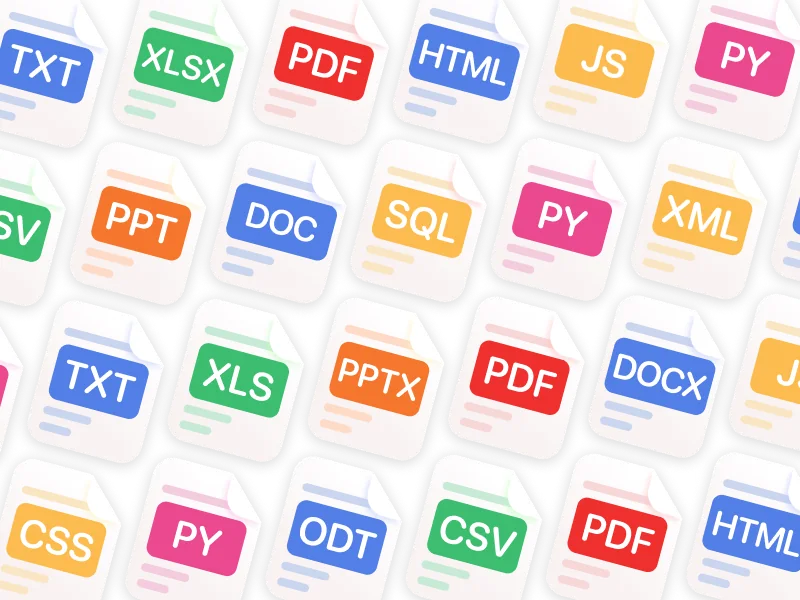
Fello AI supports PDF, Word, Excel, PowerPoint, images, and many more file formats
Chat with PDFs, images, and Office files

Upload PDFs, images, Excel sheets, slide decks, and documents, then ask for summaries, explanations, rewrites, or extracted insights. This makes Fello AI much more useful for study, research, reporting, and day-to-day professional tasks than a plain text chatbot.

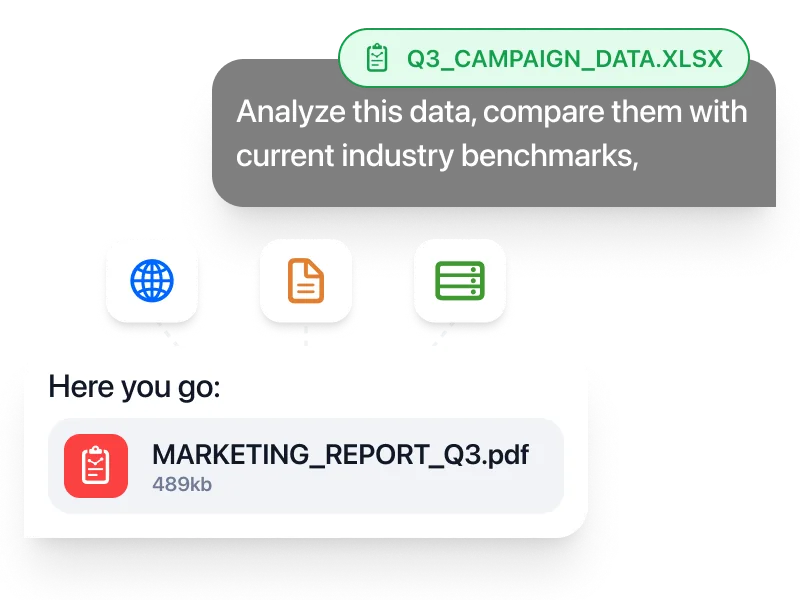
Fello AI generating a downloadable PDF report from a spreadsheet
Create real documents you can download

Generate PowerPoint presentations, Excel spreadsheets with formulas, Word documents, and PDFs, then download and use them immediately. That turns AI from a brainstorming tool into something much closer to a real productivity workspace.

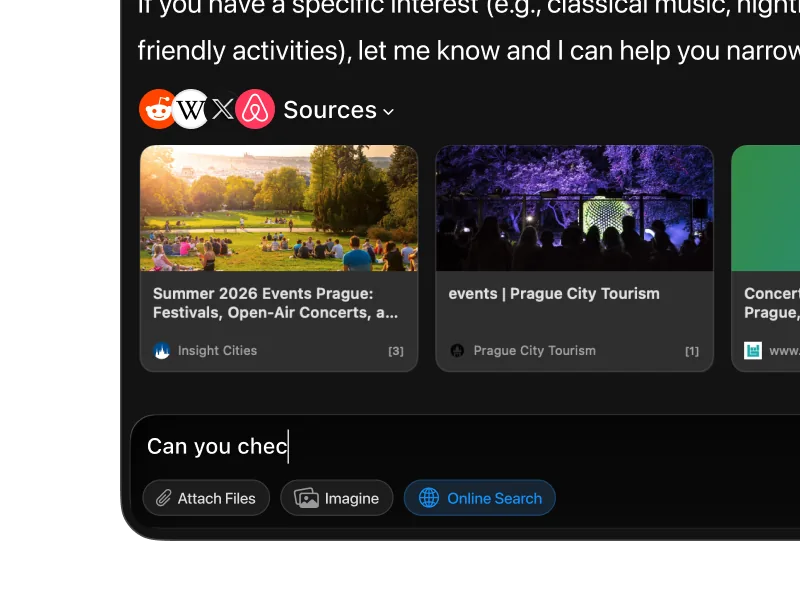
Fello AI web search results with cited sources
Search the web and keep working in one place

When you need current information, Fello AI searches the web with cited sources instead of forcing you to leave the app and manually piece things together. Especially useful when researching a topic, checking facts, or turning fresh information into a finished document.

Fello AI on Mac, iPhone, and iPad
One workflow across Mac, iPhone, and iPad

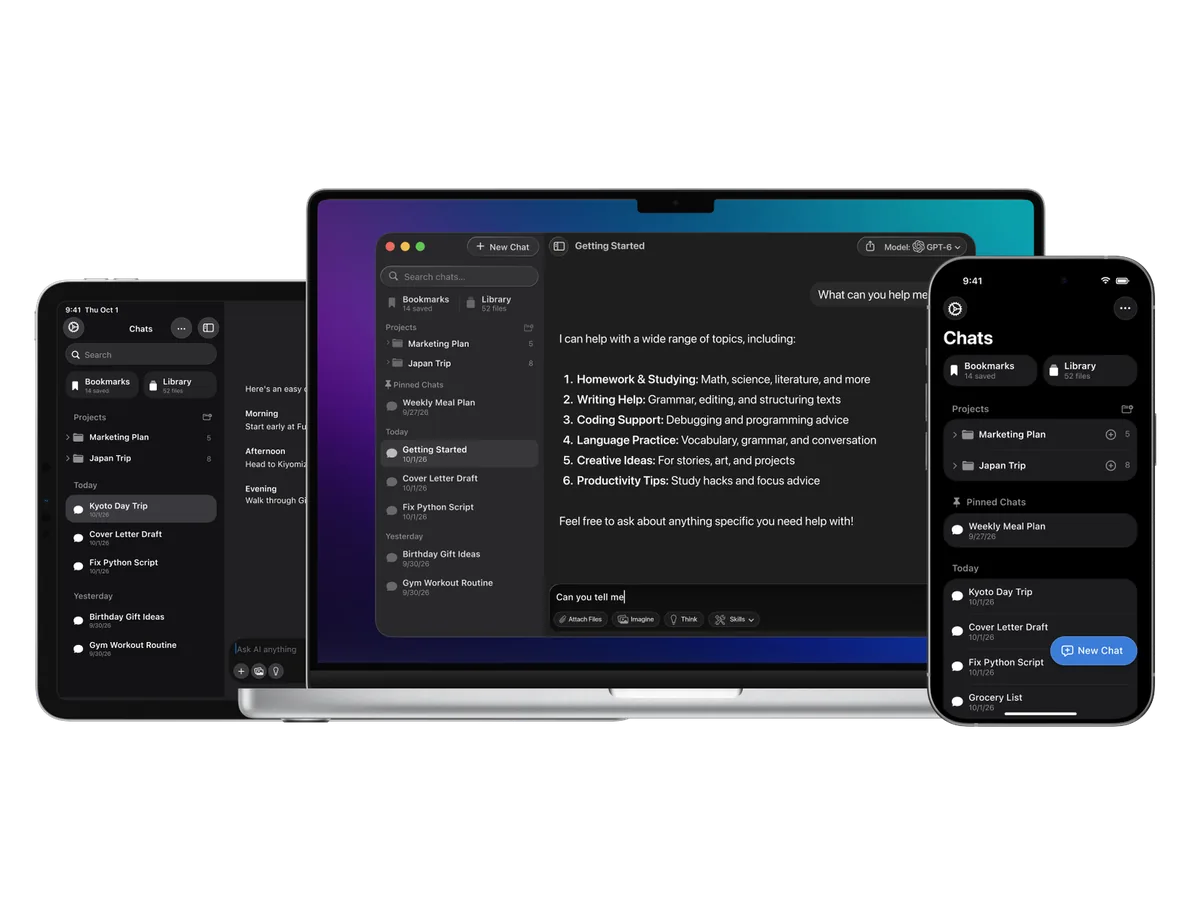
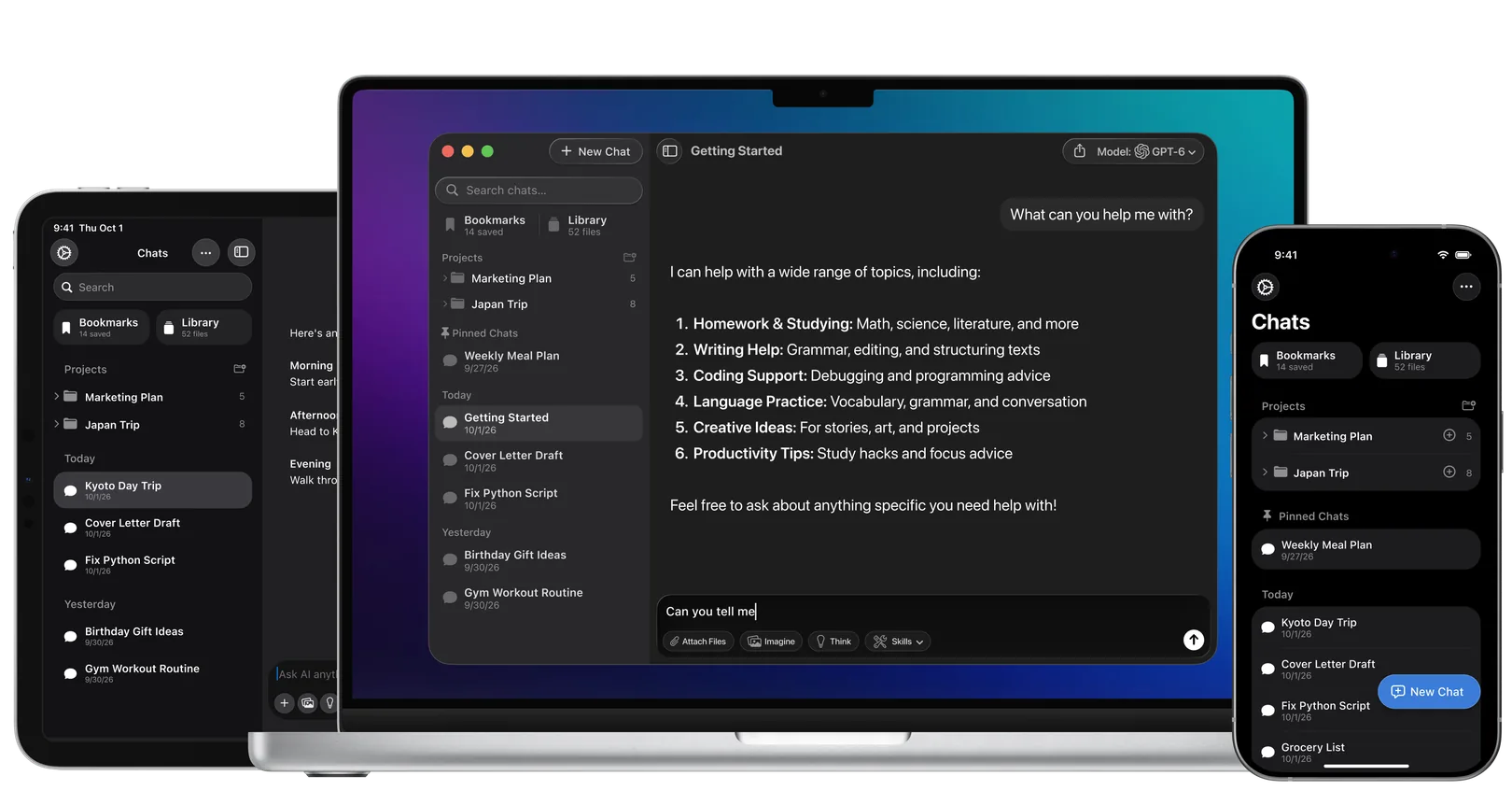
Fello AI is native on all Apple devices, so you keep the same app, the same models, and the same workflow whether you're on your Mac at a desk or on your phone on the go. No separate setup, no switching tools, no restarting the context.

For professionals

Fello AI gives professionals a practical way to use Mistral, ChatGPT, Claude, Gemini, Grok, and other top models across Mac, iPhone, and iPad as part of one consistent workflow. Analyze PDFs, Word files, Excel sheets, presentations, and images, then turn the result into real downloadable documents for client work, internal workflows, and day-to-day execution.

For students

Fello AI helps students handle everyday academic work more efficiently. Summarize readings, explain difficult topics, compare answers across models, and work with PDFs, slides, notes, and study materials in one place. Instead of relying on a single AI answer, use the model that fits the task and move from quick explanations to deeper research without jumping between apps.


Common questions

Frequently asked questions

No. Mistral's own pricing page lists the interfaces its plans include, and they are Vibe on the web, Vibe on mobile for iOS and Android, the Vibe CLI, and a Vibe extension for your IDE. There is no desktop application on that list. On a Mac you can add chat.mistral.ai to the Dock from Safari so it behaves a little like an app, use the CLI if you are comfortable in a terminal, or use a native client such as Fello AI, which runs Mistral in a real Mac app with no setup and puts every other major model beside it.
It was renamed. Mistral's help center announced on 12 August 2026 that le Chat had become Vibe, described as Mistral's unified agent for professional productivity and coding. Accounts, plans, conversations, and saved content all carried over, and the URL did not change, so chat.mistral.ai still takes you to the same place. Vibe comes in three modes: Vibe Work for multi-step tasks across your apps and tools, Vibe Code for developers in the terminal or an IDE, and Vibe Chat, which is the turn-based conversation le Chat was known for. If you are reading an older guide that talks about le Chat, it is describing this product.
There are two separate tracks. On the consumer side, Vibe has a free plan, a Pro plan at $14.99 a month, a Team plan at $24.99 per user per month, and custom enterprise pricing; students can get a discount. On the developer side, the API is billed per million tokens, with Mistral Large at $0.50 in and $1.50 out, batch processing cutting that by half, and cached input tokens reducing input cost by up to 90%. A Vibe subscription and API credits are billed independently. Through Fello AI's $9.99 a month subscription you get Mistral alongside Claude, GPT-6, Gemini, Grok, and more without managing any of that billing. Our Mistral AI pricing guide breaks down every tier in detail.
Mistral is a French company operating from Paris, so its hosted service is handled inside the European Union and under EU law rather than in the United States or China. That is the main reason European banks, industrial groups, and public bodies pick it. On the training question, Mistral's pricing page lists model training as opt-out on the Pro, Team, and Enterprise plans. As with any hosted AI, anything you paste is sent to the provider to generate a reply, so treat genuinely confidential material carefully on any plan. If you want data to stay on your own machine entirely, the open-weight Mistral models can be self-hosted.
Partly, and more genuinely than most. Mistral publishes a substantial part of its lineup as open weights. Its help center says most open models use the permissive Apache 2.0 license, which allows use for any purpose, distribution, modification, and sharing of modified versions. Certain models instead use a modified MIT license with the same permissions plus one condition: companies with monthly revenue above $20 million USD must either buy a commercial license or use the model through Mistral Studio. Licensing is stated on each model card, so check the one you plan to build on. Not everything is open: the top hosted models are served through Mistral's API rather than released. But compared with OpenAI, Anthropic, and Google, whose frontier models are closed without exception, Mistral's open releases are a real commitment rather than a gesture, and they come in sizes small enough to run on your own hardware.
Yes, for the open-weight models. You can download them and run them with tools like Ollama or LM Studio with nothing leaving your machine, under Apache 2.0 for most and a modified MIT license for some. The smaller sizes, including the Ministral models designed for on-device use, run comfortably on a modern Apple silicon Mac; larger ones need more unified memory. Mistral's top hosted models are not released as open weights and cannot be self-hosted. For most people the cloud route through Fello AI or Vibe is simpler and faster.
The core lineup runs from tiny edge models up to the flagship. Mistral Large is the cost-efficient flagship, Mistral Medium 3.5 is the model Mistral itself recommends for most general tasks and coding, and Mistral Small 4 handles high-volume simple work for very little. Beyond those there are specialists: Magistral for step-by-step reasoning, Codestral and Devstral for code, Pixtral for images, Voxtral for speech, OCR for documents, and the Ministral sizes for on-device use. For everyday chat you can ignore most of that and use the default.
It is one of its genuine strengths. Mistral was built by a French team for a European market, and it handles French, German, Spanish, Italian, and Portuguese with noticeably better idiom and register than models trained with English as the overwhelming default. Many models can translate; fewer write naturally. If a meaningful share of your work is in a European language other than English, Mistral is worth keeping in the picker even when something else is your usual first choice.
Yes. Fello AI works on any Mac running macOS 12 Monterey or later, including Intel-based Macs. Because Fello AI uses cloud-based AI, your local hardware does not affect the quality or speed of the responses. That is different from running an open-weight Mistral model locally, which needs Apple silicon and a good amount of unified memory.
Fello AI includes 30+ models: GPT-6, Claude 5, Gemini 3.8, Grok 4.7, DeepSeek V4.1, Kimi K3, Qwen 3.8 Max, GLM 5.3, Perplexity, and more alongside Mistral, plus image models including GPT Image 2, Nano Banana 2, Seedream 5, and FLUX.2. You can switch between them in any conversation to compare answers or pick the right model for each task, without opening a second app or paying a second subscription.

All the AI you need.
One beautiful app.

Download Fello AI for Mac, iPhone, and iPad. Free to start.

Fello AI running on Mac, iPad, and iPhone

4.7 rating·27,000+ reviews·Free to start