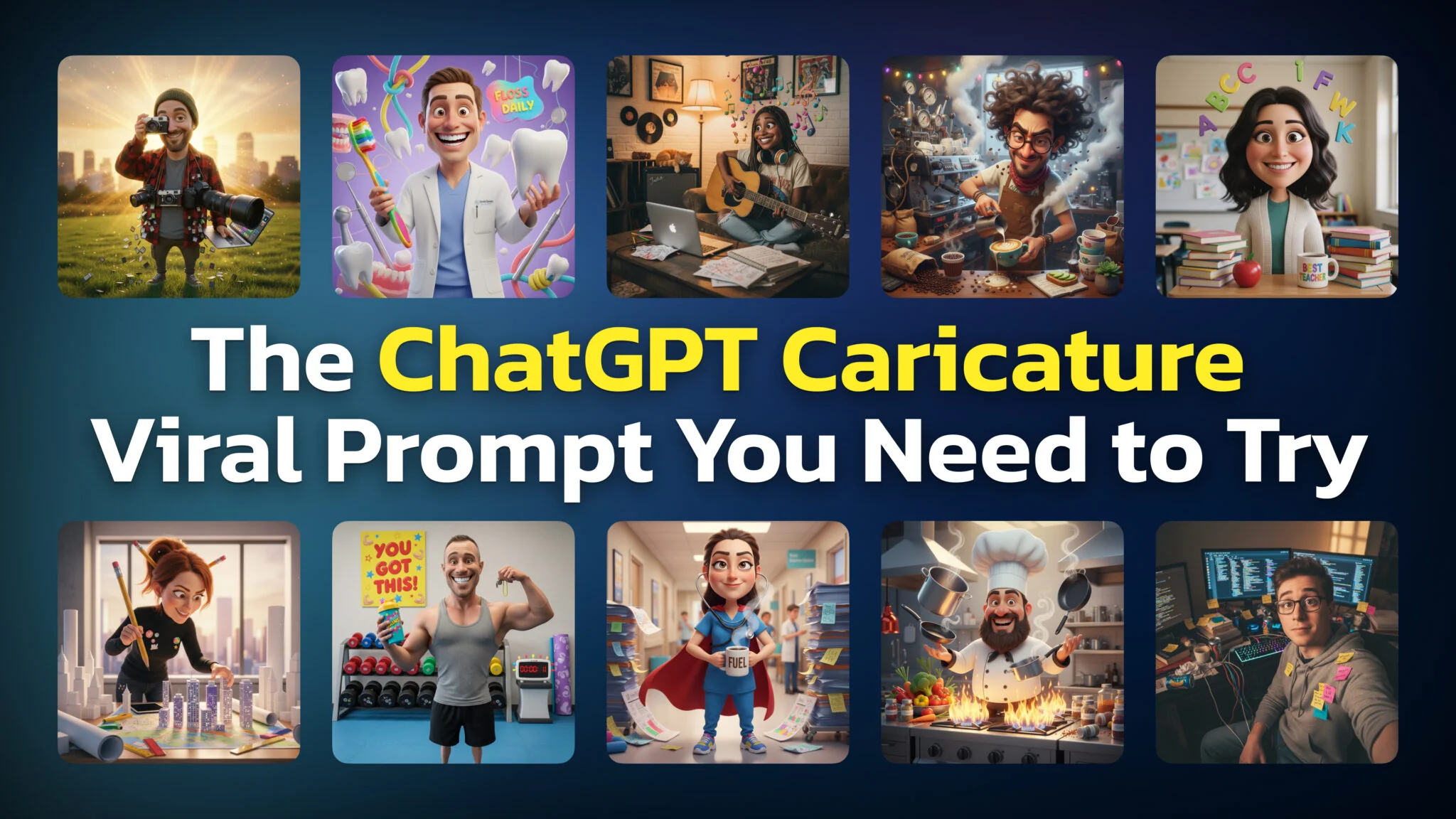
If you’ve been on social media in the past few weeks, you’ve seen them. Cartoon versions of real people — exaggerated features, surrounded by objects from their daily lives, looking like characters pulled straight from a Pixar movie.
They’re AI caricatures, and they’re everywhere. Facebook, Instagram, TikTok, LinkedIn — your feed is full of them. And they all start with one simple ChatGPT prompt.
Here’s what the trend is, how to do it yourself, and how to make your caricature actually look good.


The ChatGPT Caricature Prompt Everyone Is Using
The prompt that started it all is surprisingly simple:
“Create a caricature of me and my job based on everything you know about me.”
That’s it. One sentence. You paste it into ChatGPT, upload a photo of yourself, and the AI generates a stylized cartoon version of you — complete with exaggerated facial features and visual references to your profession, hobbies, and personality.
A software developer might get a caricature surrounded by monitors, coffee cups, and tangled cables. A teacher might see themselves buried in books with an apple on their desk. A fitness trainer could be holding dumbbells twice their size.
The results feel weirdly personal. That’s because this prompt doesn’t just look at your photo. It pulls from your entire ChatGPT conversation history — every question you’ve asked, every topic you’ve explored, every detail you’ve shared over weeks or months of use. The AI already knows a lot about you, and this prompt puts that knowledge on display.
That combination of self-recognition and surprise is exactly why the trend went viral. People share their caricatures not just because they look fun, but because they’re startled by how accurate they are.


What You Need Before You Start
Before you type the prompt, here’s what you need:
A ChatGPT Account with Image Generation
The caricature feature uses ChatGPT’s built-in image generation, powered by gpt-image-2 since April 2026 rather than the old DALL-E handoff. You’ll need:
- ChatGPT Free — Image generation works on the free plan, capped at roughly 2 to 3 images per rolling 24 hours. That is enough for a caricature and one retry.
- ChatGPT Plus, Team, or Enterprise — Same generator, much higher caps, so you can iterate on the prompt without waiting out a cooldown. For the full picture of what the generator can do, see our guide to the ChatGPT image generator.
A Clear Photo of Yourself
The quality of your photo directly affects the quality of your caricature.
- Use a well-lit headshot or upper body shot. Natural light works best.
- Face the camera. Straight-on or slight angles produce better results than profile shots.
- Keep the background simple. A busy background can confuse the AI.
- Avoid group photos. Stick to solo shots so ChatGPT knows who to caricature.
A selfie taken in good lighting is more than enough. You don’t need a professional headshot.
ChatGPT Conversation History (Optional but Helpful)
The viral prompt works best if you’ve been using ChatGPT regularly. The more conversations you’ve had, the more context the AI has about your job, interests, and habits.
If you’re a new user or don’t have much history, don’t worry — there’s a workaround. More on that below.


How to Use the ChatGPT Caricature Prompt (Step by Step)
Here’s exactly how to create your caricature:
Step 1: Open ChatGPT at chat.openai.com or in the ChatGPT app.
Step 2: Start a new conversation.
Step 3: Click the attachment icon (the paperclip or “+” button) and upload a clear photo of yourself.
Step 4: Type the prompt:
Create a caricature of me and my job based on everything you know about me.
Step 5: Hit enter and wait. Generation usually takes 15-30 seconds.
Step 6: Review the result. If you want adjustments, tell ChatGPT what to change — “make the colors more vibrant,” “add a laptop,” “make it more exaggerated.”
That’s the entire process. No special settings, no plugins, no third-party tools.


What If You’re New to ChatGPT?
The viral prompt relies on ChatGPT knowing things about you. If you just signed up or rarely use the tool, the AI won’t have enough context to create a personalized caricature. You’ll get something generic — a vague cartoon that could be anyone.
The fix is simple: tell ChatGPT who you are directly in the prompt.
Instead of the standard prompt, try something like this:
Create a caricature of me based on this photo. I’m a graphic designer who works from home. I’m obsessed with coffee, I have two cats, and I spend most of my day in Figma and Photoshop. I also run a lot and listen to true crime podcasts. Make it fun and exaggerated.
The more specific details you include, the better. Think about:
- Your job and what a typical workday looks like
- Tools and equipment you use daily
- Hobbies and interests outside of work
- Personality quirks (night owl, always late, obsessive organizer)
- Objects you’re always seen with (specific coffee mug, headphones, notebook)
Concrete details beat vague descriptions. “I drink three espressos before 9 AM” gives ChatGPT more to work with than “I like coffee.”


How to Get Better Results
Not all caricatures come out equal. Here’s what separates a generic result from one that makes people say “that looks exactly like you.”
Be Specific About Your Profession
“I’m a marketer” is too broad. “I’m a content marketer who writes SEO blog posts and spends half the day arguing about headlines in Slack” gives ChatGPT a vivid picture to work with.
Add Physical Details
ChatGPT will work from your photo, but you can guide it. Mention your glasses, beard, curly hair, tattoos, or anything else you want emphasized. Caricatures exaggerate — so tell the AI what to exaggerate.
Request a Specific Style
The default output tends to be a 3D Pixar-like style, which is what most viral caricatures look like. But you can push it in other directions:
- “Make it look like a hand-drawn editorial cartoon“
- “Use a comic book style with bold outlines”
- “Create it in a watercolor illustration style“
- “Make it look like a South Park character“
Iterate
Your first result won’t always be your best. Tell ChatGPT what you like and what to change:
- “Keep the face but change the background to a kitchen”
- “Make the eyes bigger and add more humor”
- “The proportions are good but add a dog next to me”
Each round of feedback gets you closer to something worth sharing.
Use a Better Photo
If the result looks off, the photo is usually the problem. Try a different image — better lighting, different angle, higher resolution. A clear, well-lit photo solves most quality issues.


Best Variations of the Prompt
The original prompt is a great starting point, but these variations let you customize the output for different purposes.
The Classic (What Everyone Uses)
Create a caricature of me and my job based on everything you know about me.
Best for: People with extensive ChatGPT history who want a personalized result.
The Detailed Self-Description
Create a caricature of me based on this photo. I work as a [your job]. My daily life involves [2-3 specific activities]. I’m known for [personality trait]. Include [specific objects or details] in the scene.
Best for: New ChatGPT users or anyone who wants more control over the result.
The LinkedIn Professional
Create a polished, professional caricature of me suitable for a LinkedIn profile. Show me in my role as a [job title] with subtle references to my industry. Keep it clean and business-appropriate.
Best for: A fun but work-appropriate profile image.
The Couple or Group Caricature
Create a caricature of us based on these photos. [Person 1] is a [job] and [Person 2] is a [job]. Show us together with elements from both our professions.
Best for: Couples, business partners, or friend groups who want a shared caricature.
The Hobby-Focused Version
Create a caricature of me, but instead of my job, focus on my hobbies: [list hobbies]. Show me in my element doing what I love.
Best for: People who’d rather showcase their interests than their career.
The Exaggerated Personality
Create a wildly exaggerated caricature of me. I’m a [job title] who [funny or extreme habit]. Push the humor as far as you can. Think boardwalk caricature artist energy.
Best for: Maximum entertainment value.
The Pixar Movie Poster
Create a caricature of me in the style of a Pixar movie poster. I’m the main character — a [job title] on an adventure through a typical workday. Include a movie title based on my profession.
Best for: A creative, shareable image that stands out from the standard trend.


What Your Caricature Reveals About You
Here’s the part that catches most people off guard.
The viral prompt doesn’t just generate a funny image. It shows you — in cartoon form — what ChatGPT has learned about you from your past conversations.
Some people discover the AI knows their profession, hobbies, and daily routines in surprising detail. The caricature might include your morning coffee habit you never explicitly mentioned, or reference a project you discussed months ago. It pieces together a profile from scattered conversations.
This is the “wow” factor that drives the trend. But it’s also a reality check.
Every time you ask ChatGPT for advice, brainstorm with it, or share context about your life, you’re building a profile. The caricature is just a visual summary of that profile. For many people, seeing it laid out in a single image — all the little details the AI remembered — is the first time they realize how much data they’ve been sharing.
That realization is part of why the trend resonates. It’s fun, but there’s an undercurrent of “wait, it knows all that about me?”


Privacy: What You Should Know
The caricature trend is harmless fun for most people. But it’s worth understanding what you’re doing when you participate.
Your Photo Goes to OpenAI
When you upload a photo to ChatGPT, OpenAI processes it on their servers. Their privacy policy covers how this data is handled, but the key point: your photo doesn’t stay only on your device.
Your Caricature Can Reveal Personal Information
When you share your caricature on social media, you’re not just sharing an image. You’re sharing a visual summary of your profession, habits, and personality — details that might be useful to someone trying to impersonate you or build a profile for social engineering.
This doesn’t mean you shouldn’t participate. It means you should think about what’s in the image before you post it.
Chat History Is the Real Data
The caricature itself is a byproduct. The bigger privacy consideration is the conversation history that ChatGPT draws from. If you’ve shared sensitive information in past chats — financial details, health information, work projects — that data is already part of your profile.
You can manage this in ChatGPT settings:
- Turn off chat history to prevent future conversations from being stored.
- Delete specific conversations you’d rather ChatGPT not reference.
- Review your data in Settings > Data Controls.
Practical Advice
- Don’t upload photos of other people without their consent.
- Review your caricature before sharing — make sure it doesn’t reveal anything you’d rather keep private.
- If you’re concerned about data, use the manual prompt (describe yourself instead of relying on chat history).


Final Words
The ChatGPT caricature trend is a perfect example of what happens when AI capabilities meet social media virality. It’s fun, it’s shareable, and it gives people a reason to engage with AI in a way that feels personal. Whether you see it as a creative tool or a privacy wake-up call probably depends on how comfortable you are with what the AI already knows about you.
Either way, now you know how to make one.
Frequently Asked Questions
Does the ChatGPT caricature prompt work on the free plan?
Yes. Image generation is available on the free plan, limited to roughly 2 to 3 images per rolling 24-hour window. Plus at $20/month lifts that cap so you can iterate on the prompt instead of waiting.
Why does my caricature look generic?
Most likely because ChatGPT doesn’t have enough context about you. Either you’re a new user with limited chat history, or your prompt is too vague. Try the detailed self-description prompt and include specific details about your job, hobbies, and personality.
Can I create a caricature of someone else?
Yes, but with caveats. You can upload someone else’s photo and describe them in the prompt. However, ChatGPT won’t have conversation history for that person, so you’ll need to provide all the details manually. Also, respect people’s privacy — don’t create or share caricatures of someone without their permission.
What art style does ChatGPT use for caricatures?
The default tends to be a 3D, Pixar-like style — colorful, rounded, and cartoonish. You can request different styles in your prompt: comic book, watercolor, anime, pop art, hand-drawn sketch, or any other art style.
Can I use my caricature as a profile picture?
You can use it on your personal social media profiles. However, be aware that images generated by ChatGPT are subject to OpenAI’s usage policies. For commercial use (like a business logo or paid advertisement), review OpenAI’s terms of service first.
Is this trend only on ChatGPT?
ChatGPT started the trend, but other AI tools can create similar caricatures. Google Gemini, Grok (on X), and Midjourney can all generate caricature-style images, though the prompts and results vary. The “based on everything you know about me” angle is unique to ChatGPT because of its conversation memory feature.
How much does it cost?
Nothing. The prompt works on the free plan within its 2 to 3 images per 24 hours. If you already have ChatGPT Plus ($20/month), image generation is included at a much higher cap.
Why did my caricature include something I never mentioned?
ChatGPT infers details from your conversation history. If you’ve discussed topics related to a hobby or interest — even indirectly — the AI might include visual references to it. This inference ability is what makes the results feel surprisingly accurate (and occasionally unsettling).