More than 1,000 people every month type “how to turn off Google Gemini” into search, and the number keeps climbing. Google quietly switched Gemini on by default across Gmail, Chrome, Android, Workspace, Maps and Search through 2025 and early 2026, and most users only noticed when the AI started summarising their inbox or hijacking the power button. A class-action lawsuit (Thele v. Google LLC, filed November 11, 2025) accuses Google of secretly enabling these features around October 10, 2025. Users in the EU, UK and Japan were opted out by default, while US users were opted in. If you live in the US, the off switch is yours to find, and Google has not made it easy.
This guide gives you the exact settings paths to turn Google Gemini off on every surface where it now lives. That covers Android, Samsung Galaxy, Pixel, iPhone, Gmail, Chrome, Google Workspace, Maps, Docs, Drive and Google Search. You’ll get step-by-step instructions, a comparison table showing what each toggle actually disables, and the privacy backstory worth knowing. There’s also a recommendation for a private AI alternative if you still want a smart assistant on your terms.
The Key Takeaways
- Preinstalled Gemini on most Android phones cannot be uninstalled, only disabled; you can change the default assistant or remove it from your launcher.
- Three separate toggles are needed to fully remove Gemini from Gmail: the main Smart features checkbox plus two Workspace toggles (“in Google Workspace” and “in other Google products”).
- Disabling Smart features also kills spellcheck and priority inbox in Gmail, which Engadget and Proton both flagged as a dark pattern.
- Chrome now bundles a 4GB on-device AI model (Gemini Nano); turning it off requires a separate Chrome setting most users have never opened.
- Deleting the Gemini app does NOT remove your activity history from your Google account; you have to delete it manually.
How to Turn Off Google Gemini in 2026: Quick Answer
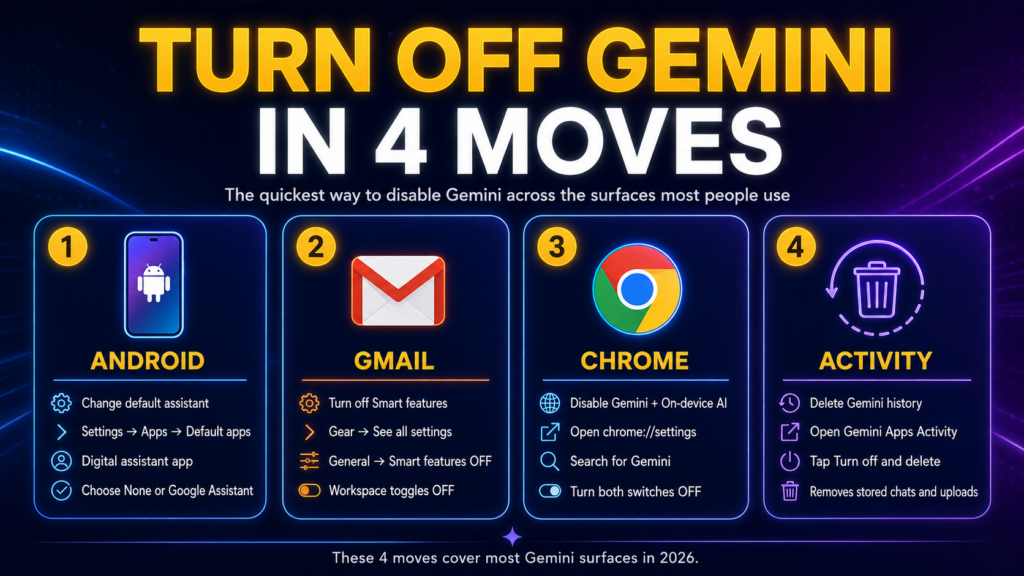
To turn off Google Gemini on Android, go to Settings → Apps → Default apps → Digital assistant app and select None or Google Assistant. To remove Gemini from Gmail on the web, open the gear icon, then See all settings → General, uncheck Smart features, and toggle off both Workspace options. In Chrome, open chrome://settings, search for “Gemini”, and turn off both Gemini in Chrome and On-device AI. Repeat the Gmail Smart features step inside your Google Account to also disable Gemini in Maps, Drive and Docs.
Those four moves cover roughly 90% of the surfaces where Gemini is now active. The rest of this guide handles the device-specific edge cases, the Workspace admin path, AI Overviews in Search, and how to wipe your Gemini activity once everything is off.
How to Turn Off Gemini on Android (30 seconds)
Google completed its Gemini transition on Android in March 2026, retiring Google Assistant on mobile devices. That means a long-press on the power button now opens Gemini, “Hey Google” routes to Gemini, and any third-party app that calls the assistant intent gets Gemini back. To fully turn it off, you need to flip three separate settings, because Google scattered them across three different menus.
Here is the full Android sequence according to Google’s official Gemini management page:
- Open Settings on your Android phone.
- Tap Apps → Default apps → Digital assistant app.
- Choose None if you want no assistant at all, or Google Assistant to switch back to the classic version.
- Go to Settings → System → Gestures → Press & hold power button and pick a non-Gemini action, usually Power menu.
- Open the Gemini app, tap your profile picture, go to Settings → Talk to Gemini hands-free, and turn off Hey Google.
If the Gemini app still shows up in your launcher, that’s fine; the steps above stop it from intercepting voice commands and button presses. On most Android phones where Gemini comes preinstalled, the app can only be disabled, not fully uninstalled. To hide it from the launcher, long-press the icon and choose Disable app, which greys it out.
Switching Back to Google Assistant
Many readers don’t actually want no assistant; they want the old Google Assistant back. Open the Gemini app, tap your profile, and choose Switch to Google Assistant → Google Assistant, then confirm. Your old Assistant settings (routines, voice match, smart home control) come back intact. This is the cleanest fix if you only added Gemini because the system update prompted you to and now regret it.
How to Turn Off Gemini on Samsung Galaxy (30 seconds)
Samsung phones add a wrinkle because they also have Bixby running alongside Gemini. You can remap the Side Button on a Galaxy S22, S23, S24 or S25 to ignore both. To turn Gemini off on a Samsung phone, go to Settings → Apps, tap Gemini, and tap Disable at the bottom. To stop the Side Button from launching Gemini, go to Settings → Advanced features → Side Button and change the long-press action to Power off menu or assign it to Bixby if you prefer.
If you want to remove Gemini as the assistant without disabling the app itself, use Settings → Apps → Choose default apps → Digital assistant app, then select None or another assistant. Samsung published its own support note on remapping the Side Button if you want to keep the long-press for power-off rather than any AI assistant.
How to Turn Off Gemini on Google Pixel (1 minute)
On Pixel 8, Pixel 9 and Pixel 10, the steps mirror stock Android because Pixel is Google’s reference device. Go to Settings → Apps → Default apps → Digital assistant app and pick None or Google Assistant. Then go to Settings → System → Gestures → Press & hold power button and set it to Power menu. Finally, in the Gemini app, turn off Hey Google under Settings → Talk to Gemini hands-free.
Pixel devices ship with Gemini Nano preinstalled as part of Android System Intelligence, used for features like Magic Compose and Recorder summaries. That on-device model cannot be removed without rooting the device, but it does not send data to Google’s servers; it runs locally on the phone.
How to Turn Off Gemini on iPhone (10 seconds)
Gemini on iPhone is a regular app, not the system assistant. Apple does not let third-party AI replace Siri at the OS level (Apple Intelligence handles that role), so the iPhone Gemini path is the simplest of any device. To turn off Gemini on iPhone, long-press the Gemini app icon, tap Remove App, and choose Delete App to uninstall it completely. That’s the whole “disable” flow on iOS.
The catch: uninstalling the app does not delete your Gemini Apps Activity from your Google account. Your past conversations, file uploads and image generations remain stored under your Google identity until you delete them manually (see the Gemini activity section below). If you used Gemini through the Google app on iPhone rather than the standalone Gemini app, open the Google app and tap your profile. Then disable the Gemini AI features toggle to stop AI summaries appearing in search results.
How to Turn Off Gemini in Gmail (3 toggles, ~1 minute)
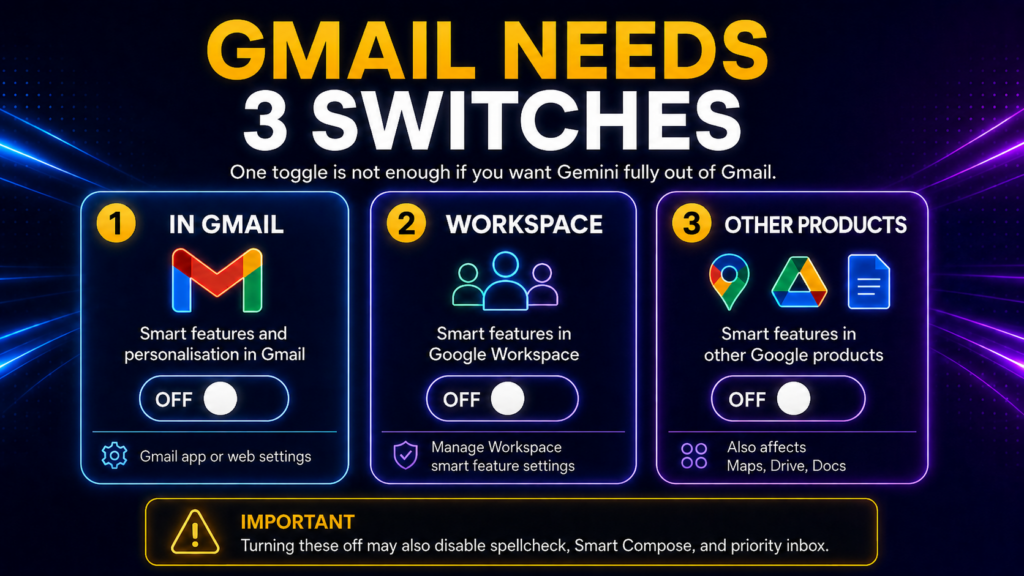
Gmail is where the Gemini opt-in story turned into a lawsuit. Google enabled Smart features for most US Gmail accounts around October 10, 2025, which gave Gemini permission to read inbox content, attachments and Drive files for summaries, replies and “help me write” drafts. Turning Gemini off in Gmail requires three separate toggles because Google split personal Smart features from Workspace Smart features in 2024 and never reunified them.
To turn off Gemini in Gmail on the web:
- Open Gmail on your computer.
- Click the gear icon in the top right, then See all settings.
- On the General tab, scroll to Smart features and personalisation.
- Uncheck the Smart features box.
- Click Manage Workspace smart feature settings.
- Toggle off Smart features in Google Workspace and Smart features in other Google products.
- Click Save.
To turn off Gemini in the Gmail mobile app:
- Open the Gmail app on Android or iPhone.
- Tap the menu icon (three lines, top left), then Settings.
- Select your Gmail address.
- Tap Smart features and personalisation in Gmail and toggle it off.
- Tap Smart features and personalisation in other Google products and toggle it off too.
Both Engadget and Proton flagged the side effect: turning off Smart features in Gmail also turns off spellcheck, grammar suggestions, priority inbox sorting and Smart Compose. Google did not unbundle these from the Gemini access toggle, which privacy researchers have called a dark pattern designed to discourage opt-out. If you want to keep spellcheck and lose only the AI summaries, there is no clean option; the toggles are all-or-nothing.
How to Turn Off Gemini in Chrome (3 settings, ~1 minute)
Google integrated Gemini into Chrome through 2025, adding a side-panel chat, AI Mode in the address bar, and a 4GB on-device model called Gemini Nano that Chrome silently downloaded to most installs in February 2026. Disabling Gemini in Chrome requires three separate settings because the browser splits its AI features across user-facing toggles and a deeper system menu.
To turn off Gemini in Chrome on your computer:
- Open Chrome and go to chrome://settings in the address bar.
- In the search bar at the top of Settings, type Gemini.
- Toggle off Gemini in Chrome to remove the side panel and toolbar icon.
- In the same Settings menu, go to System in the left sidebar.
- Toggle off On-device AI to delete the Gemini Nano model from your machine.
- Go to You and Google → AI features → Page content sharing and toggle it off to stop Chrome from sending tab contents to Google’s servers for AI processing.
The On-device AI toggle was added in February 2026 after researchers noticed Chrome had downloaded the 4GB model without explicit user consent. Once you turn the toggle off, the model is removed from your machine and stops downloading future updates. If the toggle does not appear in your Chrome build, update Chrome to the latest version; older releases hide the setting behind a flag at chrome://flags under “Optimization Guide On-Device Model”.
How to Turn Off Gemini in Google Workspace, Maps, Docs and Drive (1 minute)
Gemini is wired into every Workspace app, including Google Docs, Sheets, Slides, Drive, Calendar, Maps and Meet. The good news is that the Smart features in other Google products toggle inside Gmail (covered above) controls the Maps, Drive, Docs and Calendar surfaces in one move. If you already turned both Gmail Smart features toggles off, you have also turned off Gemini in Maps, Docs and Drive for personal accounts.
For Workspace business accounts, the picture is different. Personal Gmail users own the toggle themselves; Workspace business users do not. Only your Workspace admin can disable Gemini at the org level through Google’s Workspace admin console. If you are a Workspace user who wants Gemini off but your admin has it on, you can still disable the per-app Gemini buttons. Inside any Doc or Sheet, click the Gemini icon in the top right corner and choose Turn off Gemini for this account. This hides the panel but does not block Gemini from accessing data at the org level.
In Google Maps, the “Ask Maps” panel and Gemini-generated place summaries are tied to the same Smart features toggle. After you turn it off, the Ask Maps icon may still appear in the app, but tapping it prompts you to re-enable smart features, and nothing happens until you do.
How to Turn Off Gemini in Google Search: AI Overviews and AI Mode (1 minute setup)
Google Search now shows Gemini-generated AI Overviews at the top of most result pages and an experimental AI Mode tab that turns the whole search experience into a chat. There is no single “turn off AI Overviews” button in Google Search settings, which has frustrated millions of users since the feature launched.
The cleanest workaround is the &udm=14 trick: add &udm=14 to any Google search URL, and Google returns the classic blue-link results with no AI Overview. You can make this permanent by setting up a custom search engine in Chrome, Firefox or Safari pointing to https://www.google.com/search?q=%s&udm=14. Several browser extensions (including Hide Gemini and Google AI on the Chrome Web Store) do the same trick automatically. Inside the Google app on iPhone or Android, you can also opt out of AI Overviews via Search Labs at search.google.com/search-labs, but the labs setting only applies when you are signed in.
How to Delete Your Gemini Activity (30 seconds)
Turning off Gemini does not delete the chat history, file uploads or generated content already stored in your Google account. If you used Gemini at any point, the data is still there until you remove it. Google’s data retention policy then keeps “temporary” activity for up to 72 hours after deletion for “safety and abuse” review. For a deeper walkthrough of the privacy controls, see our guide on how to stop AI training on your data.
To delete your Gemini activity:
- Open the Gemini app or go to gemini.google.com on the web.
- Tap your profile picture, then Gemini Apps Activity.
- Tap Turn off and delete activity.
- Confirm the deletion.
This wipes both your chat history and any uploaded files. If you want to use Gemini occasionally without leaving a trail (for example, to compare it with ChatGPT for a single task), see our guide on Gemini Anonymous Mode, which walks through the temporary-chat workflow.
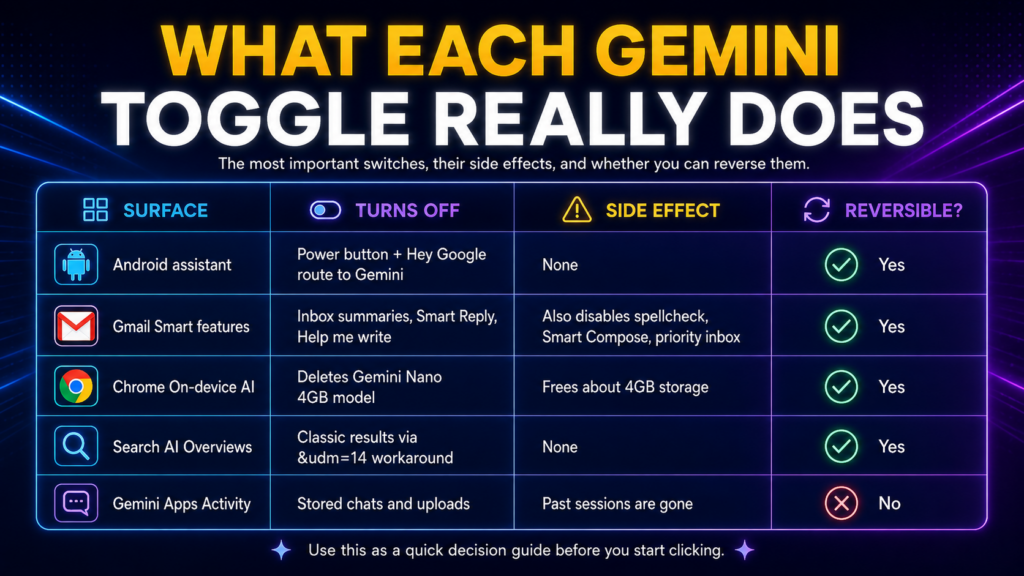
What Gets Disabled Where: The Complete Map
The table below summarises every Gemini toggle, what each one actually disables, the side effects, and how reversible the change is. Use it as a checklist before you start clicking.
| Surface | What “off” disables | Side effects | Reversible? | Time |
|---|---|---|---|---|
| Android default assistant | Power button + Hey Google routes to Gemini | None; Google Assistant remains available | Yes, anytime | 30 sec |
| Samsung Side Button | Long-press launches Gemini | None | Yes | 30 sec |
| iPhone Gemini app | Removes the app entirely | None on iOS (Siri is unaffected) | Reinstall from App Store | 10 sec |
| Gmail Smart features | Inbox AI summaries, “help me write”, smart replies | Also kills spellcheck, Smart Compose, priority inbox | Yes, but takes ~24 hours to re-enable | 1 min |
| Workspace Smart features in other products | Gemini in Maps, Drive, Docs, Calendar | Loses place summaries, doc suggestions | Yes | 1 min |
| Chrome Gemini in Chrome | Side panel and toolbar icon | None | Yes | 30 sec |
| Chrome On-device AI | Deletes Gemini Nano 4GB model | Saves 4GB disk, ends background updates | Yes; model re-downloads | 30 sec + delete time |
| Chrome Page content sharing | Stops sending tab contents to Google | None | Yes | 30 sec |
| Google Search AI Overviews | AI summary at top of results | None; just classic results | Permanent via &udm=14 URL trick | 1 min one-time setup |
| Gemini Apps Activity | Deletes stored chat history | Past sessions gone | Cannot be undone | 30 sec |
| Workspace org-level Gemini | Full org-wide disable | Affects every user in your domain | Admin only | Admin task |
Why This Matters: The Gmail Lawsuit and Privacy Backstory
The reason “how to turn off Google Gemini” became a Hard-difficulty search term in 2026 is a real story worth knowing. In late 2025, Google rolled out Gemini access to Gmail, Chat and Meet for most US Workspace and consumer accounts by default, with the opt-out buried under three menu layers. A viral social media post in January 2026 surfaced the change and racked up over 6.5 million views in a week.
The class-action lawsuit filed shortly after accuses Google of using Gmail content, including private messages and attachments, to power AI features without explicit user consent. Google’s official Gmail account on X responded on November 21, 2025 with the line that “we do not use your Gmail content to train our Gemini AI model”. But the company has acknowledged that Gmail data still flows through Gemini for personalisation features like summarisation and draft suggestions. Whether that counts as “training” is the point the lawsuit is testing.
The geographic split makes the dark-pattern reading harder to dismiss. Users in the EU, UK and Japan were opted out by default because of GDPR and local privacy law. Users in the US, Canada and most of Asia were opted in unless they found the toggle. That two-tier privacy posture is what motivated the Engadget piece on de-Gemini-ing your Google apps, the Tuta and Proton guides, and a flood of HuffPost and Yahoo coverage in early 2026. If you live in a US-default-on jurisdiction and want Gemini off, the steps above are the official escape route.
A Better Alternative: Use Multiple AI Models Without the Auto-Opt-In
Turning Gemini off does not mean giving up AI. If you want a smart assistant that does not auto-opt you into anything, Fello AI runs Claude, ChatGPT, Gemini, Grok and DeepSeek under one subscription on Mac, iPhone and iPad. You pick which model handles a given prompt; nothing routes through your Gmail unless you explicitly hand it a file. At $9.99/month for the full model lineup including DeepSeek, it’s roughly half the price of a single ChatGPT Plus or Gemini Pro subscription. There’s no “Smart features” toggle quietly turning on in the background either.
If you mainly want Gemini-style features but in a cleaner desktop app, our Gemini Mac app review covers Google’s official native client, and our Gemini desktop client guide for macOS lays out every native option, official and third-party. Trying to decide whether to keep Gemini at all or switch to a different model for daily use? ChatGPT vs Gemini and ChatGPT vs Claude vs Gemini on Mac put the three frontier options side by side. For a straight cost comparison, the Gemini Pricing 2026 guide shows what you’re paying for if you keep Gemini on.
Conclusion
Turning off Google Gemini in 2026 takes more clicks than it should because Google scattered the toggles across Android settings, the Gemini app, Gmail, Chrome, your Google Account, the Workspace admin console and Search Labs. The steps in this guide cover every surface where Gemini is now active, and the comparison table above gives you a one-page checklist. Start with the four-step quick answer at the top, then work through the device or product sections that apply to you.
If you want to stay in control of which AI model sees your data, try a multi-model app like Fello AI; if you’d rather drop AI features altogether, the off switches are now all in one place. Bookmark this page, because Google reshuffles these menus often, and we update the paths as they change. If Meta’s assistant is the next thing on your list, here is how to turn off Meta AI on Facebook, Instagram, WhatsApp, and Messenger.
FAQ
Can I completely uninstall Gemini from my Android phone?
It depends on your device. On most Android phones where Gemini comes preinstalled by the manufacturer, the app can only be disabled, not uninstalled. To stop it acting as your assistant, change the default digital assistant under Settings → Apps → Default apps, remap the power button gesture, and turn off Hey Google in the Gemini app. On iPhone you can uninstall the Gemini app completely.
Will turning off Gemini in Gmail break my spellcheck?
Yes, partially. Disabling Smart features in Google Workspace in Gmail also turns off Smart Compose, grammar suggestions and priority inbox. Google bundles these features behind the same toggle as Gemini’s inbox access, which Engadget, Proton and several privacy groups have called a dark pattern. There is no clean way to keep spellcheck while disabling only the AI summaries.
Is Gemini still listening if I turn off Hey Google?
No. Once you turn off Hey Google under Talk to Gemini hands-free in the Gemini app, the wake-word listener is disabled and your phone does not transmit audio to Google’s servers for Gemini. You will still need to change the default assistant separately if you want a long-press on the power button to stop opening Gemini.
Why is Gemini turned on by default in the US but off in Europe?
GDPR in the EU and similar privacy laws in the UK and Japan require explicit opt-in consent before processing personal data for AI features. The US has no equivalent federal law, so Google rolled out Gemini Smart features for US Gmail accounts by default while making them opt-in in regulated regions. The current Gmail class-action lawsuit centres on whether the US default-on rollout meets reasonable consent standards.
Can my Workspace admin force Gemini back on after I disable it?
Yes, for business and education accounts. Workspace admins control Gemini access at the org level through the admin console. If your admin enables Gemini for your domain, the personal Smart features toggles in Gmail and other Workspace apps are overridden, and you’ll need to talk to IT to opt out individually. Personal Gmail accounts are not affected; you keep full control of your own toggles.