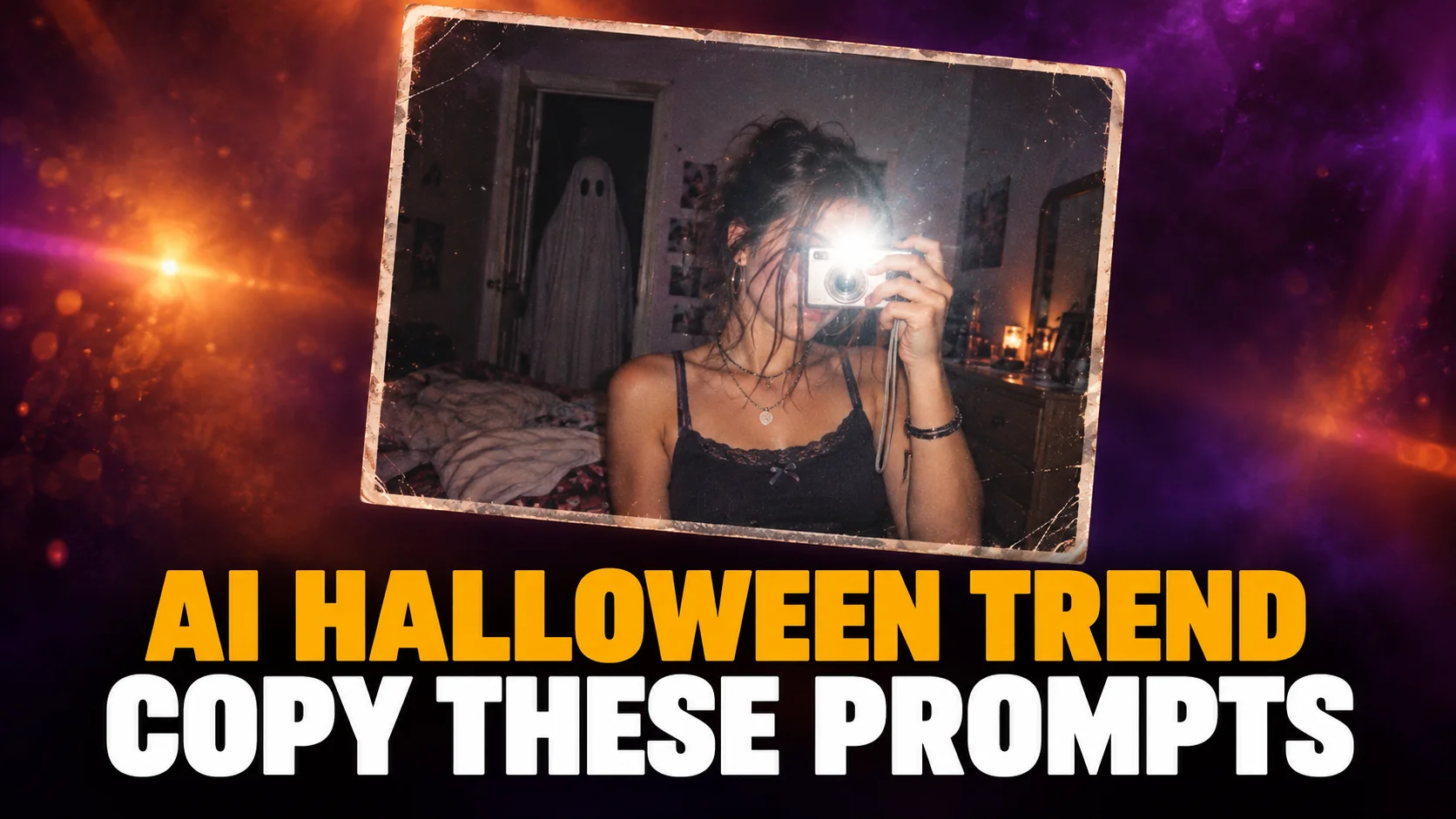
The AI Halloween trend turns one selfie into a spooky photo that looks like it was found in a drawer from 2003: a teenage bedroom at night, a harsh camera flash, film grain, and a masked figure or a bedsheet ghost in the dark doorway behind you. You make it by attaching your own photo to a prompt in ChatGPT or Gemini, and both apps do it on their free plans.
This guide shows how to do the AI Halloween trend step by step. It gives you ten copy-paste prompts we ran in ChatGPT on the same stand-in photos, with what each one got right and where it drifted. It also covers what prompt lists skip: why a Halloween prompt gets refused, how to keep the photo looking like you, and what Google and OpenAI do with your selfie.
The Key Takeaways
- What it is: a selfie turned into a 90s or 2000s horror snapshot. Google published a ghost-in-the-doorway prompt on its own blog on 24 October 2025, one of the earliest versions of the trend.
- Cost: free in both apps. OpenAI says ChatGPT Images 2.5 is available on every ChatGPT tier, and Google ticks image generation for users without a paid plan.
- The rule that matters most: attach a clear photo of yourself. Without one, you get a stranger in the costume.
- What the rules bar: gore, other people's faces without their consent, and copyrighted film characters. Describe the costume instead of naming it.
- Watermarks: images from both apps now carry Google's invisible SynthID watermark. All 10 of our ChatGPT test images also carried C2PA Content Credentials naming ChatGPT.
What Is the AI Halloween Trend?
The AI Halloween trend is a selfie rebuilt as a nostalgic horror photo. Think a messy bedroom at night, a hard disposable-camera flash, film grain, and something unsettling in the background. The mood is a slumber-party horror film, not gore. The most copied version puts a figure in a black hooded robe and a white mask in the doorway, which is why many people call it the Ghostface AI trend.
The trend goes back at least to Google. On 24 October 2025, Google's own Halloween post for the Gemini app published a prompt for a "dream Y2K style portrait" in shiny purple bedding, holding a 90s landline. In it, "a ghost in a bedsheet" stands in "the doorway of a dimly lit hallway." The same post shared a second prompt that turns a person into a Victorian ghost. Prompt sites have been remixing both ever since, swapping the bedsheet ghost for a masked killer and the purple bedding for a cluttered 2000s bedroom.
Four details make the photo read as a real 2003 snapshot instead of an AI render. A hard flash gives a bright face and a dark background. Film grain hides the too-clean AI skin. Clutter, like posters and a tube TV, makes the room look lived in. A casual costume cue, like cat ears or plastic fangs, makes it look like a sleepover rather than a photoshoot. Every prompt in this guide spells those details out, because a model fills in whatever you leave unsaid with the glossy default look.
How to Do the AI Halloween Trend in ChatGPT or Gemini
To do the AI Halloween trend, open ChatGPT or the Gemini app, attach one clear photo of yourself, paste a prompt, and send. The whole thing takes a couple of minutes, and you do not need a paid plan or a separate photo app.
- Pick the photo. Use a sharp, well-lit selfie or portrait with your face uncovered and looking roughly at the camera. Turn off beauty filters. One person per photo works best.
- Open the app. In ChatGPT, start a new chat. In Gemini, start a new chat.
- Attach the photo. Use the plus or paperclip button to add your selfie to the message.
- Paste the prompt. Copy one of the prompts below exactly, then change any detail you want, like the costume or the room.
- Fix with a follow-up, not a new chat. If the face drifts or the lighting is wrong, reply with one short correction, such as
keep my face exactly as in the original photoormake the flash harsher. In ChatGPT, the follow-up edits the last image.
Why the Reference Photo Matters
The reference photo decides whether the result looks like you, and it is the step people skip. A text prompt on its own produces a convincing stranger in a convincing bedroom. If the result has to look like you, the model needs your face as the starting point. OpenAI says ChatGPT Images 2.5 is "better at preserving the subjects in your reference photos." Gemini's image model, Nano Banana, is built for this kind of photo edit. Our Nano Banana prompt guide explains why the reference photo carries more weight than any wording you add.
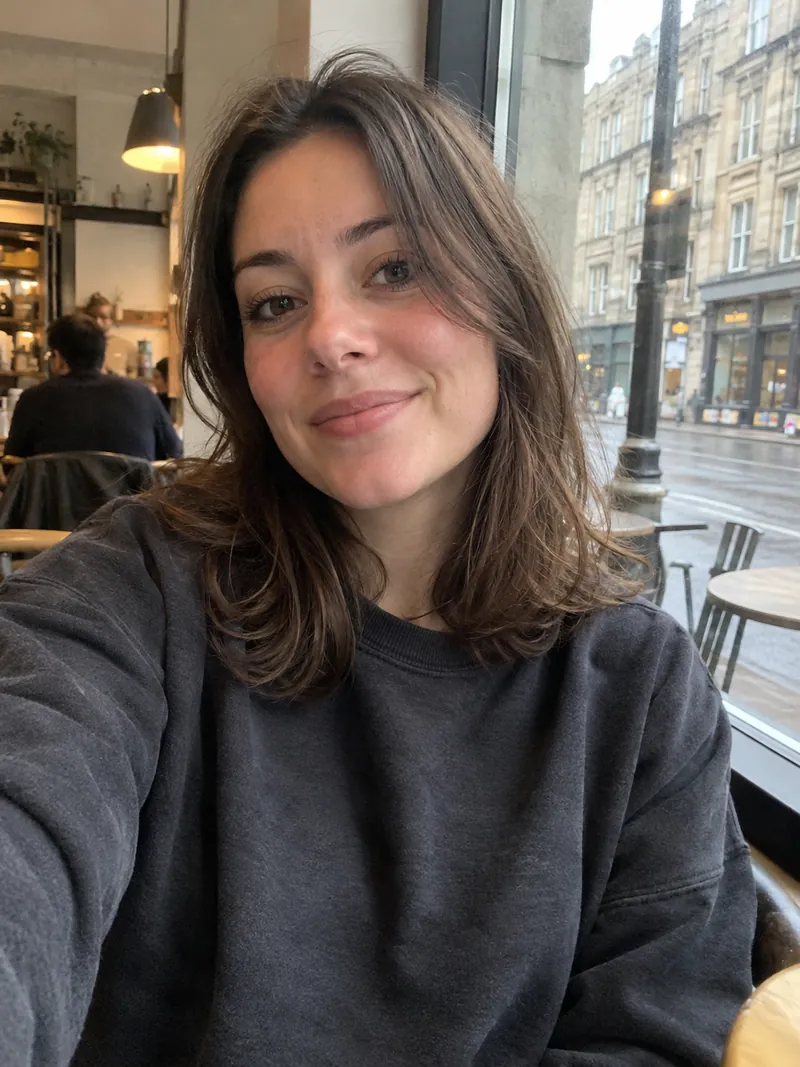
For this guide we did not upload a real person's face. We generated a stand-in selfie in ChatGPT, shown below, and attached that same photo to every prompt built for one person, so you can compare each result with the original. The pet and couple prompts used AI-generated stand-in photos of a dog and a couple.
The AI Halloween Trend Prompt (Y2K Ghostface Style)
This is the AI Halloween trend prompt most people are looking for: the Y2K bedroom, the flash, and the masked figure in the doorway. It describes the masked figure instead of naming the film character, which is deliberate, and the section on failed prompts shows why.
Prompt: Use the person in my photo. Keep their face, skin tone and hairstyle exactly as they are. Show them lying on a bed in a messy early-2000s teenage bedroom at night, holding a corded landline phone and looking bored. Posters on the wall, a small tube TV, orange string lights. Shot on a cheap disposable camera with a hard on-camera flash: bright face, dark background, visible film grain, slightly faded colors, a date stamp in the corner. In the dark doorway behind them stands a tall figure in a black hooded robe and a white mask, half in shadow. Unsettling, not gory. Vertical 4:5.
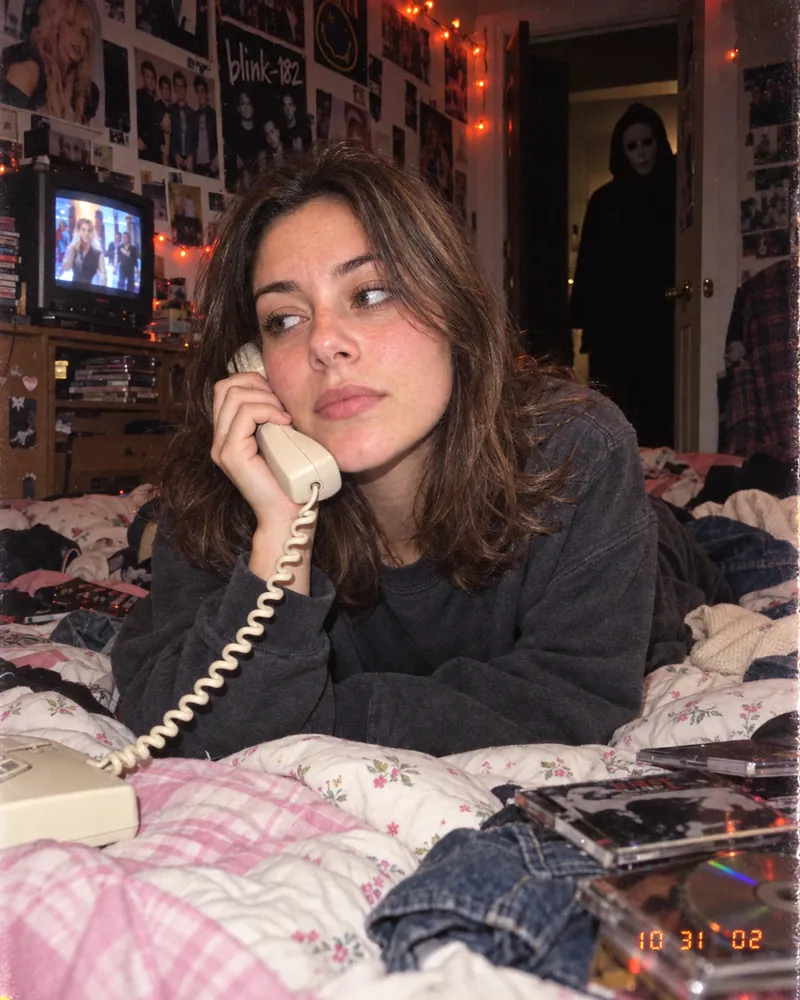
To change the look, swap one element at a time. Replace the masked figure with a ghost in a white bedsheet with eye holes for Google's original version, or replace the landline with a flip phone for a later-2000s feel. Change one thing per attempt, so you can see which change caused which result.
8 More AI Halloween Photo Prompts to Copy and Paste
These eight AI Halloween photo prompts cover the other looks people are posting, from a classic vampire to a cozy pumpkin patch photo that works as a profile picture. Each one keeps the face uncovered and describes the light, because those two details decide whether the result looks like you and like a real photo. For year-round portrait styles outside Halloween, our Gemini AI photo prompts cover film stills, magazine covers and headshots.
1. Victorian Ghost (Google's Own Prompt)
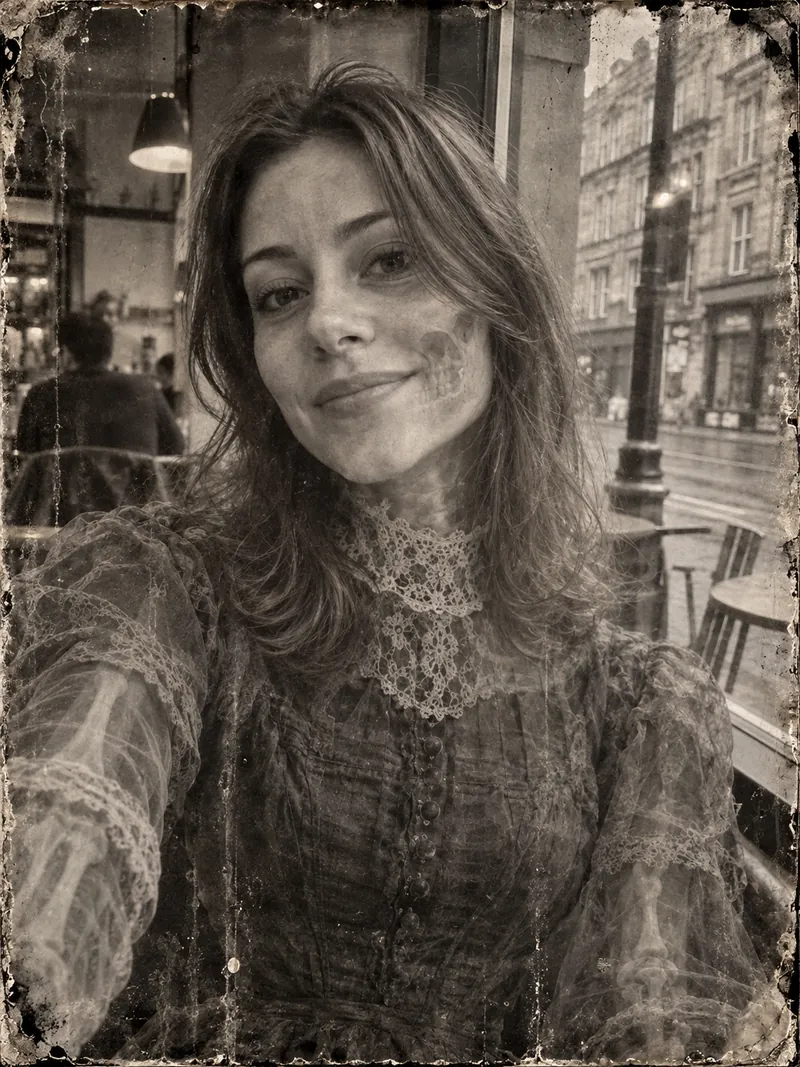
Google published this prompt word for word in its 2025 Halloween post. It asks for a black and white daguerreotype of a translucent Victorian ghost that keeps your pose and framing. ChatGPT gave us sepia instead.
Prompt: Transform this person into a semi-skeletal spectral translucent Victorian ghost. Victorian clothing. Maintain existing pose and framing. ultra-realistic photograph. black and white Daguerreotype. wet plate photography. streaks. stains.
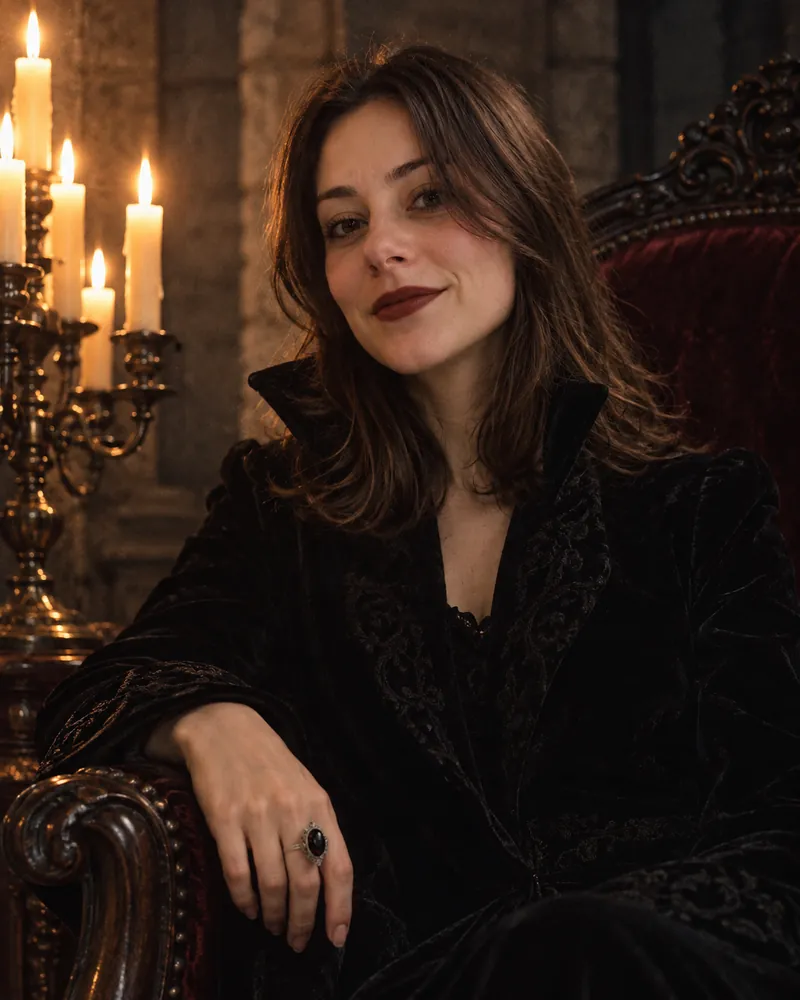
2. Candlelit Vampire
The vampire portrait is the safest costume look for a profile picture, because the face stays clean and the drama comes from candlelight. The No blood line keeps it clear of the gore rules both apps publish.
Prompt: Use the person in my photo and keep their face exactly as it is. Turn them into an elegant vampire: pale skin, dark red lips, a high-collared black velvet coat, a single silver ring. They sit in a high-backed chair in a stone room lit only by a candelabra on the left. Deep shadows, warm candlelight on the face, the background softly blurred. It looks like a still from a 1990s gothic film shot on 35mm. No blood. Vertical 4:5.
3. Witch at Dusk
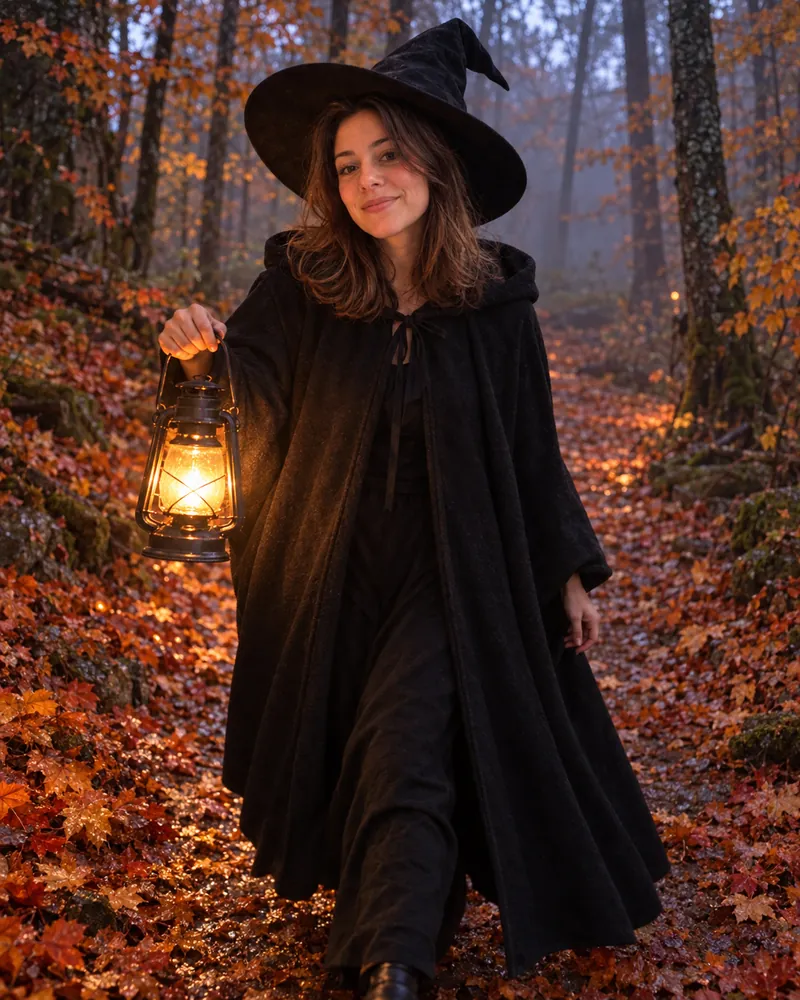
The witch prompt asks for a candid photo rather than a fantasy painting, which stops ChatGPT from drifting into illustration. The lantern is there to light the face from below, which is what makes it spooky.
Prompt: Use the person in my photo and keep their face exactly as it is. Dress them in a long black hooded cloak and a wide-brimmed witch hat, walking along a forest path at dusk. Orange and red leaves on the ground, light fog between the trees, a lantern in one hand lighting their face from below. Natural and candid, like a real photo taken by a friend, not a fantasy painting. Vertical 4:5.
4. Half-Face Skeleton Makeup
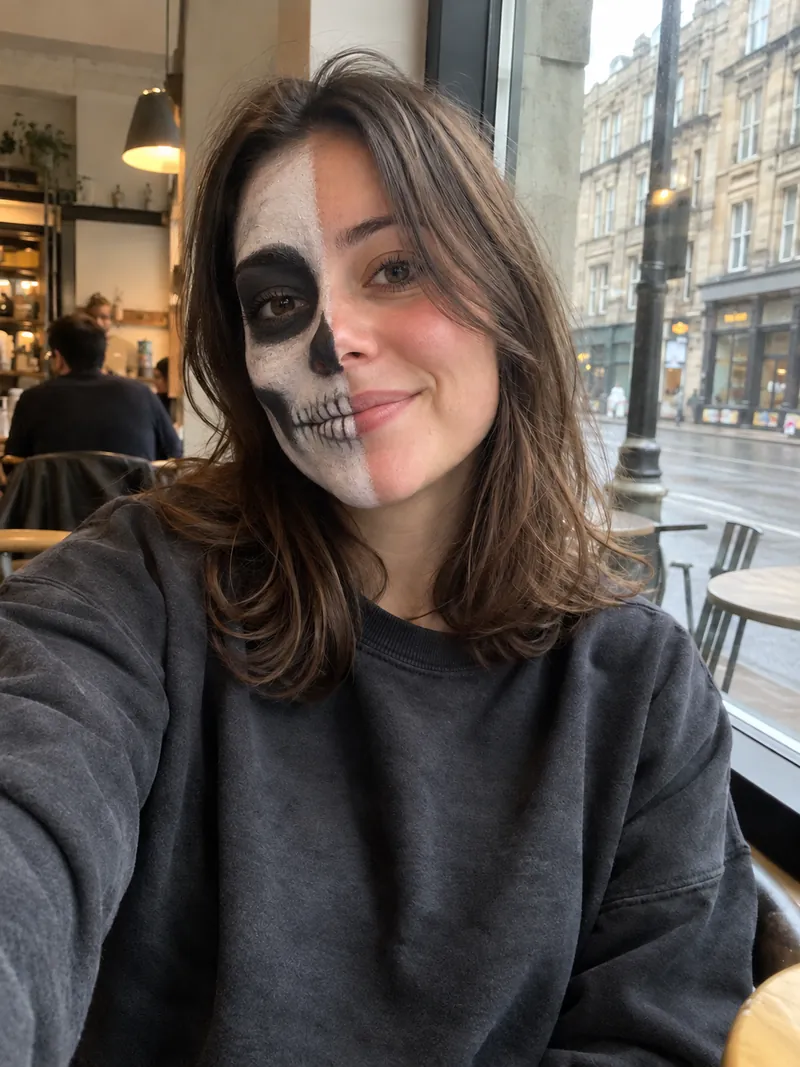
This prompt edits your existing photo instead of building a new scene, so it is the best way to preview face paint before you buy the makeup. Asking for "slightly imperfect" paint is what makes it look applied by hand.
Prompt: Keep the person in my photo exactly as they are: same pose, same clothes, same background. Add realistic Halloween face paint to the left half of their face only: a black and white skeleton design with painted teeth over the lips and a dark socket around the eye. The right half stays bare. The paint should look applied by hand and slightly imperfect, like a real makeup photo.
5. VHS Camcorder Hallway
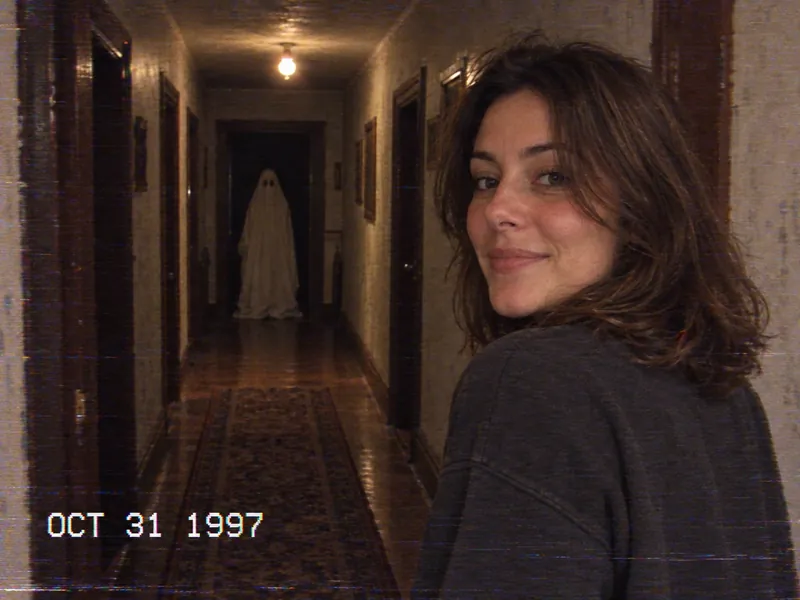
The VHS prompt is the found-footage cousin of the main trend. The timestamp, the scan lines and the 4:3 frame do the work, and the still bedsheet ghost at the end of the hallway is creepier than anything gory.
Prompt: Use the person in my photo and keep their face exactly as it is. Show them standing at the end of a long, dim hallway in an old house, looking back over their shoulder at the camera. Frame it like a still from a 1990s home-video camcorder: 4:3, soft focus, color bleed, scan lines, a timestamp reading OCT 31 1997 in the bottom corner. One weak ceiling bulb. At the far end of the hallway, a figure under a white bedsheet with eye holes stands perfectly still. Eerie, not gory.
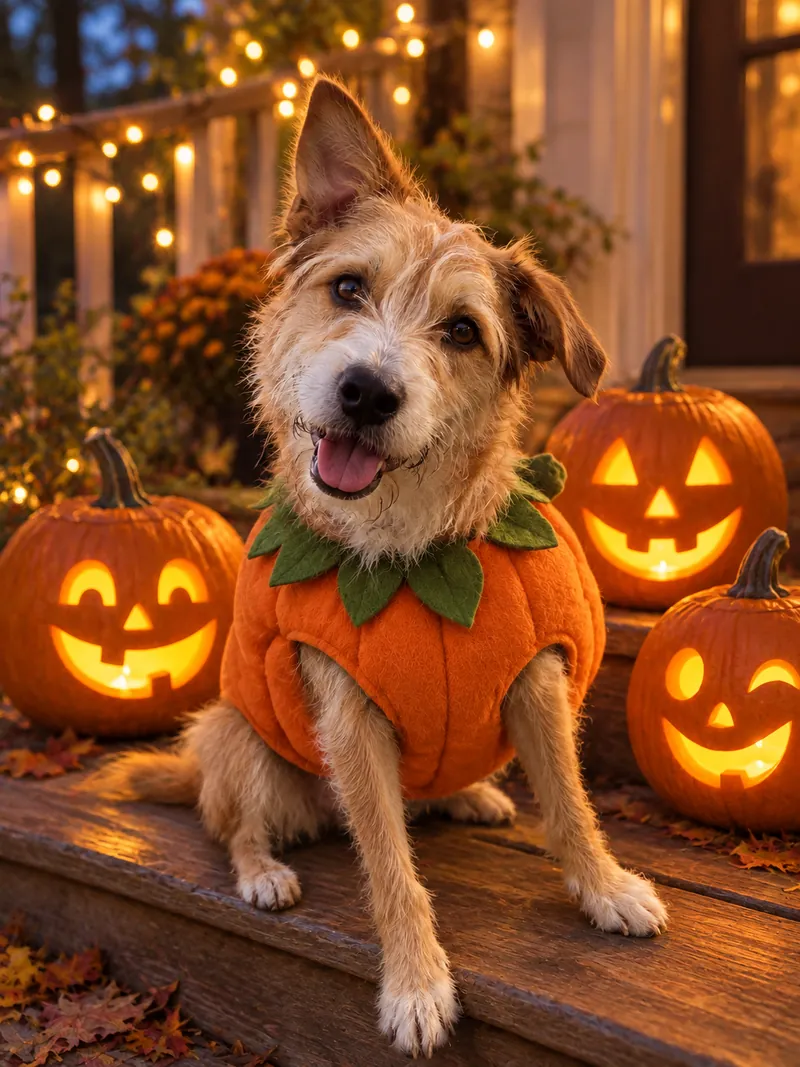
6. Pet in a Pumpkin Costume
Pets are the easiest subject for the AI Halloween trend, because nobody asks whether a cat consented. Attach a photo of your pet instead of yourself, and the prompt keeps its markings.
Prompt: Use the pet in my photo and keep its face, fur color and markings exactly as they are. Dress it in a small, well-fitted pumpkin costume and sit it on a porch step next to three carved jack-o'-lanterns at dusk. Warm glow from the pumpkins, string lights softly blurred behind. Cute and realistic, like a photo taken on a phone.
7. Vampire Couple
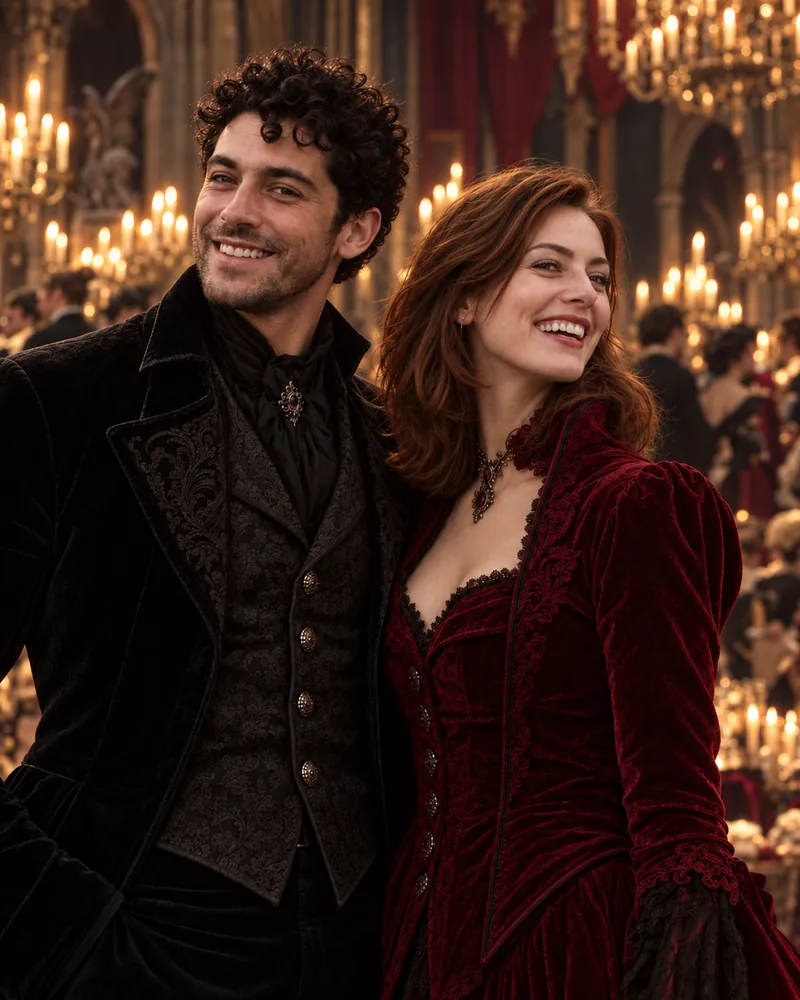
The couple prompt works with two photos attached, one of each person, or with one photo of both. It also needs the other person's permission. Gemini's own privacy page asks users to "get permission before recording people in a Live chat, or using their faces or voices in Gemini." OpenAI's usage policies bar using someone's photorealistic likeness without consent.
Prompt: Use the two people in the photo or photos I attached and keep both faces exactly as they are. Put them side by side as a vampire couple at a candlelit gothic ball. The first person wears a black velvet suit with a high collar, the second wears deep red velvet. Chandeliers, candlelight, a dark ballroom behind them. Elegant, not gory. Vertical 4:5.
8. Pumpkin Patch Profile Picture
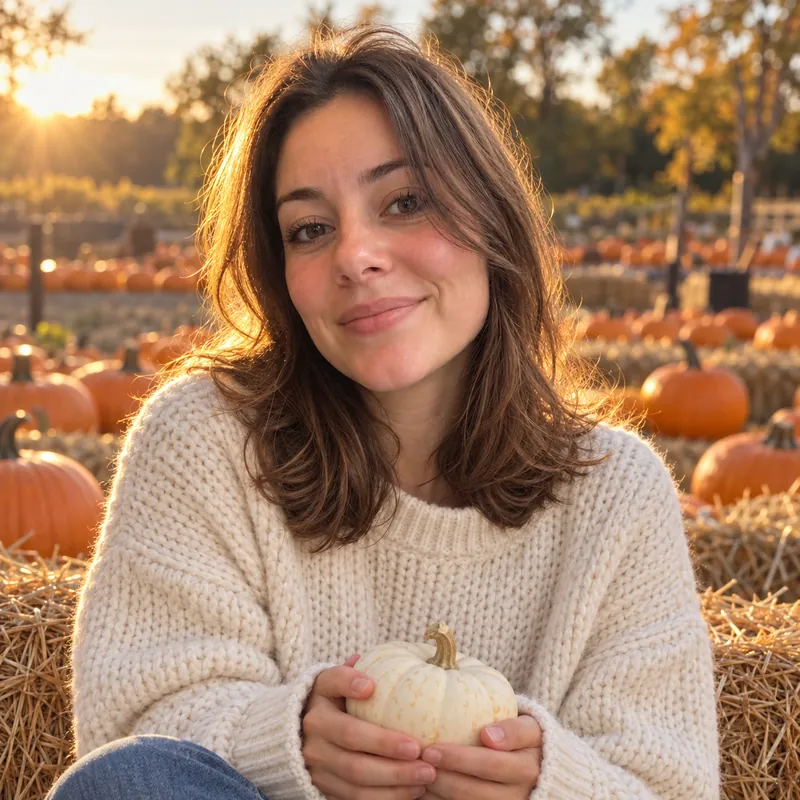
This prompt makes a cozy autumn profile picture, not a scary one. It is built for small sizes: a square crop, the face centered, and golden late-afternoon light that still reads as autumn at thumbnail size.
Prompt: Use the person in my photo and keep their face exactly as it is. Show them sitting on a hay bale in a pumpkin patch in late-afternoon sun, wearing a cream chunky knit sweater and holding a small white pumpkin. Golden backlight, shallow depth of field, rows of orange pumpkins behind. It looks like a real photo taken on a phone, not a studio shoot. Square 1:1 crop with the face centered, for a profile picture.
A Día de Muertos AI Portrait, Done With Respect
A Día de Muertos AI portrait works best as a portrait of someone taking part in the celebration, not as a Halloween costume. Día de Muertos is not a Mexican Halloween. UNESCO lists the festivity, as practised by the indigenous communities of Mexico, on its Representative List of the Intangible Cultural Heritage of Humanity. It describes the festivity as commemorating "the transitory return to Earth of deceased relatives and loved ones." It runs from the end of October to the beginning of November. That is why it overlaps with Halloween in your feed.
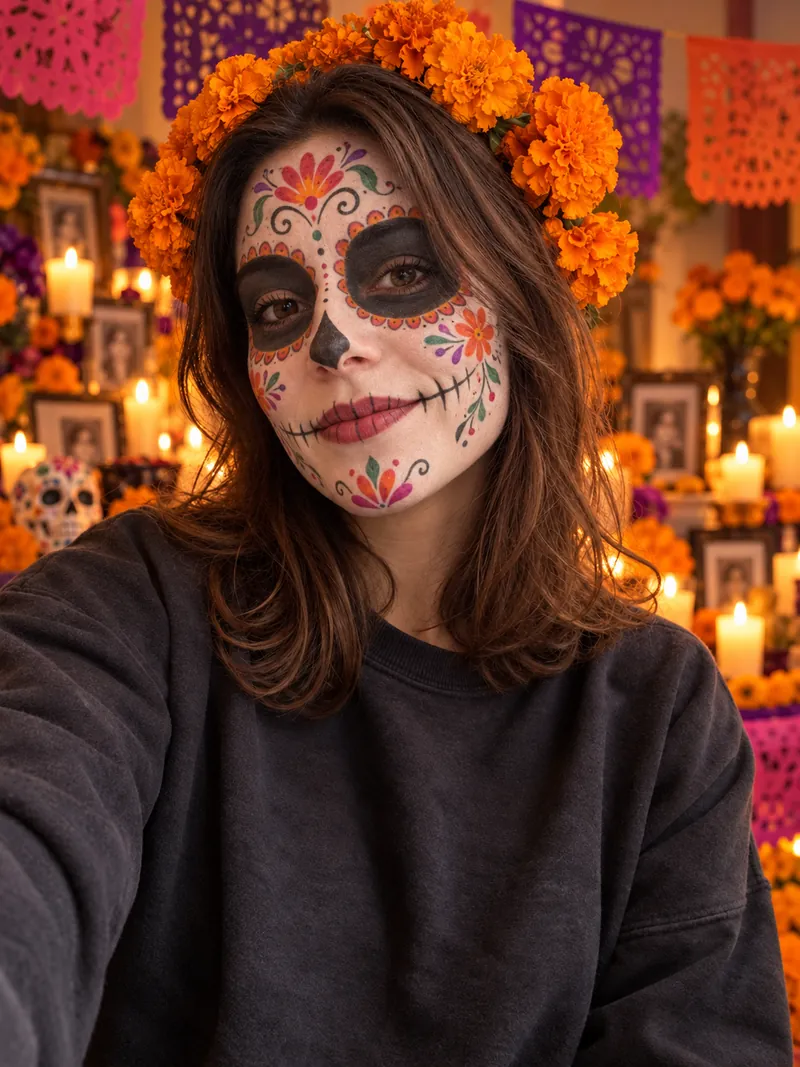
The prompt below keeps the traditional elements UNESCO describes, such as flowers, candles and offerings at a home altar. It also uses the real names: calavera face paint, orange cempasúchil marigolds, an ofrenda and papel picado. Leave out horror cues like blood, masks or a figure in the doorway. They turn a remembrance into a costume.
Prompt: Use the person in my photo and keep their face shape, eyes and skin tone exactly as they are. Paint their face in traditional Día de Muertos calavera makeup: a white base, black around the eyes, colorful flowers on the forehead and cheeks, fine line work on the chin. A crown of orange cempasúchil marigolds in their hair. Behind them, a softly blurred ofrenda with candles, marigolds and papel picado in pink, purple and orange. Warm candlelight. A respectful portrait, like a real photo taken at a family celebration.
Our AI Halloween Trend Test in ChatGPT: What Worked and What Drifted
ChatGPT turned our stand-in photos into a usable Halloween photo for all ten prompts, and the face stayed recognizable in every result. The misses were small details that came out slightly different. Think face paint on the wrong cheek, or a lantern at the hip instead of under the chin. That settles a claim some prompt sites still repeat, that ChatGPT cannot keep your face. OpenAI says ChatGPT Images 2.5 makes reference subjects "look more recognizable," and our results match.
Results for All 10 Prompts
| Prompt | What ChatGPT got right | What drifted | Tip |
|---|---|---|---|
| Y2K doorway | Corded phone, tube TV, posters, string lights, date stamp, masked figure in the doorway | The plain "white mask" came out looking very close to the film mask | Ask for a plain white featureless mask if you want it generic |
| Victorian ghost | Same pose and framing, lace dress, bones showing through the cheek and arms | Sepia instead of black and white, and the modern cafe stayed in the background | Add a Victorian parlor background for a full period scene |
| Candlelit vampire | Velvet coat, dark red lips, candelabra on the left, carved chair | The ring got a dark stone, and the skin is not very pale | Write very pale skin if you want the full vampire look |
| Witch at dusk | Cloak, hat, lantern, fog, orange and red leaves | The lantern hangs at the hip, so it does not light the face from below | Say lantern held up at chin height |
| Half-face skeleton | A true edit: same pose, clothes and cafe, with hand-painted-looking makeup | "Left half" was read as the left of the picture, which is the subject's right cheek | Write the left side of the picture or their own left cheek |
| VHS hallway | 4:3 frame, OCT 31 1997 timestamp, one ceiling bulb, still bedsheet ghost | Scan lines and color bleed are subtle, so it looks cleaner than real tape | Add heavy tracking lines and color bleed |
| Pet in a pumpkin costume | The dog's fur, face and ears, the costume, the porch and string lights | The jack-o'-lanterns spread over two steps instead of sitting beside the dog | Add all on the same step if placement matters |
| Vampire couple | Both faces kept from one photo, black and red velvet, chandeliers | Extra guests appeared in the background | Add an empty ballroom for just the two of you |
| Día de Muertos | Calavera makeup, marigold crown, ofrenda, candles, papel picado | The original sweatshirt and selfie pose stayed | Describe an outfit if you want the whole photo restyled |
| Pumpkin patch | Square crop, knit sweater, white pumpkin, golden backlight | Nothing worth fixing | Use it as is for a profile picture |
What the Results Mean for Your Prompt
The pattern behind the table: ChatGPT follows the look and the mood of a prompt closely, and treats exact counts, sides and hand positions as suggestions. Put the detail you care about most in a short follow-up message rather than burying it in a long prompt. We ran this test in ChatGPT only. We did not run them in Gemini. The Victorian prompt is Google's own and the Y2K prompt adapts Google's, so those two are written for Gemini. For the rest, expect some drift.
Why Your AI Halloween Photo Failed, and How to Fix It
Most failed AI Halloween photos fail for one of five reasons: a named character, gore, someone else's face, a covered face, or a missing reference photo. Each one has a simple fix.
Named Film Characters
OpenAI's usage policies list "attempts to infringe on intellectual property rights of others" among the things its services cannot be used for. A prompt that names a film character can come back refused or watered down. The fix is to describe what the costume looks like, which is also what makes it recognizable: a tall figure in a black hooded robe and a white mask carries the look without the name. In our Y2K test, that description alone produced a mask very close to the film's.
Blood and Gore
Gemini's policy guidelines say the app should not depict "sensational, shocking, or gratuitous violence, whether real or fictional," and list "excessive blood, gore, or injuries" as an example. OpenAI tracks violence and gore as a safety category for ChatGPT Images 2.5 and checks both prompts and images. Keep the mood eerie and let light, fog and shadow do the work. A still figure in a doorway is scarier than a wound anyway.
Other People's Faces
Using a friend's, a partner's or a celebrity's photo without consent is where the AI Halloween trend stops being harmless. OpenAI's usage policies bar the "use of someone's likeness, including their photorealistic image or voice, without their consent in ways that could confuse authenticity."
Gemini's privacy page says to "only upload, generate, and edit content you have rights and permissions to." Ask first, and leave children's photos out of it.
A Covered Face
Full masks, full-face paint and heavy prosthetics hide the features that make the photo look like you, so the result becomes a good photo of nobody in particular. Keep at least the eyes, nose and mouth visible, or use the half-face skeleton prompt, which keeps one side bare on purpose.
It Looks Too Clean, or Not Like You
A photo that looks glossy and artificial is missing the flash, the grain or the clutter, so add them back one at a time. A photo that looks like a stranger usually means the selfie was not attached, was too small, or showed a face at an angle. Reply in the same chat with keep my face exactly as in my original photo, or start again with a sharper, front-facing photo.
Is the AI Halloween Trend Safe? What Happens to Your Selfie
The AI Halloween trend is as safe as the app you upload your selfie to. In ChatGPT and Gemini, you can stop that photo from being used for training in a few taps. Both companies say they may use what you upload to improve their models unless you change a setting.
In Gemini: Keep Activity and Temporary Chats
Google's Gemini Apps Privacy Hub says a subset of chats is reviewed by human reviewers to improve Google services when the Keep Activity setting is on. Reviewed chats are kept for up to three years even if you delete your activity. With Keep Activity off, or in a temporary chat, Google keeps the chat with your account for 72 hours. Google says temporary chats "are not used to train Google's AI models." With Keep Activity off, Google does not use your future chats to improve its models unless you submit feedback.
In ChatGPT: Improve the Model for Everyone and Temporary Chat
OpenAI's data controls page says that when Improve the model for everyone is off, your new conversations "won't be used to train OpenAI models." You find it under Settings, then Data controls. A Temporary Chat stays out of your history, is not used to improve OpenAI's models, and OpenAI can keep a copy for up to 30 days for safety purposes. One catch: giving a thumbs up or down after opting out can still send that whole conversation for training.
Both Apps Watermark the Result
Your Halloween photo is marked as AI-generated, even when nobody can see it. Google adds an invisible SynthID watermark to images made with its AI, and you can ask Gemini whether an image carries one. OpenAI's provenance help page says images made in ChatGPT now include both C2PA Content Credentials and a SynthID watermark. We checked the files from our own test. Every one carried a C2PA manifest that names ChatGPT as the software and labels the image as made by a trained algorithm. Each manifest also records a watermark action. OpenAI warns that a screenshot or a file conversion is enough to lose the credentials, but the watermark is designed to survive light edits, cropping and screenshots. Our guide on how to tell if a photo is AI-generated shows how to check any image.
The practical rule: use the app you already trust with your data, and turn off training if it matters to you. Think twice before uploading your face to an unfamiliar free Halloween filter site.
Run Every Halloween Prompt in ChatGPT and Gemini From One App
The fastest way to find which model nails your Halloween look is to run the same prompt through both and compare. Fello AI puts GPT image generation and Google's Nano Banana in one app on Mac, iPhone and iPad. Attach your selfie, paste a prompt from this guide, and switch models without a second app or a second account.
Fello AI also runs GPT, Claude, Gemini, Grok and DeepSeek for text. That covers the rest of Halloween: the party invite wording, the caption, or a costume idea when you are stuck. It has a free tier, so you can try a prompt before deciding whether you need more.
If you would rather not write a prompt at all, AI Photo Editor, from the team behind Fello AI, does it the other way round: pick a look, add your photo, done. Its October update added six Halloween looks: Día de Muertos, Gothic doll, Witch academy, Vampire glam, Leopard makeup and Mannequin. It is free to download on iPhone, iPad and Mac, with a Pro subscription and edit packs sold in the app.
The Verdict
The AI Halloween trend works on a free plan, and ChatGPT handled all ten looks in our test with the face intact. It rewards specifics, not tricks. Attach a clear photo, describe the flash, the grain and the room, describe the costume instead of naming the character, and keep it eerie rather than bloody. Start with the Y2K doorway prompt. Then pick the look that fits where the photo is going. Use the vampire or pumpkin patch for a profile picture and the VHS hallway for a story. Save the Día de Muertos portrait for when you mean it as one. In December, the same method makes the AI Christmas photo trend, with ten prompts tested the same way.
FAQ
Is the AI Halloween trend free?
Yes. OpenAI says ChatGPT Images 2.5 is available on every ChatGPT tier, and Google's Gemini limits page ticks image generation for users without a Google AI plan. Free plans have lower usage limits, so you may run out after several attempts. Our guide to Nano Banana's free limits covers the Gemini side.
Can I do the AI Halloween trend in ChatGPT, or only in Gemini?
Both can do it. Google published one of the first versions of the prompt for Gemini, and we ran all ten prompts in this guide in ChatGPT with the face kept recognizable each time. OpenAI says ChatGPT Images 2.5 is better at keeping the subject of a reference photo recognizable. See our ChatGPT Images 2.5 breakdown for what changed.
Why doesn't my AI Halloween photo look like me?
Usually because the selfie was missing, blurry, or covered by the costume. Attach a sharp, front-facing photo, keep the face uncovered in the prompt, and reply keep my face exactly as in my original photo instead of starting a new chat.
Can I do the AI Halloween trend with a friend or partner?
Yes, with their permission. Attach a photo of each person, or one photo of both, and use the couple prompt. OpenAI's usage policies bar using someone's photorealistic likeness without consent, and Google asks users to get permission before using other people's faces in Gemini.
Can people tell my Halloween photo was made with AI?
A detector can. Images from Gemini and ChatGPT carry an invisible SynthID watermark, and ChatGPT images also carry C2PA Content Credentials, which openai.com/verify can check. Most people scrolling past will not notice, so label it as AI if you post it somewhere it could be taken as real.