Fello AI 6.9.0 is rolling out on the App Store now for iPhone, iPad, and Mac. This release is about the heart of the app: the AI models. It brings new frontier models, builds thinking into every one of them, and gives you a clearer way to choose between them. It also makes Fello AI a better place to be if you use it for free.
All Top-Tier AI Models in One Place
From day one, Fello AI has had one simple idea: you should not have to pick a single AI company and hope it stays the best. We bring every top-tier model into one app, under one subscription, so you always have the right one at hand.
Having them all in one place pays off every day:
- Every model has its strengths. One is best at writing, another at code, another at research. Use the right one for each task.
- No more downtime. When one AI service goes down, switch to another and keep working.
- Get a second opinion. Ask two models and compare. When they agree, you can trust the answer.
- Always the newest models. Get the latest AI as soon as it launches, with no extra subscriptions.
With every update we keep making this better, and 6.9.0 is a big step.
New Models
Four new models join the lineup in this release:
- GPT-6, OpenAI's newest flagship, for everyday writing, research, and hard problems.
- Grok 4.7, xAI's latest, for fast, current answers with Grok's direct style.
- GPT Image 2.5, OpenAI's newest image model, for sharper images and more reliable edits.
- Muse Image, Meta's new image model, which both creates new images and edits the ones you give it.
Two models you already use also got upgraded recently. Gemini 3.8 is Google's latest, a fast all-rounder that is great with long documents and images. Muse Spark 1.3 is the newest version of Meta's chat model, strong at reasoning and writing.
They sit alongside Claude, DeepSeek, Kimi, Qwen, GLM, Nano Banana, FLUX, and more. Not sure which one to use for what? Our overview of the best AI models explains what each one is best at.
We also made important under the hood changes so new models can arrive in Fello AI as soon as they launch, often without you having to update the app.
Thinking Is Now Built Into Every Model
Not long ago, "thinking" or "reasoning" models were releasing separately as a distinct model category. That has changed. Almost every recent frontier model can now think before it answers, so we turn it simply into a switch on the same model.
To turn thinking on or off, click the Think button in the message input, or use the Thinking switch in the model picker.

Leave it on for math, code, planning, and anything with several steps. Turn it off when you want a quick answer, a rewrite, or a casual chat. The setting is saved with each conversation, so your coding chat can think hard while your quick-questions chat stays fast.
A Redesigned Model Picker
The model picker is redesigned on iPhone, iPad, and Mac. New models are clearly marked, and each model shows two ratings so you can see at a glance which model fits the job.
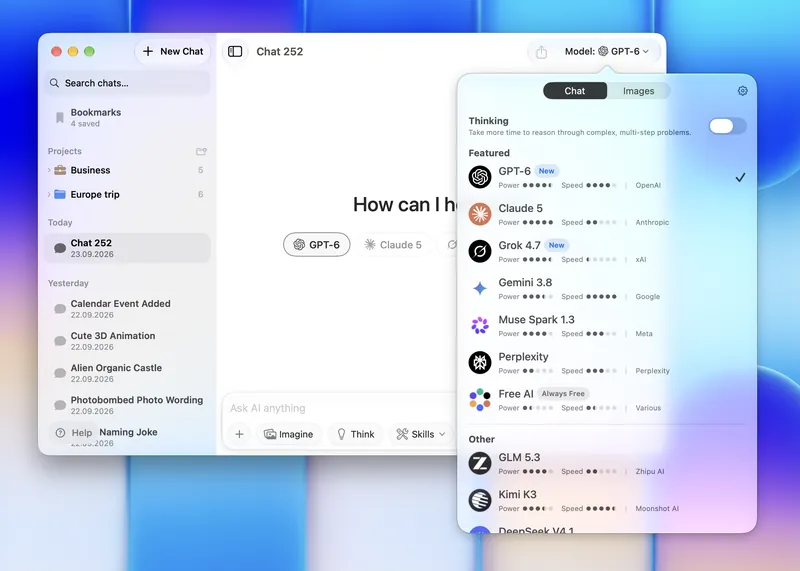
- Power shows how capable the model is: how well it reasons, writes, codes, and follows instructions. This is our own rating combining public benchmarks, user rating and our own evaluation based on how each model actually does in Fello AI. For image models, the same rating is shown as Quality.
- Speed shows how fast the model answers. We measure it on our own servers, through the same connection your messages take, so it reflects the speed you really get in Fello AI, not a number from a lab.
Need depth for a hard problem? Pick a model with high Power. Want answers right away? Go for Speed. Many models give you a good balance of both.
On Mac, a new gear button in the picker takes you straight to Model Settings, where you choose your preferred model for starting a new chat or shortcuts for a quick model selection when you are starting a new chat.
Use Fello AI for Free
Not everyone needs the most powerful models for everything. Plenty of people use Fello AI for everyday questions, quick rewrites, and ideas, and are happy with our free model, Free AI.
In 6.9.0 we made the free experience much smoother. When you reach your free limit on the Premium models, Fello AI no longer interrupts you. You see a simple message, and you can keep chatting with Free AI right away. The message also shows when your Premium messages refill, and if you ever want unlimited access to every top-tier model, Premium is one tap away.
Other Improvements
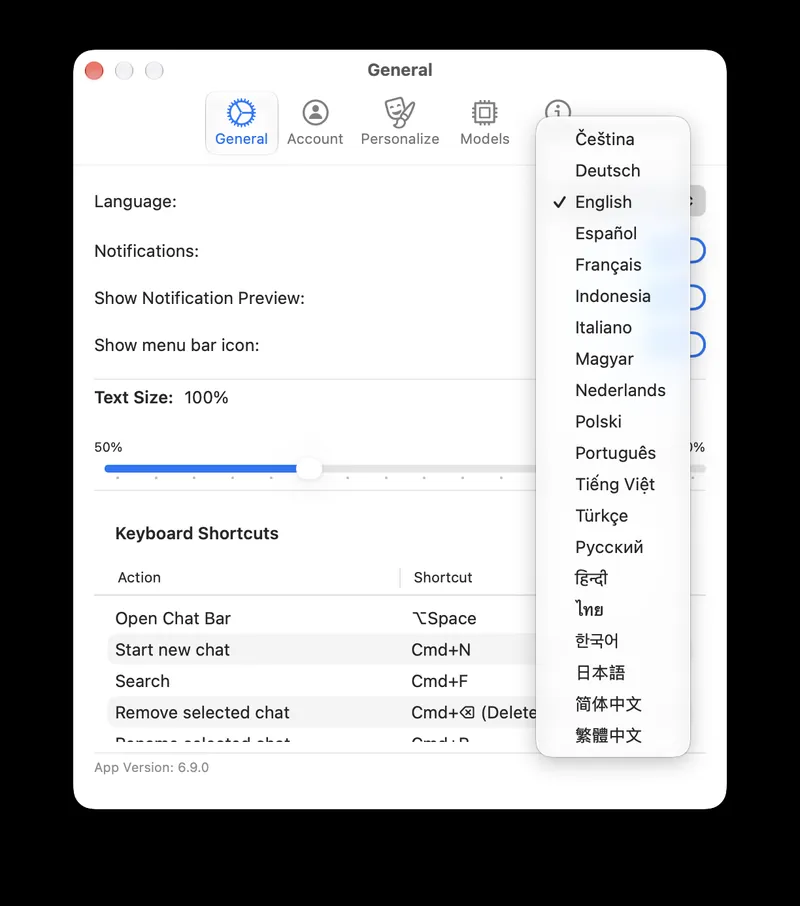
- 12 new languages. Fello AI is now available in 12 more languages, so even more people can use it in their own language.
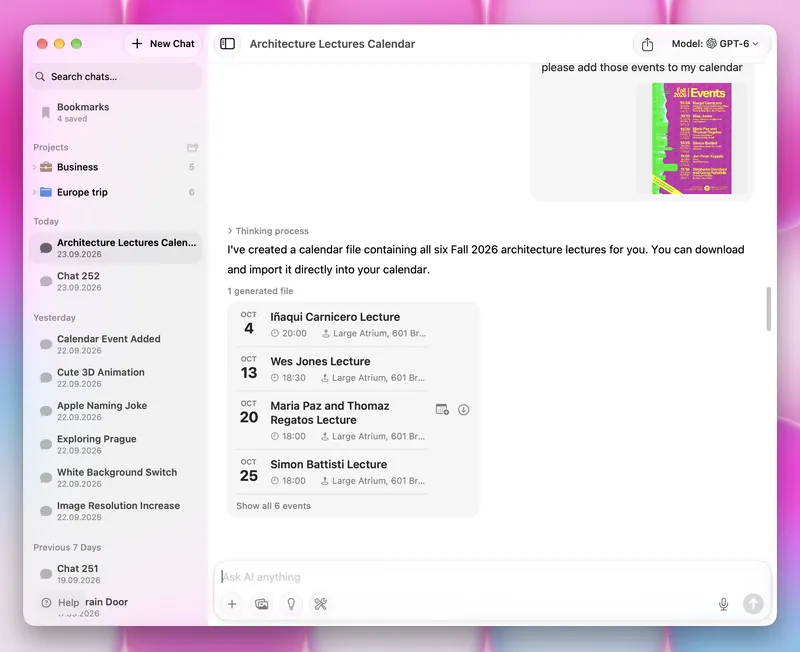
- Calendar and contact cards. Calendar invites (.ics) and contact cards (.vcf) now appear as proper cards in the chat. One tap adds the event to your calendar or the person to your contacts. Ask Fello AI to turn an email into an invite and save it in seconds.
- Ask Siri for a specific model. Name the model you want and Siri sends your question straight to it.
- Better accessibility. On iPhone and iPad, VoiceOver now reads every button and announces what is selected, and Reduce Motion turns off onboarding and streaming animations.
- Fixes. The file preview sidebar shows the right file again, and we fixed a rare crash when deleting a chat on Mac. We've also fixed the annoying "jump" to the top of your conversation that happened in some cases when AI replied.
Available Now on the App Store
Fello AI 6.9.0 is rolling out now on iPhone, iPad, and Mac. Update from the App Store to try GPT-6, Grok 4.7, GPT Image 2.5, and Muse Image, switch thinking on and off in any chat, and explore the new model picker.
Got feedback or need help? I would love to hear from you. Email me at [email protected]. Your input helps shape every update.