Create
Use Skills
Skills let Fello AI do real work for you: research, plan trips, make podcasts, and create or edit presentations, spreadsheets, documents and PDFs.
On this page
What each skill can doMore things Skills can doWhen skills start on their ownSwitch a skill onGood to keep in mindSkills let Fello AI do real work for you, not just write text. It can research a topic, plan a trip, make a podcast, and create or edit presentations, spreadsheets, documents and PDFs. Some skills start on their own when you ask. Others you switch on first.
What each skill can do
In the Skills list, they're grouped as General and Office.
Search
Searches the web and reads whole pages. It also finds YouTube videos and reads their transcripts, and reads public posts on X, Reddit, TikTok, Instagram and LinkedIn.
- What are people on Reddit saying about the new iPhone battery life?
- Summarize this video: [YouTube link]
Deep Research
For a big question, it checks dozens of sources and writes a comprehensive report with citations. It first shows you a plan to approve, then takes a few minutes to research.
- Compare the best electric family cars under $45,000
Travel
Finds flights, hotels and Airbnb stays with prices and links. It can also suggest where to fly from your airport, check the weather and the best time to visit, and tell you if you need a visa.
- Find flights from Prague to Lisbon next weekend and two hotels near the center
- Do I need a visa for Japan with a Czech passport?
Podcast
Turns a text, an article or your notes into a podcast with two hosts. It can also read a text aloud with one voice and give you the audio file.
- Turn my notes into a 5-minute podcast
PowerPoint, Excel and Word
Create new files or edit the ones you attach. Presentations can have up to 40 slides. Spreadsheets can include formulas, and you can ask for a CSV file instead.
- Make a 10-slide presentation about healthy sleep for my team
- Add a total column to this spreadsheet
Works with the PDF you attach. It can:
- change text inside the PDF or translate it, keeping the layout
- fill in a form and add your signature
- reorder, delete, merge or split pages
- turn a PDF into a Word document, or its tables into Excel
- make the file smaller, add a watermark or a password
- read scanned pages
- Translate this PDF into German
- Fill in this form with my details
More things Skills can do
These aren't in the Skills list, but Fello AI uses them when you ask:
- Photo tools: attach a photo and ask to remove the background, make it sharper and bigger, add a filter, crop or resize it, or combine photos into a collage or a PDF.
- Calendar and contacts: ask for a calendar event you can add to Apple, Google or Outlook Calendar, or a contact card for your phone.
- Files: ask to put files into a ZIP, rename a file or tell you its size and details.
Calendar, contact and file tools work once Skills are in use, for example after you attach a file or switch a skill on.
When skills start on their own
For many requests, you don't need to do anything. When you ask for a search, a podcast, a trip, a presentation, spreadsheet, document, PDF or image, Fello AI often switches to the right skill by itself. Attaching a PDF or an Office file does the same.
Deep Research takes a few minutes, so it only runs when you switch it on.
Switch a skill on
- In the message box, click Skills (the wrench icon).
- Click a skill to switch it on.
- The button turns blue and shows how many skills are on. Send your message.
- Next to the message box, tap +.
- Find the skill under General or Office, and tap it. A checkmark appears.
- The + shows a blue count of the skills that are on. Send your message.
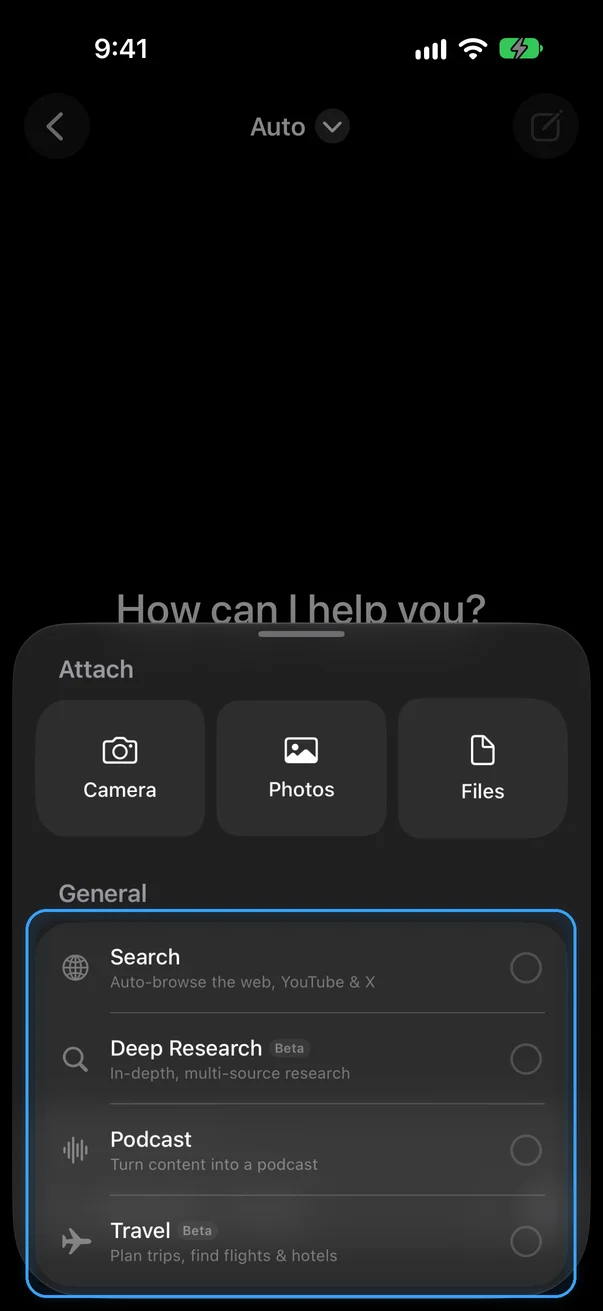
Skills stay on for that chat.
Good to keep in mind
- Subscribers only. Skills are available to Fello AI subscribers.
- Beta. PowerPoint, Excel, Word, PDF, Travel and Deep Research are marked Beta.
- Imagine and Skills don't mix. Turning on one turns off the other.
Already have a reply you like? Use Turn into… in the reply menu to make a PDF, Word document or presentation from it. To go further, see Make documents and slides and Research with web search.
